
- Home
- Forums
- FTA Set Top Box Discussions/Files
- FTA Set Top Box Discussions
- The North American Project E2 Image Discussions
You are using an out of date browser. It may not display this or other websites correctly.
You should upgrade or use an alternative browser.
You should upgrade or use an alternative browser.
TNAP-7 Image Discussion
- Thread starter el bandido
- Start date


el bandido
TNAP-Images
Get rid of the static ip and set it to DHCP. Save, exit, reboot.
No improvement !Get rid of the static ip and set it to DHCP. Save, exit, reboot.
el bandido
TNAP-Images
As for the Network Manager itself, I cannot find anything that is broken in it. Everything I have tried works as advertised. Several things were added in the Network Manager to modernize it. If you do not update something like the Network Manager, then some will ask: "Why?" If you do update then some will say: "It is broken." Cannot win either way, so I choose the updated version.
I spent like 8 hours looking at the Network part of the image, and while I did not find anything that was broken, several things were improved. For example, The image backups did not contain wpa_supplicant.wlan0.conf. This means the settings for the Network were not being restored or partially restored. On image reboot after image install, my NIC was assigned 192.168.1.161, but my wifi is set to 192.168.1.4. So the receiver opened with 192.168.1.161, assigned 192.168.1.4 to the wifi and stopped there with the receiver showing the wifi address as valid, but in reality, the receiver was still on 192.168.1.161 until a reboot took place.
We have made some changes. And in the process I mean right in the middle of the network edits, here comes a large image update. Which I guess now is as good of time as any other. When the new images come up, Flash them. Online update will not be suggested. Python and other things are upgraded:
Image updates:

This works for me without issue. The wifi adapter being used is Ancient.

I spent like 8 hours looking at the Network part of the image, and while I did not find anything that was broken, several things were improved. For example, The image backups did not contain wpa_supplicant.wlan0.conf. This means the settings for the Network were not being restored or partially restored. On image reboot after image install, my NIC was assigned 192.168.1.161, but my wifi is set to 192.168.1.4. So the receiver opened with 192.168.1.161, assigned 192.168.1.4 to the wifi and stopped there with the receiver showing the wifi address as valid, but in reality, the receiver was still on 192.168.1.161 until a reboot took place.
We have made some changes. And in the process I mean right in the middle of the network edits, here comes a large image update. Which I guess now is as good of time as any other. When the new images come up, Flash them. Online update will not be suggested. Python and other things are upgraded:
Image updates:
This works for me without issue. The wifi adapter being used is Ancient.
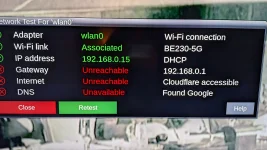
All looks good after reboot, but wifi get lost after few sec:
I'll go back to last working version "TNAP-7-osmio4kplus-20261017" till the new one.
I'll go back to last working version "TNAP-7-osmio4kplus-20261017" till the new one.
Attachments



Megatron817
Administrator
See if deactivate the Ethernet Adapter does anything. I had deactivated mine. I am back to using the Octagon sf8008 today but wasn't having wifi problems with the Mio4k+.All looks good after reboot, but wifi get lost after few sec:
I'll go back to last working version "TNAP-7-osmio4kplus-20261017" till the new one.
I did that too, but no joy.See if deactivate the Ethernet Adapter does anything. I had deactivated mine. I am back to using the Octagon sf8008 today but wasn't having wifi problems with the Mio4k+.
el bandido
TNAP-Images
1023 Images are available in the receiver. If you have any networking problems, Get the netlog folder from the receiver, zip it, and attach it to a post. The netlog folder will be here: /home/root/logs/netlogI just noticed that wifi is active after reboot. As soon as I try to connect to external places (software update, flash online, or a file transfer program from a laptop), wifi colapses.
No issues on Mini4k.


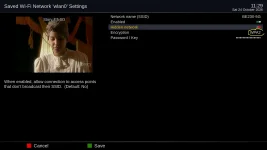
Just found that encryption in "wi-fi network 'wlan0' settings", must be "WPA2" only (it was set to WPA2/WPA3, assuming that means WPA2 or WPA3), despite the fact that my router wifi security type is "WPA3-personal"!!
Now wi-fi connection is ok.
Now wi-fi connection is ok.
Attachments

el bandido
TNAP-Images
Excellent!With today's update, the issue I pointed out here post#850
is resolved; it is now able to read small SRs again. Thanks!
Please test new driver: ustym4kpro-20261024 multiboot
Cool. Sometimes easy to overlook. Sometimes ambiguous too. Especially when paired up with, like you saw.....'if i use wpa2 on the router, 2 & 3????? must be the hot ticket'. Then the cussing starts.Just found that encryption in "wi-fi network 'wlan0' settings", must be "WPA2" only (it was set to WPA2/WPA3, assuming that means WPA2 or WPA3), despite the fact that my router wifi security type is "WPA3-personal"!!
Now wi-fi connection is ok.
Were you not also having problems with the Ethernet port?
I was curious because my wifi connection to router from the osmio has been rock solid. On ViX anyways....
Dug into /lib/modules/5.15.0/extra. Then opened wlan.ko in notepad++
Around line 28787 started seeing text that looks like debugging info. Queried? Blurted out to the os? Don't know.
/usr/src/debug/wlan-qcacld-20/4.5.25.55....bla-bla-bla like it points to a directory not present in ViX (at least).
There's some pretty verbose crap present. After that my vision got blurry.
Wouldn't it have been nice to see an in-your-face 'dumbass is using the wrong encryption scheme'? lol!
el bandido
TNAP-Images
Correct, and that’s expected. A LAN connection has no encryption setting on any device, because a cable doesn’t need one. WPA2/WPA3 only protect the wireless link between a Wi-Fi device and the router. Your router’s “WPA3-Personal” setting has no effect on its LAN ports. So nothing is missing on your Zero4K, and the image isn’t restricting anything. Plug it in and it’s done.

stephan94
Legit VIP
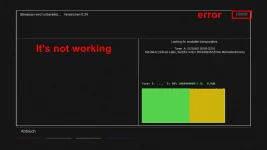
Unfortunately, the blind scan does not work at all; it is still searching using the blind scan settings for the SF 8008 (Octagon), which is incorrect.Excellent!
Please test new driver: ustym4kpro-20261024 multiboot
Many menus still refer to the 8008 (for example, the signal finder), even though this is an Ustym 4K PRO.
Attachments



el bandido
TNAP-Images
Excellent! Thanks for testing. If the blindscan binary in /usr/bin was changed to octagon-blindscan it would work. I will give instructions if you want to do that. Or you may install the 1023 image.


el bandido
TNAP-Images
Unzip the attached file. Place octagon-blindscan into /usr/bin of the ustym4kpro receiver.Unfortunately, the blind scan does not work at all; it is still searching using the blind scan settings for the SF 8008 (Octagon), which is incorrect.
Many menus still refer to the 8008 (for example, the signal finder), even though this is an Ustym 4K PRO.
Then using Telnet or Terminal:
chmod +x /usr/bin/octagon-blindscan
reboot
Satellite Blindscan will work.
Attachments
Megatron817
Administrator
Been using the VU+zero4k today. I set up multiboot on it using openatv so what can be done is have two versions of TNAP 7. One with the Radio fix (10/24 image) and one without and when we want to use the AAC radio just boot in that slot. Normal everyday TV use another slot. That audio sync issue is seen on Satellite timeshift and recordings on all services ATSC. Multiboot and TNAP7 has really made this zero4k great again. Thanks.