
- Home
- Forums
- FTA Set Top Box Discussions/Files
- FTA Set Top Box Discussions
- Optibox Raptor HD - Discussions
You are using an out of date browser. It may not display this or other websites correctly.
You should upgrade or use an alternative browser.
You should upgrade or use an alternative browser.
Review of the Optibox Raptor FTA Receiver
- Thread starter el bandido
- Start date
The fist two should be feasible but 3 and 4 i dont see it happening at least for Raptor maybe Raptor 2......
However i will do my best to fit this into the new upcoming FW.
OUTSTANDING, I look forward to hearing about your progress!!
Last night I thought of another request that would bring something to NA that no other receiver has offered...
Would it be possible to have a firmware loader and channel editor that are Linux based? This would bring functionality to not only North America, but also all the droves of linux users around the world. Again, in my opinion, a move like that would set you apart of your competitors.
Thanks for listening Team Amiko, I hope this market feedback will be helpful in designing software that will set the standard for the industry. You are on the cutting edge.
Buzz

el bandido
TNAP-Images
Here is a list of the problems or bugs I have found in the Raptor. This is a short list when you consider all the features this receiver has.
(1) Unable to manually add a PID in the receiver for the CW channels. (I need to look at this again.)
(2) Audible Beep feature for the transponder signal strength does not work.
(3) Problems with some hard drives causing the receiver to hard boot into PAL.
(4) I get an error when trying to play a TS file.
That is about all I have found so far. Here are a few comments about these items.
The manual PID feature probably works, but not the way we need it to work. I think the receiver has to be able to find the channel on the transponder before the channel can be added. I will try to check this later.
I think I see an option for a beep feature on the transponder signal but I have not heard it beep yet.
The hard drives that I have had problems with also have a windows operating system stored on them. These are back-up hard drives but they also have movies and music stored on them. i suspect the stored Winodws OS to be the booting problem.
The TS file problem needs to be looked at too. When I record, they are stored in ts format so I would expect the Raptor to play the TS files too. The Amiko was able to play these files.
Note: There may be an error on my part that is causing some or all of the problems on this list. More time is needed for me to study these issues. I have posted this list so you can see what kind of problems I have encountered. EB
(1) Unable to manually add a PID in the receiver for the CW channels. (I need to look at this again.)
(2) Audible Beep feature for the transponder signal strength does not work.
(3) Problems with some hard drives causing the receiver to hard boot into PAL.
(4) I get an error when trying to play a TS file.
That is about all I have found so far. Here are a few comments about these items.
The manual PID feature probably works, but not the way we need it to work. I think the receiver has to be able to find the channel on the transponder before the channel can be added. I will try to check this later.
I think I see an option for a beep feature on the transponder signal but I have not heard it beep yet.
The hard drives that I have had problems with also have a windows operating system stored on them. These are back-up hard drives but they also have movies and music stored on them. i suspect the stored Winodws OS to be the booting problem.
The TS file problem needs to be looked at too. When I record, they are stored in ts format so I would expect the Raptor to play the TS files too. The Amiko was able to play these files.
Note: There may be an error on my part that is causing some or all of the problems on this list. More time is needed for me to study these issues. I have posted this list so you can see what kind of problems I have encountered. EB
el bandido
TNAP-Images
I added satellite tuner number two today. I added it first because I am unsure if the terrestrial tuner has the correct video format for North America. After a satellite is scanned with two tuners installed, the Raptor gives you the option of saving scanned satellites to the other tuner.
Tuner 2 has a 4ft. Geosat 1.2 meter dish attached to a Stab hh120 rotor. Its current lnb is an Invacom 031 quad with only linear connected.
Tuner 1 has a 7.5 foot c band dish and a motorized 30 inch ku dish connected together with a 22 KHz switch.
I Double checked the beep feature for the transponder signal and it Does work. There is no beep without a Q signal, and the beeps get faster as the signal gets stronger. Having an audible sound that changes with the transponder's signal strength is a big plus!!! This feature allows me to put a walkie talkie or a cell phone next to the tv and I can hear the transponder signal strength change while I am outside adjusting the dish!! The transponder signal beep feature is a very good option for any fta receiver.
I took a picture of the installed 1TB hard drive after I took the cover off the Raptor today. The power supply plug for the hard drive is factory installed inside the Raptor. The jumper cable that is needed for data was shipped with the Raptor.
All you need to install an internal hard drive inside the Raptor is a sata (esata) 2.5 notebook type hard drive and the 4 mounting screws for the hard drive. Everything else that is needed comes with the Raptor.
Tuner 2 has a 4ft. Geosat 1.2 meter dish attached to a Stab hh120 rotor. Its current lnb is an Invacom 031 quad with only linear connected.
Tuner 1 has a 7.5 foot c band dish and a motorized 30 inch ku dish connected together with a 22 KHz switch.
I Double checked the beep feature for the transponder signal and it Does work. There is no beep without a Q signal, and the beeps get faster as the signal gets stronger. Having an audible sound that changes with the transponder's signal strength is a big plus!!! This feature allows me to put a walkie talkie or a cell phone next to the tv and I can hear the transponder signal strength change while I am outside adjusting the dish!! The transponder signal beep feature is a very good option for any fta receiver.
I took a picture of the installed 1TB hard drive after I took the cover off the Raptor today. The power supply plug for the hard drive is factory installed inside the Raptor. The jumper cable that is needed for data was shipped with the Raptor.
All you need to install an internal hard drive inside the Raptor is a sata (esata) 2.5 notebook type hard drive and the 4 mounting screws for the hard drive. Everything else that is needed comes with the Raptor.
el bandido
TNAP-Images
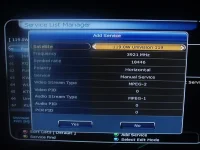
You can manually add a channel in the Raptor.
This is done in the "Service List Manager" menu. So Yes, we can manually add a PID in the Raptor. I just added the PIDS for the CW channels, tp3720 at 91W. EB
This is done in the "Service List Manager" menu. So Yes, we can manually add a PID in the Raptor. I just added the PIDS for the CW channels, tp3720 at 91W. EB
el bandido
TNAP-Images
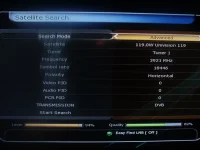
You may add a PID to a satellite's transponder in the "Satellite Search" menu. If you add a PID here, the receiver will search the transponder for the PID information you entered. If it does not find an exact match for your PID, then nothing is added.
You may also add a PID in the "Service List Manager" menu. The receiver doe not look for any information in this menu. It takes whatever you enter and adds it to the channel list for the selected satellite and transponder. This is where I successfully added the CW PIDS for 91W.
You nay change a channel name in the "Service List Manager". Once you change a channel name, it stays changed. Doing a blind scan or an auto scan does not have any effect on the channel name you changed. The receiver will find the channel in a blind or automatic scan, but it will assign the PID the name you changed it to.
As an example, I changed one channel on 118.8W to Unvision. Then I did a blind scan and an auto scan to see if the name would change. It did not. This is a smart receiver!!EB
You may also add a PID in the "Service List Manager" menu. The receiver doe not look for any information in this menu. It takes whatever you enter and adds it to the channel list for the selected satellite and transponder. This is where I successfully added the CW PIDS for 91W.
You nay change a channel name in the "Service List Manager". Once you change a channel name, it stays changed. Doing a blind scan or an auto scan does not have any effect on the channel name you changed. The receiver will find the channel in a blind or automatic scan, but it will assign the PID the name you changed it to.
As an example, I changed one channel on 118.8W to Unvision. Then I did a blind scan and an auto scan to see if the name would change. It did not. This is a smart receiver!!EB
Attachments


Species
Visiting Staff
You may add a PID to a satellite's transponder in the "Satellite Search" menu. If you add a PID here, the receiver will search the transponder for the PID information you entered. If it does not find an exact match for your PID, then nothing is added.
You may also add a PID in the "Service List Manager" menu. The receiver doe not look for any information in this menu. It takes whatever you enter and adds it to the channel list for the selected satellite and transponder. This is where I successfully added the CW PIDS for 91W.
You nay change a channel name in the "Service List Manager". Once you change a channel name, it stays changed. Doing a blind scan or an auto scan does not have any effect on the channel name you changed. The receiver will find the channel in a blind or automatic scan, but it will assign the PID the name you changed it to.
As an example, I changed one channel on 118.8W to Unvision. Then I did a blind scan and an auto scan to see if the name would change. It did not. This is a smart receiver!!EB
INTELLIGENT BLIND SCAN


easily confused
Legit Super Moderator
"As an example, I changed one channel on 118.8W to Unvision. Then I did a blind scan and an auto scan to see if the name would change. It did not. This is a smart receiver!!"
This is great news, EB. This is one irritation I currently find with my S-9. I rename all the channels so my wife knows what they are when she checks different sats, I then do some blind scanning and have to go through everything and rename the channels again.
This is great news, EB. This is one irritation I currently find with my S-9. I rename all the channels so my wife knows what they are when she checks different sats, I then do some blind scanning and have to go through everything and rename the channels again.
el bandido
TNAP-Images
The Raptor's channel editor is a very impressive and powerful item. It works so well that there is very little need for an additional channel editor such as SetEdit. I have always enjoyed being able to edit a sat file on a computer. If the Raptor had an North American sat file in it, I would have very little use for SetEdit because everything I need to do can be done in the receiver.
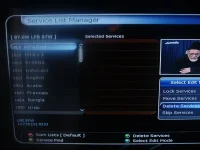
I scanned 87W ku today and now I need to delete the channels I do not want. This task is done in the "Service List Manager" menu. All I need to do is press the blue remote button while in this menu and select Delete Services. There are two columns for channels. The far column on the left contains the satellite's channels. Pressing the remote's OK button on a highlighted channel will move the channel to the center column where it can be deleted.
There is a small tv screen on the far right that displays whatever the highlighted channel in the far left column is playing. This tv screen gives you an opportunity to actually see what you are deleting. When you have all the channels you want deleted moved to the center column, press the remote's green button and you will be asked if you want to delete all of them or exit without deleting anything.
It takes very little time to delete channels on a satellite, even if there is a hundred or more that you want to delete.
I scanned 87W ku today and now I need to delete the channels I do not want. This task is done in the "Service List Manager" menu. All I need to do is press the blue remote button while in this menu and select Delete Services. There are two columns for channels. The far column on the left contains the satellite's channels. Pressing the remote's OK button on a highlighted channel will move the channel to the center column where it can be deleted.
There is a small tv screen on the far right that displays whatever the highlighted channel in the far left column is playing. This tv screen gives you an opportunity to actually see what you are deleting. When you have all the channels you want deleted moved to the center column, press the remote's green button and you will be asked if you want to delete all of them or exit without deleting anything.
It takes very little time to delete channels on a satellite, even if there is a hundred or more that you want to delete.
Attachments

Yankee495
Legit VIP
My Viewesat did the tic-tac-toe tile of available channels. Only one was live but it really was cool. Good for when all channels have commercials and you have no guide. You can pop it up and see a shot of shows.
Boy, not much to complain about. The OS on the drive issue might suck for some people who only have a backup drive and don't wanna change it. Then again, any use of that drive on any device could ruin the backup so you shouldn't use it. I understand you was testing.
Great job EB. I thanked and liked every post you made except I didn't like the paid for editor. I'm sure this will change.
I posted a list a couple of years ago for a manufacturer to go by to successfully market a product in the US. It was a simple list.
First, it would be nice to have a dish and receiver combo package guaranteed to work together.
Here is the plan:
A dual tuner, dual band C/Ku receiver with an OTA tuner, USB, eSATA, & internal HDD, that can read and write all formats known to man & stream those same formats & browse the web, do Netflix, telepathic control and a 10 inch wireless dish that you stab in the ground and call it good, like one of those windmill flowers and all for only $99!
Such a simple setup!
SORRY!
The Alien and Raptor both seem very nice. The NTSC 480 is the way to go. My Vizio does PAL but when I fed it through a RF modulator to use a coax to the bedroom I thought the guy on ebay ripped me off. He said the converter worked good.
The S9 was in Pal and it couldn't convert that.
Again, thanks for the time to take and post the pics and info. I know it becomes work real fast.
Boy, not much to complain about. The OS on the drive issue might suck for some people who only have a backup drive and don't wanna change it. Then again, any use of that drive on any device could ruin the backup so you shouldn't use it. I understand you was testing.
Great job EB. I thanked and liked every post you made except I didn't like the paid for editor. I'm sure this will change.
I posted a list a couple of years ago for a manufacturer to go by to successfully market a product in the US. It was a simple list.
First, it would be nice to have a dish and receiver combo package guaranteed to work together.
Here is the plan:
A dual tuner, dual band C/Ku receiver with an OTA tuner, USB, eSATA, & internal HDD, that can read and write all formats known to man & stream those same formats & browse the web, do Netflix, telepathic control and a 10 inch wireless dish that you stab in the ground and call it good, like one of those windmill flowers and all for only $99!
Such a simple setup!
SORRY!
The Alien and Raptor both seem very nice. The NTSC 480 is the way to go. My Vizio does PAL but when I fed it through a RF modulator to use a coax to the bedroom I thought the guy on ebay ripped me off. He said the converter worked good.
The S9 was in Pal and it couldn't convert that.
Again, thanks for the time to take and post the pics and info. I know it becomes work real fast.
Yankee495
Legit VIP
With all my day dreaming I forgot to ask, does it use a wireless keyboard? The one Like the Alien?
I'm about to order the mini KB and figure I can just use it for something else if I end up with a receiver that don't/can't use it.
My desktop is hooked to my 32" on the wall in the bedroom and it would be useful for that...so not a waste no matter what.
I'm about to order the mini KB and figure I can just use it for something else if I end up with a receiver that don't/can't use it.
My desktop is hooked to my 32" on the wall in the bedroom and it would be useful for that...so not a waste no matter what.
el bandido
TNAP-Images
I have not seen a wireless keyboard option like the Alien has. I do not know if the Raptor supports it or not, but I doubt it does.
The SetEdit channel editor I bought is not really needed for the Raptor. You can easily edit almost anything you need to in the Raptor. The Raptor''s edit features are easy and fast. The only thing that I have not been able to do in the Raptor ios change a diseqc 1.2 position. For example, let's say that I have 119W at diseqc 1.2 position 50 but for some reason I want to change it to 30. This change or edit cannot be done in the Raptor...either it can't be done or I have not figured out how to do it yet.
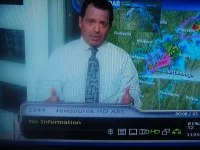
One another note, the Raptor appears to be able to play AAC audio. There is a CNN feed on 87W ku that scans in as AAC in its channel label. It takes the Raptor a few seconds to figure this audio out, but it does play it. Somebody else might want to look at this AAC CNN feed on 87W ku. EB
The SetEdit channel editor I bought is not really needed for the Raptor. You can easily edit almost anything you need to in the Raptor. The Raptor''s edit features are easy and fast. The only thing that I have not been able to do in the Raptor ios change a diseqc 1.2 position. For example, let's say that I have 119W at diseqc 1.2 position 50 but for some reason I want to change it to 30. This change or edit cannot be done in the Raptor...either it can't be done or I have not figured out how to do it yet.
One another note, the Raptor appears to be able to play AAC audio. There is a CNN feed on 87W ku that scans in as AAC in its channel label. It takes the Raptor a few seconds to figure this audio out, but it does play it. Somebody else might want to look at this AAC CNN feed on 87W ku. EB
el bandido
TNAP-Images
Do a blind scan and see if you get it. The AAC CNN has not been up long.
G
Guest
Guest
Manhattan is having no issues with the CNN Newsource audio on Ses2 at 87w.
el bandido
TNAP-Images
el bandido
TNAP-Images
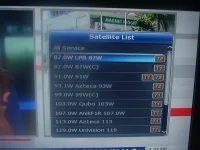
Pressing the FAV button on the remote will give you a list of the stored scanned satellites, plus your favorites list(s).
I have been looking for this option a long time. I can set up the universal remote now and make the Raptor function like the Amiko Alien and my other receivers. Sometimes the thing you are looking for the hardest is right in front of you!!!EB
I have been looking for this option a long time. I can set up the universal remote now and make the Raptor function like the Amiko Alien and my other receivers. Sometimes the thing you are looking for the hardest is right in front of you!!!EB
Attachments
G
Guest
Guest
Which one are watching Costa?
Currently there are two Newsource channels up on 87W.
The one I am referring to scanned in as Newsource HD AAC. Can you confirm this particular Newsource channel as having AAC audio?
I didn't realise that there was another CNN channel on this tp, audio is instantaneous on the Manhattan:

easily confused
Legit Super Moderator
I'm getting Newsource HD AAC on my Openbox S-9 Great pic and sound