Anaconda Blind Scan Problems

el bandido

TNAP-Images
Note: The Optibox Raptor does not have any known blind scan problems.
The following comments apply to the Optibox Anaconda and Gekko receivers.


Some people have been reporting slow blind scan speeds with the Optibox Anaconda while other people have said the blind scan is as fast as the Openbox but with more accuracy. It turns out they are both right The Optibox is spending too much time looking at "dead air", but it seems to move very fast on a satellite that has lots of transponders.

Here are a few ways to speed the blind scan up on the Anaconda while we wait for the problem to be fixed:
1. Use a Standard linear lnb with a l.o. of 10750 on the KU band.
2. For Universal lnbs, use 10600 for the l.o. frequency and turn 22KHz ON. This lnb setting will allow the receiver to scan down to about 11550 MHz.
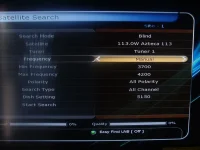
3. Manually set upper & lower scan frequencies. Use 11700 and 12225 for KU band. Use 3600 and 4170 for C band. Other manual frequency combinations may also be used.

Refer to the attached picture for the location to manually enter the upper and lower scan frequencies.


We will ask Fortis to adjust the scan in the following ways.
1. Set the blind scan Symbol Rate lower so skinny transponders below 2000SR may be found.
2. Speed the blind scan up. The Anaconda and Gekko receivers are spending too much time looking at "dead air" during a blind scan.
EB
 

Attachments

  • DSCF0075.webp
    DSCF0075.webp
    121.6 KB · Views: 9
I started testing my new Optibox Anaconda HD receiver today. My first impression was WOW, but after using it for a few hours I quickly became frustrated. Each blind scan took at least 30 to 40 minutes! Plus it discovered the same channels my Openbox S9 receiver found in only a few minutes.

To make things worse I tried to recan SES2, because the LPB channels were not discovered during the first scan and the next scan zoomed to 81% and stopped. I then deleted all the channels and performed a blind scan again only to have the same problem occur. Then the "Exit" button stopped working. I had to power down and go through the entire language, time zone and channel scans again.

Attached are images showing the scan as well as the firmware version. If anyone could please help I would greatly appreciate it.
 
Welcome to legit.
We have asked for changes to the blind scan on the Anaconda and Gekko. Hopefully an updated firmware will appear soon.

What lnb are you using and what antenna settings are you using with the lnb?
 
I started testing my new Optibox Anaconda HD receiver today. My first impression was WOW, but after using it for a few hours I quickly became frustrated. Each blind scan took at least 30 to 40 minutes! Plus it discovered the same channels my Openbox S9 receiver found in only a few minutes.

To make things worse I tried to recan SES2, because the LPB channels were not discovered during the first scan and the next scan zoomed to 81% and stopped. I then deleted all the channels and performed a blind scan again only to have the same problem occur. Then the "Exit" button stopped working. I had to power down and go through the entire language, time zone and channel scans again.

Attached are images showing the scan as well as the firmware version. If anyone could please help I would greatly appreciate it.

WOW is right! It is a great box...as EB mentioned the issues have been sent, and we will have this fixed, I doubt it will take more than a week or two at most, these guy's are good and want to fix any problems...If you see any more issues just say so..we want this box to be top notch so we can all enjoy something different that makes us all happy.
 
I've also encountered another blind scan issue with my anaconda. Once in a while, using blind scan the receiver jumps immediately to 100% complete and keeps doing it until a hard boot is performed. No major problem but a reboot clears the time and day setting and must be reset.
 
I've also encountered another blind scan issue with my anaconda. Once in a while, using blind scan the receiver jumps immediately to 100% complete and keeps doing it until a hard boot is performed. No major problem but a reboot clears the time and day setting and must be reset.

This is exactly the same problem I had, except mine went to 81.2%.
 
I performed another blind scan on SES2 this time setting the lower frequency to 11700 and the upper frequency to 12225. The scan took 13 minutes and discovered 26 channels on SES2 KU band. Better than 30 to 40 minutes, but is 13 minutes normal for this receiver?
 
I performed another blind scan on SES2 this time setting the lower frequency to 11700 and the upper frequency to 12225. The scan took 13 minutes and discovered 26 channels on SES2 KU band. Better than 30 to 40 minutes, but is 13 minutes normal for this receiver?

There is no normal yet! We should be able to have this box blind scan pretty quick. Keep in mind this box is very new to NA and we are doing our best to have things adjusted for us here,.,.

New files will be posted as soon as they are ready.
 
I've also encountered another blind scan issue with my anaconda. Once in a while, using blind scan the receiver jumps immediately to 100% complete and keeps doing it until a hard boot is performed. No major problem but a reboot clears the time and day setting and must be reset.

WOW am I ever glad you posted that! I just started testing a Gekko tonight and had that problem on only the second attempt at scanning! I thought it was broken! Like you, pulling the plug fixed it though. (By the way, when setting the time, is there a way to set the YEAR without having to just scroll forward through the months and let the year advance every time you pass from December to January?)

Like the other people posting here, mine seems to take an unusually long time scanning most satellites. The ones that take the longest are the ones with the least transponders. And yes, I've tried restricting the range to only 11700-12200. (Apropos of THAT, I know that somewhere, it was said to me that if you select manual scan range instead of auto, it remembers the numbers you put in for the next time you select manual. So far, that's not working for me -- unless it's another symptom of the bug above. I'll have to test that eventually, but I didn't have a lot of time today.)
 
A quick way to set the date/year is to put the time in automatic and leave it for a while. it will get something that resembles the time and date on its own. It will set the correct date and time if it is left on a Bell transponder.

The numbers for manual have to be set every time. The receiver does not remember what you set.
We are expecting new firmware within a couple of weeks, but we all know how that goes.

Fortis did give us a firmware that boots in NTSC instead of PAL, and they did give us something that resembles an American satellite file. A better satellite file is being worked on.

Some versions of these receivers have been on the market in other countries since 2010. But I do not think Fortis ever had any real feedback on how these receivers run in North America until a few weeks ago. EB
 
Last edited:
More input: what takes even longer than a satellite without a lot of transponders? A satellite with a lot of transponders that it can't decode. I was trying 107.3W Ku tonight to get a sample of 4:2:2 (still with the default firmware, not E2, but I had another network-related idea I wanted to try) and I had to give up because it was taking forever. That satellite is full of Digicipher transponders. Besides being scrambled, the more important part is, they're not DVB-compatible at all! I wonder if the same problem would be had on a DirecTV satellite, but I don't intend to try right now.
 
The numbers for manual have to be set every time. The receiver does not remember what you set.

My bad, I was assuming something based on what costac said in another thread. He said that if you select manual, it comes up with the right numbers automatically, but he was talking C-band. On Ku-band, it doesn't.

BTW, I'm getting the impression that the scan on the Gekko is really buggy. I'm trying to scan AMC-6 Ku, and not only did it blow through the vertical side in no time at all with finding no transponders (whereas we know that most of them on that bird are in fact vertical), it's been hung for quite a while at 81.2% on the horizontal side. (The Openbox did that once upon a time when they were playing with the blind scan parameters. The part about hanging on AMC-6 Ku horizontal, not the part about blowing through the vertical. It did the vertical just fine. I wonder if skipping the vertical is another manifestation of whatever bug makes it sometimes skip the scan altogether. I really have this gut feeling that there's some bogus data in the satellite list somewhere that's making it do that. It would be SO nice if we could delete satellites and rebuild from ground zero rather than having to edit the satellites that are already there, then we'd know if that was the source of the problem.
 
It does not remember them on c band either. If it does, I have never seen it.

All the tools to build a sat file are available on this site. You can do everything but delete a satellite with the tools we have.
We have also constructed a sat file from scratch and consider it a work in progress. I have had issues with it too, but I think most of its issues have been solved.

You may download and install the satellite file that is in this link:
http://www.legitfta.com/forum/showthread.php?9887-Optibox-Raptor-Beta-Sat-File

The .fdu file works on all three Optibox receivers. EB
 
I too did a Ku scan of 107.3W and got absolutely nothing.
I do not know where the 107.3W 4:2:2 channels are but my Raptor did not see them this morning when this post was written.

These people are pretty good about fixing our problems. We asked for the diseqc 1.2 positions to be adjustable instead of preset. (We have a Gekko thread on this 1.2 position problem.)
Either coincidence or not, but somebody decided to fix it. I am running a firmware file in the Raptor where it is fixed. It is my belief that the blind scan issues will be improved soon too.

Diseqc 1.2 picture attached. EB
 
I too did a Ku scan of 107.3W and got absolutely nothing.
I do not know where the 107.3W 4:2:2 channels are but my Raptor did not see them this morning when this post was written.

The 4:2:2 channels are Canadian news feeds, but there's almost always at least one up even if it's just color bars. Maybe we've caught them at an off time.
 
AnikF1-107.3w:

11935
11943
11949 H 5859

These 4:2:2 feeds are MIA for me as well this morning.
 
A quick way to set the date/year is to put the time in automatic and leave it for a while. it will get something that resembles the time and date on its own. It will set the correct date and time if it is left on a Bell transponder.

The numbers for manual have to be set every time. The receiver does not remember what you set.
We are expecting new firmware within a couple of weeks, but we all know how that goes.

Fortis did give us a firmware that boots in NTSC instead of PAL, and they did give us something that resembles an American satellite file. A better satellite file is being worked on.

Some versions of these receivers have been on the market in other countries since 2010. But I do not think Fortis ever had any real feedback on how these receivers run in North America until a few weeks ago. EB


Auto time thingy works real well.
 
There was a 4:2:2 feed of Popocatepetl on 93W Ku under the name Fly H.D. (it wasn't HD) for a week or so, but it's gone this morning. (The Popocatepetl feed is now on the same transponder and PIDs as the "Service 2" Azteca feed usually is, under the name FLY 4 TVA, and it's not 4:2:2 anymore.)
 
Back
Top