TNAP-5 on Octagon

Hello I am using TNAP-5 on my Octagon SK8008 everything works good except there is no video enhancement.. I try downloading from the plugin menu and installing it
but I don't see it?
 
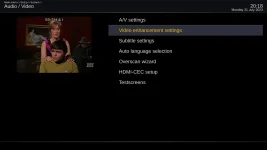
Menu for the Video enhancement plugin can be seen after the plugin is installed and the receiver is Rebooted. The path to the Video enhancement menu is: Menu--->Setup--->System--->Audio/Video

1_0_1_7_2F3_0_EEEE025D_0_0_7_20230731201820.webp

1_0_1_7_2F3_0_EEEE025D_0_0_7_20230731201853.webp
 
I obtained an Octagon SF8008 Supreme recently. I want to load TNAP into one of the empty slots. I have searched all over the place looking for the procedure to load an image on this box but have not been able to find it. I have tried a couple things indicated for the first SF8008 but no luck. Can someone point me to the info I need?
 
I obtained an Octagon SF8008 Supreme recently. I want to load TNAP into one of the empty slots. I have searched all over the place looking for the procedure to load an image on this box but have not been able to find it. I have tried a couple things indicated for the first SF8008 but no luck. Can someone point me to the info I need?

Does it have OpenATV on it now? If so you make a folder named images and put the TNAP.zip in the folder and use the software manger and Flash online menu.
 
It does have OpenATV on it and the Define image. I found those directions and tried it. But the flash online menu did not offer the USB (local source). Only images stored online. But those directions said name the folder "Images" not "images" like you wrote. I will try again. My first experience with OpenATV. I never tried that one on the MIO 4Ks I have. Thx for the response, I'll let you know.
 
Yes that was a problem. Named the folder correctly (images) I actually typoed that to start with. :( And now the file tree in the Flash Online menu displays "Downloaded Images" and the images on the USB stick are there. TNAP successfully installed. :)
 
Back
Top