Youtube/Media Player Plugin and Mio+

I used to enjoy playing youtube videos through my Edision Mio+ using the plugin for this so I could watch youtube videos on my TV screen. The youtube plugin uses the media player plugin. Lately, almost any video I play stops and starts as I play it as though it's being buffered. Effectively, the feature doesn't work anymore for me. I am using TNAP 4.1 with the latest updates.

Troubleshooting already tried:
- Uninstalled and reinstalled both the youtube and the media player plugins.

- I've checked the Network menu in the Mio+. I use the wired LAN connection and the network test passes. Netspeedtest shows 80.24 Mbps download and 10.18 Mbps upload.

- I did a cold and warm restart of the Mio+.

- I restarted my cable/network router. The router works fine for all other household Internet applications.

I wonder if others have tried this feature while using TNAP 4.1?

I notice most youtube audio is labelled as MPEG 4-AAC. I wonder if this is contributing to the videos not playing smoothly.

- The youtube setup screen is as follows:
Youtube Setup Screen.webp
 
That may have helped. But some videos still won't play smoothly. I think I'll just connect my PC via HDMI cable directly to the TV. Then I can play anything at full resolution. What's interesting is I don't recall this being an issue at some point in the past.
 
Yeah I got Kodi 18.9 on my OpenPli develop image in another slot and the youTube app in Kodi has the same issues with some videos. YouTube wants you to see the ads so with these apps like these not doing ads they are not fully supported by the YouTube servers. Just my opinion.
 
Workaround discovered: The plugin allows me to download the video of interest. The audio and video tracks download separately to my local disk. When I play it locally, it plays perfectly even at the HD resolution. The only catch is it takes a bit of time to download.
 
Workaround discovered: The plugin allows me to download the video of interest. The audio and video tracks download separately to my local disk. When I play it locally, it plays perfectly even at the HD resolution. The only catch is it takes a bit of time to download.

Yep that is a cool option for saving and watch later. Slow to download to usb tells me the stream is slow from the server using these apps. but not all content.
 
It would help to provide a title for a video(s) that does not play correctly. The problem needs to be replicated if possible.

I have no idea what this means:
I am using TNAP 4.1 with the latest updates
The images have dates and numbers. Knowing what they are is better than guessing at what you have. Providing a screenshot of the About page for the image, or posting the build dates and numbers would help. (Menu--->Information--->About)
 
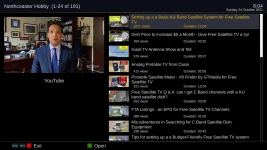
It's easy to provide a sample example. I have "Maximum video resolution" configured at 640x360 for this example. One example is the video "Setting up a Basic KU Band Satellite System for Free Satellite TV". I learned that configuring Youtube setup with "Use DASH MP4 format" to OFF will then download a single file containing video and audio.

See images below.

TNAP 4.1 About Screen.webp
Youtube Sample_1.webp
Youtube Sample_2.webp

ADDED: I just did an online update. Suddenly, the youtubes play correctly even at highest resolution! Is this a coincidence or did this update resolve something on this subject? Below is my current About screen. For now, it seems issue is resolved.
TNAP 4.1 About Screen_update.webp
 
Last edited:
Is this a coincidence or did this update resolve something on this subject?
Hard to say....At least it works for the moment.

YouTube is a maintenance item for fta receivers. Let us know if it gives more problems.
 
Perhaps just the act of doing an update "twigged" something and the update itself didn't actually change any software that applied to the youtube plugin. I've been watching all morning and every video plays perfectly at highest resolution. I had forgotten how useful this feature is and fun to use.
 
Back
Top