TNAP-5.1 Image Discussion

I loaded the current TNAP5.1 image fresh. Tested. Problem still there. I then started stepping back in time loading each image fresh. 0427: bad. 0412: Good! The feature works if I load 0412 with no updates. Then I online updated 0412: Bad.
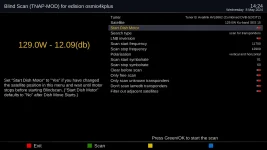
I'll let you figure out why but here's the news. The Start Dish Motor feature is now working completely on the latest image (0505) including displaying the correct dB level in the Blind Scan window. Not related to solving this, I reconfigured my whole system to put the motor on Tuner B and a fixed dish on Tuner A. This is probably temporary since Tuner A is superior and I'll likely change the motor back to Tuner A later. Perhaps because of this, or because I flashed an older image (0412) that allowed the feature to work, I now have it working even on the latest image.

I'm getting to like this feature. Now...if we could have some way to select a list of satellites in advance to blind scan then we could walk away and come back later to all the blind scan results.
 
So what's wrong with just parking your dish on the sat that you wish to scan and doing it? That's how I've always done it.
Just like the dish aim tweaker plugin. I found that if you use it and it bumps the dish back and forth searching for the strongest signal.
It can screw up the rest of the reference counts for the rest of your stored positions. Having you going through and manually peaking signals and storing the new position.
Or just going into the dish controller and resetting the zero reference.
I'm all for sending the goto command and letting the dish stop. And then scanning. Crazy, ain't it!
"evly machine a-have it rimitation"

TNAP and most other images are designed for Motorized Satellite Systems that are not broken or need of repair.
Fix your dish system and you will not have these problems!

Now I gotta ask:
Why are you even bothering to post in this thread? You have berated about the TNAP image not living up to your personal expectations and have berated other images because the channel guide does not equal what a pay satellite receiver has. So why post in this thread? You don't use the TNAP image, you don't like the TNAP image ...etc. Are you bored or just Trolling?
 
A little more news. I reversed my programming: motor is back on Tuner A and fixed dish is on Tuner B. Problem has returned.

Per Post#123,
Did you Notice there is an online update??? Menu--->Setup--->Software update. See if that fixes it. Thanks for your efforts!
 
Yes. I installed and issue is resolved.

There is One issue left.
Octagon SF8008 has only one signal to deal with. Edision has three. Signal levels for Edision are different in T2MI and Non-T2MI drivers. What about Tuner 2 in the Edision MIO+? What does it show?

With the last Blindscan update installed, Can you set up tuner 2 as a motorized dish for about 3 satellites and tell me what the signal shows as compared to what it should be when the dish motor starts. If we can get the signal values for tuner 2 we can calibrate it.

Thanks.
 
...If we can get the signal values for tuner 2 we can calibrate it....
With Tuner B configured with the motor, the Start Dish Motor function moves the dish correctly but there are no readings.
129W: Blind Scan screen shows 0 dB. Should be 12.0 dB.
123W: Blind Scan screen shows 0 dB. Should be 12.0 dB.
117W: Blind Scan screen shows 0 dB. Should be 10.4 dB.
 
Now we meed the values being outputted. and do the following:

Go to signal finder and tune the first transponder 117w. Note the signal value.
Telnet to the receiver
cd /usr/lib/enigma2/python
enter this command to see what the blindscan plugin thinks the transponder signal values are.
python Dvbcsvb.py
Copy what the above command outputs. and then also copy what the value for the transponder is in signal finder.

If we have what the blindscan thinks the signal is compared to what the signal really is, then we can make a somewhat usable value to be outputted in blindscan plugin.

You may repeat this for the other 2 satellites.
 
Copy what the above command outputs. and then also copy what the value for the transponder is in signal finder....

117W:
BitError 0; Status 31; SNR 458.74; Strength 41942
Signal Finder: 10.5 dB

123W:
BitError 0; Status 31; SNR 439.08; Strength 39976
Signal Finder: 10.2 dB

129W:
BitError 0; Status 31; SNR 537.38; Strength 44563
Signal Finder: 12.4 dB
 
I notice Media Player no longer works. If I click it in the Menu, the spinning wheel starts and the box is completely locked. I must remove DC plug on rear panel to restart the box. I've tried this twice.
 
Media Player works on SF8008. I will see about Edision.

Please do the online Software update and see if the changes to Blindscan Plugin work on tuner 2 for signal in db.
Thanks.
 
Excellent!
Seems like it is working in Edision like it has been working in SF8008 Supreme.

Now you should be able to blindscan across two motorized tuners, and select position to blindscan on either tuner without getting unwanted motor movement.

You should be able to blindscan feed satellites such as 89 west c band from any position or any tuner. The ideas about moving the dish to the target satellite and then blindscanning it are great until you run into satellites that have no active channels. Sometimes there are good things to watch on 89w. Other times it is empty. 87west c band is similar.

Anyway, I guess we can say the signal id in blindscan plugin is working now for everyone. Thanks for having the patience to test it.
 
I notice Media Player no longer works. If I click it in the Menu, the spinning wheel starts and the box is completely locked. I must remove DC plug on rear panel to restart the box. I've tried this twice.

Media Player opens, loads files, plays files...etc in SF8008 Supreme.
Media Player opens, shows folders...etc., but cannot play files in OSMIO4k because no video files are available. Otherwise, it seems to work in the MIO.

IF you continue to have problems with it, then make a debug log in telnet by doing the following commands:
init 4
ENIGMA_DEBUG_LVL=5 enigma2 > /tmp/debug.log 2>&1

Now run the Media Player and let it lock up. Then get the log from the receiver, /tmp/debug.log, zip it and attach it.
 
... zip it and attach it.

Attached.View attachment mediaplayer.zip

ADDED: I really don't use the media player anymore. I used to use it to stream TV channels from around the world by loading m3u files onto Edision. But now, using the plugin Freearhey, I download the streaming files and just play them on the Edision like a satellite channel. So I can also record them too for time shifting if I choose. But I'm just curious why the Media Player causes the Edision to lock up.
 
Last edited:
Put the attached files into the receiver. Here is the location:
/usr/lib/enigma2/python/Plugins/Extensions/MediaPlayer

REBOOT and see if the crash or image freeze continues.
 

Attachments

Congratulations :yes1:
when I read all the progress made with the positioner with the dBs that are indicated (is it also active for the Uclan Ustym?), I wonder if for fun I'm not going to try turning the antenna with the MIO 4K (although I'm very happy with my Openbox S3 mini HD as a positioner).
 
Back
Top