
- Home
- Forums
- FTA Set Top Box Discussions/Files
- FTA Set Top Box Discussions
- The North American Project E2 Image Discussions
You are using an out of date browser. It may not display this or other websites correctly.
You should upgrade or use an alternative browser.
You should upgrade or use an alternative browser.
TNAP-5.1 Image Discussion
- Thread starter el bandido
- Start date


el bandido
TNAP-Images
5.1 version for MOD??? Sorry. I do not understand.
Edision os mio/mini 4k have the same updates you have. The same image on the feeds...etc. The Mini should load the 5.1 test image in Flash image first and then update it online.
Currently supporting in TNAP5.1:
Ustym4kPro
SF8008 & SF8008 Supreme
Edision 4K - MIO,MIO+, & Mini
(Some others are supported but not listed.)
Edision os mio/mini 4k have the same updates you have. The same image on the feeds...etc. The Mini should load the 5.1 test image in Flash image first and then update it online.
Currently supporting in TNAP5.1:
Ustym4kPro
SF8008 & SF8008 Supreme
Edision 4K - MIO,MIO+, & Mini
(Some others are supported but not listed.)
5.1 version for MOD??? Sorry. I do not understand.
Edision os mio/mini 4k have the same updates you have. The same image on the feeds...etc. The Mini should load the 5.1 test image in Flash image first and then update it online.
Currently supporting in TNAP5.1:
Ustym4kPro
SF8008 & SF8008 Supreme
Edision 4K - MIO,MIO+, & Mini
(Some others are supported but not listed.)
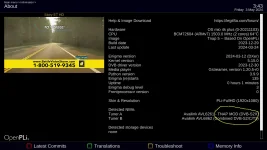
this is what I'm talking about MOD version:
el bandido
TNAP-Images
You have a choice of 4 drivers. Two of these drivers have been modded.
el bandido
TNAP-Images
Online Software update is available, dated 05-03-2024.This update is an extension of previous updates to the satfinder. Execute permissions for dvbreader.so have "supposedly" been removed to allow dvbreader.so execute privileges only when reading the stream. Previous satfinder versions had dvbreader with execute privileges at boot.
Last 5.1 version + updates, is working normal at my end (osmio4k+).
ditto


After the latest online updates, it seems to me my blind scans are faster. For example a blind scan of 99W Ku just now took 2:07. Very quick. Part of this may be related to installing a larger (4-foot) dish so the received signals are stronger and stand out from the noise. In the past, they had been getting very slow lasting over 5 or 6 minutes just to scan some Ku sat bands only. The software is stable for me.
Having said this, the Start Dish Motor feature seems not to be working now after these updates (or earlier updates?) though the feature worked previously. For 99W Ku, when I tried it this morning even with the dish manually peaked and receiving the first transponder of 11718 H 2390 Montana PBS at 9.3 dB, the reading shown by the Start Dish Motor feature is 2.08 dB. Similar happened on 103W Ku. I normally always manually peak the dish before blind scanning anyway so this feature doesn't matter to me.
Having said this, the Start Dish Motor feature seems not to be working now after these updates (or earlier updates?) though the feature worked previously. For 99W Ku, when I tried it this morning even with the dish manually peaked and receiving the first transponder of 11718 H 2390 Montana PBS at 9.3 dB, the reading shown by the Start Dish Motor feature is 2.08 dB. Similar happened on 103W Ku. I normally always manually peak the dish before blind scanning anyway so this feature doesn't matter to me.
el bandido
TNAP-Images
The blindscan plugin starts the dish motor by tuning the first transponder for the satellite to be blindscanned in the satellites.xml list. Pretty much, this has to happen, else the satellite dish does not move. All we are doing is getting a signal reading from that first transponder in the satellites.xml and displaying it. So if the dish moves, or if the dish is commanded to move, then eventually, the signal displayed will come form the first transponder in satellites.xml.
Of course you know how to start the thing: Highlight Start Dish Motor, then use the left or right arrow keys to trigger the motor to move. Once you do that, the first transponder in the satellites.xml for the satellite to be scanned will eventually have its signal displayed. There's not much of a way around this.
Somethings to check are signal for the first transponder in signal finder, and if the dish actually did move. The dish will be commanded to move again when blindscan actually starts because the tuner is going to be commanded to tune again.
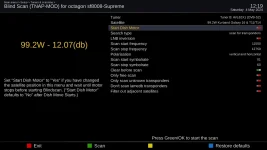
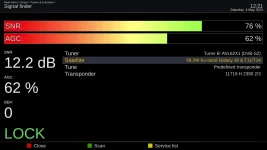
Of course you know how to start the thing: Highlight Start Dish Motor, then use the left or right arrow keys to trigger the motor to move. Once you do that, the first transponder in the satellites.xml for the satellite to be scanned will eventually have its signal displayed. There's not much of a way around this.
Somethings to check are signal for the first transponder in signal finder, and if the dish actually did move. The dish will be commanded to move again when blindscan actually starts because the tuner is going to be commanded to tune again.
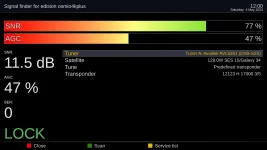
The way you describe is how it worked a short time ago. To simplify, I motored the dish to 129W Ku. There is only one active Ku transponder that scans in on this satellite: Reuters. I deleted other programmed tps from this satellite using TS-satellites Editor. So satellites.xml has only 1 tp listed. Signal Finder shows good SNR of 11.9 dB locked for Reuters. I use Start Dish Motor and it shows 2.64 dB. I do a blind scan and results show Reuters at good SNR locked. satellites.xml and blind scan results file attached. Everything is working except the dB reading showing when Start Dish Motor is activated is not correct. It seems a display issue not a function issue.
By the way, notice the Blindscan Frequency Range is not correct as printed in the Scan Results attached. On the Blind Scan screen display the range selected is correct as 11700 / 12900. This is probably not related; just a report printing issue.
View attachment satellites.txt
View attachment satellites.xml.1714846138.txt
View attachment 129.0W_C-band_1ch_1tp_05-04-2024_11-18-45.txt
By the way, notice the Blindscan Frequency Range is not correct as printed in the Scan Results attached. On the Blind Scan screen display the range selected is correct as 11700 / 12900. This is probably not related; just a report printing issue.
View attachment satellites.txt
View attachment satellites.xml.1714846138.txt
View attachment 129.0W_C-band_1ch_1tp_05-04-2024_11-18-45.txt
Attachments
Last edited:
el bandido
TNAP-Images
A lot of times, files are supposed to be designed a certain way or have content entered a certain way. If Not, then problems may exist!
Transponder information in satellites.xml is expected to be in a certain order. This is the order the blindscan plugin is looking for in a satellite transponder in satellites.xml:
freq, sr, pol, fec, inv, orb, sys, mod, roll, pilot, MIS, pls_mode, pls_code, t2mi
Most of the time in coding, 1 is 0 in a list. So transponder 1in satellites.xml will be coded as 0
Here is the code where blindscan puts together the transponder for starting the dish motor:
transponder = (tps[0][1] // 1000, tps[0][2] // 1000, tps[0][3], tps[0][4], 2, orb_pos, tps[0][5], tps[0][6], tps[0][8], tps[0][9], eDVBFrontendParametersSatellite.No_Stream_Id_Filter, eDVBFrontendParametersSatellite.PLS_Gold, eDVBFrontendParametersSatellite.PLS_Default_Gold_Code, eDVBFrontendParametersSatellite.No_T2MI_PLP_Id, eDVBFrontendParametersSatellite.T2MI_Default_Pid)
Here is a satellite transponder from the satellites.xml in TNAP-5.1:
(freq, sr, pol, fec, inv, orb, sys, mod, roll, pilot, MIS, pls_mode, pls_code, t2mi)
<transponder frequency="11718000" symbol_rate="2390000" polarization="0" fec_inner="2" system="1" modulation="2" />
Here is the same transponder from the satellites.xml that you posted:
(freq, sr, pol, fec, inv, orb, sys, mod, roll, pilot, MIS, pls_mode, pls_code, t2mi)
<transponder system="1" fec_inner="2" frequency="11718000" polarization="0" symbol_rate="2390000" modulation="2" />
The first item in the transponder is supposed to be frequency. The first item in your transponder is system. No way this is gonna work!
The Blindscan Frequency Range is recorded by what was being displayed when the blindscan started. I am going to guess you have two or more satellites using slightly different lnb settings, and you were moving between them when doing a blindscan. Fix the satellites.xml problem first and see if this issue is also fixed.
Transponder information in satellites.xml is expected to be in a certain order. This is the order the blindscan plugin is looking for in a satellite transponder in satellites.xml:
freq, sr, pol, fec, inv, orb, sys, mod, roll, pilot, MIS, pls_mode, pls_code, t2mi
Most of the time in coding, 1 is 0 in a list. So transponder 1in satellites.xml will be coded as 0
Here is the code where blindscan puts together the transponder for starting the dish motor:
transponder = (tps[0][1] // 1000, tps[0][2] // 1000, tps[0][3], tps[0][4], 2, orb_pos, tps[0][5], tps[0][6], tps[0][8], tps[0][9], eDVBFrontendParametersSatellite.No_Stream_Id_Filter, eDVBFrontendParametersSatellite.PLS_Gold, eDVBFrontendParametersSatellite.PLS_Default_Gold_Code, eDVBFrontendParametersSatellite.No_T2MI_PLP_Id, eDVBFrontendParametersSatellite.T2MI_Default_Pid)
Here is a satellite transponder from the satellites.xml in TNAP-5.1:
(freq, sr, pol, fec, inv, orb, sys, mod, roll, pilot, MIS, pls_mode, pls_code, t2mi)
<transponder frequency="11718000" symbol_rate="2390000" polarization="0" fec_inner="2" system="1" modulation="2" />
Here is the same transponder from the satellites.xml that you posted:
(freq, sr, pol, fec, inv, orb, sys, mod, roll, pilot, MIS, pls_mode, pls_code, t2mi)
<transponder system="1" fec_inner="2" frequency="11718000" polarization="0" symbol_rate="2390000" modulation="2" />
The first item in the transponder is supposed to be frequency. The first item in your transponder is system. No way this is gonna work!
The Blindscan Frequency Range is recorded by what was being displayed when the blindscan started. I am going to guess you have two or more satellites using slightly different lnb settings, and you were moving between them when doing a blindscan. Fix the satellites.xml problem first and see if this issue is also fixed.
The way my satellites.xml file is organized is the way the Edision created it in some previous version of TNAP.
So I did a test. I created a brand new satellite using TS-Satellites Editor in TNAP5.1. This new satellite in satellites.xml is created exactly as my file shows. Not as you describe. So there is no point my "fixing" my file since as soon as I create a new satellite then that new satellite would be organized "incorrectly" in satellites.xml per your description.
I checked backups I have of my satellites.xml from December 2023. I also checked a backup of my satellites.xml from 2022. The frequency has never been listed first in any of those backups. It seems we are saying that satellites.xml files created before TNAP5.1 are not compatible with TNAP5.1. Yet if I use TNAP5.1 now to create a new satellite, this new satellite listing in satellites.xml is created incorrectly. I'm not sure where I go from here. Perhaps I just accept I can't use the Start Dish Motor feature. Everything else is working fine so I won't worry about it.
So I did a test. I created a brand new satellite using TS-Satellites Editor in TNAP5.1. This new satellite in satellites.xml is created exactly as my file shows. Not as you describe. So there is no point my "fixing" my file since as soon as I create a new satellite then that new satellite would be organized "incorrectly" in satellites.xml per your description.
I checked backups I have of my satellites.xml from December 2023. I also checked a backup of my satellites.xml from 2022. The frequency has never been listed first in any of those backups. It seems we are saying that satellites.xml files created before TNAP5.1 are not compatible with TNAP5.1. Yet if I use TNAP5.1 now to create a new satellite, this new satellite listing in satellites.xml is created incorrectly. I'm not sure where I go from here. Perhaps I just accept I can't use the Start Dish Motor feature. Everything else is working fine so I won't worry about it.
el bandido
TNAP-Images
Online Flash images have been updated to 0505. These images contain a dropbear update (see link).
https://en.wikipedia.org/wiki/Dropbear_(software)
TNAP-5.1 images should be considered stable and usable.
https://en.wikipedia.org/wiki/Dropbear_(software)
TNAP-5.1 images should be considered stable and usable.
el bandido
TNAP-Images
The way my satellites.xml file is organized is the way the Edision created it in some previous version of TNAP.
So I did a test. I created a brand new satellite using TS-Satellites Editor in TNAP5.1. This new satellite in satellites.xml is created exactly as my file shows. Not as you describe. So there is no point my "fixing" my file since as soon as I create a new satellite then that new satellite would be organized "incorrectly" in satellites.xml per your description.
I checked backups I have of my satellites.xml from December 2023. I also checked a backup of my satellites.xml from 2022. The frequency has never been listed first in any of those backups. It seems we are saying that satellites.xml files created before TNAP5.1 are not compatible with TNAP5.1. Yet if I use TNAP5.1 now to create a new satellite, this new satellite listing in satellites.xml is created incorrectly. I'm not sure where I go from here. Perhaps I just accept I can't use the Start Dish Motor feature. Everything else is working fine so I won't worry about it.
Edision Does Not Create Satellites.xml Files!
The satellites.xml is a system file and is generated in the enigma2 image build. The satellites.xml file is created elsewhere, and not by enigma2 directly, but satellites.xml file is put into a normal enigma2 image build. The satellites.xml resides in /etc/tuxbox of system files.
TS Sat Editor creates satellite.xml files or modifies satellite.xml files and puts them in /etc/enigma2 of receiver files. The enigma2 image has 2 satellite.xml files when TS Sat Editor is used, and possibly when some other editors are used.
During image updates or new image installs, most users that understand how will restore settings from the previous image and think "All is Well". Most of the time All Is Well, but other times, a problem is simply reintroduced. When you restore settings, you basically restore the contents of /etc/enigma2 which would include the satellites.xml file if one is present.
Enigma2 is set to use satellites.xml file and some other .xml files if they reside in enigma2. So if you have a satellite.xml file in /etc/enigma2, then it is used and the system satellites.xml file which is in /etc/tuxbox is ignored.
It is a good idea to Not Restore Settings at some points in time and make a Fresh Install. Most of the time when this is suggested, it is ignored because restoring settings is easy-painless. A fresh install takes a bit of work.
Attached are satellite.xml files taken from the feeds of TNAP 4.2, TNAP5, and TNAP5.1. You will note all of these satellites.xml files have a dated header at the top and are designed the same way as previously listed. A satellites.xml file that was generated using TS Sat Editor Today is also included, and it too is generated in the same format and is readable by the blindscan plugin.
This tidbit at the top means something and should not be deleted like it is in your satellite.xml files: <?xml version="1.0" encoding="UTF-8"?>
Where or how you got your satellites.xml and how or why it is in that condition is debatable. At the end of the day though, it does not matter. Either remove it from /etc/enigma2 and start proper by using TS Sat Editor to copy the real satellites.xml file in /etc/tuxbox or forget about it and be happy with what you have. Most likely, this won't be the last conversation about it because the blindscan plugin has been modified, and errors in satellites.xml will be obvious..
Attachments
Last edited:
Something occurred to me after sleeping on it. Maybe I am configuring my system incorrectly.
I have a total of 5 LNBs configured:
Tuner A: LNB1, LNB2, LNB3
Tuner B: LNB1, LNB2
I've always wondered if I should be configuring these instead as follows:
Tuner A: LNB1, LNB2, LNB3
Tuner B: LNB4, LNB5
Also, Tuner B/LNB2 is funky since it's a Shaw Direct LNB. Its LO frequency is 10075 MHz with a scan range of 11025 to 12225 MHz. It's designed to cover lower Ku and upper Ku. Maybe this and the above configurations are causing problems. I will reprogram using unique LNB numbers for the whole system.
I understand your point about carrying forward old files. In general in past, I haven't done this for the concern you mention. However, in transitioning from TNAP5 to TNAP5.1, I did carry forward using the "lazy way". I think for the transition from TNAP4.2 to TNAP5, I didn't carry forward but allowed the system to create new files.
I understand more. I will go away and probably reflash fresh and reconfigure. It's all fun & games.
I have a total of 5 LNBs configured:
Tuner A: LNB1, LNB2, LNB3
Tuner B: LNB1, LNB2
I've always wondered if I should be configuring these instead as follows:
Tuner A: LNB1, LNB2, LNB3
Tuner B: LNB4, LNB5
Also, Tuner B/LNB2 is funky since it's a Shaw Direct LNB. Its LO frequency is 10075 MHz with a scan range of 11025 to 12225 MHz. It's designed to cover lower Ku and upper Ku. Maybe this and the above configurations are causing problems. I will reprogram using unique LNB numbers for the whole system.
I understand your point about carrying forward old files. In general in past, I haven't done this for the concern you mention. However, in transitioning from TNAP5 to TNAP5.1, I did carry forward using the "lazy way". I think for the transition from TNAP4.2 to TNAP5, I didn't carry forward but allowed the system to create new files.
I understand more. I will go away and probably reflash fresh and reconfigure. It's all fun & games.

Megatron817
Administrator
TS-satellites editor changes the format and removes the top header about the xml version and encoding. I noticed this years back when I got in to enigma2. Might be better to use Notepad++ for editing and not TS-satellites editor if it matters as far as the blind scan plugins goes. I haven't had any problems that I know about having My Sat xml in the wrong format but I have fixed my sat xml file to the tnap 5.1 version and edited with notepad++ to keep this format.
el bandido
TNAP-Images
It's all fun & games.
It's a Hobby! So nothing should be a big deal. For your system, each individual lnb should be assigned its own number. Other than that, whatever works, use it.
To straighten out the satellites.xml thingy, simply Delete satellites.xml in /etc/enigma2 and Reboot. Nothing else needs to be done, but you may lose channels on some satellites due to satellite names being different. The TS Sat Editor may be used.
When updating,
Channel files and Bouquets can usually be carried forward without issues, though some may not work due to satellite name changes.
Any nims settings in the settings file of /etc/enigma2/settings may be copied and reused.
Almost everything else in the /etc/enigma2 folder should be dumped. OR Notes should be made if anything else is kept.
As it is now, Many satellites, especially C band will display no signal in the blindscan plugin because the first transponder in satellites.xml will not have a signal. It will be up to the individual user to fix this because no one is maintaining the TNAP satellites.xml file besides Lyngsat.
el bandido
TNAP-Images
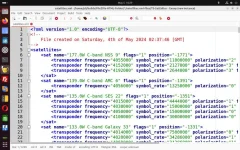
TS Sat Editor appears to make a decent satellites.xml file. The header is proper as shown below. This should run without errors, but I have not tested it.
Megatron817
Administrator
TS Sat Editor appears to make a decent satellites.xml file. The header is proper as shown below. This should run without errors, but I have not tested it.
View attachment 18299
If you use the TS-Satellite editor to make updates and save then the format is changed. Never had an issue with that format though.