TNAP-5.1 Image Discussion

TNAP images currently Does Not have a frequency spacing rule or requirement for transponders. Most enigma2 images require transponders with the same polarity to be spaced 2 or 4 MHZ apart.

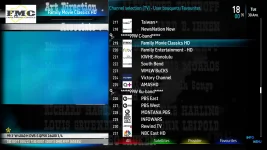
Shown below, the MIO4K logged a transponder at 3929V and another transponder at 3930V on a blindscan of 117w. This is sort of a moot point in this case because neither transponder had channels or even a lock. But there are other transponders in the world that are spaced less than 2MHz apart that have channels or services. The Blindscan in TNAP is currently unfiltered and unregulated. Whatever is found is shown and scanned with very few exceptions. Really the only rule being it has to be a satellite transponder or at least resemble one.
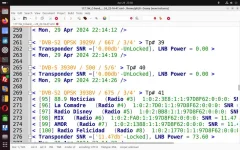
117w-scan-log.webp
 
Better version.
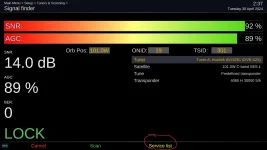
Found 1 not important issue in "signal finder": missing "service list" option, as it was in previous versions.

servicelist.webp
 
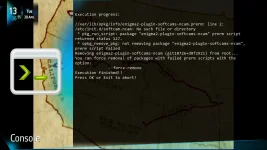
Just found that I can't remove softcam-ncam:

removing.webp

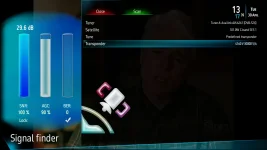
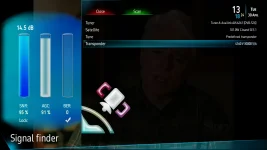
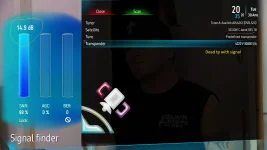
also, when switching from one transponder to another, the signal jumps to the sky (45db, 26db, etc), before settling to whatever is normal:

signal1.webpsignal2.webp

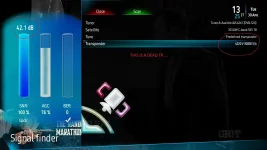
On a dead tp is doing the same:
signal3.webp
 
Last edited:
In terminal, Enter this command: opkg remove --force-remove enigma2-plugin-softcams-ncam

REBOOT
Check installed Plugins.
Let me know if that does not work.


For the signal issue, Is Allow signal below lock turned On or Off?

Online updates should fix the signal meter shown in post#62.
 
The removal went good.
The "Allow signal below lock" is off.
Well, the adding of the "service list" is slowing down the system, more then before with the dreadful spinner:

spinner.webp
 
Last edited:
As a test, set "Allow signal below lock" to ON. see what effect that has on the signal level.

As another test change the skin for something simple and one that does not poll a lot. Try PLi HD night or something similar.
 
With "Allow signal below lock" to ON, signal finder is showing a signal on dead tp:

signal3-1.webp

As for the sluggishness I replaced the 3 files in Satfinder folder with the ones from previous version, & sluggishness is gone
 
Okay. Attach what you replaced.
I don't think there has been any updates to Satfinder in at least six months. Be interesting to see what you replaced with what we have. Thanks.
 
Please use the private message system (pm) for random chatter that has nothing to do with this thread.

So Without making any other changes, installing that satfinder plugin makes your receiver run correctly, yes? What else is broken or in need of repair?
 
Yes.
It looks like it is a normal run for whatever features I use, in all images, except "tnap mod" I didn't check it yet.
I will ask my friend how tnap 5.1 runs in osmiomini4k.
Can't say anything about other features (pluto, iptv, etc), I do not use.
Thank you for your work.
 
Flashed 04-29-2024 version Supreme to slot 4.

Setup completed without any problems.

Switching channels on 101 c band (same mux) takes about 5 to 10 seconds. While staying on the same mux, switching channels are almost instant. A few minutes later, switching channels on same mux, takes 15 seconds. Nuts!

Switched to 87 ku and switched channels on same news mux and it took almost 30 seconds to tune in a channel. Switched to another channel in same mux and dropped down to 10 seconds. A few minutes later switched again and tune in was almost instant. Switched again and tune took 10 seconds.

While in 101 c band mux, went to system and selected signal finder. It took 15 seconds to display. Exited and returned a few minutes later and display was instant.

Rebooted to slot 3 (build date 02-22) where everything works well for me except with a few quirks that I avoid.

slot 3 version.webp
 
Where the infobar gets the db reading can be set in the MIO receivers. Look in one of the two the settings menus for this option.

Looks like the crash file comes from a python file that is different than what we are using. You will need to do an online update that will be available in a few minutes so everyone is on the same satfinder plugin.

Our satfinder contains a dvbreader that may be the heart of the problem with slowness. There are reasons WHY OpenPLi doesn't put the dvb reader in with the satfinder, but we should be able to get away with some things because the build here is only for a few receiver models.

Remember to delete any .py files before doing an online update!
 
Flashed 04-29-2024 version Supreme to slot 4.

Setup completed without any problems.

Switching channels on 101 c band (same mux) takes about 5 to 10 seconds. While staying on the same mux, switching channels are almost instant. A few minutes later, switching channels on same mux, takes 15 seconds. Nuts!

Switched to 87 ku and switched channels on same news mux and it took almost 30 seconds to tune in a channel. Switched to another channel in same mux and dropped down to 10 seconds. A few minutes later switched again and tune in was almost instant. Switched again and tune took 10 seconds.

While in 101 c band mux, went to system and selected signal finder. It took 15 seconds to display. Exited and returned a few minutes later and display was instant.

Rebooted to slot 3 (build date 02-22) where everything works well for me except with a few quirks that I avoid.

View attachment 18281


Try online update and see if things improve. Use the receiver menus or in terminal: opkg update && opkg upgrade

05-01-2024.webp
 
I don't have the 8008 supreme.
but with the Ustym 4K Pro (which is the twin brother of the other 8008) I've had absolutely no problems (so far).
changes between programmes are quick the signalfinder is very fast
the blindscan works well
I don't use the positioner (another receiver controls the antenna)

 
The dvbreader.so in the satfinder plugin allows the preview of channels or services on a transponder to be seen. The dvbreader.so is an executable with permission set at 0755.

The dvbreader.so has been in TNAP satfinder for some time. I will take a guess and say that some previous attempts to fix Satfinder crashes AFTER the dvbreader.so was added has allowed the dvbreader.so to run while navigating the menus. This would explain the problems of sluggish operation in the receivers.

The Satfinder that is in the feeds now goes back probably at least a year and a half. The file size of this Satfinder is small in part because there are no efforts to fix crashes in it. You can add swap files (band aid on a bullet wound), install more memory, or whatever else you want to do. But if the dvbreader.so is allowed to run when it should not run, then you will have problems!
 
"The dvbreader.so in the satfinder plugin allows the preview of channels or services on a transponder to be seen. The dvbreader.so is an executable with permission set at 0755."
..but this file had & has 326 permission !!!! Should I change it to 755 ?
the other 2 files in the folder have permission 647.
 
Back
Top