
- Home
- Forums
- FTA Set Top Box Discussions/Files
- FTA Set Top Box Discussions
- The North American Project E2 Image Discussions
You are using an out of date browser. It may not display this or other websites correctly.
You should upgrade or use an alternative browser.
You should upgrade or use an alternative browser.
TNAP-5.1 Image Discussion
- Thread starter el bandido
- Start date


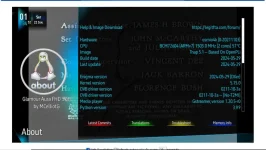
Only problem I have noticed is my clock no longer displays current time just 0000
Is there a setting I missed? On screen time is correct just the display on the STB thats not working. Other than that I think 4180 has calmed down and plays much better now. Only thing I did was when I re scanned for the 8PSK change it scanned in as S and not S2 changed that and it's been OK. Wish I had caught that earlier
Is there a setting I missed? On screen time is correct just the display on the STB thats not working. Other than that I think 4180 has calmed down and plays much better now. Only thing I did was when I re scanned for the 8PSK change it scanned in as S and not S2 changed that and it's been OK. Wish I had caught that earlier
Attachments
Last edited:

el bandido
TNAP-Images
The 0000 display issue has already been discussed. Please see posts 174 and 179.
The 0000 display issue has already been discussed. Please see posts 174 and 179.
Thanks Sorry I missed those
el bandido
TNAP-Images
Flashed 05-29 with backup but zapping between c and ku channels produced the slow down effect again. Continued zapping between channels became even slower. Had to restore prior backup.
There will be more updates soon that should have the image speed fixed. The last channel recall should also work and the F4 button should be mapped to go forward, or opposite of recall. So if you recall a channel and want to go back to where you were, press F4.
el bandido
TNAP-Images
TNAP 5.1 feeds are updated.
TNAP 5.1 Online images are updated to 07-29-2024.
TNAP 5.1 Online images are updated to 07-29-2024.
Hello:
I am using what may be the most recent/updated TNAP 5.1 (20240729) on my Edision4K+Mio but repeatedly encounter a blind scan error on Galaxy 36 (89W) during the horizontal blind scan after apparently locating 1 vertical transponder. The message encourages me to send the logfile to /home/root/enigma2_crash.log to the OpenPli forum. The error message is slightly off the left side of my display rendering some of it illegible. Here's what I can make out.
(missing a letter or letters) raceback (most recent call last):
File"/usr/lib/enigma2/pythonStartEnigma.py",line223,in processDelay callback(*retval)
File"/usr/lib/enigma2/python/Plugins/SystemPlugins/Blindscan/plugin.py",line1572,in blindscanSessionClose UnboundlocalError: localvariable'msg'referenced before assignment (I then cannot read the letters before it continues...) ePYObject) (CallObject(<bound method Session.processDelay of < _ _ main _ _ . Session object at 0xb1c7d2f8>>,()) failed)
If someone wishes to have me email the crash report, PLEASE instruct me on how to save the crash log to the USB, and what it would be called so as to help me know what I am doing. I save my backups to the USB but have never seen the crash log populate anywhere. Thank you
I am using what may be the most recent/updated TNAP 5.1 (20240729) on my Edision4K+Mio but repeatedly encounter a blind scan error on Galaxy 36 (89W) during the horizontal blind scan after apparently locating 1 vertical transponder. The message encourages me to send the logfile to /home/root/enigma2_crash.log to the OpenPli forum. The error message is slightly off the left side of my display rendering some of it illegible. Here's what I can make out.
(missing a letter or letters) raceback (most recent call last):
File"/usr/lib/enigma2/pythonStartEnigma.py",line223,in processDelay callback(*retval)
File"/usr/lib/enigma2/python/Plugins/SystemPlugins/Blindscan/plugin.py",line1572,in blindscanSessionClose UnboundlocalError: localvariable'msg'referenced before assignment (I then cannot read the letters before it continues...) ePYObject) (CallObject(<bound method Session.processDelay of < _ _ main _ _ . Session object at 0xb1c7d2f8>>,()) failed)
If someone wishes to have me email the crash report, PLEASE instruct me on how to save the crash log to the USB, and what it would be called so as to help me know what I am doing. I save my backups to the USB but have never seen the crash log populate anywhere. Thank you

Megatron817
Administrator
Hello:
I am using what may be the most recent/updated TNAP 5.1 (20240729) on my Edision4K+Mio but repeatedly encounter a blind scan error on Galaxy 36 (89W) during the horizontal blind scan after apparently locating 1 vertical transponder. The message encourages me to send the logfile to /home/root/enigma2_crash.log to the OpenPli forum. The error message is slightly off the left side of my display rendering some of it illegible. Here's what I can make out.
(missing a letter or letters) raceback (most recent call last):
File"/usr/lib/enigma2/pythonStartEnigma.py",line223,in processDelay callback(*retval)
File"/usr/lib/enigma2/python/Plugins/SystemPlugins/Blindscan/plugin.py",line1572,in blindscanSessionClose UnboundlocalError: localvariable'msg'referenced before assignment (I then cannot read the letters before it continues...) ePYObject) (CallObject(<bound method Session.processDelay of < _ _ main _ _ . Session object at 0xb1c7d2f8>>,()) failed)
If someone wishes to have me email the crash report, PLEASE instruct me on how to save the crash log to the USB, and what it would be called so as to help me know what I am doing. I save my backups to the USB but have never seen the crash log populate anywhere. Thank you
Just flashed the 2024-07-29 TNAP 5.1 image onto my Mio4k+ to see if I could replicate the crash. Are you Blind scanning 89w C-band or Ku-band ?
I will say so far no crash on other satellites while doing Blind scans but I have found my Hauppauge Tv Tuners don't work with this updated version of Tnap 5.1
where The version from 2024-05-29 and updated online to 2024-07-29 the Hauppauge works fine.
Do you have another image you could use to see if the same problem exists? Although I really don't use TNAP I did not see where assigning where logs are to be stored was in the webif or setup menu. What's up with that?
Perhaps FTP to the receiver and look in /home/root. I found enigma2_crash.log there. To get it to your stick just drag it there. It will copy it. Filezilla, of course!
I use OpenViX normally. I found that my satellites.xml did not have 89W. So I added it from searching satellites-xml.org.
The attached file had a few circular polarized transponders. Those are the ones from the site. The rest were from blindscans and were wild feeds that i added to it.
V-H scanned in without a hitch. Most were encrypted and there were a few ball games and I got to learn what pickleball was.
It wouldn't let me attach an .xml so I renamed the extension .txt
View attachment 89W C -band.txt
Perhaps FTP to the receiver and look in /home/root. I found enigma2_crash.log there. To get it to your stick just drag it there. It will copy it. Filezilla, of course!
I use OpenViX normally. I found that my satellites.xml did not have 89W. So I added it from searching satellites-xml.org.
The attached file had a few circular polarized transponders. Those are the ones from the site. The rest were from blindscans and were wild feeds that i added to it.
V-H scanned in without a hitch. Most were encrypted and there were a few ball games and I got to learn what pickleball was.
It wouldn't let me attach an .xml so I renamed the extension .txt
View attachment 89W C -band.txt
Thank you Megatron817 and ArloG!
I was attempting to blind scan only C-band on 89W on the Edision Mio 4K+. I have the capacity for Ku with the Edision receiver but I have an 8.5 foot Orbitron mesh dish and no Ku LNB. To date, I have never been able to receive anything on 89W though I am holding out hope since that satellite is apparently prone to carry sports feeds. The Galaxy 36 / 89W blind scan is the only one that has ever given me a green screen error message (that disappears after 10 seconds). I will keep trying and utilize ArloG's transponder data within the Edision's 'Signal Finder' to see if I can lock anything in. My strongest signal one satellite west at 91W (Galaxy 32 / Nimiq 6) is for the scrambled CW channels at 4084 H and approximates 9.3 db. In response to ArloG's suggestion, I don't use any other 'images'. I'm unclear as to how to adapt and utilize an image other than the TNAP 5.1. I would be willing to try something else but I believe my signal problems are more alignment-based. Thank you again both of you!
I was attempting to blind scan only C-band on 89W on the Edision Mio 4K+. I have the capacity for Ku with the Edision receiver but I have an 8.5 foot Orbitron mesh dish and no Ku LNB. To date, I have never been able to receive anything on 89W though I am holding out hope since that satellite is apparently prone to carry sports feeds. The Galaxy 36 / 89W blind scan is the only one that has ever given me a green screen error message (that disappears after 10 seconds). I will keep trying and utilize ArloG's transponder data within the Edision's 'Signal Finder' to see if I can lock anything in. My strongest signal one satellite west at 91W (Galaxy 32 / Nimiq 6) is for the scrambled CW channels at 4084 H and approximates 9.3 db. In response to ArloG's suggestion, I don't use any other 'images'. I'm unclear as to how to adapt and utilize an image other than the TNAP 5.1. I would be willing to try something else but I believe my signal problems are more alignment-based. Thank you again both of you!
Megatron817
Administrator
Thank you Megatron817 and ArloG!
I was attempting to blind scan only C-band on 89W on the Edision Mio 4K+. I have the capacity for Ku with the Edision receiver but I have an 8.5 foot Orbitron mesh dish and no Ku LNB. To date, I have never been able to receive anything on 89W though I am holding out hope since that satellite is apparently prone to carry sports feeds. The Galaxy 36 / 89W blind scan is the only one that has ever given me a green screen error message (that disappears after 10 seconds). I will keep trying and utilize ArloG's transponder data within the Edision's 'Signal Finder' to see if I can lock anything in. My strongest signal one satellite west at 91W (Galaxy 32 / Nimiq 6) is for the scrambled CW channels at 4084 H and approximates 9.3 db. In response to ArloG's suggestion, I don't use any other 'images'. I'm unclear as to how to adapt and utilize an image other than the TNAP 5.1. I would be willing to try something else but I believe my signal problems are more alignment-based. Thank you again both of you!
No problem Blind scanning 89W C band here using the 2024-07-29 Tnap 5.1 image. Found two transponders active on the H side.
Pickle ball SLC Pri at 4145 H 7000 2/3 8psk dvb-s2 and SNF HDR Primary at 4171 H 17144 2/3 16Apsk dvb-s2. Don't know how long they will be active.
Bredle since I am slightly south of you, the pickle ball signal WAS strong at 14.4 db and the current SNF HDR signal is 15.9 db for my setup. You should have no problem locking those two in.
Sorry I am a lil slow on the draw. You have a strong signal. I am not seeing anything. What is your signal strength for the scrambled CW channels on 91W?
No problem Blind scanning 89W C band here using the 2024-07-29 Tnap 5.1 image. Found two transponders active on the H side.
Pickle ball SLC Pri at 4145 H 7000 2/3 8psk dvb-s2 and SNF HDR Primary at 4171 H 17144 2/3 16Apsk dvb-s2. Don't know how long they will be active.
Hi Megatron:
Thank you for the info!
It appears that I have only about 7.8 - 8.1 db for the SNF HDR Primary at 4171 H 17144 2/3 16Apsk dvb-s2 though I am at 56% max SNR and unable to lock. Better than nothing! I will attempt another blind scan to see if anything comes in. On a positive note, I am no longer receiving the green screen error message.
Thank you
el bandido
TNAP-Images
The blindscan crash error was caused by trying to read a message that does not exist. This error has been fixed. It would not do ant good to contact OpenPli about this error because the error resides in TNAP, Not OpenPLi. Maybe the crash log can be fused to reflect this. This particular error though should be fixed in the next online update.
The Hauppauge ATSC tuners disappeared in the last update on MIO4k receivers, but continues to work on SF8008. This error was caused by fixing an error on the SF8008 when usb tuner TBS5925 is installed. (Fix one thing. Break something else...)
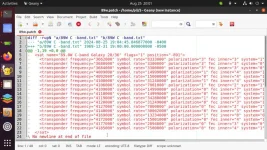
The 89w.txt file uploaded by Arlo is nothing but errors. Your settings file and your satellites.xml file will be corrupted or destroyed if you try to copy and paste this file into the sastellites.xml file used by TNAP. The tabs and spaces are not correct along with the wrong indent. The erros for the 89w.txt file are shown below in red. Every transponder in the list is currently dead.
The only active transponder on 89w that I can find tonight is a 4:2:2 football game that just started. It should be active for a while.
The transponder information is: 4170H 17143SR 2/3fec 16APSK. This transponder may be viewable on a 8.5 foot dish as it is strong.
A difference file is also attached. The difference file shows the errors of the 89w.txt that was posted (see screenshot above). Difference files or some other way of checking for correct file formats should always be used., The posting of files is appreciated. Please try to post files that can be used or state that they may contain errors. Most file types have to be Zipped before posting Thanks.
The Hauppauge ATSC tuners disappeared in the last update on MIO4k receivers, but continues to work on SF8008. This error was caused by fixing an error on the SF8008 when usb tuner TBS5925 is installed. (Fix one thing. Break something else...)
The 89w.txt file uploaded by Arlo is nothing but errors. Your settings file and your satellites.xml file will be corrupted or destroyed if you try to copy and paste this file into the sastellites.xml file used by TNAP. The tabs and spaces are not correct along with the wrong indent. The erros for the 89w.txt file are shown below in red. Every transponder in the list is currently dead.
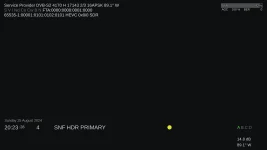
The only active transponder on 89w that I can find tonight is a 4:2:2 football game that just started. It should be active for a while.
The transponder information is: 4170H 17143SR 2/3fec 16APSK. This transponder may be viewable on a 8.5 foot dish as it is strong.
A difference file is also attached. The difference file shows the errors of the 89w.txt that was posted (see screenshot above). Difference files or some other way of checking for correct file formats should always be used., The posting of files is appreciated. Please try to post files that can be used or state that they may contain errors. Most file types have to be Zipped before posting Thanks.

Sorry I am a lil slow on the draw. You have a strong signal. I am not seeing anything. What is your signal strength for the scrambled CW channels on 91W?
CW feed
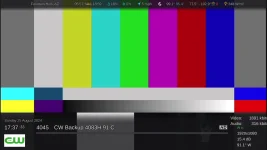
Earlier Pickle ball feed
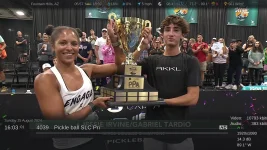
Thank you El Bandido!
I manually entered the coordinates into the Signal Finder and have less than 8.0 db and an inability to view/lock that football feed on Galaxy 28 / 89W. I am no longer encountering the green screen error message on this satellite or anywhere else.
I clearly have a hardware alignment issue given all of the feedback received. Earlier today I manually entered some of the ArloG's coordinates into the Signal Finder but nothing panned out. I appreciate everyone who has attempted to assist me.
I manually entered the coordinates into the Signal Finder and have less than 8.0 db and an inability to view/lock that football feed on Galaxy 28 / 89W. I am no longer encountering the green screen error message on this satellite or anywhere else.
I clearly have a hardware alignment issue given all of the feedback received. Earlier today I manually entered some of the ArloG's coordinates into the Signal Finder but nothing panned out. I appreciate everyone who has attempted to assist me.
Perhaps a butt peeling was needed. Although even sections from satellite-xml.org are not easily directly c/p into the file.
In notepad++ it is easy to reveal formatting and non-printable characters. It's pretty easy after a few goes to place your cursor at the end of a LF and hit enter to the next line.
Paying attention to tab symbols at the beginning. Pasting in the new line and checking for exact formatting. I've been chided many times for adding blindscan found transponders to my master file.
Sure. A single error in the xml will cause a crash and loss of tuner settings. Learning how to add transponders sure beats waiting a half hour to find the same transponders again and again in a blindscan looking for new and possibly active ones.
That's why we make and are drilled again and again to backups. Sorry. The posted file might have been reformatted by simply changing the extension. Don't know, don't care.
If you add this way and are 100% accurate. Blindscans can be much faster not looking for stuff you already have. Or option two. Don't. Works for you.

In notepad++ it is easy to reveal formatting and non-printable characters. It's pretty easy after a few goes to place your cursor at the end of a LF and hit enter to the next line.
Paying attention to tab symbols at the beginning. Pasting in the new line and checking for exact formatting. I've been chided many times for adding blindscan found transponders to my master file.
Sure. A single error in the xml will cause a crash and loss of tuner settings. Learning how to add transponders sure beats waiting a half hour to find the same transponders again and again in a blindscan looking for new and possibly active ones.
That's why we make and are drilled again and again to backups. Sorry. The posted file might have been reformatted by simply changing the extension. Don't know, don't care.
If you add this way and are 100% accurate. Blindscans can be much faster not looking for stuff you already have. Or option two. Don't. Works for you.
el bandido
TNAP-Images
Tabs and spaces may be set different on two otherwise identical files. The machine or compiler does not care about this, but the file has to be consistent throughout. The indents do have to be the same because the indents tell the machine or compiler where parts of the file belong.
Tabs and spaces may be set different on two otherwise identical files. The machine or compiler does not care about this, but the file has to be consistent throughout. The indents do have to be the same because the indents tell the machine or compiler where parts of the file belong.
Understood. E-Channelizer is the channel editor of choice for me. And tested this evening on TNAP. The as-installed xml starts out with the expected tabs.
One a scan is run, the box is read, and Last Scanned bouquet is created in the list. If you create a folder rightfully named. Like 101W, Ku97W. And drag the scanned channels into it. Sort, delete DC2+, Verimatrix channels. Then write back to the box. The tabs are removed in the xml. If the current state is saved as a lamedb file. The xml in it also has the leading tabs removed and replaced with spaces.
You are well aware of the problem I experienced. I noticed missing tabs in a comparison of the original file. Once non-printbles were revealed. A single space after an EOL cr/lf was found. It was fixed.
Then a bit of time to correct the leading tabs. And the file worked perfect. No more satellite selection right RCU button freeze.
Adding channels in a new bouquet from a new satellite scan. Then writing back to the box. The tabs were replaced with spaces again. But TNAP had no issues, as neither did openViX. So. There you have it. (haha.....the skin grafts are taking nicely. they just itch like you don't know what!)