TNAP-7 Image Discussion

The edits and updates for Octagon SF8008 Avalink tuners is considered to be complete and will probably be put into the next image. No one seems to have a SF8008 silabs tuner, so it is unknown what these edits will do to those receivers. The same edits can be put into ustym 4K Pro receivers, but again, No one to test...

Here is what 101w looks like on my 1.2 meter dish when blindscanning for low symbol rates:

22tp-99w-blindscan_20261011145248.webp


186ch-99w-ku-scan_20261011152240.webp
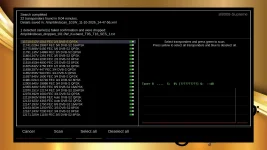
Note the message:
1 detected carrier(s) failed confirmation and were dropped:
/tmp/blindscan_dropped_101.0W_Ku-band_T9S_T16_SES_1.txt


Signal finder or Sat finder has been modified to allow a scan or signal check of dropped transponders. If a dropped transponder check is wanted, then it should be done after the scan completes else a reboot or a re-scan of the same satellite will delete it.
 
The edits and updates for Octagon SF8008 Avalink tuners is considered to be complete and will probably be put into the next image. No one seems to have a SF8008 silabs tuner, so it is unknown what these edits will do to those receivers. The same edits can be put into ustym 4K Pro receivers, but again, No one to test...

Here is what 101w looks like on my 1.2 meter dish when blindscanning for low symbol rates:

View attachment 20305


View attachment 20306
Note the message:
1 detected carrier(s) failed confirmation and were dropped:
/tmp/blindscan_dropped_101.0W_Ku-band_T9S_T16_SES_1.txt


Signal finder or Sat finder has been modified to allow a scan or signal check of dropped transponders. If a dropped transponder check is wanted, then it should be done after the scan completes else a reboot or a re-scan of the same satellite will delete it.
I have a version with the Silabs tuner and will test it out once it stops raining and I can better align my KU dish.
 
Excellent!
I will see about getting you something to test with!


One thing I almost did but did not do was drop the transponders that cannot render something useful from the scan. The reason is simple: Users think more transponders scanned means more sensitivity or better performance while less transponders means less sensitivity or less performance.

The Edision 4K receivers will scan usually somewhere between 12 and 14 transponders on 101w ku as compared to 20 or more transponders for the Octagon SF8008. Looke closely at the scan report shown below. 12 out of the 22 transponders were unlocked. That means scan time was wasted on 12 transponders that were not going to supply anything useful. Edision scans less than Octagon. Both return about the same amount of channels or services...


You might do like Carl did and load the 1006 image. See posts 753-756 of this thread. If the recording still does not work after loading the 1006 image, then we will have to do the steps one at a time as mentioned earlier to see where the problem is in post#734. Or if you do not want to load another image, then do the steps outlined in post#734. Thanks.
 
I upgraded to the 10/05/2026 firmware - the drive mounts but nothing gets recorded even though the timer is set correctly.
For me, when I find a recording did not get recorded, I look to see if the path to the movie folder is set correctly.
I use a microSD card for my folders and I have found that sometimes after a reboot the receiver loses it's path to the recording folder (playlist), so I have to go into the Storage Devices folder and reset it to the correct path. This may not be your problem but it's usually mine when something doesn't get recorded? Hope this helps..!
 
Waited about 8.5 years to get these items fixed.


Vu+ Zero 4K: blindscan, symbol rates and radio in TNAP 7​


The Zero 4K has had several fixes in TNAP 7. Here is what changed, and what this receiver still can’t do.

Problem 1:
Universal LNB Blindscan now works. Before these fixes, blindscan on the Zero 4K found few or no transponders using Universal type LNB. There were two separate problems.

1. High band was never really scanned. Universal LNBs switch to the high band (11.7–12.75 GHz) when the receiver sends a 22 kHz tone. The Zero 4K’s blindscan program resets the tuner chip before it scans. On this receiver the chip itself generates that 22 kHz tone, so the reset switched the tone off and the program never turned it back on. Every “high band” pass actually scanned the low band again. The blindscan program is now patched to turn the tone back on (or keep it off for low band) before each pass.

2. The live signal graph got in the way. The blindscan program talks to the tuner chip directly, bypassing the normal driver. While it runs, the signal graph on the scan screen was asking the driver for signal readings several times a second. One of those requests made the driver query the tuner chip in the middle of the search, which broke it, and the scan came back empty. The graph now pauses its readings while the scan is running and resumes when it finishes.

Tuning below 1 MS/s and above 45 MS/s​

The Zero 4K driver told the system this tuner only supports 1–45 MS/s, so anything outside that range was refused before it reached the tuner. Satfinder, zapping and channel scans could not tune a low-rate radio carrier, or a high-rate carrier above 45 MS/s.

The tuner chip is capable of more. The driver now accepts 100 kS/s to 60 MS/s, the same top rate Octagon and other receivers with this chip family use. Low-rate carriers now tune and scan normally. For example, a 360 kS/s radio transponder on 99.2W scanned and found all five of its services, and a 447 kS/s carrier on 101W locked with a strong signal.

Why the Zero 4K still won’t blindscan below 1 MS/s​

The Zero 4K can receive carriers below 1 MS/s once you enter the frequency and symbol rate yourself. What it can’t do is find them during a blindscan. The search itself runs inside the tuner chip’s own firmware. We tested this thoroughly:
  • The setting reaches the chip. The blindscan program was patched to accept low symbol rates, and the chip takes the lower limit (scans run longer, so it is searching more).
  • The search still misses them. It found nothing below 1 MS/s, even when scanning only a 20 MHz window around a carrier the receiver locks at 16.4 dB.
  • The firmware isn’t the difference. We compared it with the Octagon SF8008, whose Si2166D does find carriers below 1000 SR. The firmware and the search code are effectively the same.
  • The tuner chip issue. The Zero 4K pairs its demodulator with a Rafael Micro RT710 tuner, while the SF8008 uses an RDA5815M. The RT710’s narrowest filter is roughly twice as wide, and that most likely hides narrow carriers during the search.
So low-rate carriers have to be entered by hand on the Zero 4K, or taken from a satellites.xml or channel list that already has them. Once entered, they may tune and play, depending on LNB and dish antenna system.

Problem 2:

Radio channels that were silent​

Some radio channels played and others were silent, while the same channels played on other receivers. The silent ones carry audio without the timing stamps (PTS) the Vu+ driver insists on before it plays a single sound. They usually also lack the clock reference (PCR) that normally goes with them. Most receivers just play such audio as it arrives. The Vu+ driver waited for timing information that never came.

The driver is now patched to play audio as it arrives, and those radio channels play. Channel changes between radio and TV stay stable.

Other improvements​

  • Chip names shown: Information → Receiver now lists the demodulator and tuner chip behind each tuner. On the Zero 4K that’s a Silicon Labs Si2166 with a Rafael Micro RT710. The same names appear in the blindscan setup screen and in saved blindscan files, so anyone can look up the hardware.
  • Blindscan files record the hardware: each saved scan file notes which chips produced it, which makes results from different receivers easier to compare.

 
Waited about 8.5 years to get these items fixed.


Vu+ Zero 4K: blindscan, symbol rates and radio in TNAP 7​


The Zero 4K has had several fixes in TNAP 7. Here is what changed, and what this receiver still can’t do.

Problem 1:
Universal LNB Blindscan now works. Before these fixes, blindscan on the Zero 4K found few or no transponders using Universal type LNB. There were two separate problems.

1. High band was never really scanned. Universal LNBs switch to the high band (11.7–12.75 GHz) when the receiver sends a 22 kHz tone. The Zero 4K’s blindscan program resets the tuner chip before it scans. On this receiver the chip itself generates that 22 kHz tone, so the reset switched the tone off and the program never turned it back on. Every “high band” pass actually scanned the low band again. The blindscan program is now patched to turn the tone back on (or keep it off for low band) before each pass.

2. The live signal graph got in the way. The blindscan program talks to the tuner chip directly, bypassing the normal driver. While it runs, the signal graph on the scan screen was asking the driver for signal readings several times a second. One of those requests made the driver query the tuner chip in the middle of the search, which broke it, and the scan came back empty. The graph now pauses its readings while the scan is running and resumes when it finishes.

Tuning below 1 MS/s and above 45 MS/s​

The Zero 4K driver told the system this tuner only supports 1–45 MS/s, so anything outside that range was refused before it reached the tuner. Satfinder, zapping and channel scans could not tune a low-rate radio carrier, or a high-rate carrier above 45 MS/s.

The tuner chip is capable of more. The driver now accepts 100 kS/s to 60 MS/s, the same top rate Octagon and other receivers with this chip family use. Low-rate carriers now tune and scan normally. For example, a 360 kS/s radio transponder on 99.2W scanned and found all five of its services, and a 447 kS/s carrier on 101W locked with a strong signal.

Why the Zero 4K still won’t blindscan below 1 MS/s​

The Zero 4K can receive carriers below 1 MS/s once you enter the frequency and symbol rate yourself. What it can’t do is find them during a blindscan. The search itself runs inside the tuner chip’s own firmware. We tested this thoroughly:
  • The setting reaches the chip. The blindscan program was patched to accept low symbol rates, and the chip takes the lower limit (scans run longer, so it is searching more).
  • The search still misses them. It found nothing below 1 MS/s, even when scanning only a 20 MHz window around a carrier the receiver locks at 16.4 dB.
  • The firmware isn’t the difference. We compared it with the Octagon SF8008, whose Si2166D does find carriers below 1000 SR. The firmware and the search code are effectively the same.
  • The tuner chip issue. The Zero 4K pairs its demodulator with a Rafael Micro RT710 tuner, while the SF8008 uses an RDA5815M. The RT710’s narrowest filter is roughly twice as wide, and that most likely hides narrow carriers during the search.
So low-rate carriers have to be entered by hand on the Zero 4K, or taken from a satellites.xml or channel list that already has them. Once entered, they may tune and play, depending on LNB and dish antenna system.

Problem 2:

Radio channels that were silent​

Some radio channels played and others were silent, while the same channels played on other receivers. The silent ones carry audio without the timing stamps (PTS) the Vu+ driver insists on before it plays a single sound. They usually also lack the clock reference (PCR) that normally goes with them. Most receivers just play such audio as it arrives. The Vu+ driver waited for timing information that never came.

The driver is now patched to play audio as it arrives, and those radio channels play. Channel changes between radio and TV stay stable.

Other improvements​

  • Chip names shown: Information → Receiver now lists the demodulator and tuner chip behind each tuner. On the Zero 4K that’s a Silicon Labs Si2166 with a Rafael Micro RT710. The same names appear in the blindscan setup screen and in saved blindscan files, so anyone can look up the hardware.
  • Blindscan files record the hardware: each saved scan file notes which chips produced it, which makes results from different receivers easier to compare.
Checking this out now on the VU+zero4k. Thanks.
Have found a bug. The blind scan finds the 16apsk transponders but when the service scan does the scan of the 16apsk transponder it lists the services from the previous found 8psk transponder and those service play showing the wrong frequency. Looking at the 16apsk transponders with signal finder it shows no signal. Strange how the tuner can see the 16apsk during a blind scan but not with the signal finder.
 
16apsk transponder where? I cannot fix it like this.

We make scan reports automatically. Would help a lot if you post the found transponder report and the servicescan report for this bug or other bugs/scan issues and I will see about fixing it. By default these reports will be in /tmp of the receiver files. The service scan reports can be outputted to the usb drive, but the transponders file will always be in /tmp until the receiver reboots.
 
For me, when I find a recording did not get recorded, I look to see if the path to the movie folder is set correctly.
I use a microSD card for my folders and I have found that sometimes after a reboot the receiver loses it's path to the recording folder (playlist), so I have to go into the Storage Devices folder and reset it to the correct path. This may not be your problem but it's usually mine when something doesn't get recorded? Hope this helps..!
It turns out that none of that was my problem. For some reason a deleted timer that runs at the same time kept getting restored to timers.xml which ended up cancelling both timers. I deleted both from the list and configured a timer that I needed and haven't had a problem since then.
 
16apsk transponder where? I cannot fix it like this.

We make scan reports automatically. Would help a lot if you post the found transponder report and the servicescan report for this bug or other bugs/scan issues and I will see about fixing it. By default these reports will be in /tmp of the receiver files. The service scan reports can be outputted to the usb drive, but the transponders file will always be in /tmp until the receiver reboots.
16aspk is on 99w Ku . Signal finder is getting some signal now and service is tx-2 but too weak for me to watch, getting some breaks of audio.
You will see from the scan report it shows MontanaPBS was scanned in. As a work around I will just uncheck the 16apsk when doing the blind scan
Service scan.
 

Attachments

Last edited:
Checking this out now on the VU+zero4k. Thanks.
Have found a bug. The blind scan finds the 16apsk transponders but when the service scan does the scan of the 16apsk transponder it lists the services from the previous found 8psk transponder and those service play showing the wrong frequency. Looking at the 16apsk transponders with signal finder it shows no signal. Strange how the tuner can see the 16apsk during a blind scan but not with the signal finder.
Either an online update which updates enigma2 Or an image flash should fix it. Let me know if there are additional problems. Thanks.
 
Fresh flashed tnap7 on my vu+zero4k, and noticed that the tuner still suffer from the same issue: wrong signal display !
Another issue (for now) is that EPG import is not showing info for all channels as osmio+/mini find/show, but I understand that this is still a work in progress & not a big issue.
 

Attachments

  • vu1.webp
    vu1.webp
    78.8 KB · Views: 10
  • osmio1.webp
    osmio1.webp
    74.9 KB · Views: 8
  • vu2.webp
    vu2.webp
    51.3 KB · Views: 7
  • osmio2.webp
    osmio2.webp
    55.8 KB · Views: 6
First, EPG import ONLY works when the transponder frequency and symbol rate matches what the epg file was made with. This is why people in Europe load a channel list. The epg would not work for a lot of channels if they simply blindscanned.

Wrong signal display? What exactly is wrong? I see two screenshots but have no clue what you are claiming is wrong. Thanks.
 
Hi everyone,

Yesterday, I installed the first image on my Vu+ Zero 4K box.
Unfortunately, I couldn't install OSCam—or any other CAM—because there is no download option available under the extensions/plugins menu. A new update was released today, which I haven't tried yet! My question is: if I install this update, will it then allow me to install OSCam?
 
Either an online update which updates enigma2 Or an image flash should fix it. Let me know if there are additional problems. Thanks.
I connected the VU+zero4k back up and did the online update and yes it is fixed. Thanks.
I need to try the Hauppauge 955q again. Yesterday the device was detected but could not get any signals. The 950Q works but having an audio sync issue. Can fix that with the audio sync in the audio settings but soon as I change the channel and go back to the channel the issue is back.
 
Audio sync issue? There is a price on that. Thanks for finding it!

Look around the radio channels and you will see moat of them play. There was a risk of audio sync in doing that and seems you have found it! If you can make steps to reproduce, it will help in fixing it. At any rate, I will look at it.The radio channel issue was difficult to fix!
 
Back
Top