
The Edision OS mio 4K user info indicates additional USB tuners may be installed. The only DVBS tuner listed is the TBS5925. That model has been out of production for over a year and been replaced with the TBS5927. Different drivers too from what I have found so far. Are the drivers for the 5927 available for the Edision? Are there other USB tuners known to work? I was actually looking at the TBS5927 for another application but was hoping it might work with the Edision as well.

You are using an out of date browser. It may not display this or other websites correctly.
You should upgrade or use an alternative browser.
You should upgrade or use an alternative browser.
Adding USB DVBS2X tuner
- Thread starter Fearless
- Start date

el bandido
TNAP-Images
It is a great idea to find out what works Before you buy!
For TBS driver questions , ask in this forum: https://www.satdreamgr.com
There is also a 2018 DVB-S2X usb device from Sundtek that should work in the MIO. I am thinking of trying one of those.
Sundtek is here:https://shop.sundtek.de/
Sundtek also produces an ATSC usb device, but the driver needs updating to run in the MIO. The MIO has a 5.0 kernel as the latest update, so drivers need to be made for that. TBS did not offer good support when their products were being introduced into enigma2 receivers. The TBS products do not have some features in enigma2 such as blindscan. The Sundtek device may be a better choice for the MIO.
For TBS driver questions , ask in this forum: https://www.satdreamgr.com
There is also a 2018 DVB-S2X usb device from Sundtek that should work in the MIO. I am thinking of trying one of those.
Sundtek is here:https://shop.sundtek.de/
Sundtek also produces an ATSC usb device, but the driver needs updating to run in the MIO. The MIO has a 5.0 kernel as the latest update, so drivers need to be made for that. TBS did not offer good support when their products were being introduced into enigma2 receivers. The TBS products do not have some features in enigma2 such as blindscan. The Sundtek device may be a better choice for the MIO.
Last edited:
LOL exactly what I'm trying to avoidbut the driver needs updating to ruin in the MIO.


EnoSat
Legit VIP
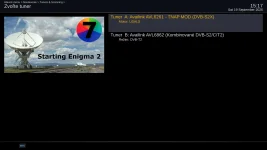
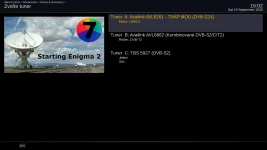
Since the TBS5927 also appeared in the list of available drivers, I tried installing it

However, the tuner is not available after a restart.
5927.log
5927_2.log
Code:
root@osmio4kplus:~# lsusb
Bus 003 Device 001: ID 1d6b:0001 Linux 5.15.0 ohci_hcd Generic Platform OHCI controller
Bus 002 Device 002: ID 734c:5927 TBS-Tech TBS 5927
Bus 001 Device 001: ID 1d6b:0002 Linux 5.15.0 ehci_hcd EHCI Host Controller
Bus 001 Device 002: ID 346d:5678 USB Disk 20
Bus 004 Device 001: ID 1d6b:0001 Linux 5.15.0 ohci_hcd Generic Platform OHCI controller
Bus 002 Device 001: ID 1d6b:0002 Linux 5.15.0 ehci_hcd EHCI Host Controller
root@osmio4kplus:~#
However, the tuner is not available after a restart.
Code:
usb: resetting device on bus 1 hub 1 port 1
USB: New high speed device connected to bus 1 hub 1 port 1
usb: no driver found for 734c:5927
Code:
root@osmio4kplus:~# ls /lib/firmware | grep -i tbs
root@osmio4kplus:~#
Code:
root@osmio4kplus:~# opkg install enigma2-plugin-drivers-dvb-usb-tbs5927 tbs-kernel-module-dvb-usb-tbs5927-5.15.0 firmware-dvb-usb-tbs5927
Solver encountered 1 problem(s):
Problem 1/1:
  - conflicting requests
  - nothing provides tbs-kernel-module-dvb-usb-5.15.0 needed by tbs-kernel-module-dvb-usb-tbs5927-5.15.0-1.0+git-r0.osmio4kplus

Solution 1:
  - do not ask to install a package providing tbs-kernel-module-dvb-usb-tbs5927-5.15.0


root@osmio4kplus:~#
Code:
root@osmio4kplus:~# opkg install kernel-module-dvb-usb
Installing kernel-module-dvb-usb-5.15.0 (5.15) on root
Downloading http://162.216.113.217/tnap-7/osmio4kplus/kernel-module-dvb-usb-5.15.0_5.15-r0.1_osmio4kplus.ipk.
Configuring kernel-module-dvb-usb-5.15.0.
root@osmio4kplus:~#
Code:
root@osmio4kplus:~# opkg install --force-depends enigma2-plugin-drivers-dvb-usb-tbs5927 tbs-kernel-module-dvb-usb-tbs5927-5.15.0 firmware-dvb-usb-tbs5927
Installing tbs-kernel-module-dvb-usb-tbs5927-5.15.0 (1.0+git) on root
Downloading http://162.216.113.217/tnap-7/osmio4kplus/tbs-kernel-module-dvb-usb-tbs5927-5.15.0_1.0+git-r0_osmio4kplus.ipk.
Installing firmware-dvb-usb-tbs5927 (1.0) on root
Downloading http://162.216.113.217/tnap-7/all/firmware-dvb-usb-tbs5927_1.0-r0_all.ipk.
Configuring firmware-dvb-usb-tbs5927.
Configuring tbs-kernel-module-dvb-usb-tbs5927-5.15.0.
root@osmio4kplus:~#
Code:
root@osmio4kplus:~# opkg install --force-depends tbs-frontend-stv091x tbs-kernel-module-stv091x-5.15.0
Installing tbs-kernel-module-stv091x-5.15.0 (1.0+git) on root
Downloading http://162.216.113.217/tnap-7/osmio4kplus/tbs-kernel-module-stv091x-5.15.0_1.0+git-r0_osmio4kplus.ipk.
Installing tbs-frontend-stv091x (1.0+git) on root
Downloading http://162.216.113.217/tnap-7/osmio4kplus/tbs-frontend-stv091x_1.0+git-r0_osmio4kplus.ipk.
Configuring tbs-kernel-module-stv091x-5.15.0.
Configuring tbs-frontend-stv091x.
root@osmio4kplus:~#Attachments
Last edited:
el bandido
TNAP-Images
opkg install --force-depends bypasses dependency checks. It does not fix the underlying dependency problems!
In your TBS5927 case, the package manager reported:
nothing provides tbs-kernel-module-dvb-usb-5.15.0
When you ran: opkg install --force-depends ... You told opkg to proceed even though the package's declared dependencies were not satisfied. You cannot expect the device to work correctly when doing this. It can also result in multiple problems:
A driver package installs even though required kernel modules are missing.
The installation reports success, but the driver cannot initialize correctly.
Future package upgrades may encounter the same unresolved dependencies.
The actual packaging error remains unfixed.
We need to establish whether tbs-kernel-module-dvb-usb-5.15.0 is genuinely required or whether the recipe should depend on the existing kernel-module-dvb-usb-5.15.0 package. If the standard module is compatible, correct the recipe's dependency.
The first log demonstrates the requirement for a compatible driver providing stv091x_attach(). The second log reveals the remaining requirement for stv6120_attach().
I will look at this as time permits.
In your TBS5927 case, the package manager reported:
nothing provides tbs-kernel-module-dvb-usb-5.15.0
When you ran: opkg install --force-depends ... You told opkg to proceed even though the package's declared dependencies were not satisfied. You cannot expect the device to work correctly when doing this. It can also result in multiple problems:
A driver package installs even though required kernel modules are missing.
The installation reports success, but the driver cannot initialize correctly.
Future package upgrades may encounter the same unresolved dependencies.
The actual packaging error remains unfixed.
We need to establish whether tbs-kernel-module-dvb-usb-5.15.0 is genuinely required or whether the recipe should depend on the existing kernel-module-dvb-usb-5.15.0 package. If the standard module is compatible, correct the recipe's dependency.
The first log demonstrates the requirement for a compatible driver providing stv091x_attach(). The second log reveals the remaining requirement for stv6120_attach().
I will look at this as time permits.