TNAP-4.1 Image -20210906 - Discussion

Hi all, this might be a question for EB. I made the leap from 4,0 to 4,1. Not too hard, just had to find the right type of usb's to use. I have everything reconfigured...network, sats, and so forth, however I can't get the hvr-955q to scan (receive) any channels. Maybe a driver or two missing? I have a Edision OSMio 4K+, single boot/slot being used. Hvr-955q working ok on 4,0. I am scanning on 8vsb not cable or atlanta. I read that the 950q needs two drivers, but nothing on 955q requirements. The 955q is recognized as a LG LGDT3306A, just not picking up any channels. No internet, phone, cable, fibre here, so webif is no help. Hope I covered everything. Thanks in advance everyone.
 
Did you uninstall anything? Carefully check, the antenna coax and antenna.
Haupauge 850, 950 and 955 drivers are built in the TNAP images. Nothing is missing that I know about. You may go back to 4.0 and see if the tuner starts working.
 
Hi, i just have a very basic (maybe dumb) question.

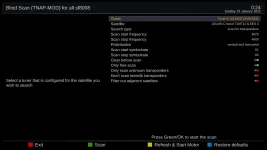
Is there any way that, instead of pressing the GREEN button to start scan, i could use the OK button in Blind Scan screen?

It is very annoying for me, every time i perform a blind scan, to look again at the remote, browsing for the green button.

Any way i could modify this on TNAP 4.1?
i want to press OK instead of green..... maybe modifying the keymap.xml? Any info would be greatly appreciated.

Thanks and greetings from Monterrey, Mexico.
 

Attachments

  • 1_0_1_1_1_FFFF_9A50FFB_0_0_0_20220122191123.webp
    1_0_1_1_1_FFFF_9A50FFB_0_0_0_20220122191123.webp
    168.4 KB · Views: 6
Not working for me in TNAP 4.1, i HAVE to press the green button to start blind scanning.

Even in the screenshot i previously posted, it says "PRESS THE GREEN BUTTON TO START THE SCAN"

I pressed the OK button and nothing, as soon as i press the green button the scan start.
 
You will need to modify the blindscan plugin to change this. Currently the OK button starts the satellite motor when a different satellite is selected.
 
You will need to modify the blindscan plugin to change this. Currently the OK button starts the satellite motor when a different satellite is selected.

Ohhhh! :( so is not as easy as replace a file via ftp.

By the way, in Openpli 8.0 and 8.1 when i press the OK button, it automatically move my diseqc motor in KU AND start the blind scan, both functions at the same time by pressing the OK button.

Is it possible you could add this "feature" in the next update? please! this is the ONLY one thing that really bothers me, and if you fix this, its gonna be PERFECT for me, i aint gonna need any other firmware on my Edision os Mio+, other than the TNAP 4.1

Thank you.
 
The Blindscan plugin and other plugins are a collection of files. So the blindscan plugin can be changed by modifying a file and transferring it to the box.
In Openpli 8.0 and 8.1 when you press the OK button, it starts the scan AND moves your motor.
 
In Openpli 8.0 and 8.1 when you press the OK button, it starts the scan AND moves your motor.

Is it possible you could make TNAP 4.1 to act as the Openpli? i mean to start scan AND move the motor with the OK button?

Btw, if i copy-paste the whole Openpli 8.1 blindscan plugin folder into /usr/lib/enigma2/python/Plugins/SystemPlugins in the TNAP 4.1.... do you think it could work? or is not as easy as that
 
It is undesirable to have the motor moving with the blindscan started. You will mes up part of the scan doing that. You may change the blindscan files in the receiver to OpenPLi if you like....Maybe wait a little bit and I will see about changing some things???
 
It is undesirable to have the motor moving with the blindscan started. You will mes up part of the scan doing that. You may change the blindscan files in the receiver to OpenPLi if you like....Maybe wait a little bit and I will see about changing some things???

Thank you very much Bandido, i think im gonna wait until you update the plugin in TANP 4.1.

In the meantime, i guess im gonna continue to press the "famous" green button to do a blind scan on my Edision Os mio+ 4k.

Thanks again and greetings from Monterrey, Mexico.
 
OK, I have a couple of issues after my install and update.

First, plugins -
clicking on plugins says:
"some plugins are not available"
SystemPlugins/Videomode (expected a string or other character buffer object)

clicking on the plugin - 6 Media player - crashes enigma
Type error: Expected a string or other character buffer object

PVR --
there are now 2 copies of all recordings -
1 all filename listed as .ShowName.ts and will not play
2 the "Instant record" version of the same file which will play

Audio-
On tne NPR transponder the MPEG channels are fine.
AAC channels are very low unless "Downmix" is enabled.

Any ideas?
Thanks in advance.
 
Welcome to Legit!
Most likely your image is corrupted. Di you use settings from a previous image or install?
What image did you install and update? What previous image were you using?
 
Thanks. I posted once long ago with an issue that is still not working in the new version.

So I have Satdreamgr6 [2021-10-16] in slot 1. I assume it's settings are in use.
Slot 2 has TNAP4.1 [2022-02-08]. I went to the update page and it updated from on line, I assume.

Thanks for the speedy response.
 
I loaded it in to a folder on the hard drive and during the install it let me choose a slot. It came up on the channel I was on from slot 1.
Is there a different install path I should have followed?

edit- I used the multi boot image. Was that correct?
 
Last edited:
Back
Top