TNAP-4.1-Test Images for Edision MIO/MIO+

Status
Not open for further replies.
Time held for an hour then I turned it on and was messing and around. I had turned off the internet with the network adapters went from wireless to wired while watching Cozi the clock did change to transponder time and Cozi is some hours ahead but the date was right. Turned the adapter off and on again the internet time was set right. That would be how to sync the time it seems. Turn the adater off and on. Might have to do it a few times to get it to stick.
 
Sync trick with adapter on and off doesn't work at all with OpenPli 8.1 Keeps going back transponder time.So what ever changes you made to TNAP 4.1 EB, 4.1 is better.
 
Saturday night I flashed TNAP 4.1 into a vacant slot. I did a complete installation without restoring anything from backup files. I scanned one satellite then left the receiver in Standby overnight. Sunday morning the clock seemed stable. So I online updated the Mio+ with all updates there. I spent Sunday morning scanning all satellites in the arc that I can see. I then configured my system back to normal including all channels, bouquets and even the Media Player with all playlists.

So far...since Saturday night, the Mio+ clock is boringly accurate whether the receiver is on, or in Standby, or after restarts. Not sure if it's the new software or perhaps the action of doing a completely clean install where all switches, etc. are reset to default that is responsible. No conclusions yet. But the champagne is being chilled as I type. And the receiver is in Standby.
 
TNAP Is not built on the OpenPli 8.1 branch. So it is hard to compare the two images in some ways, but in other ways, they would be equal.

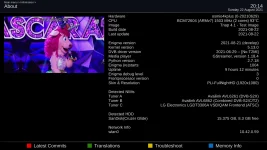
Shown below is the About page for the best time build for me so far.
Build date = 2021-08-22
Last update = 2021-08-22
Enigma version = 2021-08-21

8-22-2021-About_20210822201417.webp
 
...Added: what do you know! I enabled the HDMI-CEC menu on the receiver. Now when I restart the receiver, the TV picture comes on.
After doing the clean installation, I noticed HDMI pre-emphasis and HDMI-CEC menu access were OFF by default. My restart issue of the receiver not syncing to my TV after a restart returned. I changed HDMI pre-emphasis and HDMi-CEC menu access to ON. This resolved my restart issue and the TV display now always appears after any receiver restart.

My clock is still showing accurate date/time.
 
Thanks it works well,
I have done the flashimage method successfully.:bigthumbup:

Ka blindscan, I can't find where it is?
I can't find the inversion when the LOF is above the search area.
KA-SAT search does not match KA LNBs


What is the make/model of your ka lnb?

Where can your ka lnb be purchased?
 
Hello el bandido.
one LNB KA( D) is from Inverto, it is a KA / KU band LNB.
Unfortunately, this LNB is no longer available
https://www.inverto.tv/lnb/208/kaku...-one-kaku-switchable-output-and-one-ka-output
The other is also a KA-SAT LNB from Inverto intended for programs with another frequency band.
which has been modified to receive KA (A)
https://www.inverto.tv/lnb/130/twin...arity-lnb23mm-197-202ghz-lo212o-ghz?locale=de
it is for this modified LNB (Qarz is replaced by 27 MHz) that the inversion (as in C band) is important because the LOF is above the search zone
for my example LOF 20357 for zone 18200/19200

otherwise there are others (but much more expensive) from norsat
here for example
https://www.satellites.co.uk/forums/threads/norsat-ka-band-lnbs.179563/
who additionally need a feedhorn which is not free.
https://www.satellites.co.uk/forums/threads/norsat-ka-band-lnbs.179563/
 
Since I think I now have a clean install, I want to ask how I can do some PID edits on a tp. Today I learned that the DC Channel on 87W Ku no longer scans in. I'm told there is no longer a PAT table for this transponder.

The tp info is:
11760H
S/R 3.9787mb
D/R 5.5mb
VPID 1500
APID 1501
PMT ID 8191
PCR 1500
Service ID 5
 
Let me know if there are any more problems with the time. This includes today, tomorrow or even next week. Thanks.

Dreamboxedit should allow the entry of pids. PIDS can also be manually entered but it can be time consuming. Try Dreamboxedit and see if it works.
 
Let me know if there are any more problems with the time. This includes today, tomorrow or even next week....
I've had two instances of the date going to 1969 today. But this is different. The first case was when I was streaming via a link in my IPTV bouquet. The second just occurred now while I was watching a recorded show. It seems when not using the satellite function, the receiver gets pulled off its correct date/time for some reason. Otherwise, time has been accurate whether the receiver was on or in standby.
 
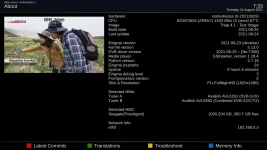
Can you post a screenshot or clear picture of the About page? (Menu--->Information--->About)

Also, what is in /etc/default/ntpdate? You may use the Dream-Explorer plugin to see this file as shown. This file should be set to "yes"

ntp-file_20210823192733.webp
 
I think the hardware clock not being updated has caused most of the time issues in TNAP 4.1. You could change that to "yes", but it would be better to update correctly, else there may be problems or issues. The changes are in the feeds, but they cannot be "seen" by the receiver because the package versions are equal. So a flash is needed.

The latest image to Flash is 8-24-2021. Really all you need to do is put a fresh, known-to-be-good usb drive into the receiver, then select Flash image in receiver menus. Select a slot that has with backup and start the flash process. Do absolutely nothing else, and the image should flash, then restore your receiver. Usually this Flash & Restore takes 5-10 minutes, depending on what was installed in the receiver.
After the 8-24 image is installed, check and see if the rest of the time issues disappear. Verify the image is dated 8-24 in the About page of the receiver.
 
it would be great:yes1:

Your KA lnb has been added to the image. Check and see that it works correctly.
We will try to add the KA lnb to blindscan if it works correctly in the image. Thanks.

tnap4.1-8-24-2021_20210823234128.webp<--------->new-ka-lnb_20210823234310.webp


Flash the 8-24 image. Then test the new lnb setting for KA....
 
It works perfectly.
the frequencies are now correct.:yes1:
currently, as you said the blindscan is not working.

I also noticed that for this test the MIO4K
does not take into account what has been modified by the
TS Satellite editor plugin modified in KA band
The modifications are well stored in etc / enigma2 / satelittes.xml
but the receiver does not take into account this xml.
in KU no problem
 

Attachments

  • KA 20357 OK1-vert.webp
    KA 20357 OK1-vert.webp
    78 KB · Views: 5
  • ts editor-tile.webp
    ts editor-tile.webp
    106.5 KB · Views: 8
I also noticed that for this test the MIO4K
does not take into account what has been modified by the
TS Satellite editor plugin modified in KA band
The modifications are well stored in etc / enigma2 / satelittes.xml
but the receiver does not take into account this xml.
in KU no problem

Try to make the modifications again using TS satellite editor with the new lnb setting.
Blindscan will be next.
 
Status
Not open for further replies.
Back
Top