
- Home
- Forums
- FTA Set Top Box Discussions/Files
- FTA Set Top Box Discussions
- The North American Project E2 Image Discussions
You are using an out of date browser. It may not display this or other websites correctly.
You should upgrade or use an alternative browser.
You should upgrade or use an alternative browser.
TNAP-4 Images for OSMIO4K - 20201221 - Discussion
- Thread starter el bandido
- Start date

el bandido
TNAP-Images
The T2MI plugins have been updated and sent to the 4.0 server. Do a Software update (Menu--->Setup--->Software update), then uninstall and reinstall the T2MI plugin. Doing this should fix the About page.

stephan94
Legit VIP
el bandido
TNAP-Images
Hi guys. I have a few questions in general.
First. Is it me being a hardhead?
How many flash TNAP and go through the initial setup and are up and running fluidly in a very short time?
I'm being nice here. So if you could. Please do the same.
What's the sense? The thinking that goes into mapping remote buttons to migrate from using a regular, everyday tv remote to a whole world of conflusteration?
I mean. Even hitting the help button to show me the out-of-box keymapping for a quick start is kinda' not there.
Now mind you I've been an openatv user for a long time. No reason. It's just what came in the first receiver I used. A Zgemma H7.AC.
For months I've been using openvix. Why? some guy was whining that opentv didn't have serviced on a transponder displayed in Signal Finder. Remember that one EB?
Once I tried it. It's pretty cool.
Now i can plant discovered tp's in the satellites.xml. Restart the GUI. And peek at what is in the existing and newly entered tp's and decide if it's worth even cluttering as scan or waiting for a long time to find out that they are all encrypted. Right?
Openatv lacks that. TNAP has it.
Well. I had an issue in vix recently where watching a particular channel in 4:3 format. Heading over the the Video rc button took me to the media folder on my hdd.
A duplicate of what a normal person would think should be the Media button. Which some brain trust duped.
Setup>Video setting were glitchy. And limited.
Anyway once a dude over at satelliteguys saw the same thing. He assisted in getting the Video button to do what it....should!....cycle between letterbox, panscan, scale.
Verbiage in atv is a bit different. But the same things happen.
Not vix. The 4:3 format video had what you would expect. Black bordering.
It gets deeper. The vix forum addressing the issue got denials, my tv is not setup right, its me, all sorts of crap.
Brits. Arrogant. Thank God for Lucas Electrics.
Anyway. Once I got the format button to function. Them 4:3 video would go letterbox, full screen. For a few seconds. It constantly toggled back to 4:3. Back and forth. And forth and back.
Openatv? Nope. Letterbox and full screen works. And "sticks". It's only a few channels that do this.
So off to TNAP world. Oh my god. It was flashed in a slot. Upgraded. And my previous channel list flashed in it along with my custom satellite.xml.
The good thing? That channel displayed perfectly in any selection I chose. And it stuck like that. Just like openatv.
*Ding* A strike against the vix team.
Seat belts fastened.
1) How in the heck do I change channels in a semi intelligent, the 4 way up/down?
Don't tell me that everyone using TNAP fires it up and don't end up in a ball of confusion until they learn after a few hours or days how to navigate the simple things.
I want to change a channel. How about going to the epg and simply scrolling up/down the listings and....what is the cockamamy term?...."zapping" on a channel to watch it.
Or just pressing a button that opens the channel list on a boo-kay and letting me scroll it, hitting the OK button and watch it. Or Hitting it once to see a channel preview befoe..."zapping" it.
2) I put my new updated and ordered channels into TNAP. In an order so I can watch Star Trek lets say and it's at the bottom of the list on 101W.
NOW I remember the last time I fired up TNAP. All of the channels are in alphabetical order. Why? I scheduled root canal because it sent me into oblivion.
Why do this? Whats the reasoning? If a person writes in a channel list with your favorite channel editor. Why does the image alphabetize it out-of-box.
I still didnt find the setting (if there is one) to make it like atv and <choking> vix does without any settings, tweaks at all.
I don't get it.Pick up 50 TV remotes. Sony, Sanyo, Samsung. A green one, a blue one, the colors you choose.
Channel up, channel down, Display (video) shows display settings, Media shows what you may have on a USB or HDD.
Dishnet, Direc, your cable company cable box. There is some normalcy there.
Heaven forbid if you borrowed your friends car to discover after the fact that the brakes are on the radio volume control.
<Sigh. Taking a deep breath here.
Dudes. How do I get a channel list and scroll through it. And change to watch it? Easily.
What are the steps do do the most simple and straight forward things?
And that channle list (once the novocaine wears off) in MY order and not A-Z.
.....but at least she displays 4:3 in whatever or however I decide to watch it in. And it stays there like it should. TNAP? "Tylenol 'n a percocet"?
First. Is it me being a hardhead?
How many flash TNAP and go through the initial setup and are up and running fluidly in a very short time?
I'm being nice here. So if you could. Please do the same.
What's the sense? The thinking that goes into mapping remote buttons to migrate from using a regular, everyday tv remote to a whole world of conflusteration?
I mean. Even hitting the help button to show me the out-of-box keymapping for a quick start is kinda' not there.
Now mind you I've been an openatv user for a long time. No reason. It's just what came in the first receiver I used. A Zgemma H7.AC.
For months I've been using openvix. Why? some guy was whining that opentv didn't have serviced on a transponder displayed in Signal Finder. Remember that one EB?
Once I tried it. It's pretty cool.
Now i can plant discovered tp's in the satellites.xml. Restart the GUI. And peek at what is in the existing and newly entered tp's and decide if it's worth even cluttering as scan or waiting for a long time to find out that they are all encrypted. Right?
Openatv lacks that. TNAP has it.
Well. I had an issue in vix recently where watching a particular channel in 4:3 format. Heading over the the Video rc button took me to the media folder on my hdd.
A duplicate of what a normal person would think should be the Media button. Which some brain trust duped.
Setup>Video setting were glitchy. And limited.
Anyway once a dude over at satelliteguys saw the same thing. He assisted in getting the Video button to do what it....should!....cycle between letterbox, panscan, scale.
Verbiage in atv is a bit different. But the same things happen.
Not vix. The 4:3 format video had what you would expect. Black bordering.
It gets deeper. The vix forum addressing the issue got denials, my tv is not setup right, its me, all sorts of crap.
Brits. Arrogant. Thank God for Lucas Electrics.
Anyway. Once I got the format button to function. Them 4:3 video would go letterbox, full screen. For a few seconds. It constantly toggled back to 4:3. Back and forth. And forth and back.
Openatv? Nope. Letterbox and full screen works. And "sticks". It's only a few channels that do this.
So off to TNAP world. Oh my god. It was flashed in a slot. Upgraded. And my previous channel list flashed in it along with my custom satellite.xml.
The good thing? That channel displayed perfectly in any selection I chose. And it stuck like that. Just like openatv.
*Ding* A strike against the vix team.
Seat belts fastened.
1) How in the heck do I change channels in a semi intelligent, the 4 way up/down?
Don't tell me that everyone using TNAP fires it up and don't end up in a ball of confusion until they learn after a few hours or days how to navigate the simple things.
I want to change a channel. How about going to the epg and simply scrolling up/down the listings and....what is the cockamamy term?...."zapping" on a channel to watch it.
Or just pressing a button that opens the channel list on a boo-kay and letting me scroll it, hitting the OK button and watch it. Or Hitting it once to see a channel preview befoe..."zapping" it.
2) I put my new updated and ordered channels into TNAP. In an order so I can watch Star Trek lets say and it's at the bottom of the list on 101W.
NOW I remember the last time I fired up TNAP. All of the channels are in alphabetical order. Why? I scheduled root canal because it sent me into oblivion.
Why do this? Whats the reasoning? If a person writes in a channel list with your favorite channel editor. Why does the image alphabetize it out-of-box.
I still didnt find the setting (if there is one) to make it like atv and <choking> vix does without any settings, tweaks at all.
I don't get it.Pick up 50 TV remotes. Sony, Sanyo, Samsung. A green one, a blue one, the colors you choose.
Channel up, channel down, Display (video) shows display settings, Media shows what you may have on a USB or HDD.
Dishnet, Direc, your cable company cable box. There is some normalcy there.
Heaven forbid if you borrowed your friends car to discover after the fact that the brakes are on the radio volume control.
<Sigh. Taking a deep breath here.
Dudes. How do I get a channel list and scroll through it. And change to watch it? Easily.
What are the steps do do the most simple and straight forward things?
And that channle list (once the novocaine wears off) in MY order and not A-Z.
.....but at least she displays 4:3 in whatever or however I decide to watch it in. And it stays there like it should. TNAP? "Tylenol 'n a percocet"?

Megatron817
Administrator
Someone has taken the time to customize Openatv and you are use to that. Openpli comes basic leaving it up to you to customize. Tnap has been somewhat customized but still you can do more customizing if you want to or use it as is. The EPG can be changed by opening the EPG and press the menu button for the settings. The only thing I see in alphabetical order is the satellite lists. My bouquets are sorted the way I built them. In channel selection screen the green button brings up the satellite lists and the blue button brings up the bouquets. As far as i know OpenATV works the same way. If you look at the Edision remote OpenATV has used the page + and - to change the channel but really the up and down arrows are for chaning the channels on the Edision remote.
el bandido
TNAP-Images
Using 841 words to tell us you don't like the way the image changes channels is a bit much. I have about 40 different fta satellite receivers of various makes/models that I have used at least once in the past twenty years and they all change the channels basically the same way. So maybe understand how they work and you will be happier??? Otherwise, use OpenATV and enjoy life!
Almost all fta satellite receivers have a key to press to bring up the satellite list. In TNAP images, this is the green button.
After pressing the green remote button, select a satellite and press the OK button. This gives channels for the satellite. (And again, a standard practice in fta satellite receivers.) Now scroll through the channels for the satellite and press OK on the channel you want. Simple enough.
TNAP images are preset to use Neutrino style channel selection. In the middle of the remote is an OK button. Directly above the OK button is an arrow up, and directly below the OK button is an arrow down. Use these two arrows for single channel changes.
You may also change channels through the epg list which is usually empty, (For those that want to zap through an empty epg list for whatever reason. )
Use the Hotkey menu to change remote key Function(s). Don't like the way the keys are mapped? Re-map them.
A bouquets list should stay in the order that you assign it. You can expect any other channels lists besides Bouquets or epg to be in alphabetical order.
Using channel editors can cause corruption or errors. You should be able to go into Antenna setup and scroll all the way to the end of the satellite list in Both directions without any hangups. Something is wrong if you cannot do this, and the satellites.xml file should be immediately fixed for proper operation.
You are welcome to attach any Bouquet that does not work correctly. But you will also need to attach at least the satellites.xml file and the lamedb file that were in use when the offending Bouquet file(s) were made. Corruption or errors probably exist if the Bouquet file is not shown in the assigned, non-alphabetical order.
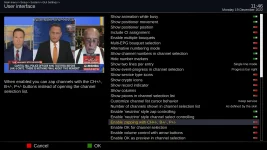
If you don't like the Neutrino channel style then disable it in User interface menu. There are other channel change features that can be enabled using this menu.
Almost all fta satellite receivers have a key to press to bring up the satellite list. In TNAP images, this is the green button.
After pressing the green remote button, select a satellite and press the OK button. This gives channels for the satellite. (And again, a standard practice in fta satellite receivers.) Now scroll through the channels for the satellite and press OK on the channel you want. Simple enough.
TNAP images are preset to use Neutrino style channel selection. In the middle of the remote is an OK button. Directly above the OK button is an arrow up, and directly below the OK button is an arrow down. Use these two arrows for single channel changes.
You may also change channels through the epg list which is usually empty, (For those that want to zap through an empty epg list for whatever reason. )
Use the Hotkey menu to change remote key Function(s). Don't like the way the keys are mapped? Re-map them.
A bouquets list should stay in the order that you assign it. You can expect any other channels lists besides Bouquets or epg to be in alphabetical order.
Using channel editors can cause corruption or errors. You should be able to go into Antenna setup and scroll all the way to the end of the satellite list in Both directions without any hangups. Something is wrong if you cannot do this, and the satellites.xml file should be immediately fixed for proper operation.
You are welcome to attach any Bouquet that does not work correctly. But you will also need to attach at least the satellites.xml file and the lamedb file that were in use when the offending Bouquet file(s) were made. Corruption or errors probably exist if the Bouquet file is not shown in the assigned, non-alphabetical order.
If you don't like the Neutrino channel style then disable it in User interface menu. There are other channel change features that can be enabled using this menu.
Using 841 words to tell us you don't like the way the image changes channels is a bit much. I have about 40 different fta satellite receivers of various makes/models that I have used at least once in the past twenty years and they all change the channels basically the same way. So maybe understand how they work and you will be happier??? Otherwise, use OpenATV and enjoy life!
I could have used an even 1024 or 2048 words....0400, 0800 hex if you please...to tell you I would like to not have to spend half a day making sense out of no sense.
Please do not be offended.
What you're saying in essence is every piece of A/V equipment a person owns or has owned over the eons is operated in basically the same way of methodology. But once you cross the interest into FTA, the game changes. Nonsense. I challenge you to visit Wally World or Best Buy and pick up any brand of remote control from rip-chow-ching to Sony. 3 seconds. Maybe 5. You'll be testing your potential new tv out with flying colors.
Of course you're not going to change your way of presenting your own, very nice rendition of Enigma 2 firmware. But for God sakes where is it posted that the green button does what?
And 40 receivers. Seriously? I only have 4 including a GI VC2+. If the color keys on the remotes are used. They are usually to select options in a menu.
Learn how to use it? As you say. There is a "standard way". Wouldn't that include the Help button? Which is largely empty of the little hovering arrows.
Almost all fta satellite receivers have a key to press to bring up the satellite list. In TNAP images, this is the green button.
After pressing the green remote button, select a satellite and press the OK button. This gives channels for the satellite. (And again, a standard practice in fta satellite receivers.) Now scroll through the channels for the satellite and press OK on the channel you want. Simple enough.
TNAP images are preset to use Neutrino style channel selection. In the middle of the remote is an OK button. Directly above the OK button is an arrow up, and directly below the OK button is an arrow down. Use these two arrows for single channel changes.
You may also change channels through the epg list which is usually empty, (For those that want to zap through an empty epg list for whatever reason. )
Use the Hotkey menu to change remote key Function(s). Don't like the way the keys are mapped? Re-map them.
A bouquets list should stay in the order that you assign it. You can expect any other channels lists besides Bouquets or epg to be in alphabetical order.
Using channel editors can cause corruption or errors. You should be able to go into Antenna setup and scroll all the way to the end of the satellite list in Both directions without any hangups. Something is wrong if you cannot do this, and the satellites.xml file should be immediately fixed for proper operation.
A common glitch seen is this. There has never been an issue with scrolling a satellite list. It's in the scanning section where there is a neverending issue with any image.
Using a full-fledged and complete factory released satellites.xml file has you scrolling through a gazillion sats.
Comes a point in any image I've tried where there is a hiccup that will not let you cycle "the other way".
Leaving you bumping through the entire list and hoping you don't pass your intended sat. Because if you do. You have to do it all over again.
Sometimes a restart gui fixes it. Reboot always does. For a bit.
You are welcome to attach any Bouquet that does not work correctly. But you will also need to attach at least the satellites.xml file and the lamedb file that were in use when the offending Bouquet file(s) were made. Corruption or errors probably exist if the Bouquet file is not shown in the assigned, non-alphabetical order.
Strange how with fingers crossed I was able to read atv with E-Channelizer, save it to a lamedb file. And write it to vix. No anomalies.
And from vix to a file and then a write to atv. Or read from image A, let the editor set. Boot into image B in another slot and write. Not a burp, one.
Having never seen this before I thought it was a settings hidden deep in TNAP. The Bouquets never had issues nor did the channels or ordering of them.
If you don't like the Neutrino channel style then disable it in User interface menu. There are other channel change features that can be enabled using this menu.
I'm sorry, man. I just guess every image I try from now on will need setting down with a pen and pad and jot what all the key do and don't.
One thing cannot be argued with is the wally world/best buy challenge.
Reminds me of the time I ordered a Rib Eye and all the fixin's and taking the first bite and it tasted like liver. I sent the steak back and the chef came darting out of the kitchen. No how, no way would he take a bite of the steak to taste the liver left on the grill.
....lets see...03FB hex is a good stopping place.
View attachment 17551
Okay then
el bandido
TNAP-Images
That is not what I said...What you're saying in essence is every piece of A/V equipment a person owns or has owned over the eons is operated in basically the same way of methodology. But once you cross the interest into FTA, the game changes. Nonsense. I challenge you to visit Wally World or Best Buy and pick up any brand of remote control from rip-chow-ching to Sony. 3 seconds. Maybe 5. You'll be testing your potential new tv out with flying colors.
FTA Satellite receivers are not televisions. FTA Satelllite Receivers are also not sold at any of the stores you mention unless something has changed recently. I simply told you how in general fta satellite receivers are setup and have been setup for at least a couple of decades. I have a decent collection of various fta receivers to base it on.
What you describe is not a common glitch. It is a sign of a corrupted file or a file that contains errors. Improper use of a channel editor or improper file editing can cause this. There is a video in the link below that shows proper operation without errors. No reboots, resets or restarts needed.A common glitch seen is this. There has never been an issue with scrolling a satellite list. It's in the scanning section where there is a neverending issue with any image.
Using a full-fledged and complete factory released satellites.xml file has you scrolling through a gazillion sats.
Comes a point in any image I've tried where there is a hiccup that will not let you cycle "the other way".
Leaving you bumping through the entire list and hoping you don't pass your intended sat. Because if you do. You have to do it all over again.
Sometimes a restart gui fixes it. Reboot always does. For a bit.
http://162.216.113.217/video/20221219_1934.ts