TNAP-4 Images for OSMIO4K - 20201221 - Discussion

Hello El Bandido,
I do not understand very well .
I just made an online update for the driver
(I unplugged the MIO4K after 20 minutes because it was left with the update message without restarting itself)
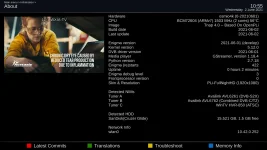
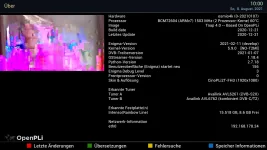
after reconnecting the MIO4K it has restarted normally and in the information appears with the driver 2021 01 07
and the 5.9.0 kernel ??
it's amazing
why the update is not done ?if it doesn't work online, how can i do it by myself?

stephan94
 

Attachments

  • no update.webp
    no update.webp
    126.2 KB · Views: 9
There is no 5.9 kernel on the TNAP-4 server, so try flashing the image. Do this:

Backup your settings
Put Good Blank or Empty usb drive in the receiver
Select Flash image in the receiver (Menu--->Setup--->Flash image).
Select the Tnap-4 06-02-2021 and press the OK button on the remote.
Select the correct image slot (with backup). Press the OK buitton on the remote.
Wait 5-10 minutes for the image to flash and restore settings.

flash-image_20210602105643.webp

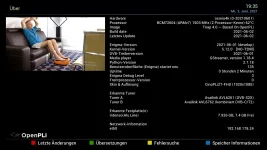
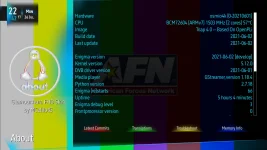
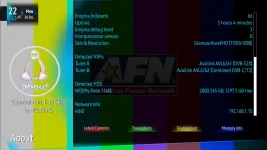
osmio4k-About_20210602105509.webp
 
Thank you so much ,
it worked perfectly.
I was with the first version of Tnap 4.0
that's why it didn't work.
have a good day

But as I understand it now T2MI works all the time?
it is no longer necessary to switch from "NoT2MI" to "T2MI"
like we did before.
 

Attachments

  • Encode_1080P_507.mp4_20210602_193626.701.webp
    Encode_1080P_507.mp4_20210602_193626.701.webp
    106.2 KB · Views: 10
Thank you so much ,
it worked perfectly.
I was with the first version of Tnap 4.0
that's why it didn't work.
have a good day

But as I understand it now T2MI works all the time?
it is no longer necessary to switch from "NoT2MI" to "T2MI"
like we did before.

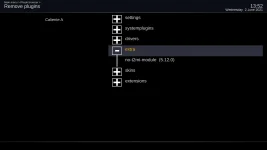
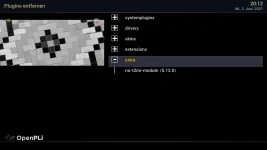
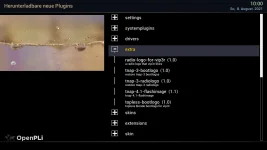
Be sure to remove any T2MI or Non-T2MI plugins before flashing. If you have installed these plugins and do not remove them, then system restore will Install them again.
To remove plugins:
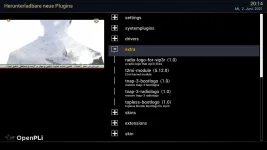
Menu---> then press red remote button (see below).
installed-plugins_20210602135213.webp

Delete the T2MI and Non-T2Mi then re-flash the image. On your About page, It looks like you flashed the image with the Non-T2MI plugin installed and system restore installed it!
 
It's annoying I just reinstalled everything, including the plugins or skins that are not recognized by the MIO4K
is it really essential?
when I uninstall the "NOT2MI" the "T2MI" appears next to Kernel version 5.12
and we cannot uninstall it or else it is removed but the indication next to 5.12 is still there

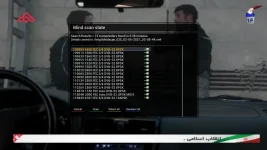
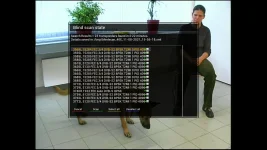
on the other hand the blindscan always works well (including with the small sr close to each other)
 

Attachments

  • no t2mi.webp
    no t2mi.webp
    39.1 KB · Views: 14
  • t2mi.webp
    t2mi.webp
    57.7 KB · Views: 15
  • blindscan OK.webp
    blindscan OK.webp
    100 KB · Views: 21
The indication next to 5.12 is still there because the "About" file has not been changed. I will fix that later, and will update the extra T2MI plugin later today. The T2MI driver that is in the extra feeds now is the old T2MI driver and should be removed.
 
Is the update server OK? I just reinstalled TNAP 4.0 from the last multiboot image to (hopefully) fix the problem of the time reverting to 1970 (that at least four people other than me on SatelliteGuys are having since the last update) and when I tried to update from the network again, after rebooting it was still only indicating TNAP 2021-02-20 and Enigma2 2021-02-14. I tried the network update again and this time it only downloaded one more file, but when rebooting it got stuck on "boot". I pulled the power and it booted normally, but still only on the un-updated version. I also note that the kernel version still says NO-T2MI. Before my prior re-load to fix the wifi, I had a system fully updated to this month or last, including the latest T2MI driver. I haven't done anything different.
 
Is the update server OK? I just reinstalled TNAP 4.0 from the last multiboot image to (hopefully) fix the problem of the time reverting to 1970 (that at least four people other than me on SatelliteGuys are having since the last update) and when I tried to update from the network again, after rebooting it was still only indicating TNAP 2021-02-20 and Enigma2 2021-02-14. I tried the network update again and this time it only downloaded one more file, but when rebooting it got stuck on "boot". I pulled the power and it booted normally, but still only on the un-updated version. I also note that the kernel version still says NO-T2MI. Before my prior re-load to fix the wifi, I had a system fully updated to this month or last, including the latest T2MI driver. I haven't done anything different.

I can't answer your question, but I am one of the people with TNAP 4.0, where NTP time suddenly is not keeping proper time anymore. I finally gave up on that, and am now using transponder time, specifically, the Bars & Tone channel on AFN 3900 V DVB-S2 8psk 27500 2/3 as a startup service. It now once again keeps perfect time using that.

I believe that NTP time is for some reason, suddenly not working right only IF you keep your Mio in Standby, when you aren't specifically using it. Not sure why it's doing that again all of a sudden, as I haven't updated my Mio for a couple months.

I have full view of my Mio's front screen while sitting in my living room chair, and I could see the clock suddenly change to a totally random time for NO REASON. This only happened while it was in Standby mode. It might happen multiple times a day, then not happen for a while. Oh, and my Mio is hardwired to my router, which is only 2 feet away from it, and my router keeps perfect time.

This is the image I am using:

1_0_19_192_65_12_A2F8F3C_0_0_0_20210726224217.webp

1_0_19_192_65_12_A2F8F3C_0_0_0_20210726224345.webp
 
Last edited:
Anything about the operations of TNAP that is discussed at SatelliteGuys or other forums may not be seen or known about! It is hard enough to keep up with one forum. Searching the Internet for issues with TNAP is not a good option. Post any complaints, suggestions, or comments that you want to be known about the operations of TNAP on this site because this is where the image is assembled.

The best thing to do before doing any updates or upgrades is to make a full image backup using the backupsuite plugin. Doing this makes sense because it gives a complete restore point. If you cannot backup the whole image, at least backup and save the settings.

Loading a TNAP image dated 2021-02-20 then trying to update it online would most likely result in failure. There were several hundred package changes between what was available in 2021-02-20, and what is on the server now. A lot of things changed in 4 months. It is a good idea to flash to a newer image and not try to update a several month old image online. You can expect failure when you do this.

Images from May are available in the forum. These images should work well, and should not have any time issues. Links to these images are below.
https://legitfta.com/forum/showthread.php?26985-TNAP-4-Images-for-OSMIO4K-20201221
https://legitfta.com/forum/showthread.php?26983-TNAP-4-Images-for-OSMIO4K-20201221

There is a test image on the server that can be flashed. Since it is a Test image, it may not work the way you would like. I do not suggest flashing it.

What is on the TNAP 4.0 server should work fine with the May image that is available for downloading in the forums. A newer version of TNAP should be available in the next few weeks.
 
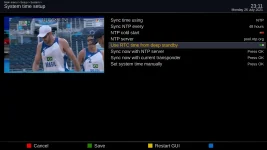
The SystemTime was probably the most misunderstood item in TNAP. The Edision MIO receivers have an excellent Real Time Clock or RTC. My tests have shown the RTC in the MIO receivers do not need to be synced more than once a week. Syncing the time every 5 minutes using the SystemTime plugin may cause more problems than it solves --especially since the RTC in the MIO receivers works well.

The SystemTime Plugin was eliminated some time ago (last quarter for 2020). This plugin stayed in TNAP, and at one point may have caused time issues for some because of coding conflicts. The SystemTime Plugin will be deleted in TNAP 4.1 because its features are embedded in the image. Hopefully this will cause less confusion about how to set the receiver up so it will keep correct time.

Here is how I had SystemTime set:
Systemtime-menu_20210726231108.webp

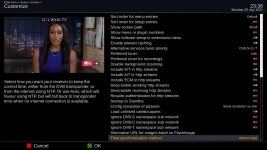
This is what the next TNAP will have:
time-sync-new_20210726233639.webp

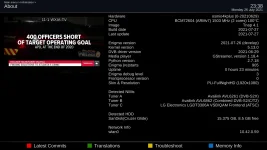
This image should be available soon.
TNAP-4.1-About_20210726233806.webp
 
Loading a TNAP image dated 2021-02-20 then trying to update it online would most likely result in failure. There were several hundred package changes between what was available in 2021-02-20, and what is on the server now. A lot of things changed in 4 months. It is a good idea to flash to a newer image and not try to update a several month old image online. You can expect failure when you do this.

Images from May are available in the forum.

OK, this one was definitely my fault! I thought I had put the May image on the USB stick I was using to flash, but it was the older one. I was looking at the date on the USB force install version, not the multiboot version.
 
The SystemTime was probably the most misunderstood item in TNAP. The Edision MIO receivers have an excellent Real Time Clock or RTC. My tests have shown the RTC in the MIO receivers do not need to be synced more than once a week. Syncing the time every 5 minutes using the SystemTime plugin may cause more problems than it solves --especially since the RTC in the MIO receivers works well.

The SystemTime Plugin was eliminated some time ago (last quarter for 2020). This plugin stayed in TNAP, and at one point may have caused time issues for some because of coding conflicts. The SystemTime Plugin will be deleted in TNAP 4.1 because its features are embedded in the image. Hopefully this will cause less confusion about how to set the receiver up so it will keep correct time.

I wasn't syncing it every 5 minutes, I was only syncing it once a day. Even so, any time (since the last online update) I put the receiver into standby, the time would reset to January 1970 at some apparently-random time from a few minutes to a few hours later.

The only thing I see different between your settings and mine is that I had "NTP cold start" set to On instead of Off.
 
It looks like there have been two changes in the TNAP dvb time files. The first change fixed some problems that had existed for some months or years, while the second change which was around May 2021 probably allowed some problems to creep back in. A lot of users in other parts of the world set the time using transponder instead of internet. Transponder time in North America is "Hit or Miss" with it working great for some users, but creating problems for other users.

The biggest difference in time between a normal home computer and the MIO fta receiver is the home computer has a battery to help with time syncs during reboots, sleep mode, restarts, or power failures. The MIO does not have a battery, so it needs to be time-synced during restarts. We will see about changing the dvb time files again to fix the problems that have been discussed here in the past few days.

It is important to remember that TNAP is put together at this forum. If you have problem(s) and do not list them here, then it may be some months or even longer before any attempt is made to fix the problem.
 
Downloaded this morning and now running TNAP 4.1. I will switch to standby when not using my Mio+ to see if the time is kept accurately. Time for me was always accurate for me with TNAP4.0 except when I switched to standby.

Added: Within an hour, the time on the front of the Mio+ had jumped many hours. I switched on the receiver and it seemed to correct itself without my doing anything. I am changing the Time Synchronization Method from Auto to Internet (NTP). My Internet is very reliable. Let's see if this helps.
 
Last edited:
I noticed the time was wrong again. So I turned on the receiver. The date shows Wednesday, December 31, 1969. So the clock issue seems not to be fixed unless there is some other configuration that needs to be changed. I will just leave the receiver on for now so the time remains accurate.

One new problem with this image is that the menu to force a time update has been removed. So I now have no way to force an immediate time update other than to restart the receiver.
 
Hello el bandido
I haven't sent a message for a very long time because I moved.
Now I am starting over.
I just noticed that T2MI no longer works and that there is no longer the possibility (as in the old versions) to load the T2MI plugin.
Is there a solution?
This is the version I'm working with:
have a good day
stephan94
 

Attachments

  • 49 east T2MI.webp
    49 east T2MI.webp
    89.6 KB · Views: 5
  • t2mi.webp
    t2mi.webp
    208.4 KB · Views: 3
  • t2mi2.webp
    t2mi2.webp
    114.4 KB · Views: 7
  • t2mi3.webp
    t2mi3.webp
    57.1 KB · Views: 5
Hello El bandido
after updating TNAP 4.0 using the "software update" method
T2MIs are now working perfectly.
only side effect after the update;
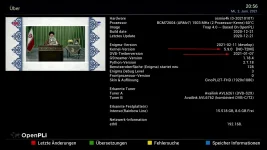
when calling up version information in MIo4K
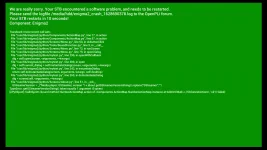
we get a nice green screen error ?!

Have a good day

Stephan94
 

Attachments

  • TNAP 4.0 T2MI.webp
    TNAP 4.0 T2MI.webp
    130.3 KB · Views: 4
  • TNAP 4.0 T2MIb.webp
    TNAP 4.0 T2MIb.webp
    134.2 KB · Views: 4
  • Encode_1080P_527.mp4_20210811_160059.251.webp
    Encode_1080P_527.mp4_20210811_160059.251.webp
    147.4 KB · Views: 5
When the T2MI drivers are changed using the plugins, the About page is also changed. So the About page needs to be updated in the T2MI-Non-T2MI plugins...
 
Back
Top