
- Home
- Forums
- FTA Set Top Box Discussions/Files
- FTA Set Top Box Discussions
- The North American Project E2 Image Discussions
You are using an out of date browser. It may not display this or other websites correctly.
You should upgrade or use an alternative browser.
You should upgrade or use an alternative browser.
TNAP-5.1 Image Discussion
- Thread starter el bandido
- Start date


el bandido
TNAP-Images
Wasn't it decided some time ago that TNAP images were not suited for your uses? Anyway...
Plugins from other sources may be installed in TNAP by simply installing the plugins on a known-to-be-good usb drive and then inserting the usb drive into the receiver while watching a tv channel. Follow onscreen instructions.
You may also use the Software manager to install plugins by Downloading Software manager from the System plugin feeds.Step by step information on installing plugins using the Software manager is found in the OpenPli Wiki:
https://wiki.openpli.org/Tips_and_Tweaks#Install_an_IPK_file
For any image, plugins from outside sources should be installed using terminal. Put the imported plugin in /tmp of receiver files and install it by name or simply type in terminal: cd /tmp, then opkg install *.ipk
Using terminal for .ipk installation is preferred because how the plugin Does or Does not install is fully displayed and contains any error information. A Full Image Backup of the receiver is highly suggested before installing any plugins.
Adding a terminal to webif is not really on the TNAP list of "Things to Accomplish". Terminal is used little to none by most users. In most Linux type distributions, terminal is available natively. In Windows, terminal is available after a putty installation. Either way, it is just about as simple to start terminal in Linux or putty in Windows as compared to starting webif then starting terminal in webif.
Newtork shares, virtual hard drives, external hard drives...etc are possible as the enigma2 receiver is basically a stripped Linux computer. See 1.44 and maybe 1.45 of OpenPli Wiki:
https://wiki.openpli.org/Main_Page
Plugins from other sources may be installed in TNAP by simply installing the plugins on a known-to-be-good usb drive and then inserting the usb drive into the receiver while watching a tv channel. Follow onscreen instructions.
You may also use the Software manager to install plugins by Downloading Software manager from the System plugin feeds.Step by step information on installing plugins using the Software manager is found in the OpenPli Wiki:
https://wiki.openpli.org/Tips_and_Tweaks#Install_an_IPK_file
For any image, plugins from outside sources should be installed using terminal. Put the imported plugin in /tmp of receiver files and install it by name or simply type in terminal: cd /tmp, then opkg install *.ipk
Using terminal for .ipk installation is preferred because how the plugin Does or Does not install is fully displayed and contains any error information. A Full Image Backup of the receiver is highly suggested before installing any plugins.
Adding a terminal to webif is not really on the TNAP list of "Things to Accomplish". Terminal is used little to none by most users. In most Linux type distributions, terminal is available natively. In Windows, terminal is available after a putty installation. Either way, it is just about as simple to start terminal in Linux or putty in Windows as compared to starting webif then starting terminal in webif.
Newtork shares, virtual hard drives, external hard drives...etc are possible as the enigma2 receiver is basically a stripped Linux computer. See 1.44 and maybe 1.45 of OpenPli Wiki:
https://wiki.openpli.org/Main_Page
Last edited:
Wasn't it decided some time ago that TNAP images were not suited for your uses? Anyway...
Psst. Somebody asked me in a pm. Being the good guy I am. If I don't know. I'll find out. Right?
Plugins from other sources may be installed in TNAP by simply installing the plugins on a known-to-be-good usb drive and then inserting the usb drive into the receiver while watching a tv channel. Follow onscreen instructions.
Cool. Didn't know that. Kind of unconventional. But cool.
You may also use the Software manager to install plugins by Downloading Software manager from the System plugin feeds.Step by step information on installing plugins using the Software manager is found in the OpenPli Wiki:
https://wiki.openpli.org/Tips_and_Tweaks#Install_an_IPK_file
Ahh. Software manager (Package manager in the webif?). Poking aound in SWM I guess i typed in the wrong key words. Was wondering why the slot was named as it is instead of TNAP 5.x
For any image, plugins from outside sources should be installed using terminal. Put the imported plugin in /tmp of receiver files and install it by name or simply type in terminal: cd /tmp, then opkg install *.ipk
Using terminal for .ipk installation is preferred because how the plugin Does or Does not install is fully displayed and contains any error information. A Full Image Backup of the receiver is highly suggested before installing any plugins.
Yeah. That Terminal sure would be handy right at my finger tips in the webif. A bit more 'friendly' to paste in links and paths. I'm sure you'll agree. But cool. Putty is is.
Adding a terminal to webif is not really on the TNAP list of "Things to Accomplish". Terminal is used little to none by most users. In most Linux type distributions, terminal is available natively. In Windows, terminal is available after a putty installation. Either way, it is just about as simple to start terminal in Linux or putty in Windows as compared to starting webif then starting terminal in webif.
Well. I mean little to none is an under estimate. But then again. My training wheels were off in a week or so. Good thing dad didn't put hardware on them like the men's stall at public restroom. But...cool.
Newtork shares, virtual hard drives, external hard drives...etc are possible as the enigma2 receiver is basically a stripped Linux computer. See 1.44 and maybe 1.45 of OpenPli Wiki:
https://wiki.openpli.org/Main_Page
Right. Just that once I did map my share as an HDD. In settings like movie storage, image backup location.... and stuff. They still found their way to the USB EHD. So. I be axin'.
I shall attempt the process again. But....cool!
Thanks, man.
el bandido
TNAP-Images
Having terminal in webif requires shellinabox, which is not terribly hard to add. You are limited in a webif terminal. Commands suchs as init 4 cannot be used in a webif terminal because the command stops webif. I don't see much use for terminal in wbif, but it can probably be added in TNAP6 as shown below.

Last edited:
Having terminal in webif requires shellinabox, which is not terribly hard to add. You are limited in a webif terminal. Commands suchs as init 4 cannot be used in a webif terminal because the command stops webif. I don't see much use for terminal in wbif, but it can probably be added in TNAP6 as shown below.
Oh crap. My bad. I can init 4 but that kills the gui. So init 3 is moot.
Like mentioned. Was just a suggestion. I use terminal in the webif frequently. Mostly because c/p from clipboard is easier than putty.
Happy New Year! (as you look in the mirror telling yourself....."I'll always drink again...just not this week").

stephan94
Legit VIP
Happy New Year!
I just saw that the TNAP 6 image was available in test version, the 8008 and the Ustym 4Kpro.
but I don't see anything for the MIO4k and MIO4k+ (although their names are written on the ad).
will they be arriving soon?
ps: I've just seen it's now arrived
I just saw that the TNAP 6 image was available in test version, the 8008 and the Ustym 4Kpro.
but I don't see anything for the MIO4k and MIO4k+ (although their names are written on the ad).
will they be arriving soon?
ps: I've just seen it's now arrived
Attachments

el bandido
TNAP-Images
Happy New Year!
I just saw that the TNAP 6 image was available in test version, the 8008 and the Ustym 4Kpro.
but I don't see anything for the MIO4k and MIO4k+ (although their names are written on the ad).
will they be arriving soon?
ps: I've just seen it's now arrived
The MIO images have not been loaded on a receiver. You may see if they boot and run.
https://www.tnapimages.com/tnap6-test-image/
stephan94
Legit VIP
there are a few problems, the image loads fine; everything is accessible, but if you do a restart the receiver remains stuck on “boot”.The MIO images have not been loaded on a receiver. You may see if they boot and run.
you have to use the special method to restart on another image.
I found the same. TNAP6 appeared to be working but I had no network connection. In trying to get the network to be connected, I rebooted and then the receiver stopped with EDISION on the front panel and the new splash screen. I can use the manual method to reboot to TNAP5.1 and it works fine. But if I select TNAP6, again it freezes as above. So I can't now run TNAP6....if you do a restart the receiver remains stuck on “boot”. you have to use the special method to restart on another image.

Megatron817
Administrator
The MIO images have not been loaded on a receiver. You may see if they boot and run.
https://www.tnapimages.com/tnap6-test-image/
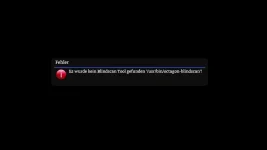
Crash when clicking tuner setup and the getting stuck after reboot look like network problem causing it not sure. I know wireless is not working.
Attachments

Megatron817
Administrator
Any one want some more free streaming channels on the Enigma2 box. This package is for the Samsung TV plus Plugin.
Install the epg import ipk first then the Samsung TV ipk then restart gui.
The picon go to usr/share/enigma2/picon. Doesn't have every picon most.
Once you open the samsung TV plusplugin in plugins browser press the menu button on the remote to open the settings to set it up and green button to save then green button to download the Samsung TV plus bouquet. Exit the plugin and go to bouquets to stream away.
Tested on tnap5 and 5.1 on the MIo4k+
Forgot to add in the setup I set service 2 NONE and epg mode 2.
Install the epg import ipk first then the Samsung TV ipk then restart gui.
The picon go to usr/share/enigma2/picon. Doesn't have every picon most.
Once you open the samsung TV plusplugin in plugins browser press the menu button on the remote to open the settings to set it up and green button to save then green button to download the Samsung TV plus bouquet. Exit the plugin and go to bouquets to stream away.
Tested on tnap5 and 5.1 on the MIo4k+
Forgot to add in the setup I set service 2 NONE and epg mode 2.
Attachments
Last edited:
Is anybody having trouble with the NTP time staying accurate in 5.1? Mine sure doesn't seem to sync with NTP servers. If I reboot, it might even go all the way back to 1969, besides being off clockwise. Just like the old versions of TNAP used to do, before EB finally got that ironed out.
el bandido
TNAP-Images
Most of the hard drive that had TNAP 5 on it was erased by accident. Trying to further support TNAP 5 now would be difficult due to the hard drive loss. I can't think of a good reason the time would just quit or stop working correctly. Maybe reload the image as a fresh install or wait a week or two for TNAP 6 to improve.
Megatron817
Administrator
Is anybody having trouble with the NTP time staying accurate in 5.1? Mine sure doesn't seem to sync with NTP servers. If I reboot, it might even go all the way back to 1969, besides being off clockwise. Just like the old versions of TNAP used to do, before EB finally got that ironed out.
I always use a startup service and transponder time sync but I did just set tnap 5.1 to ntp sync then set startup service to dead transponder and got 1969 after multiboot from another slot back to 5.1 so I do see what you are saying.
Megatron817
Administrator
Most of the hard drive that had TNAP 5 on it was erased by accident. Trying to further support TNAP 5 now would be difficult due to the hard drive loss. I can't think of a good reason the time would just quit or stop working correctly. Maybe reload the image as a fresh install or wait a week or two for TNAP 6 to improve.
Yes ntp time on tnap 6 is working fine.
Megatron817
Administrator
MikeB try the auto setting time sync. The ntp seems intermittent, I got it to work after a second reboot and auto also worked.
edit well after going to another slot and back to 5.1 the auto setting also didn't work got 1969 so never mind.
edit well after going to another slot and back to 5.1 the auto setting also didn't work got 1969 so never mind.
Last edited: