TNAP-5 Image Discussion

Should not be any changes or difference in the timer area from 4.2 to 5.0 but I guess anything is possible.

Post the timer files that you are using and we will see if your problem can be duplicated.

How do I do that? BTW, I played with TNAP5 timers again and found that even though I set the timer for today it advanced the record date by 1 day all on its own.
 
The timers.xml file located at: /etc/enigma2 in receiver files will have saved timed recording information.
Your site wouldn't take the upload as an attachment. It said "invalid file".

<?xml version="1.0" ?>
<timers>
<timer begin="1703116800" end="1703118540" serviceref="1:0:1:3:1:FF37:A2F1018:0:0:0:" repeated="127" name="ABC" description="ABC" afterevent="standby" eit="0" location="/media/usb/movie/" justplay="0" always_zap="1" pipzap="0" zap_wakeup="always" rename_repeat="1" conflict_detection="1" descramble="1" record_ecm="0">
</timer>
</timers>
 
Looks like you are wanting to record ABC 7 on 993w from 7pm to 7:29pm, Correct? What transponder frequency do you have for this channel? Check your receiver and see.
 
Looks like you are wanting to record ABC 7 on 993w from 7pm to 7:29pm, Correct? What transponder frequency do you have for this channel? Check your receiver and see.

ABC7 on 99W C-band from 1830 to 1900 EST everyday. That's when I normally record. Transponder freq has been the same for years. 4120H30000-9/10 8PSK DVB-S2. Recordings work fine on TNAP4.2.
 
Okay. So this is what you want:
ABC7 on 99W C-band from 1830 to 1900 EST everyday. That's when I normally record. Transponder freq has been the same for years. 4120H30000-9/10 8PSK DVB-S2. Recordings work fine on TNAP4.2.

But this is what you have:
Your site wouldn't take the upload as an attachment. It said "invalid file".

<?xml version="1.0" ?>
<timers>
<timer begin="1703116800" end="1703118540" serviceref="1:0:1:3:1:FF37:A2F1018:0:0:0:" repeated="127" name="ABC" description="ABC" afterevent="standby" eit="0" location="/media/usb/movie/" justplay="0" always_zap="1" pipzap="0" zap_wakeup="always" rename_repeat="1" conflict_detection="1" descramble="1" record_ecm="0">
</timer>
</timers>

Let's break this down a little bit. Start and end times are in epoch time. Use epoch converter. (My timezone = EST)
https://www.epochconverter.com/

timer begin="1703116800" Epoch convert:, Next time Start event =
GMT: Thursday, December 21, 2023 12:00:00 AM
Your time zone: Wednesday, December 20, 2023 7:00:00 PM GMT-05:00
Relative: In 7 hours


timer end="1703118540" Epoch convert:, Next time End event =
GMT: Thursday, December 21, 2023 12:29:00 AM
Your time zone: Wednesday, December 20, 2023 7:29:00 PM GMT-05:00
Relative: In 7 hours


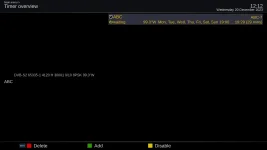
Here is a screenshot of your timer as seen in the receiver menu:
screenshot_20231220121243.webp

Your timer is set for 1900 to 1929 when you actually want 1830 to 1900.
Carefully check and adjust your timer. Then test it tonight and se if it works. If you still have problems after resetting the timer to the proper time, then we will try something else.
 
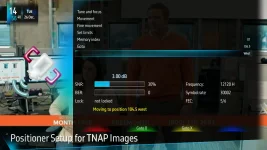
The source for the AVL6261 driver found in Edision Mio4K and Edision Mini 4K has been made available. A user named ocean posted the mods needed to show a signal below lock , which is useful for dish alignment and other things. This mod was done on the AVL6261 T2MI driver and the symbol rate was also lowered to 500, whereas before it was around 1500 for T2MI version.

I have not tested it enough to know the capabilities, but it seems to work OK. Is anyone interested in testing this feature?

Cozi on 103w. Signal shown is below Lock:
screenshot_20231226145641.webp
 
It appears TNAP5 no longer has available the plugin to add streaming URLs to our bouquets. This was a useful tool to provide access to favourite streams from a bouquet that I labelled "IPTV".

If this plugin is no longer available, is there some other way to accomplish this?
 
I've done this manually, to an IPTV bouquet I created, and using Notepad++ (which is a free download) here is my template, but be aware I haven't used it for some time, so some/all of them may now be obsolete. You can manually build your own bouquet, (or edit your own) by changing the info below to match your info. This file is located in:

Code:
\\osmio4k\root\etc\enigma2\userbouquet.iptv_channels_tv_.tv

P.S. I'm still running TNAP 4.2

Code:
#NAME IPTV Channels (TV)
#SERVICE 4097:0:0:0:0:0:0:0:0:0:http%3a//170.178.189.66:1935/live/Stream1/playlist.m3u8
#DESCRIPTION American Horrors
#SERVICE 4097:0:0:0:0:0:0:0:0:0:https%3a//nimble.dashstreams.net/onestudio/americanclassictv/playlist.m3u8:American Classic Network
#DESCRIPTION American Classic Network
#SERVICE 4097:0:0:0:0:0:0:0:0:0:https%3a//nimble.dashmedia.tv/onestudio/classictv/playlist.m3u8:Classic Tv 4U
#DESCRIPTION Classic Tv 4U
#SERVICE 4097:0:0:0:0:0:0:0:0:0:http%3a//247retrotv.com%3a1935/live/smil%3a247retro.smil/chunklist_w1193920237_b1928000_sleng.m3u8:24/7 Retro TV
#DESCRIPTION 24/7 Retro TV
#SERVICE 4097:0:0:0:0:0:0:0:0:0:https%3a//nimble.dashstreams.net/onestudio/horrified/playlist.m3u8:Horrified Tv
#DESCRIPTION Horrified Tv
#SERVICE 4097:0:0:0:0:0:0:0:0:0:https%3a//nimble.dashstreams.net/onestudio/its_comming_soon/playlist.m3u8:It's At The Movies
#DESCRIPTION It's At The Movies
#SERVICE 4097:0:0:0:0:0:0:0:0:0:https%3a//nimble.dashstreams.net/onestudio/movee4u/playlist.m3u8:Movee 4U
#DESCRIPTION Movee 4U
#SERVICE 4097:0:0:0:0:0:0:0:0:0:https%3a//moviemix.samsung.wurl.com/manifest/playlist.m3u8
#DESCRIPTION MovieMix
#SERVICE 4097:0:0:0:0:0:0:0:0:0:https%3a//vcnleomarkstudios.teleosmedia.com/stream/leomarkstudios/screamfest/playlist.m3u8
#DESCRIPTION Screamfest
#SERVICE 4097:0:0:0:0:0:0:0:0:0:https%3a//asylum-stirr.amagi.tv/playlist.m3u8
#DESCRIPTION The Asylum
#SERVICE 4097:0:0:0:0:0:0:0:0:0:https%3a//gideommd.mmdlive.lldns.net/gideommd/d5b6a753f86e4e51b8e15c7d23887a4f/manifest.m3u8
#DESCRIPTION YouToo America Backup
#SERVICE 4097:0:0:0:0:0:0:0:0:0:https%3a//gideommd.mmdlive.lldns.net/gideommd/d5b6a753f86e4e51b8e15c7d23887a4f/chunklist_b1128000.m3u8
#DESCRIPTION YouToo America Prime
#SERVICE 4097:0:0:0:0:0:0:0:0:0:https%3a//y5w8j4a9.ssl.hwcdn.net/andprivehd/tracks-v1a1/index.m3u8
#DESCRIPTION Prive
 
Last edited:
Thanks for the tip of just adding to my current IPTV bouquet. It works! I didn't use your template. Instead I ftped into my Mio+ and copied the existing IPTV bouquet to my PC. I followed the format in my existing bouquet and added a new stream. I ftped the revised file back to the Mio+, rebooted and now I have the new stream in my IPTV bouquet.

This is actually better than using the plugin since that required me to use the remote control to tediously key in a very long string. With this method, I just copy, paste, edit using my PC.
 
There are or will be some updated Plugins for python 3. But some of the old plugins will be lost for good or until someone takes the time to convert them...
 
The source for the AVL6261 driver found in Edision Mio4K and Edision Mini 4K has been made available. A user named ocean posted the mods needed to show a signal below lock , which is useful for dish alignment and other things. This mod was done on the AVL6261 T2MI driver and the symbol rate was also lowered to 500, whereas before it was around 1500 for T2MI version.
I have not tested it enough to know the capabilities, but it seems to work OK. Is anyone interested in testing this feature?
Hello el bandido
I only have the MIO4K (no +) is this the right Edision?
what do I have to do to be able to try this new possibility?
If you send me the modification and tell me where I should place it, I can of course try it out. (hoping it will be conclusive)
 
Back
Top