- Home
- Forums
- FTA Set Top Box Discussions/Files
- FTA Set Top Box Discussions
- The North American Project E2 Image Discussions
You are using an out of date browser. It may not display this or other websites correctly.
You should upgrade or use an alternative browser.
You should upgrade or use an alternative browser.
TNAP-7 Image Discussion
- Thread starter el bandido
- Start date


el bandido
TNAP-Images
What is the output of lsusb in telnet or putty terminal?
Does this exact same usb stick work in other images? If it does then boot to one of them and run lsusb in terminal for comparison purposes.
The lsusb lists all usb devices connected to the receiver, and is very helpful in solving usb related problems.
Does this exact same usb stick work in other images? If it does then boot to one of them and run lsusb in terminal for comparison purposes.
The lsusb lists all usb devices connected to the receiver, and is very helpful in solving usb related problems.
Now the tnap doesn load: box display shows "boot", but no pic !What is the output of lsusb in telnet or putty terminal?
Does this exact same usb stick work in other images? If it does then boot to one of them and run lsusb in terminal for comparison purposes.
The lsusb lists all usb devices connected to the receiver, and is very helpful in solving usb related problems.
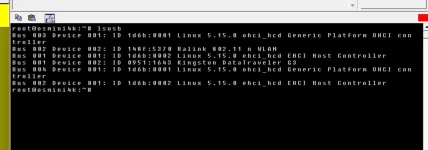
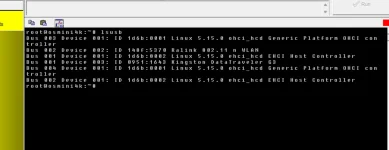
here are the "lsusb" tests from tnap & vix:
Attachments
el bandido
TNAP-Images
???
What does not boot? TNAP-7? Explain as I thought you were using it? If the box does not boot, remove Both usb devices, then try to boot.
Also, your screenshot is labeled vix and the other is tnap? tnap what? tnap-7? I assume you are comparing OpenVix and TNAP-7 which is OK. Just need to clarify as the output is the same, which is good. Thanks.
What does not boot? TNAP-7? Explain as I thought you were using it? If the box does not boot, remove Both usb devices, then try to boot.
Also, your screenshot is labeled vix and the other is tnap? tnap what? tnap-7? I assume you are comparing OpenVix and TNAP-7 which is OK. Just need to clarify as the output is the same, which is good. Thanks.
I'm talking about tnap7, as the title of the menu says; if it was about tnap6, I will post in that menu not here.
I run "lsusb" in tnap & openvix images, as you suggested in post #23.
It looks like there are no differences on the output of the command !
Now, tnap7 does not load (as I mentioned in #24), but I can connect to the box: box display shows "boot" & the screen is black !
I'm thinking to do fresh flash.
I run "lsusb" in tnap & openvix images, as you suggested in post #23.
It looks like there are no differences on the output of the command !
Now, tnap7 does not load (as I mentioned in #24), but I can connect to the box: box display shows "boot" & the screen is black !
I'm thinking to do fresh flash.
I'm talking about tnap7, as the title of the menu says; if it was about tnap6, I will post in that menu not here.
I run "lsusb" in tnap & openvix images, as you suggested in post #23.
It looks like there are no differences on the output of the command !
Now, tnap7 does not load (as I mentioned in #24), but I can connect to the box: box display shows "boot" & the screen is black !
I'm thinking to do fresh flash.
I run "lsusb" in tnap & openvix images, as you suggested in post #23.
It looks like there are no differences on the output of the command !
Now, tnap7 does not load (as I mentioned in #24), but I can connect to the box: box display shows "boot" & the screen is black !
I'm thinking to do fresh flash.
el bandido
TNAP-Images
OK thanks for clarifying.
It may not be booting because of the usb drive or the usb wifi. Disconnect both of those and see if it boots.
Wait a bit, probably late this evening or tomorrow and a rebuilt image with updates will be available.
It may not be booting because of the usb drive or the usb wifi. Disconnect both of those and see if it boots.
Wait a bit, probably late this evening or tomorrow and a rebuilt image with updates will be available.

el bandido
TNAP-Images
TNAP-7 Dated 0131 Is on the feeds, and also available at tnapimages.com.
Missing Blindscan module Added. tested on osmini4k
Channel changing crashes Made edits to correct
Revert to TNAP PlutoTV plugin Let's see if that helps
Attempted to fix the wifi issue in OSmini4k.
As for the usb problem and image backup problems in osmini4k, I have no clue. My usb drive works, and I am able to backup images. If the image stops or fails to boot after installing 0131 image, wait 2-3 minutes for everything to stop, then in terminal run:
init 4
ENIGMA_DEBUG_LVL=5 enigma2 > /tmp/debug.log 2>&1
Then navigate to /tmp of the receiver, get debug.log and attach it here.
Missing Blindscan module Added. tested on osmini4k
Channel changing crashes Made edits to correct
Revert to TNAP PlutoTV plugin Let's see if that helps
Attempted to fix the wifi issue in OSmini4k.
As for the usb problem and image backup problems in osmini4k, I have no clue. My usb drive works, and I am able to backup images. If the image stops or fails to boot after installing 0131 image, wait 2-3 minutes for everything to stop, then in terminal run:
init 4
ENIGMA_DEBUG_LVL=5 enigma2 > /tmp/debug.log 2>&1
Then navigate to /tmp of the receiver, get debug.log and attach it here.
Installed new version, osmini4k-20260131 multiboot.zip
Blindscan works, yellow button works
I have problems with booting, usb removed, above command does not complete
Blindscan works, yellow button works
I have problems with booting, usb removed, above command does not complete
Code:
TNAP 7 osmini4k

osmini4k login: root
Password:
root@osmini4k:~# init 4
root@osmini4k:~# ENIGMA_DEBUG_LVL=5 enigma2 > /tmp/debug.log 2>&1
Segmentation fault         ENIGMA_DEBUG_LVL=5 enigma2 > /tmp/debug.log 2>&1
root@osmini4k:~#el bandido
TNAP-Images
The provided command runs. Segmentation fault error Is Not Good!
My receiver:
Corrupted installation/flashing
Hardware issue (bad RAM )
Incompatible plugin causing instant crash
Possible solutions.
Reflash the image cleanly --Do not let autorestore run or restore anything.
Or try a different multiboot slot
My receiver:
Code:
pli@pli-Precision-T5610:~$ telnet 192.168.1.193

Trying 192.168.1.193...

Connected to 192.168.1.193.

Escape character is '^]'.


TNAP 7 osmini4k


osmini4k login: root

root@osmini4k:~# init 4

root@osmini4k:~# ENIGMA_DEBUG_LVL=5 enigma2 > /tmp/debug.log 2>&1
Corrupted installation/flashing
Hardware issue (bad RAM )
Incompatible plugin causing instant crash
Possible solutions.
Reflash the image cleanly --Do not let autorestore run or restore anything.
Or try a different multiboot slot
el bandido
TNAP-Images
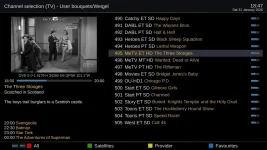
Code has been added to help stabilize the screenshots in Edision osmini4k. There is only so much that can be done I guess. The screenshot issue does not seem to exist in the Edision osmio4k, or any other receiver i tested besides the Edision osmini4K. But I can say improvements have been made --at least for me...
Getting C and Ku band satellite epg up and running brings the cross-contamination problem, where channels that are not supposed to have epg get it. We will see about solving these problems and getting our epg working correctly.
Getting C and Ku band satellite epg up and running brings the cross-contamination problem, where channels that are not supposed to have epg get it. We will see about solving these problems and getting our epg working correctly.
el bandido
TNAP-Images
New images should be online in a little bit unless something changes.
TNAP Images uses a custom OpenWebif that streams correctly to tablets and smartphones.
A customized "Free" version of Wireguard allows safe streaming over the Internet for those that have a static ip. These items have been tested to work in TNAP-7
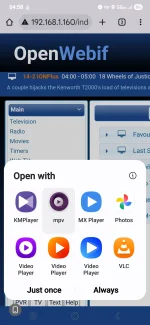
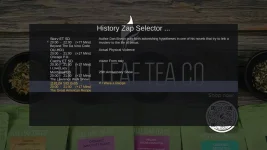
The Channel History button has been set for SF8008 and includes EPG description:
The weather here has been a bit cold and windy, which allowed for some time to straighten things out. There is still more to do.
TNAP Images uses a custom OpenWebif that streams correctly to tablets and smartphones.
A customized "Free" version of Wireguard allows safe streaming over the Internet for those that have a static ip. These items have been tested to work in TNAP-7
The Channel History button has been set for SF8008 and includes EPG description:
The weather here has been a bit cold and windy, which allowed for some time to straighten things out. There is still more to do.
el bandido
TNAP-Images
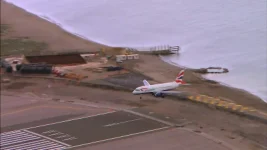
The Edision screenshot has been improved a bit, but as shown below, a fast moving screenshot has "issues". I am not going to spend anymore time trying to fix it as I see the problem to be driver related or hardware, either one is above my limited abilities.
Regarding tnap7 for osmini4k, I have only problems:
Only 1 of 4 or more trys to load, the image is starting, no matter if the box is connected by wire or wifi.
Most of the trys the box stays in "boot" (box display), with black screen.
When I get lucky and the box loads the image, usb ports are not recognized by the image, hence there is no way to make a backup or to load a backup. So, after a lot of strugle, I manage to load the backup of the last version of tnap6.
I will see how tnap7 works for osmio4k+.
Only 1 of 4 or more trys to load, the image is starting, no matter if the box is connected by wire or wifi.
Most of the trys the box stays in "boot" (box display), with black screen.
When I get lucky and the box loads the image, usb ports are not recognized by the image, hence there is no way to make a backup or to load a backup. So, after a lot of strugle, I manage to load the backup of the last version of tnap6.
I will see how tnap7 works for osmio4k+.
el bandido
TNAP-Images
Tell me, Are you Fresh Installing the thing or are trying to install backups? When you have problems with a new image, do not allow anything to autoinstall or reinstall from previous images. This is important when problems occur.
If TNAP-7 runs for me on the osmini4k, then it should run right for you if the hardware is equal. Really there is nothing "killer" in this image that should cause a no boot situation that I can find.
Telnet into the mini4k, run init 4 wait a few seconds, then run enigma2 .... What is the output? The crash or stoppage information will be towards the bottom of the output.
If TNAP-7 runs for me on the osmini4k, then it should run right for you if the hardware is equal. Really there is nothing "killer" in this image that should cause a no boot situation that I can find.
Telnet into the mini4k, run init 4 wait a few seconds, then run enigma2 .... What is the output? The crash or stoppage information will be towards the bottom of the output.
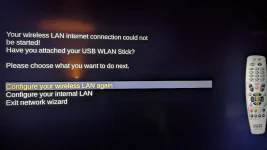
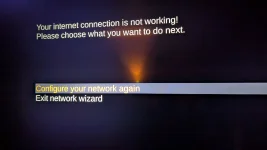
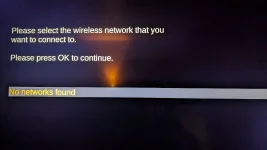
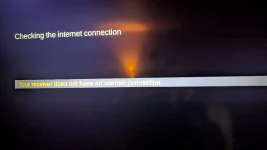
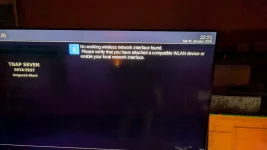
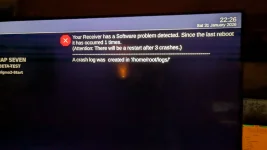
yes, FRESH INSTALL from tnap6, & no old autoinstall/settings; here are the messages when setting network (wifi):
so, i can't connect to the box to run your suggested commands or find the crashlog from pic#6 !!!
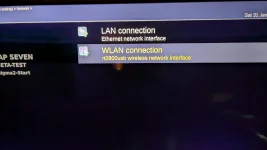
The WLAN adapter is listed in pic#7, but doesn't work in this tnap version as it was in previouse versions & in other images.
so, i can't connect to the box to run your suggested commands or find the crashlog from pic#6 !!!
The WLAN adapter is listed in pic#7, but doesn't work in this tnap version as it was in previouse versions & in other images.