
- Home
- Forums
- FTA Set Top Box Discussions/Files
- FTA Set Top Box Discussions
- The North American Project E2 Image Discussions
You are using an out of date browser. It may not display this or other websites correctly.
You should upgrade or use an alternative browser.
You should upgrade or use an alternative browser.
TNAP-7 Image Discussion
- Thread starter el bandido
- Start date

el bandido
TNAP-Images
The word "error" is seen about 14 times with nothing really unexpected except for the Hauppauge tuner. Try this:
Start a telnet session and enter init 4
Make a complete copy of the enigma2 folder in the receiver's /etc folder (/etc/enigma2)
Now delete everything in the receiver's enigma2 folder Except for the settings file. The settings file should be the only thing left in /etc/enigma2.
In the telnet session, type reboot to properly restart the receiver.
Blindscan 101w C band after the reboot and then test the various channels. Blindscan a few more satellites if everything is OK and verify they work.
As for the image updates you mentioned, I do not think anything was in them that would cause this problem. The ATSC dvb satellite inserts could I guess cause dvb-satellite problems. But I would expect the ATSC updates to cause problems on both polarities and not just horizontal. And add that no one else has reported horizontal polarity issues like you have described.
Start a telnet session and enter init 4
Make a complete copy of the enigma2 folder in the receiver's /etc folder (/etc/enigma2)
Now delete everything in the receiver's enigma2 folder Except for the settings file. The settings file should be the only thing left in /etc/enigma2.
In the telnet session, type reboot to properly restart the receiver.
Blindscan 101w C band after the reboot and then test the various channels. Blindscan a few more satellites if everything is OK and verify they work.
As for the image updates you mentioned, I do not think anything was in them that would cause this problem. The ATSC dvb satellite inserts could I guess cause dvb-satellite problems. But I would expect the ATSC updates to cause problems on both polarities and not just horizontal. And add that no one else has reported horizontal polarity issues like you have described.

After deleting all except the settings file and doing various blind scans of C band, some H transponders were still not working properly.
Turns out the Digiwave DGS-8x1 switch was the culprit. Swapped another Digiwave replacement and everything working correctly again.
Thanks EB for checking the txt file.
Turns out the Digiwave DGS-8x1 switch was the culprit. Swapped another Digiwave replacement and everything working correctly again.
Thanks EB for checking the txt file.
el bandido
TNAP-Images
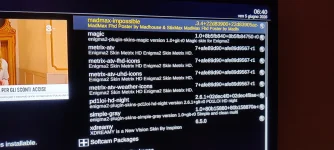
Where did you download Matrix skins? No such skin exists on TNAP 7 feeds that I know about.
el bandido
TNAP-Images
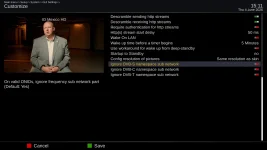
Set Ignore DVB-S namespace sub network = No to solve this.55.6W/3925V - ONID-1/TID-201
55.6W/4015V - ONID-1/TID-201
55.6W/4050V - ONID-1/TID-201
55.6W/3885H - ONID-1/TID-301
55.6W/4086V - ONID-1/TID-301
For the greyed out channel and for the issue shown above, delete or set to empty lamedb and lamedb5 in /etc/enigma2.
Rescan and post results.
I downloaded the 2 skins right from the feed, as you can see from the photoWhere did you download Matrix skins? No such skin exists on TNAP 7 feeds that I know about.

Edision Mio+ Crashing
I processed the normal updates online this morning and all seemed to be fine. However, many services in my iptv folders lately even before these updates haven't been playing when previously they played well. In troubleshooting this issue, which may have nothing to do with any updates, I flashed a fresh download dated May 31, 2026 and restored settings. That didn't install cleanly (green screen encountered) but otherwise seemed to run. It didn't solve my iptv issue so I switched back to my previous slot that has May 13, 2026 with all updates applied.
The receiver played well initially. Now, however hours later the Edision is going to green screen and rebooting every few minutes without any action on my part. There is a statement after each reboot about 5 updates pending and it asks if I want to install them. But when I check, there are no updates.
My main question: Rather than using an old release with lots of updates, is there now or will there be a fresh version online with all updates to flash? I can reflash easily as long as I restore the settings. Latest crash log and error message attached.
ADDED: I notice that Pluto TV no longer works. When I try to play a service, it says "No data has been received". This is odd since Pluto has worked well in recent weeks for all services. This is the same error for almost all of my other IPTV services. I've gone back now to the latest online version with all updates applied and the receiver continues to green screen/crash. I am using a 128GB memory stick for storage which has worked flawlessly in recent weeks. I only use it to record programs which I watch then delete the same day. I also keep a minimum of backups on stick. I've also deleted almost all IPTV folders except for a couple. Another most recent crash log attached.

I processed the normal updates online this morning and all seemed to be fine. However, many services in my iptv folders lately even before these updates haven't been playing when previously they played well. In troubleshooting this issue, which may have nothing to do with any updates, I flashed a fresh download dated May 31, 2026 and restored settings. That didn't install cleanly (green screen encountered) but otherwise seemed to run. It didn't solve my iptv issue so I switched back to my previous slot that has May 13, 2026 with all updates applied.
The receiver played well initially. Now, however hours later the Edision is going to green screen and rebooting every few minutes without any action on my part. There is a statement after each reboot about 5 updates pending and it asks if I want to install them. But when I check, there are no updates.
My main question: Rather than using an old release with lots of updates, is there now or will there be a fresh version online with all updates to flash? I can reflash easily as long as I restore the settings. Latest crash log and error message attached.
ADDED: I notice that Pluto TV no longer works. When I try to play a service, it says "No data has been received". This is odd since Pluto has worked well in recent weeks for all services. This is the same error for almost all of my other IPTV services. I've gone back now to the latest online version with all updates applied and the receiver continues to green screen/crash. I am using a 128GB memory stick for storage which has worked flawlessly in recent weeks. I only use it to record programs which I watch then delete the same day. I also keep a minimum of backups on stick. I've also deleted almost all IPTV folders except for a couple. Another most recent crash log attached.
Attachments
Last edited:

EnoSat
Legit VIP
Yes, but this will cause all picons to be lost, since they are created based on a namespace in the format ABCD0000 rather than ABCD1234Set Ignore DVB-S namespace sub network = No to solve this.
For the greyed out channel and for the issue shown above, delete or set to empty lamedb and lamedb5 in /etc/enigma2.
Rescan and post results.
View attachment 19947
el bandido
TNAP-Images
Either false update packages are being shown or there are packages to update that Software update does not know about....Edision Mio+ Crashing
I processed the normal updates online this morning and all seemed to be fine. However, many services in my iptv folders lately even before these updates haven't been playing when previously they played well. In troubleshooting this issue, which may have nothing to do with any updates, I flashed a fresh download dated May 31, 2026 and restored settings. That didn't install cleanly (green screen encountered) but otherwise seemed to run. It didn't solve my iptv issue so I switched back to my previous slot that has May 13, 2026 with all updates applied.
The receiver played well initially. Now, however hours later the Edision is going to green screen and rebooting every few minutes without any action on my part. There is a statement after each reboot about 5 updates pending and it asks if I want to install them. But when I check, there are no updates.
My main question: Rather than using an old release with lots of updates, is there now or will there be a fresh version online with all updates to flash? I can reflash easily as long as I restore the settings. Latest crash log and error message attached.
ADDED: I notice that Pluto TV no longer works. When I try to play a service, it says "No data has been received". This is odd since Pluto has worked well in recent weeks for all services. This is the same error for almost all of my other IPTV services. I've gone back now to the latest online version with all updates applied and the receiver continues to green screen/crash. I am using a 128GB memory stick for storage which has worked flawlessly in recent weeks. I only use it to record programs which I watch then delete the same day. I also keep a minimum of backups on stick. I've also deleted almost all IPTV folders except for a couple. Another most recent crash log attached.
View attachment 19952
About the crash:
Our automatic log system creates nothing we can use 19 out of 20 times. Use telnet to generate a proper log while I see what can be done to solve the logging issue. The logs you posted are empty in the critical area we need to see.
In telnet, copy and paste these 3 lines one at a time and press the Enter key after each one:
init 4
sleep 5
ENIGMA_DEBUG_LVL=5 enigma2 > /tmp/enigma.log 2>&1
Then run the receiver until it crashes. Retrieve the log from /tmp of receiver files and post it. Thanks.
Pluto Tv changed their streaming to needing an actual login account to work. This was started back at the end of February, and has been rolled out slowly to all their channels. Without a log in account (so they can track you), it won't grab the session keys, and you can't stream it outside of Pluto.tv mainstream. There are some Docker workarounds, or 1 Windows proxy bridge program that'll run 24/7 on a machine local to your network, and also provide EPG service. Those can be found up on GitHub, but not sure they could be integrated into working for an Enigma satellite receiver to work with them. They DO work with Channels DVR though.I notice that Pluto TV no longer works
Attachments

Last edited:
Here it is. It only took minutes to crash....Then run the receiver until it crashes. Retrieve the log from /tmp of receiver files and post it. Thanks.
Attachments
Somebody has done something right. When I checked the Pluto services a few hours later, all that I randomly checked worked. So maybe my Edision was chatting with Pluto and they resolved their differences.Pluto Tv changed their streaming to needing an actual login account to work...
el bandido
TNAP-Images
Useless log. You will need to make one using telnet.Here it is. It only took minutes to crash.
The size of your last attached log is 17.4 kB (17,425 bytes). A proper log will be 3X or around 50-60_kB, depending on how long it runs. Your log starts with:
OpenPLi Enigma2 crash log
crashdate=Sat Jun 6 08:20:44 2026
compiledate=Jun 5 2026
skin=PLi-FullNightHD/skin.xml
sourcedate=2026-06-04
branch=develop
rev=9d2c76b
Which means the receiver made it. Steps to correct this are being worked on. But for the moment and with the image that you are using, you will need to make the log following these exact steps:
In telnet, copy and paste these 3 lines one at a time and press the Enter key after each one:
init 4
sleep 5
ENIGMA_DEBUG_LVL=5 enigma2 > /tmp/enigma.log 2>&1
Run the telnet command, then attach the enigma.log in /tmp after the receiver stops or crashes.
The log you attached only has this:
Backtrace:
enigma2(_Z17handleFatalSignaliP9siginfo_tPv) [0x86E40]
/lib/libc.so.6(__default_rt_sa_restorer) [0xB5564120]
/lib/libc.so.6(pthread_kill) [0xB55C1764]
/lib/libc.so.6(gsignal) [0xB5562BD4]
/lib/libc.so.6(abort) [0xB5544460]
/usr/lib/libstdc++.so.6(_ZN9__gnu_cxx27__verbose_terminate_handlerEv) [0xB5887128]
/usr/lib/libstdc++.so.6(n/a) [0xB58841A0]
-------FATAL SIGNAL 6
Which really does not tell us anything. The log made from telnet commands shown above should contain the full output.
Ok, I did it right but sent you the wrong log. Here is the enigma.log file from the latest crash.Useless log. You will need to make one using telnet...
Attachments
el bandido
TNAP-Images
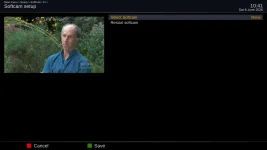
You are a victim of the SoftCSA kill switch. Seems your receiver is running timeshift --which is a recording --which the SoftCSA kill switch addresses in part. You should be able to turn SoftCSA ON and the problem would disappear. But the next update or image fixes it properly. If you do turn SoftCSA ON, remember to turn it OFF after the next update or image install.
I can't activate or deactivate SoftCSA since I don't have the SoftCSA interface you show. Maybe the additional 5 mysterious updates that want to be loaded but don't exist include the new SoftCSA interface. I did have oscam ON which I've now turned OFF. I also had timeshift activated but have turned it OFF for now to keep things simple. So far, no green screens.You are a victim of the SoftCSA kill switch. Seems your receiver is running timeshift --which is a recording --which the SoftCSA kill switch addresses in part. You should be able to turn SoftCSA ON and the problem would disappear. But the next update or image fixes it properly. If you do turn SoftCSA ON, remember to turn it OFF after the next update or image install.
el bandido
TNAP-Images
A Kill Switch was added for SoftCSA which in turn caused the receiver to crash while recording with SoftCSA set to OFF (default). This has been solved in the 0606 image. The ghost updates that appeared on every reboot should also be fixed.
The missing skins or skins that are installed and not seen will be checked when time permits....
This 55w problem should be fixed NOW in 0607 image. Let me know if it is not fixed after updating and testing.55.6W/3925V - ONID-1/TID-201
55.6W/4015V - ONID-1/TID-201
55.6W/4050V - ONID-1/TID-201
55.6W/3885H - ONID-1/TID-301
55.6W/4086V - ONID-1/TID-301
The missing skins or skins that are installed and not seen will be checked when time permits....
Flashed the 0607 image and restored settings. No ghost updates any longer. Can timeshift and record. No more green screens. And the only IPTV services that don't work are those that, unfortunately, appear to have gone dead but that's not an Edision issue. Pluto is working fine.A Kill Switch was added for SoftCSA which in turn caused the receiver to crash while recording with SoftCSA set to OFF (default). This has been solved in the 0606 image. The ghost updates that appeared on every reboot should also be fixed...