TNAP-7 Image Discussion

Got the SF8008 back connected up and flashed 0208 image. Looks good, I now have vfd display setup to show clock always and swapped to alternate display skin. 100% clock now, no letters at all on the front display. Thanks.
 
Analysis of All 5 Crash Logs:
You have TWO DIFFERENT RECEIVERS with TWO DIFFERENT PROBLEMS:

RECEIVER 1: osmini4k (2 crashes)
Crash Logs: 21:20:57 and 21:20:58
---------------------------------
Problem: Missing framebuffer devices - /dev/fb0 not found
Graphics drivers not loading at boot
Enigma2 cannot initialize display
This is a hardware/driver initialization issue

RECEIVER 2: osmio4kplus (3 crashes)
Crash Logs: 17:45:57, 17:46:03, 17:46:13
Problem: SkinSelector Python bug when accessing LCD skins
Root Cause (crash #1 - 17:45:57):
File "/usr/lib/enigma2/python/Screens/SkinSelector.py", line 304, in selectionChanged
TypeError: 'NoneType' object is not subscriptable
--------------------------------------------------
What happened:
1. User navigated to: Menu → LCD Setup → LCD Skin Selector
2. SkinSelector tried to load LCD skins from /usr/share/enigma2/display/
3. Line 128: [SkinSelector] Directory does not exist: /usr/share/enigma2/display
4. Code didn't handle missing directory properly
5. Tried to access None[something] causing TypeError

Secondary crashes (#2 and #3):
Enigma2 tried to show BSOD error screen
Failed because error handler can't open modal dialog from non-modal screen
Cascading failures...
Status: Receiver works fine UNTIL user tries to access LCD skin settings

For the MIO+, LCD skin settings, more enigma2 edits are added to keep this from happening. It is understood that folders or files are being added to the receiver manually to solve this problem. This is fine, but it should not be done right now. The image needs to be proven to work correctly before adding any missing files, else you will have several receivers working correctly, then others crashing. Allow the main or root problem to be fixed first, then add whatever you want.

As for the OSMini4k crashing and failing on boot:
The 0208 image was checked and ran on an osmini4k before the images were uploaded. After the images were uploaded, the osmini4k image was then downloaded again using receiver menus and reinstalled, with settings being automatically restored. No issues were found.

Reload the mini4k image. Just simply reload the image and do not put the first file in it. Reboot it two or three times. Does it work correctly? If the answer is yes, then start installing your files that you want to use. The main difference between the last mini4k image and this one are the python updates, and the preloading of all network drivers that are available. I doubt either one of these are causing the boot failure, but we need to narrow it down and solve it if possible.
 
1. osmio4k+ is fixed by adding the mising display folder provided by Megatron817.
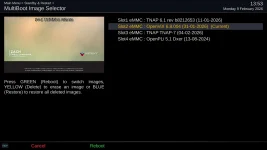
2. on mini, I booted on vix image, from here I deleted tnap7 from the slot, but when I reboot vix image, the box is booting on TNAp slot, witch is (should be), empty !!!!
 
You forced a boot from a broken image slot. The next reboot you do should be from the multiboot section in the VIX image or other working image menus. This will set multiboot correctly. It will always reboot to the broken image slot until you use the multiboot menu in the receiver and change it.

The OAweather plugin was broken and should be fixed in the next update. An online update is available now.
 
Been having an issue of when rebooting or using multiboot manager to go to another slot.
The box will hang and on the TV screen saying your SF8008 will now restart or reboot. I would have to use puTTY to reboot the box.
Think it could be the saving of the epg data and not knowing what dat file because I have multiple dat files with different names for other slots. Looking at the setting file at etc/enigma2 it shows
config.misc.epgcachepath=/media/hdd/
No setting for the Name so I went to the epg settings in the menus and changed the name from epg to epg1.
Went back and looked at the settings file in etc/enigma2 at it now shows
config.misc.epgcachefilename=epg1
Not having any more hangs after doing that so It could be important to rename your epg in the settings menu if you have multiple epg files at media/hdd.
 
What is or what is not in the settings file can cause problems at times. Or so it seems.
I have had a problem with the ATSC channels hanging. Have yet to fix it or find a solution.
 
You forced a boot from a broken image slot. The next reboot you do should be from the multiboot section in the VIX image or other working image menus. This will set multiboot correctly. It will always reboot to the broken image slot until you use the multiboot menu in the receiver and change it.

The OAweather plugin was broken and should be fixed in the next update. An online update is available now.
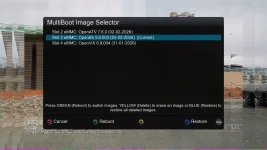
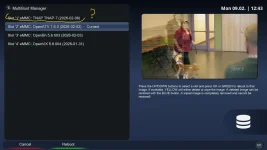
I did that: vix & blackhole images show slot1 empty.
Only ATV still lists TNAP in slot1 ????
 

Attachments

  • multiboot2.webp
    multiboot2.webp
    177.9 KB · Views: 2
  • multiboot1.webp
    multiboot1.webp
    101.1 KB · Views: 3
Different images, different distros of images may identify other installed images by different names. Or in this case not at all, probably because part of the image appears to be missing!

Delete or overwrite the broken TNAP 7 image. OpenVix has no problem "seeing" a healthy TNAP-7 image.

vix-multiboot_20260209135302.webp
 
I deleted tnap from slot1 in atv image & now shows "slot1: empty".
Could it be because vix & openbhn are openpli based images, and atv is diff. distro ?
Anyways, I flashed 208 in slot1, from vix, and there are no more crashlogs after wifi, password setup & full restart.
I will deleted and go for 209 version.
 
0209 fixes the osmio4k+ missing display folder. Out of the 6 images being built, osmio4k+ was the only one missing a display folder. Code was also added to silence the crash if the display folder was missing. Add to this drama that I no longer have a working mio4k+ to check and test, which I now boldly use as an excuse for not fixing this display folder issue earlier.

Other differences in 0209 are the weather plugin being fixed along with some efforts at making the Metrix skin work properly. These images are being built in batches which makes it almost as easy to update all as opposed to one. Plus if you update one image such as mio4k+ to 0209 and leave the rest at 0208, it sometimes causes questions...
 
Not having the harware available, is hard to patch all the problems in one shot, especially for a work-in-progress software.
If the distance & taxes weren't an impediment, I would lend you an osmio4k+, but...
thx for your efforts to keep this hobby alive.
 
Just did a clean install of version 209 in mini, setup wifi, pass and no problems.
Uninstalled all the softCams, full restart and the box is stuck in boot:
 

Attachments

Same story for mini: after a hard boot, box gets stuck in boot:
 

Attachments

Same story for the Mini? Yet you reference the Mini in both posts???? Confusing.
Understand that this image in its current state can mass-produce log files when only one or two are needed. All of those logs point to the same thing: graphics not being loaded. I am going to pull all of those pre-loaded drivers from the image and see if that helps your situation.
 
regarding "TNAP-7-osmio4kplus-20260209_multiboot", is working good.
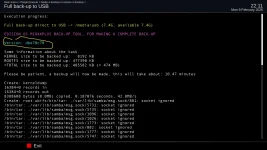
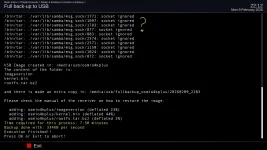
the only thing I do not understand is "backupsuite" listing (socket ignored !), and if is usable if need it:
no big issue as long as there is another option for a backup.
 

Attachments

  • backupsuite1.webp
    backupsuite1.webp
    118.6 KB · Views: 2
  • backupsuite2.webp
    backupsuite2.webp
    118.1 KB · Views: 2
BackupSuite should be discarded-deleted-forgotten about. The onboard backup is much improved and allows the backup of any slot. I suggest using the plugins menu and immediately removing Backupsuite.
 
Back
Top