TNAP-7 Image Discussion

One thing I noticed is the numerous AI mentions in the channelselection code. Here is an example:
def addNoAITranslationFlag(self):
eDVBDB.getInstance().addFlag(eServiceReference(self.csel.getCurrentSelection().toString()), FLAG_NO_AI_TRANSLATION)
eDVBDB.getInstance().reloadBouquets()
self.close()

def removeNoAITranslationFlag(self):
eDVBDB.getInstance().removeFlag(eServiceReference(self.csel.getCurrentSelection().toString()), FLAG_NO_AI_TRANSLATION)
eDVBDB.getInstance().reloadBouquets()
self.close()

At least someone sees the light. There is no stopping AI and it should become a routine part of the enigma2 image build. Everyone I have seen approach PLi or another image group with AI features for enigma2 are treated like they have the plague or something. I realize there are standards but some of this is ridiculous. This image we can do damn well what we want to it. Approval is not needed. We are here to have fun and not tell someone what they do or don't need.

I got python3 Anthropic built and loaded into the feeds which gives options for some AI toys. Here is a small possible list:

Ideas that WILL work on the receiver:​

  1. Smart Log Analyzer - Send oscam.log to Claude API, get diagnostics back
  2. EPG Enhancer - Improve program descriptions using AI
  3. Channel List Organizer - AI-powered favorites management
  4. Configuration Validator - Check oscam configs and suggest fixes
  5. Network Troubleshooter - Analyze connection issues
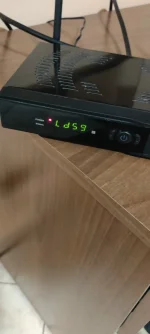
 
Hello everyone!
I haven't read all the pages of this thread, so please excuse me if I describe bugs that have already been reported.
Qviart Dual:
1) In Epgimport, there are only 3 sources, missing all the European ones.
Furthermore, after the first complete reboot, if you access the "plugins" menu, an error regarding the Epgimport plugin appears, as if a folder or file is missing.
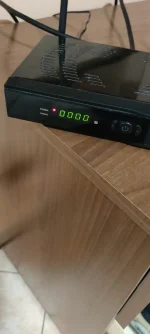
2) The decoder display doesn't show the channel or time, but "loadxx," where "xx" is a number, in my case 59.
In short, the percentage we see during the receiver's startup remains displayed, from 0 to 100.
The percentage varies; sometimes the number 59 (load59) remains, other times 64 (load64).
3) After turning off the receiver, the time "00:00" is displayed, always, after every shutdown.
Photo attached.
Thank you for your work!
 

Attachments

  • 1.webp
    1.webp
    183.3 KB · Views: 2
  • 2.webp
    2.webp
    226.8 KB · Views: 2
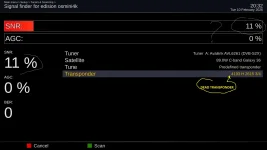
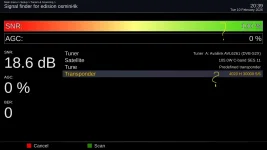
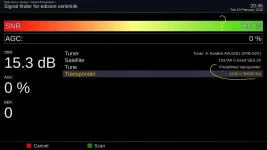
There is an old issue (as was at the begining of previous new versions): some dead tp are showing signal.
Not an nuisance, but merely a cosmetic for mini & osmio+.
 

Attachments

  • dead tp1.webp
    dead tp1.webp
    55.2 KB · Views: 4
  • dead tp2.webp
    dead tp2.webp
    52.2 KB · Views: 4
  • dead tp3.webp
    dead tp3.webp
    52.7 KB · Views: 4
Let's explain this One time as it has been mentioned before.

Enigma2 is altered to allow receivers to show signal below lock. This feature is not fully implemented. Some Edision drivers will show signal when there is none.

Every time a new image is put together, items are added, checked, then more items are added with repeat checks. It is a slow process especially with this image. So either change the Edision drivers or wait for the rest of the signal below lock files to be added.... This is WHY you have seen this problem before with new images.
 
Online updates today broke the front display from working properly on the Mio4kPlus. Just a white loading bar on the front display at 100%.
Debug file shows a skin file does not exist. I can't find what is missing and how would it get removed during an update?
Flashed todays image 0212 and it has same issue.
 

Attachments

Last edited:
Online updates today broke the front display from working properly on the Mio4kPlus. Just a white loading bar on the front display at 100%.
Debug file shows a skin file does not exist. I can't find what is missing and how would it get removed during an update?
Flashed todays image 0212 and it has same issue.
Same here !
 
See if the attached file is the correct skin file for it.
In receiver files, go to: /usr/share/enigma2/display. Delete everything in the display folder. Then unzipped the attached file and place it inside the display folder, which gives: /usr/share/enigma2/display/skin_default. Reboot and see if that fixes it. Next is to see if that particualr display exists in the build....
 

Attachments

See if the attached file is the correct skin file for it.
In receiver files, go to: /usr/share/enigma2/display. Delete everything in the display folder. Then unzipped the attached file and place it inside the display folder, which gives: /usr/share/enigma2/display/skin_default. Reboot and see if that fixes it. Next is to see if that particualr display exists in the build....
No that did not fix it. The debug also shows loading a skin file 'skin_user xml' and also shows that file does not exist but doesn't show where that file goes.
 
Forget about the log for a minute as that will just confuse.

The mio4kplus has a different display. I do not have this receiver, and if we cannot find solutions for it that are good then it needs to be deleted from our build. I think maybe with a little patience, we can work through it.

So let's make sure the history is correct.
Originally the display worked, but then there were complaints about crashes from the missing display folder, correct?
Now we have a display folder but with a display that does not work. The easiest solution if it works may be to revert back to what we originally had and try to silence the crash that happens because the folder is missing. This may be the easiest....

Currently the mio4kplus has several display plugins to choose from in the feeds. The build is set for display plugin 1 which is not included in the attached files because we know it does not work. Install the attached display plugins one at a time and see if one of them works. If we can get one to work, then the simple solution will be to change the plugin number in the build and mark it as problem solved. Thanks.
 

Attachments

Forget about the log for a minute as that will just confuse.

The mio4kplus has a different display. I do not have this receiver, and if we cannot find solutions for it that are good then it needs to be deleted from our build. I think maybe with a little patience, we can work through it.

So let's make sure the history is correct.
Originally the display worked, but then there were complaints about crashes from the missing display folder, correct?
Now we have a display folder but with a display that does not work. The easiest solution if it works may be to revert back to what we originally had and try to silence the crash that happens because the folder is missing. This may be the easiest....

Currently the mio4kplus has several display plugins to choose from in the feeds. The build is set for display plugin 1 which is not included in the attached files because we know it does not work. Install the attached display plugins one at a time and see if one of them works. If we can get one to work, then the simple solution will be to change the plugin number in the build and mark it as problem solved. Thanks.
The 0209 build works correct. I had tested all the display skins from the plugins 1-7 and they all worked fine. I liked number 5 the best. I think that one was what Vix uses if I remember correct. But after todays update non are working. The display just has the white loading bar at 100% with everything.
 
The 0209 build has the crash....Well let's see...Maybe not anymore.
What happens when you DELETE the display folder and reboot? Does the display work correctly after doing this?
And what happens when you access this menu after the deletion?
Main menu--->Setup--->System--->GUI settings--->Front Panel Display--->Display skin
Does it crash?
 
The 0209 build has the crash....Well let's see...Maybe not anymore.
What happens when you DELETE the display folder and reboot? Does the display work correctly after doing this?
And what happens when you access this menu after the deletion?
Main menu--->Setup--->System--->GUI settings--->Front Panel Display--->Display skin
Does it crash?
0208 had the crash. Yes it was because no display folder. 0209 had the display folder and all was good. 0208 was good after adding the folder then could download a display skin from plugins and all was good. I'm sure 0209 will crash if the display folder gets deleted but I know you had added some code to silence it. I have not tested that.
 
This is what I need to know:
What happens when you DELETE the display folder and reboot? Does the display work correctly after doing this?
And what happens when you access this menu after the deletion?
Main menu--->Setup--->System--->GUI settings--->Front Panel Display--->Display skin
Does it crash?
 
yes It did crash and without that display folder the display is dark until you go into the menus it shows the clock but small.
Has three crash files in the logs. Probably going to be the same as the ones posted by lme back when he had reported the crash.
 
I'm sorry, I was booted into the 0209 image when I did the test. On the 0212 image No crash. it says No skins available-directory does not exist.
The display is still showing the with bar loading at 100.
 
Hello everyone!
I haven't read all the pages of this thread, so please excuse me if I describe bugs that have already been reported.
Qviart Dual:
1) In Epgimport, there are only 3 sources, missing all the European ones.
Furthermore, after the first complete reboot, if you access the "plugins" menu, an error regarding the Epgimport plugin appears, as if a folder or file is missing.
2) The decoder display doesn't show the channel or time, but "loadxx," where "xx" is a number, in my case 59.
In short, the percentage we see during the receiver's startup remains displayed, from 0 to 100.
The percentage varies; sometimes the number 59 (load59) remains, other times 64 (load64).
3) After turning off the receiver, the time "00:00" is displayed, always, after every shutdown.
Photo attached.
Thank you for your work!
See if these items are fixed. Thanks.
 
Back
Top