
I do not understand: FW ?Are you using FW with ShortFrameFEC support or FW without ShortFrameFEC support ?

- Home
- Forums
- FTA Set Top Box Discussions/Files
- FTA Set Top Box Discussions
- The North American Project E2 Image Discussions
You are using an out of date browser. It may not display this or other websites correctly.
You should upgrade or use an alternative browser.
You should upgrade or use an alternative browser.
TNAP-7 Image Discussion
- Thread starter el bandido
- Start date

el bandido
TNAP-Images
FW Is FirmWare. There are different firmware reversions for the Edision, but the problem of the signal meter showing non-existent signal has already been explained.
What about the osmini4k? Any problems with it since the drivers were removed? Thanks.
What about the osmini4k? Any problems with it since the drivers were removed? Thanks.
I'm still on 212 version for mini4k. I started with internet on wire to download the wifi driver.FW Is FirmWare. There are different firmware reversions for the Edision, but the problem of the signal meter showing non-existent signal has already been explained.
What about the osmini4k? Any problems with it since the drivers were removed? Thanks.
EPG import does not work, but the basics are ok.
Will test 213 version.
Last edited:
el bandido
TNAP-Images
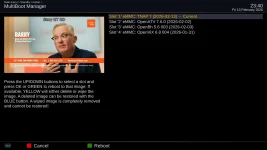
Excellent! I found a couple of issues that will cause crashes, and am inserting the proper edits into a build now. 0213 should also display the image correctly in multi-boot menus instead of having double TNAP.
Does the mio4kplus menu display correctly in 0213? Does it crash when you enter any display menu?
Thanks.
Does the mio4kplus menu display correctly in 0213? Does it crash when you enter any display menu?
Thanks.

EnoSat
Legit VIP
Some transponders use ShortFrameFEC.I do not understand: FW ?
The firmware (1.8.27679) supplied with the EDISION does not support this mode. Usually only SNR (stable or unstable) is displayed without LOCK.
Code:
root@osmio4kplus:~# dmesg  | grep avl6261
avl6261:avl_bsp_assoc_i2c_adapter(): assoc I2C for demod_id 0
avl6261: Firmware Version 1.8.27679 (3.8.5)
i2c i2c-2: avl6261: Airoha Technology AV201x successfully attached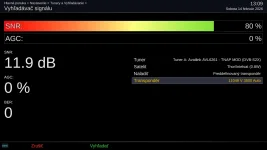
The firmware (v1.8.29209) supplied by AVAILINK supports this mode and a stable LOCK is also created.
Code:
root@osmio4kplus:~# dmesg  | grep avl6261
avl6261:avl_bsp_assoc_i2c_adapter(): assoc I2C for demod_id 0
avl6261: Firmware Version 1.8.29209 (3.8.5)
i2c i2c-2: avl6261: Airoha Technology AV201x successfully attached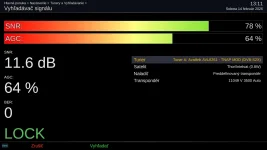
Last edited:
Is there a way to use telnet and boot to a different slot?
I'm stuck on slot #4 with TNAP 7
After downloading Aglare skin from plugins/skins, and going to GUI folder and saving. It worked, then after going in plugins/ Setup Aglare and setting to my taste, then saving. I can no longer change channels without it crashing, I can't go into the Menu's without it crashing, any buttom on the remote will cause a crash. I can use my computer and webif to change the channel.... I looked all over the webif and see no help from anywhere in webif? But, I want/need to get into the menu's and want/need to be able to use the remote..!!
I've tried to use the backside power button with the front power button to get to the Update Recovery, it doesn't work.
I've tried to flash (with OpenATV recovery emmc) using the back (and the side) usb slots and it doesn't recognize the flash drive.
So yesterday, I bought a NEW FLASH DRIVE, and it's not getting recognized either..???
If I could get rebooted to a different slot, I'm sure I could flash the latest TNAP 7 and start over.
I'm out of ideas, so I'm looking for help.., any ideas?????
So, I ask again, is there a way to use telnet and boot to a different slot?
Or maybe use telnet to do a factory reset?
THANKS....!!
EDIT:
It's on an sf8008 4K Twin
I use both usb slots for a Hauppauge 950 & a Hauppauge 955 to enable two ATSC tuners
I use a 1TB microsd for recordings
I'm stuck on slot #4 with TNAP 7
After downloading Aglare skin from plugins/skins, and going to GUI folder and saving. It worked, then after going in plugins/ Setup Aglare and setting to my taste, then saving. I can no longer change channels without it crashing, I can't go into the Menu's without it crashing, any buttom on the remote will cause a crash. I can use my computer and webif to change the channel.... I looked all over the webif and see no help from anywhere in webif? But, I want/need to get into the menu's and want/need to be able to use the remote..!!
I've tried to use the backside power button with the front power button to get to the Update Recovery, it doesn't work.
I've tried to flash (with OpenATV recovery emmc) using the back (and the side) usb slots and it doesn't recognize the flash drive.
So yesterday, I bought a NEW FLASH DRIVE, and it's not getting recognized either..???
If I could get rebooted to a different slot, I'm sure I could flash the latest TNAP 7 and start over.
I'm out of ideas, so I'm looking for help.., any ideas?????
So, I ask again, is there a way to use telnet and boot to a different slot?
Or maybe use telnet to do a factory reset?
THANKS....!!
EDIT:
It's on an sf8008 4K Twin
I use both usb slots for a Hauppauge 950 & a Hauppauge 955 to enable two ATSC tuners
I use a 1TB microsd for recordings
Last edited:
el bandido
TNAP-Images
Wow! Sorry you at having problems!
Getting the crash logs and attaching them to a post would be great!
Turn the receiver off using the back rocker switch. Press and hold front button in the middle of the receiver while turning the rocker switch on the back ON. In about 10 seconds the front switch should turn red. Wait for the recovery menu. At the top of the recover menu will be slot options for booting.
In telnet:
init 4
rm -rf /etc/enigma2
OR less dramatic:
init 4
rm -rf /etc/enigma2/settings
We need to see the crash logs if possible. Logs will be in: /home/root/logs of receiver files.
Getting the crash logs and attaching them to a post would be great!
Turn the receiver off using the back rocker switch. Press and hold front button in the middle of the receiver while turning the rocker switch on the back ON. In about 10 seconds the front switch should turn red. Wait for the recovery menu. At the top of the recover menu will be slot options for booting.
In telnet:
init 4
rm -rf /etc/enigma2
OR less dramatic:
init 4
rm -rf /etc/enigma2/settings
We need to see the crash logs if possible. Logs will be in: /home/root/logs of receiver files.
Thanks el bandido..!
"Turn the receiver off using the back rocker switch. Press and hold front button in the middle of the receiver while turning the rocker switch on the back ON. In about 10 seconds the front switch should turn red. Wait for the recovery menu."
This does not work, I've tried many times, including again just now.
Both of the telnet solutions show nothing.
Here are the logs:
"Turn the receiver off using the back rocker switch. Press and hold front button in the middle of the receiver while turning the rocker switch on the back ON. In about 10 seconds the front switch should turn red. Wait for the recovery menu."
This does not work, I've tried many times, including again just now.
Both of the telnet solutions show nothing.
Here are the logs:
Attachments
-
Enigma2_crash_2026-02-12_21-13-14.log40 KB · Views: 0
-
Enigma2_crash_2026-02-11_02-03-34.log2.3 KB · Views: 0
-
Enigma2_crash_2026-02-11_02-03-24.log4 KB · Views: 0
-
Enigma2_crash_2026-02-11_02-03-18.log42.6 KB · Views: 0
-
Enigma2_crash_2026-02-11_01-33-48.log2.3 KB · Views: 0
-
Enigma2_crash_2026-02-11_01-33-38.log4.9 KB · Views: 0
-
Enigma2_crash_2026-02-11_01-33-32.log22.2 KB · Views: 0
-
Enigma2_crash_2026-02-11_01-32-49.log2.3 KB · Views: 0
-
Enigma2_crash_2026-02-11_01-32-39.log4.9 KB · Views: 0
-
Enigma2_crash_2026-02-11_01-32-33.log42.7 KB · Views: 0
more attachment logs:
Attachments
-
Enigma2_crash_2026-02-13_02-41-23.log4.8 KB · Views: 0
-
Enigma2_crash_2026-02-13_02-41-17.log23.6 KB · Views: 0
-
Enigma2_crash_2026-02-12_21-16-53.log2.6 KB · Views: 0
-
Enigma2_crash_2026-02-12_21-16-43.log4 KB · Views: 0
-
Enigma2_crash_2026-02-12_21-16-37.log42.6 KB · Views: 0
-
Enigma2_crash_2026-02-13_02-41-33.log2.3 KB · Views: 0
-
Enigma2_crash_2026-02-13_02-42-05.log22.2 KB · Views: 0
-
Enigma2_crash_2026-02-13_02-42-11.log4.2 KB · Views: 0
-
Enigma2_crash_2026-02-13_02-43-48.log4.5 KB · Views: 0
-
Enigma2_crash_2026-02-13_02-43-42.log22.2 KB · Views: 0
el bandido
TNAP-Images
LOL
Been simpler to put all of those logs in a zipped folder. Thanks though. What happened will be in them.
What do you mean the telnet solutions show nothing?
DELETE the enigma2 folder:
init 4
rm -rf /etc/enigma2
Verify the enigma2 folder is gone:
ls -l /etc/
reboot
Deleting the enigma2 folder is similar to a factory reset. If you have access to telnet, the above commands should work.
Been simpler to put all of those logs in a zipped folder. Thanks though. What happened will be in them.
What do you mean the telnet solutions show nothing?
DELETE the enigma2 folder:
init 4
rm -rf /etc/enigma2
Verify the enigma2 folder is gone:
ls -l /etc/
reboot
Deleting the enigma2 folder is similar to a factory reset. If you have access to telnet, the above commands should work.
more attached logs:
Attachments
-
Enigma2_crash_2026-02-13_02-43-42.log22.2 KB · Views: 0
-
Enigma2_crash_2026-02-13_03-11-06.log4 KB · Views: 0
-
Enigma2_crash_2026-02-13_03-10-59.log22.2 KB · Views: 0
-
Enigma2_crash_2026-02-13_03-07-44.log2.3 KB · Views: 0
-
Enigma2_crash_2026-02-13_03-07-34.log4 KB · Views: 0
-
Enigma2_crash_2026-02-13_03-07-28.log42.7 KB · Views: 0
-
Enigma2_crash_2026-02-13_02-43-58.log2.5 KB · Views: 0
-
Enigma2_crash_2026-02-13_02-43-48.log4.5 KB · Views: 0
-
Enigma2_crash_2026-02-13_03-14-18.log22.2 KB · Views: 1
-
Enigma2_crash_2026-02-13_03-11-16.log2.3 KB · Views: 0
more logs:
Attachments
-
Enigma2_crash_2026-02-13_03-14-24.log4 KB · Views: 0
-
Enigma2_crash_2026-02-13_03-14-34.log2.3 KB · Views: 0
-
Enigma2_crash_2026-02-13_03-17-58.log22.2 KB · Views: 0
-
Enigma2_crash_2026-02-13_03-18-04.log4 KB · Views: 0
-
Enigma2_crash_2026-02-15_10-06-53.log42.7 KB · Views: 0
-
Enigma2_crash_2026-02-15_10-02-57.log24 KB · Views: 0
-
Enigma2_crash_2026-02-13_03-18-14.log2.3 KB · Views: 0
-
Enigma2_crash_2026-02-15_10-06-59.log4 KB · Views: 1
-
Enigma2_crash_2026-02-15_10-07-09.log2.3 KB · Views: 1
el bandido
TNAP-Images
Been much easier to put all of those logs in a zipped folder? Anyway, Thanks for posting them. They range from 02-11 to 02-15. Read post #175 in case you missed it.
WOW....!!
I did the ls -l /etc/ and looked down the right side, it was in aphabetical order and did not see enigma2 listed
Did the reboot and when it rebooted, it was @ set language and was ready to set up for an image. I did the motions to get through quickly and the Menu button now worked, but only settings was showing. I did a reboot with back button on/off switch, when rebooted the Menu show full list. I switched to slot 2 with TNAP 6.1. And now the reciever is working again.
When I catch my breath and rest my sole, I will flash the newest TNAP 7 to slot 4 and see how long itg takes me to break it again.
Thanks much el bandido
I did the ls -l /etc/ and looked down the right side, it was in aphabetical order and did not see enigma2 listed
Did the reboot and when it rebooted, it was @ set language and was ready to set up for an image. I did the motions to get through quickly and the Menu button now worked, but only settings was showing. I did a reboot with back button on/off switch, when rebooted the Menu show full list. I switched to slot 2 with TNAP 6.1. And now the reciever is working again.
When I catch my breath and rest my sole, I will flash the newest TNAP 7 to slot 4 and see how long itg takes me to break it again.
Thanks much el bandido