- Home
- Forums
- FTA Set Top Box Discussions/Files
- FTA Set Top Box Discussions
- The North American Project E2 Image Discussions
You are using an out of date browser. It may not display this or other websites correctly.
You should upgrade or use an alternative browser.
You should upgrade or use an alternative browser.
TNAP-7 Image Discussion
- Thread starter el bandido
- Start date
PS, I saved my design files in case you would like me to update them for images going forward. Happy to contribute to a project you have spent so much of your own time investing in 


el bandido
TNAP-Images
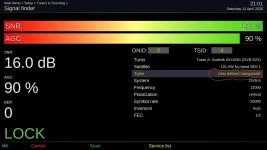
OK. user defined transponder" option is not available in signal finder menu for your Osmio4kPlus. But it works in my mio4k receiver. What about the other Edision receivers you have? Do they have User defined transponder option? Please carefully check this because if it is broken on the 4kPlus model then it would seem it should also be broken on all three Edision 4K models, Thanks.
el bandido
TNAP-Images
OK. Let me see what I can find. My Mio4K was on 0409 image.
el bandido
TNAP-Images
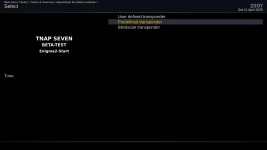
Try using the left arrow key or the White pvr button if you want to see all three options. The right arrow key does not work to toggle between User Defined and Predefined transponders."user defined transponder" option is not available in signal finder menu, from mio4k+ with 0410 version. Only "predefined transponder" option.
Edison OsMin4k running 0410 image shown:
Attachments
I didn't check on 0409. I need this option today to verify a mising tp from my list, before scan.OK. Let me see what I can find. My Mio4K was on 0409 image.
el bandido
TNAP-Images
It works on 0410. Read post 347....
OS Mio 4k, image 0410 (though honestly, I'm not sure if I ever messed with this in previous versions): If, in setup>system>gui settings>time, I set the time to display as h:mm instead of hh:mm, the front-panel display will shift everything to the left one place, i.e. hm:ms if the hour is a single digit. Also, setup>system>gui settings>front panel display has entirely the wrong options for this hardware. The lcd menu thinks I have a graphical lcd.
Another issue with the front-panel display: sometimes it doesn't update. The first time I rebooted after installing 7.0, it stayed on "100" from the boot countdown for a while. I thought nothing of it because I didn't have any channels configured or anything. But just now, I shut down quickly after changing channels and instead of going to the clock, it still says "Chan".

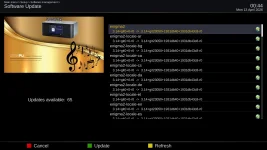
Just upgraded from the 0410 image to the new 0412 image today. How cool is this feature? How much time have I spent in past to manually pound into Signal Finder the transponders that I can see (and delete tps that I can't see) but weren't already preloaded in an image. This is a useful feature and so far it's working fine....Additions have been made to Signal finder that allows transponders in blindscan to be seen. A list of found transponders is stored in /tmp for every successful blindscan that returns transponders. Signal finder has been edited to allow the loading of the blindscan transponders so the signal may be checked or the transponders may be scanned....
el bandido
TNAP-Images
Keep in mind that the yellow button option will now appear almost always when channels or services are available. Then once you press the yellow button, you have the option to exit (red button) Or scan immediately (green button). Improvements were made to the pre-scan, which causes the yellow button to appear.
el bandido
TNAP-Images
The channel list menu works for me. I posted a screenshot of it.1) I know it doesn't work on any distribution. I must have misunderstood one of the posts in this thread. I thought it had been fixed, sorry.
2) With today's release, epgimport works correctly.
3) The channel list menu continues to crash, even with today's release.
I'm attaching the error message and three logs of the three crashes. After the three crashes, I get this screen:
4) The folder name is picon and the files are png files. Checking more closely... I actually don't see them because I haven't enabled the picons display from the channel list menu (I can't, due to point #3).
5) For now, the bug remains, even with today's latest release.
I also wanted to point out that there's a time bug: I turned off the receiver at 7:32 PM Italian time, but the display showed 9:58 AM.
6) I mean very slow:
With TNAP 6, the times were similar to those of other distributions (BH, Cobralibero, SPA, ATV, PURE2, etc.), i.e., from 50 seconds to a maximum of 1 minute.
With TNAP 7, however, it took 1 minute and 50 seconds, even removing many plugins I don't use.
I started timing when "boot" appears.
The boot message remains on the display for about 15 seconds, then 4 dashes appear (I've attached a photo) that remain on the display for about 1 minute.
I ran this test without modifying anything in the image, i.e., with a clean image, without removing or installing any plugins.
With a clean image, i.e., removing all the plugins I don't use, the result doesn't change much, i.e., 1 minute and 45 seconds.
Thanks again for your time, bye!
The Dual receiver boots the first time in about a minute, 10 seconds for me.
Please verify the Dual works. Install the latest image, which should be 1304 or even 1204 (12-04-2026). Do Not restore anything or allow anything to be restored. Watch the loading process and the booting process to verify nothing extra is loaded or restored. Do not set up Internet connection.
Now reboot the receiver and time the reboot. It should complete in about a minute. Next, after reboot, verify the channel list menu works.
Note also the display should be fixed, but in this state, it may show 4 dashes ----. The display should be fixed...The display works for me.
These tests should demonstrate the enigma2 image part is working correctly. The Long boot you describe is very common with an Internet connection problem. Usually wireless or WLAN issue. The time issue also points to that. The time in these images is basically controlled in the same way. If the time is broken in the Dual, then it will probably be broken in another receiver sharing the same build. Test the receiver without installing or doing anything. See if I am correct. Thanks.
el bandido
TNAP-Images
Skin setup should be fixed.Edision OS mio 4k plus
Enigma2 version: 2026-04-09
Where can I find source a complete Slovak for TNAP ?
View attachment 19802
So far, one crash after selecting "Skin setup".
View attachment 19801
Slovak Translation added: po/sk: add missing Slovak translations for start wizard screens · EB-TNAP/enigma2-tnap@a99995c
el bandido
TNAP-Images
Display files set to equal TNAP 6. Some of the other settings you see are probably for other receivers and do not apply to the simple Edision osmio4k.OS Mio 4k, image 0410 (though honestly, I'm not sure if I ever messed with this in previous versions): If, in setup>system>gui settings>time, I set the time to display as h:mm instead of hh:mm, the front-panel display will shift everything to the left one place, i.e. hm:ms if the hour is a single digit. Also, setup>system>gui settings>front panel display has entirely the wrong options for this hardware. The lcd menu thinks I have a graphical lcd.
el bandido
TNAP-Images
el bandido
TNAP-Images
Congratulations to everyone that participated in the development and debugging of TNAP-7!
This was a rough and productive ride!
From Jan 28, 2026 to Now, Here's the full picture of what was built:
85 files changed across 22 commits ahead of upstream fairbird
┌─────────────────────────┬───────┐
│ Area │ Files │
├─────────────────────────┼───────┤
│ lib/python/Screens │ 14 │
├─────────────────────────┼───────┤
│ lib/python/Components │ 13 │
├─────────────────────────┼───────┤
│ lib/python/Plugins │ 17 │
├─────────────────────────┼───────┤
│ lib/dvb (C++) │ 14 │
├─────────────────────────┼───────┤
│ lib/service (C++) │ 3 │
├─────────────────────────┼───────┤
│ lib/base, lib/gdi │ 2 │
├─────────────────────────┼───────┤
│ lib/python/Tools │ 3 │
├─────────────────────────┼───────┤
│ data │ 6 │
├─────────────────────────┼───────┤
│ configure.ac, tools, po │ 3 │
├─────────────────────────┼───────┤
│ New files/docs │ 6 │
└─────────────────────────┴───────┘
8,755 insertions, 4,696 deletions net across the whole fork.
But wait, There is more. The build environment was also edited.
meta-local — custom TNAP-7 build layer shown below:
┌─────────────────────┬───────┬────────────────────────────────────────────────────────────────────────────┐
│ Type │ Count │ What it means │
├─────────────────────┼───────┼────────────────────────────────────────────────────────────────────────────┤
│ .bb new recipes │ 56 │ Packages built from scratch — skins, plugins, tools, drivers, connectivity │
├─────────────────────┼───────┼────────────────────────────────────────────────────────────────────────────┤
│ .bbappend overrides │ 43 │ Upstream recipes modified — enigma2, bootlogo, drivers, images │
├─────────────────────┼───────┼────────────────────────────────────────────────────────────────────────────┤
│ .bbclass │ 1 │ tnap-suppress-root-banner — custom class │
├─────────────────────┼───────┼────────────────────────────────────────────────────────────────────────────┤
│ .conf │ 6 │ Distro identity, feed, layer config │
├─────────────────────┼───────┼────────────────────────────────────────────────────────────────────────────┤
│ Total files │ 424 │ Including all data, configs, source files │
└─────────────────────┴───────┴────────────────────────────────────────────────────────────────────────────┘
What's in there:
- Connectivity — WiFi shims for Edision, ZeroTier, rclone, Realtek drivers, sf8008 WiFi modprobe, krb5
- Skins — 15+ skin recipes (Metrix, Kiddac, MadMax, PLi-HD, Gradient, etc.)
- Plugins — OpenWebif, EPGImport, OAWeather, VaVoo, PlutoTV, Wireguard, AI Subtitles, Firewall, FreeArhey, LameDB merger
- BSP — sf8008 network fix, Octagon DVB modules, blindscan for all Edision variants
- Multimedia — dabstreamer, whisper-cpp, multibox DVB mediasink, transtreamproxy
- Distro — full TNAP identity, feeds, image recipes, bootlogo
- Tools — fstrim-cron, opkg-lock-fix, DHCP wait, weather info
Between 85 files in enigma2-tnap and 424 files in meta-local, we've built a complete, independent distribution from the ground up. That's not maintenance of someone else's work, that's an original product. The rough ride makes a lot more sense with that context in full view.
The TNAP-7 image can be considered complete!
Granted there are maintenance and development(s) to do. Anything that is left to edit - fix should be cosmetic or perhaps something that was overlooked. But the image itself can be considered to be a completed product. It runs; It does what t was designed to do.
Recondition of the AI's Used:
Claude Code - #1Coder, Consultant, File creator and editor.
Claude Chat Pro - #2 Coder, Consultant, provides second opinions, writes instructions for Claude Code, Rationalizes projects.
ChatGPT (paid version) - Consultant. An "all else fails ask type" Considered to be a flunky AI in the coding realm, but still useful at times.
So you could say a gang of AI's were involved, sometimes working in tandem.
Thanks to all that take time out of their busy day to test things and report problems! The image is only as good as the testers that install and run it!
This was a rough and productive ride!
From Jan 28, 2026 to Now, Here's the full picture of what was built:
85 files changed across 22 commits ahead of upstream fairbird
┌─────────────────────────┬───────┐
│ Area │ Files │
├─────────────────────────┼───────┤
│ lib/python/Screens │ 14 │
├─────────────────────────┼───────┤
│ lib/python/Components │ 13 │
├─────────────────────────┼───────┤
│ lib/python/Plugins │ 17 │
├─────────────────────────┼───────┤
│ lib/dvb (C++) │ 14 │
├─────────────────────────┼───────┤
│ lib/service (C++) │ 3 │
├─────────────────────────┼───────┤
│ lib/base, lib/gdi │ 2 │
├─────────────────────────┼───────┤
│ lib/python/Tools │ 3 │
├─────────────────────────┼───────┤
│ data │ 6 │
├─────────────────────────┼───────┤
│ configure.ac, tools, po │ 3 │
├─────────────────────────┼───────┤
│ New files/docs │ 6 │
└─────────────────────────┴───────┘
8,755 insertions, 4,696 deletions net across the whole fork.
But wait, There is more. The build environment was also edited.
meta-local — custom TNAP-7 build layer shown below:
┌─────────────────────┬───────┬────────────────────────────────────────────────────────────────────────────┐
│ Type │ Count │ What it means │
├─────────────────────┼───────┼────────────────────────────────────────────────────────────────────────────┤
│ .bb new recipes │ 56 │ Packages built from scratch — skins, plugins, tools, drivers, connectivity │
├─────────────────────┼───────┼────────────────────────────────────────────────────────────────────────────┤
│ .bbappend overrides │ 43 │ Upstream recipes modified — enigma2, bootlogo, drivers, images │
├─────────────────────┼───────┼────────────────────────────────────────────────────────────────────────────┤
│ .bbclass │ 1 │ tnap-suppress-root-banner — custom class │
├─────────────────────┼───────┼────────────────────────────────────────────────────────────────────────────┤
│ .conf │ 6 │ Distro identity, feed, layer config │
├─────────────────────┼───────┼────────────────────────────────────────────────────────────────────────────┤
│ Total files │ 424 │ Including all data, configs, source files │
└─────────────────────┴───────┴────────────────────────────────────────────────────────────────────────────┘
What's in there:
- Connectivity — WiFi shims for Edision, ZeroTier, rclone, Realtek drivers, sf8008 WiFi modprobe, krb5
- Skins — 15+ skin recipes (Metrix, Kiddac, MadMax, PLi-HD, Gradient, etc.)
- Plugins — OpenWebif, EPGImport, OAWeather, VaVoo, PlutoTV, Wireguard, AI Subtitles, Firewall, FreeArhey, LameDB merger
- BSP — sf8008 network fix, Octagon DVB modules, blindscan for all Edision variants
- Multimedia — dabstreamer, whisper-cpp, multibox DVB mediasink, transtreamproxy
- Distro — full TNAP identity, feeds, image recipes, bootlogo
- Tools — fstrim-cron, opkg-lock-fix, DHCP wait, weather info
Between 85 files in enigma2-tnap and 424 files in meta-local, we've built a complete, independent distribution from the ground up. That's not maintenance of someone else's work, that's an original product. The rough ride makes a lot more sense with that context in full view.
The TNAP-7 image can be considered complete!
Granted there are maintenance and development(s) to do. Anything that is left to edit - fix should be cosmetic or perhaps something that was overlooked. But the image itself can be considered to be a completed product. It runs; It does what t was designed to do.
Recondition of the AI's Used:
Claude Code - #1Coder, Consultant, File creator and editor.
Claude Chat Pro - #2 Coder, Consultant, provides second opinions, writes instructions for Claude Code, Rationalizes projects.
ChatGPT (paid version) - Consultant. An "all else fails ask type" Considered to be a flunky AI in the coding realm, but still useful at times.
So you could say a gang of AI's were involved, sometimes working in tandem.
Thanks to all that take time out of their busy day to test things and report problems! The image is only as good as the testers that install and run it!
I had already tried flashing several times without resetting settings, but nothing changed.The channel list menu works for me. I posted a screenshot of it.
The Dual receiver boots the first time in about a minute, 10 seconds for me.
Please verify the Dual works. Install the latest image, which should be 1304 or even 1204 (12-04-2026). Do Not restore anything or allow anything to be restored. Watch the loading process and the booting process to verify nothing extra is loaded or restored. Do not set up Internet connection.
Now reboot the receiver and time the reboot. It should complete in about a minute. Next, after reboot, verify the channel list menu works.
Note also the display should be fixed, but in this state, it may show 4 dashes ----. The display should be fixed...The display works for me.
These tests should demonstrate the enigma2 image part is working correctly. The Long boot you describe is very common with an Internet connection problem. Usually wireless or WLAN issue. The time issue also points to that. The time in these images is basically controlled in the same way. If the time is broken in the Dual, then it will probably be broken in another receiver sharing the same build. Test the receiver without installing or doing anything. See if I am correct. Thanks.
After reading your post, I tried flashing today's release again, without setting up the network or changing anything, but, I repeat, the result remains the same; there are the same bugs.
I also confirm the picons bug, even though I activated them during the initial configuration phase, after the flash.
Even epgimport started to stop working again.
I doubt it's a problem with my receiver because I have no problems with all the other images, no problem at all.
Thank you for your patience and kindness, but personally, the image has too many bugs, especially the time bug.
Since the first release, 7, things have gotten worse for me; that's a fact.
I'll try again in a few months, thanks anyway.
PS: If you want, I can make a complete backup and send it to you; there's nothing else I can do.