TNAP-7 Image Discussion

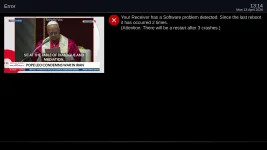
Using TNAP7, April 12, 2026 on an Edision OS Mio+, with Picture-in-Picture activated showing two different channels on same transponder on the screen, I pressed '0' to swap the two windows. Function did not work and Edision said I had a software problem. Crash log attached.

Also: we used to be able to size and locate the P-in-P window. I can't find how to do that. I can only see how to activate or deactivate.
 

Attachments

Using TNAP7, April 12, 2026 on an Edision OS Mio+, with Picture-in-Picture activated showing two different channels on same transponder on the screen, I pressed '0' to swap the two windows. Function did not work and Edision said I had a software problem. Crash log attached.

Also: we used to be able to size and locate the P-in-P window. I can't find how to do that. I can only see how to activate or deactivate.
Use hot key setup to assign the context button to (show extension selection). Then press context button and you will see the green, yellow and blue buttons will allow picture and picture options.
 
Use hot key setup to assign the context button to (show extension selection). Then press context button and you will see the green, yellow and blue buttons will allow picture and picture options.
Done. Works! Not sure how anybody on the planet would have figured that out without asking. When '0' is pressed to swap windows, got the green screen so that issue remains.

ADDED: Ok, with two windows open, using the Context button I can press Red to swap the windows. That works.
 
Last edited:
I probably need to disable that log creation. The last 18 out of 20 have been empty, and then I have no idea how they were created. So they are just time wasters for everyone at this point. What is needed is repeatable steps to re-create the crash. Let me see about getting rid of them...
 
The crash caused in channel selection screen and pressing menu twice for settings should be fixed after today (0414). Providing the way to reproduce it was the key as the receiver generated logs are not providing much useful information.

If the receiver generated logs are changed to provide more information, then the receiver slows down. At this point it is probably best just to find steps to repeat the crash or set proper debugging logs on the receiver first, then re-enact the crash. Anyway, Thanks!
 
Done. Works! Not sure how anybody on the planet would have figured that out without asking. When '0' is pressed to swap windows, got the green screen so that issue remains.

ADDED: Ok, with two windows open, using the Context button I can press Red to swap the windows. That works.
When '0' is pressed to swap windows....... Update the image and try that again. That particular crash could not be reproduced in my Mio4K, but efforts to fix it were made anyway
 
When '0' is pressed to swap windows....... Update the image and try that again. That particular crash could not be reproduced in my Mio4K, but efforts to fix it were made anyway
After today's online update, it works like a charm. I can now either press '0' to swap the windows or use the Context key as programmed yesterday which lists actions available by using the colour buttons.
 
Hello EB,
First I want to thank you for yet another amazing version of TNAP - I'm particularly excited about the decimals in the frequency, as it's fun to try to tune in those low SR transponders!

I have installed the April 12 build earlier today, and one small problem i'm running into is that the overscan wizard is not working for the right side and bottom adjustments - I can set the top and left side, but when i hit the left/right arrows for the right or bottom adjustments, the numbers change but the graphics don't. I have tried with different resolutions and with last week's build, with same results.

In case that matters, my display is an older Toshiba TV model 22LV611U

also, not sure if it's possible to change that, but since the targeted user base is mostly in North America, would it be possible to default the display refresh rate to 60Hz upon installation? Not a problem with more recent TVs but my old Toshiba just displays a black screen with 50Hz HDMI signal (I use WebIF to go in and adjust). Not a big deal, of course

Thanks!
 
Summary of what was done today:
1. Overscan wizard fix — plugin.py: write dst_apply after the four framebuffer values. SF8008 requires this to commit changes visually. Verified on device before push.
2. First-boot 60Hz default — enigma2.sh.in: pre-seed 1080p + 60Hz into the settings file on first boot for proc-based STBs (non-Amlogic). Avoids the
720p/50Hz default that was coming from VideoHardware's list ordering.

These changes should work and be available after 04-14-2026.
 
I have installed the April 12 build earlier today, and one small problem i'm running into is that the overscan wizard is not working for the right side and bottom adjustments - I can set the top and left side, but when i hit the left/right arrows for the right or bottom adjustments, the numbers change but the graphics don't. I have tried with different resolutions and with last week's build, with same results.
I found that the graphics do change, but you have to scroll a *long* way from the default value before they start.

Did you also notice that it's now "right" and "bottom" instead of "width" and "height" as it used to be?
 
You guys might be enlightened a bit to read the first post carefully in this thread as we aint in Kansas anymore: This aint the same image. This is a custom image built with the latest sources, so a bunch of things are different. Some are seen....Some not. First post is here: TNAP-7 Image Discussion

What matters if they (things like overscan) work or not. Not how they are worded or listed. Everything has to be translated into other languages which is also something to consider when it comes to wording. The language pack on this image is large.

The Plugins list for example can be configured to look several different ways. As stated earlier, edits have been made to make the overscan work properly.....We will see.... The wording is trivial if the feature works, and the wording is easily understood.
 
In regards of your post #305, my epg does not show anything on those chanels from 101W-ku !
is any tweeking to be done on the transponder digits, or any other settings ?
 
The transponder should be entered EXACTLY as shown, which means you may have to re-scan. Your transponder has to equal and be identical to the epg transponder. And of course the sources need to be selected in epgimport plugin. You have probably already done that as they are the same sources from 87w Ku. This stuff runs automatic. Set it and forget about it.
 
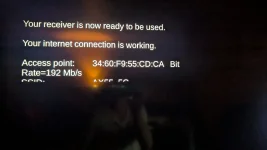
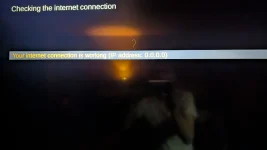
Noticed that during the internet connection setup, after everything is correct, the message does not show the ip adress, just a bunch of 0; it is like that for many tnap7 versions for Mio4k+. Not a big issue, just a "cosmetic" info thing.
Mini4k does show the true ip address !
 

Attachments

  • PXL_20260415_051701911.MP.webp
    PXL_20260415_051701911.MP.webp
    243.6 KB · Views: 5
  • PXL_20260415_051819889.MP.webp
    PXL_20260415_051819889.MP.webp
    168.2 KB · Views: 5
Octagon SF8008

Unable to set the Picon display in the channel list
We do not have the Colbat skin you are using. It might help to upload it. Is the missing wifi problem in your sf8008 repaired?

Fixes to prevent the crash have been added for April 16 2026 or later. Maybe the edits made will fix it.
 
Noticed that during the internet connection setup, after everything is correct, the message does not show the ip adress, just a bunch of 0; it is like that for many tnap7 versions for Mio4k+. Not a big issue, just a "cosmetic" info thing.
Mini4k does show the true ip address !
0416 or later:
- ef842bc97 — InstallWizard: live IP via netifaces (no more 0.0.0.0)
- 08f928af3 — InstallWizard: WiFi adapters no longer skipped
- 3ee291184 — NetworkWizard: InterfaceSelect WiFi fix, checkWlanStateCB hang fix, showIP hardcoded eth0 fix, timer infrastructure
- ba6127618 — NetworkWizard: scrollable WiFi metrics (ScrollLabel + keyUp/keyDown)
- 72c386b35 — NetworkWizard: explicit deactivate→activate before timer (the missing restart)
- 1f886cb39 — NetworkWizard: fix keyUp/keyDown scrolling condition + "up to 30 seconds" message
- 775ffb923 — NetworkWizard: IP address and Bitrate added to WiFi metrics
- bbfa8f0dd — NetworkWizard: crash fix for receivers without ScrollLabel

That area needed some work. Thanks.
 
Back
Top