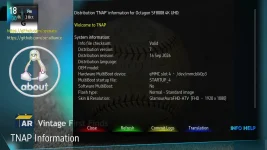
I see there are 191 online updates available. Is an updated image download coming on TNAPimages?

- Home
- Forums
- FTA Set Top Box Discussions/Files
- FTA Set Top Box Discussions
- The North American Project E2 Image Discussions
You are using an out of date browser. It may not display this or other websites correctly.
You should upgrade or use an alternative browser.
You should upgrade or use an alternative browser.
TNAP-7 Image Discussion
- Thread starter el bandido
- Start date

el bandido
TNAP-Images
Correct.
Go through them carefully and see what they are. Then look and see if an image update is available. What you are seeing is a minor enigma2 update. When one file in the enigma2 group is updated then all of the other files in enigma2 group are automatically rebuilt. This makes the update look bigger than it is.
As always, no guarantees or warranties, but you should be able to easily online update as the changes are minor. Thanks for asking.
Go through them carefully and see what they are. Then look and see if an image update is available. What you are seeing is a minor enigma2 update. When one file in the enigma2 group is updated then all of the other files in enigma2 group are automatically rebuilt. This makes the update look bigger than it is.
As always, no guarantees or warranties, but you should be able to easily online update as the changes are minor. Thanks for asking.

I have TNAP7/16 Sep 2026 installed on an OS mini 4K. In the default "Blind Scan (TNAP-MOD) for edision osmini4k" menu I cannot set the "Scan start symbolrate" to "00" to bring up the less than 1000 submenu.Page 34, Post#676 Shows the blindscan capabilities of the Edision mini-mio-mio+ 4k receivers below 1000 Symbol Rate. The lowest I have found is blindscan is 290 Symbol Rate on 99w Ku and the lowest I have found that is usable so far is 360 Symbol Rate on 99w Ku. A Professional low drift lnb is suggested for these low symbol rates. The Edision 4K receivers are the only enigma2 receivers that can blindscan this low.
The Edision 4K blindscan menu has to be set to 00 for a low symbol rate, then start the scan. Exit the blindscan plugin completely when the scan starts and when you return, the other two low symbol rate entries will be seen. This is a bug that has been fixed in the next update.
If I've read this thread properly, I understand I have to install "driver manager" to then find the alternate blindscan module that would allow setting these low SR search values. I cannot find the driver manager in any of the "Plugin Browser", "Download plugins", sub-categories.
Could you tell me where to find the driver manager itself?
Thanks, el bandido. TNAP7, as others have said, is awesome.
el bandido
TNAP-Images
TNAP allows select-able drivers for the Edision 4K receivers. You will need to install the ONE driver that supports small symbol rates. This driver is installed by default when the image is flashed for the first time. So change it and 00 symbol rate will work.
In the receiver, using the remote, Main menu--->Plugin Browser, scroll over or scroll to Driver Selector and press OK on the remote to enter Driver Selector once it is highlighted.
Once inside Driver Selector, use the remote right arrow key to cycle through the drivers. You want the one that says " T2MI-Module-TNAP-Mod"

Press the Green remote button to apply and wait for the box to reboot. (Follow onscreen instructions after pressing the green remote button.)
Once the box reboots, return to the Driver Selector to verify. Once verified, press the Red remote button to exit.
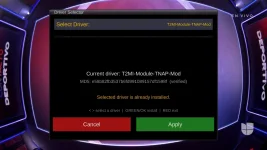
Note: The low symbol blindscan is available only with Edision 4K receivers AND this driver. No other combination will work.
In the receiver, using the remote, Main menu--->Plugin Browser, scroll over or scroll to Driver Selector and press OK on the remote to enter Driver Selector once it is highlighted.
Once inside Driver Selector, use the remote right arrow key to cycle through the drivers. You want the one that says " T2MI-Module-TNAP-Mod"
Press the Green remote button to apply and wait for the box to reboot. (Follow onscreen instructions after pressing the green remote button.)
Once the box reboots, return to the Driver Selector to verify. Once verified, press the Red remote button to exit.
Note: The low symbol blindscan is available only with Edision 4K receivers AND this driver. No other combination will work.
As a novelty, you might also want to try the nwwsviewer, which pulls the packets from the noaa weather multistream transponder on 121W. The tnapnowplaying plugin provides posters for the hidden radio channels on 101w.
I run a full goes weather setup off of a raspberry pi and use vitality goes to render it on my network. That gives me all the satellite pictures and the emwin info right from the weather satellite but I think that nwwsviewer is neat for people to actually be able to see what is available from the direct feeds.
Running into weather plugin issues specific to TNAP-7 on my SF8008 v3 that don't occur on stock OpenPLi with the same receiver class — wanted to pass along a clean writeup in case it's useful.
Environment:
File "/usr/lib/enigma2/python/Plugins/Extensions/OAWeather/plugin.py", line 176, in keySave
File "/usr/lib/enigma2/python/Plugins/Extensions/OAWeather/plugin.py", line 314, in reset
AttributeError: 'Weatherinfo' object has no attribute 'setmode'. Did you mean: 'set_mode'?
Issue 2 — after reinstalling OAWeather, city search silently fails instead of crashing:
File "/usr/lib/enigma2/python/Plugins/Extensions/OAWeather/plugin.py", line 996, in citySearch
builtins.AttributeError: 'Weatherinfo' object has no attribute 'getCitylist'
I checked Tools/Weatherinfo.pyc directly with strings — it only exposes set_mode and get_citylist (snake_case). OAWeather/plugin.py on this build is calling the old camelCase names (setmode, getCitylist) that don't exist in the currently-packaged Weatherinfo lib. Looks like plugin.py and enigma2-tools-weatherinfo are out of sync with each other on the TNAP feed — likely plugin.py is ahead of a Weatherinfo revision that renamed those methods, or vice versa.
Net effect: OAWeather's city-search screen doesn't work at all, and whenever it runs (including apparently periodic revalidation, not just manual settings-screen use), it silently resets weathercity/owm_geocode back to the plugin's hardcoded Hamburg, DE default and wipes any manually-set location out of /etc/enigma2/settings.
Separately — weathermsn also fails, but for a different reason: the classic MSN weather endpoint now returns HTTP 400 on plain "City,State,Country" text queries (tested directly with curl against weather.service.msn.com, server reachable, request rejected). It looks like it now requires a Bing/MSN location code (wc:XXXXNNNN format) rather than free text, which weathermsn.city doesn't support entering.
Both plugins work fine location-wise on stock OpenPLi, so this looks TNAP-feed-specific rather than an issue with the underlying weather services.
No big deal whatsoever and it might just be on my end but wanted to pass it along if helpful.
Environment:
- Model: sf8008, TNAP-7, imagebuild 20260916, skin xDreamy
- enigma2-plugin-extensions-oaweather 0.0-148-gb9957ad
- enigma2-tools-weatherinfo 1.0+git99+110adaf0+110adaf685-r0
File "/usr/lib/enigma2/python/Plugins/Extensions/OAWeather/plugin.py", line 176, in keySave
File "/usr/lib/enigma2/python/Plugins/Extensions/OAWeather/plugin.py", line 314, in reset
AttributeError: 'Weatherinfo' object has no attribute 'setmode'. Did you mean: 'set_mode'?
Issue 2 — after reinstalling OAWeather, city search silently fails instead of crashing:
File "/usr/lib/enigma2/python/Plugins/Extensions/OAWeather/plugin.py", line 996, in citySearch
builtins.AttributeError: 'Weatherinfo' object has no attribute 'getCitylist'
I checked Tools/Weatherinfo.pyc directly with strings — it only exposes set_mode and get_citylist (snake_case). OAWeather/plugin.py on this build is calling the old camelCase names (setmode, getCitylist) that don't exist in the currently-packaged Weatherinfo lib. Looks like plugin.py and enigma2-tools-weatherinfo are out of sync with each other on the TNAP feed — likely plugin.py is ahead of a Weatherinfo revision that renamed those methods, or vice versa.
Net effect: OAWeather's city-search screen doesn't work at all, and whenever it runs (including apparently periodic revalidation, not just manual settings-screen use), it silently resets weathercity/owm_geocode back to the plugin's hardcoded Hamburg, DE default and wipes any manually-set location out of /etc/enigma2/settings.
Separately — weathermsn also fails, but for a different reason: the classic MSN weather endpoint now returns HTTP 400 on plain "City,State,Country" text queries (tested directly with curl against weather.service.msn.com, server reachable, request rejected). It looks like it now requires a Bing/MSN location code (wc:XXXXNNNN format) rather than free text, which weathermsn.city doesn't support entering.
Both plugins work fine location-wise on stock OpenPLi, so this looks TNAP-feed-specific rather than an issue with the underlying weather services.
No big deal whatsoever and it might just be on my end but wanted to pass it along if helpful.


el bandido
TNAP-Images
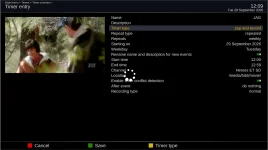
Verify /media/hdd/movie exists. In terminal, something like: ls /media/hdd/movie
You may also attach your timers.xml file in /etc/enigma2 to see if the problem can be replicated.
You may also attach your timers.xml file in /etc/enigma2 to see if the problem can be replicated.
el bandido
TNAP-Images
@ Arion, Excellent Documentation. Update the receiver and see if these are fixed or Not. Thanks
Issue 1 — OAWeather crashes on Save in its settings screen:
Issue 2 — after reinstalling OAWeather, city search silently fails instead of crashing:
Separately — weathermsn also fails
Issue 1 — OAWeather crashes on Save in its settings screen:
Issue 2 — after reinstalling OAWeather, city search silently fails instead of crashing:
Separately — weathermsn also fails
root@osmio4k:~# ls -l /media/hdd/movieVerify /media/hdd/movie exists. In terminal, something like: ls /media/hdd/movie
You may also attach your timers.xml file in /etc/enigma2 to see if the problem can be replicated.
root@osmio4k:~# ls -l /media/hdd/
drwxr-xr-x 2 root root 40 Sep 30 16:30 movie
drwxr-xr-x 2 root root 40 Sep 30 16:30 timeshift
Attachments
el bandido
TNAP-Images
Please tune the JAG channel. Then in telnet or terminal post the output of:
wget -qO- 'http://127.0.0.1/web/getcurrent' | grep -E 'e2servicereference|e2servicename'
wget -qO- 'http://127.0.0.1/web/getcurrent' | grep -E 'e2servicereference|e2servicename'
root@osmio4k:~# wget -qO- 'http://127.0.0.1/web/getcurrent' | grep -E 'e2servicereference|e2servicename'Please tune the JAG channel. Then in telnet or terminal post the output of:
wget -qO- 'http://127.0.0.1/web/getcurrent' | grep -E 'e2servicereference|e2servicename'
<e2servicereference>1:0:1:2:1:0:A1D5054:0:0:0:</e2servicereference>
<e2servicename>Heroes ET SD</e2servicename>
el bandido
TNAP-Images
Excellent! Thanks.
That narrows this down considerably. The next test should be:
1. Stay on Heroes ET SD.
2. Make a manual recording for 30–60 seconds.
3. Verify the .ts is created and plays.
4. Then create a brand-new one-time timer for Heroes ET SD, starting 1–2 minutes later and lasting 1 minute.
Verify these recordings work and are in the proper location.
That narrows this down considerably. The next test should be:
1. Stay on Heroes ET SD.
2. Make a manual recording for 30–60 seconds.
3. Verify the .ts is created and plays.
4. Then create a brand-new one-time timer for Heroes ET SD, starting 1–2 minutes later and lasting 1 minute.
Verify these recordings work and are in the proper location.
@ Arion, Excellent Documentation. Update the receiver and see if these are fixed or Not. Thanks
Issue 1 — OAWeather crashes on Save in its settings screen:
Issue 2 — after reinstalling OAWeather, city search silently fails instead of crashing:
Separately — weathermsn also fails
Great…appears to be fixed. I had to flash a new image into an open Emmc slot as I had changed some things in the process and wanted to be sure that the issue was resolved. It’s working as expected now so thanks for the rework!
Interested in trying nwwsviewer. Is there an ipk installer or telnet script to install? I mainly use OpenViX 6.7.I run a full goes weather setup off of a raspberry pi and use vitality goes to render it on my network. That gives me all the satellite pictures and the emwin info right from the weather satellite but I think that nwwsviewer is neat for people to actually be able to see what is available from the direct feeds.
I completed my goes station recently. Although the Viasat ka band dish is supposedly too small. After several feed designs I get steady signal at around 3.2 dB. The data received is impressive and overwhelming. Impressive is an understatement.
I haven't actually managed to get Vitality installed and setup. When messing around with Satdump on different goes 19 frequencies somehow I had a folder with full disk, full color images with FD in the file names. Since then I haven't been able to find any on hrpt @ 1694.1 MHz.
Attachments
el bandido
TNAP-Images
The enigma2-plugin-extensions-nwwsviewer_1.2-r0_all package is a TNAP plugin.
TNAP plugins are developed and tested for use with TNAP images. They may or may not work correctly on other Enigma2 image distributions due to differences in libraries, dependencies, Python versions, Enigma2 components, and image-specific configuration.
For this reason, no IPK installer package or Telnet installation script is provided for use on other distributions.
You are welcome to use, modify, or adapt the attached plugin as you wish. However, if you choose to run it on a non-TNAP image, you will need to provide your own installation, compatibility troubleshooting, and support.
TNAP plugins are developed and tested for use with TNAP images. They may or may not work correctly on other Enigma2 image distributions due to differences in libraries, dependencies, Python versions, Enigma2 components, and image-specific configuration.
For this reason, no IPK installer package or Telnet installation script is provided for use on other distributions.
You are welcome to use, modify, or adapt the attached plugin as you wish. However, if you choose to run it on a non-TNAP image, you will need to provide your own installation, compatibility troubleshooting, and support.
Attachments

Whenever I do a Full Restart or Restart Enigma I get the message: "[4] updated package available:
Do you want to start firmware upgrade now?
Yes
No
But when I choose "Yes" it doesn't find anything to upgrade! This happens even after I have done and completed a scheduled upgrade. Any ideas how to solve this issue?
Do you want to start firmware upgrade now?
Yes
No
But when I choose "Yes" it doesn't find anything to upgrade! This happens even after I have done and completed a scheduled upgrade. Any ideas how to solve this issue?
Attachments

el bandido
TNAP-Images
I would guess your image is around a month old. Installing today's image will probably solve that. Check your image date and see.
I have the latest Image installed. I have been experiencing this on Both my Octagon SF8008 and MIO 4KI would guess your image is around a month old. Installing today's image will probably solve that. Check your image date and see.