el bandido
TNAP-Images
Please zip your /etc//enigma2 folder and post it. Let's see what is happening. Did you get the mood mux to work by scanning??
Last edited:

enigma2.zip is attached. Yes, Mood Music is working fine now by scanning 101W.Please zip your /etc//enigma2 folder and post it. Let's see what is happening. Did you get the mood mux to work by scanning??
enigma2.zip is attached. Yes, Mood Music is working fine now by scanning 101W.
By start fresh, do you recommend I simply flash a new image and don't restore any backup settings? If that will solve this, then I can do that....Thanks for taking the time to upload this. I can't do anything with it.
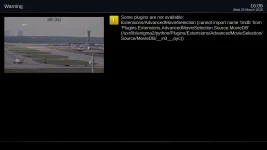
Uninstall the AdvancedMovieSelection plugin. It is python2 and I do not want to try to update it to python3.I installed and uninstalled the tmdb plugin. Now I sometimes get the following error message when I go into or out of Plugins.
View attachment 19723
I deleted the enigma2 folder and recreated. As I was building up the bouquets, they were appearing in webif. At some point, maybe when I added all the bouquets using iptv-org playlists, the webif stopped showing any bouquets. So maybe I exceeded some capacity or number of bouquets. I'm not too concerned. I think things are working faster, blind scans using the No-T2MI driver are fast and complete, now that I cleaned everything. So I will keep this configuration. The new enigma is attached.Excellent! Keep a copy and if no improvements, then revert back to using it.

It probably creates an unusual bouquetAt some point, maybe when I added all the bouquets using iptv-org playlists, the webif stopped showing any bouquets.
Because it's easy to do, I deleted, using the proper Remove entry command in the Mio4k+, all iptv-created bouquets. What do you know? Now I can see all bouquets in webif! The bouquets are still showing in the enigma2 folder but they are marked with suffix .del. And the bouquets.tv folder only has satellite bouquets.It probably creates an unusual bouquet
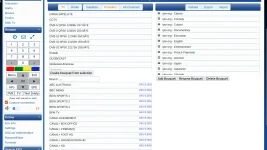
One reason I wanted to start clean with a new enigma2 folder was because I've likely never edited any bouquets BUT I wanted to verify this. So after starting with a clean enigma2, I only used the remote control to copy bouquets from the scanned satellite folders using the Edision command. No outside editor touched anything.
I have now discovered when I slowly added iptv bouquets that when I added the eleventh bouquet, it broke. Ten iptv bouquets from language, country and genre categories worked fine. Not sure what this all proves. The eleventh file added was classic.tv which you identified caused corruption.
I don't understand Claude but I think he knows what he's doing. I like that he's on my team. I deleted the four iptv bouquets you mentioned were corrupted and the webif is now working with all other iptv bouquets in place. I'll stand by for an update. I usually check about once/day normally anyway.Now maybe we are getting somewhere. My AI claims he fixed it. So wait for the next image update. The openwebif bouquet editor should be repaired:...