TNAP-7 Image Discussion

This problem also occurs with the default skin.
Yes, the Wi-Fi works correctly.
Excellent!! Update tomorrow. The crash should be gone. If not, run this in telnet or terminal (putty):
init 4
then
ENIGMA_DEBUG_LVL=5 enigma2 > /tmp/enigma.log 2>&1
That will start enigma2 debug properly and output to enigma.log in /tmp.
Then add picons and let receiver crash. Upload enigma.log to this forum.
Those steps give a much better log. Hopefully the picon crash is fixed and these steps will not be needed. Thanks.
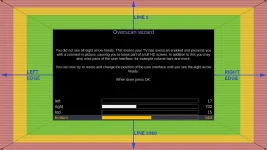
 
Summary of what was done today:
1. Overscan wizard fix — plugin.py: write dst_apply after the four framebuffer values. SF8008 requires this to commit changes visually. Verified on device before push.
2. First-boot 60Hz default — enigma2.sh.in: pre-seed 1080p + 60Hz into the settings file on first boot for proc-based STBs (non-Amlogic). Avoids the
720p/50Hz default that was coming from VideoHardware's list ordering.

These changes should work and be available after 04-14-2026.
ok i installed the 04/15 build, without backup.
- I was able to use the overscan wizard but as mentioned yesterday by MrJames, I had to lower the values for right/bottom much more than expected, so i'm not sure if this is the expected behavior or still not working right - see screenshot.
1776265802591.webp

- now about the default video refresh rate, with this installation, as expected it defaulted to 60Hz video upon initial reboot, however, when it got to the step where the wizard is asking for resolution, it went back to 50Hz until i reselected 1080p and then 60 Hz in the next screen (done via webif display)
 
The question is: Does the overscan wizard work? Do not worry about the values, they are just numbers. Does it work?

I will see what can be done about the resolution.
 
The question is: Does the overscan wizard work? Do not worry about the values, they are just numbers. Does it work?

I will see what can be done about the resolution.
yes it does - i appears to not be working at first as the numbers change but nothing else is moving, and then after a moment, once the numbers are low enough it's working and it seems to have saved it properly.
 
Clock issue I've noticed- I have it set to be H:mm so it will show 12-hour time not 24-hour. It works in the menus, but the "Info bar" on channels and also the LCD screen still show 24-hour time
 
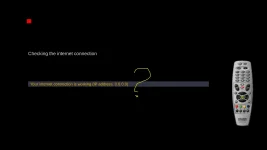
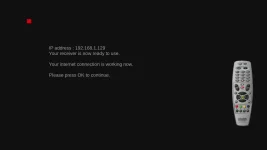
Ahh...There are two different places that it is possible to see the ip!
Let me investigate this some more. Probably more edits need to be done.
As I said is not a big inconveniece, more a cosmetic issue. I guess you concentrate your attention toward other pressing issues.
But thank you !
 
Hey guys, been out of the game for awhile and i need some help, feel like i am re-learning all over again. I have the Edision OS Mini 4K. I have no problem installing TNAP 6 to it using the USB method, but i can not get TNAP 7 to boot. It all seems to load no problem but then the receiver is stuck on boot. I have left it for 20 minutes and still just boot. I have tried a few times. Of course i am getting the file from TNAP Images site. The one thing i noticed is the size of the emmc file. with TNAP 6 it was 258,048 KB, with TNAP 7 it is 642,048 KB. Very much larger. Not sure if this has anything to do with my issue. I have never tried the multi-boot version. To be honest i dont understand the difference. Any help would be appreciated. Forgive me if my problems seem like noobie problems, and move my post somewhere more appropriate if need be.
 
...would it be possible to default the display refresh rate to 60Hz upon installation? Not a problem with more recent TVs but my old Toshiba just displays a black screen with 50Hz HDMI signal (I use WebIF to go in and adjust). Not a big deal, of course...

...It all seems to load no problem but then the receiver is stuck on boot...
Is your TV old? Any chance it's doing what brct203 discovered? Can you access using Webif from your PC?
 
No, the tv is not too old, and it is not a "black screen" but it is a black background showing a big Edision Logo across the tv screen, and also says "Boot" on the front panel display of the receiver.
 
Hey guys, been out of the game for awhile and i need some help, feel like i am re-learning all over again. I have the Edision OS Mini 4K. I have no problem installing TNAP 6 to it using the USB method, but i can not get TNAP 7 to boot. It all seems to load no problem but then the receiver is stuck on boot. I have left it for 20 minutes and still just boot. I have tried a few times. Of course i am getting the file from TNAP Images site. The one thing i noticed is the size of the emmc file. with TNAP 6 it was 258,048 KB, with TNAP 7 it is 642,048 KB. Very much larger. Not sure if this has anything to do with my issue. I have never tried the multi-boot version. To be honest i dont understand the difference. Any help would be appreciated. Forgive me if my problems seem like noobie problems, and move my post somewhere more appropriate if need be.
(1) Download attached osmini4k.zip
(2) Extract it onto a known-to-be-good usb drive. You should have an osmini4k folder when extraction is complete. Wait until extraction is complete as it may take some minutes.
(3) With the receiver Powered OFF. insert the prepared usb drive into the receiver. Power on the receiver and follow onscreen instructions.

As for the image size, you are not looking at them correctly. You are comparing it seems an unzipped multiboot image to an unzipped recovery image. They are not equal. Yes, TNAP 7 is a bit bigger, but it is measured in a few MB, Not 100's of MB.

These receivers are easy to update. The images are online and are visible in the receiver menus. Anyway, what is provided should get your receiver running.
 
Back
Top