Megatron817
Administrator
Yes, Those are fixed on Mio+ 4k. ThanksSee if these are fixed today. Thanks.
The boot ordering bug should also be fixed.
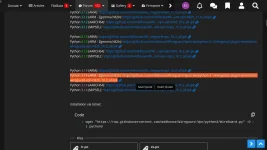
Updates include a small python version increase (3.14.3-3.14.4)
View attachment 19865

Yes, Those are fixed on Mio+ 4k. ThanksSee if these are fixed today. Thanks.
The boot ordering bug should also be fixed.
Updates include a small python version increase (3.14.3-3.14.4)
View attachment 19865

root@dual:~# opkg list | grep wireguard
enigma2-plugin-extensions-wireguard-tnap - 4.0+git0+3c1c57226e-r0 - WireGuard VPN Self-Hosted Server for TNAP
kernel-module-wireguard-4.4.35 - 4.4.35-4 - wireguard kernel module
 wireguard kernel module; WireGuard secure network tunnel
wireguard-tools - 1.0.20210914-r0 - WireGuard is an extremely simple yet fast and modern VPN
wireguard-tools-bash-completion - 1.0.20210914-r0 - WireGuard is an extremely simple yet fast and modern VPN
wireguard-tools-doc - 1.0.20210914-r0 - WireGuard is an extremely simple yet fast and modern VPN - Documentation files
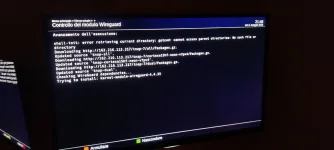
root@dual:~# opkg update
Downloading http://162.216.113.217/tnap6.1/all/Packages.gz.
Updated source 'TNAP-all'.
Downloading http://162.216.113.217/tnap6.1/cortexa15hf-neon-vfpv4/Packages.gz.
Updated source 'TNAP-cortexa15hf-neon-vfpv4'.
Downloading http://162.216.113.217/tnap6.1/dual/Packages.gz.
Updated source 'TNAP-dual'.
Downloading http://162.216.113.217/downloads/xDreamy-skin/Packages.gz.
Updated source 'TNAP-xdreamy'.
root@dual:~# opkg install wireguard-tools
Installing kernel-module-ip6-udp-tunnel-4.4.35 (4.4.35) on root
Downloading http://162.216.113.217/tnap6.1/dual/kernel-module-ip6-udp-tunnel-4.4.35_4.4.35-4_dual.ipk.
Installing kernel-module-udp-tunnel-4.4.35 (4.4.35) on root
Downloading http://162.216.113.217/tnap6.1/dual/kernel-module-udp-tunnel-4.4.35_4.4.35-4_dual.ipk.
Installing kernel-module-wireguard-4.4.35 (4.4.35) on root
Downloading http://162.216.113.217/tnap6.1/dual/kernel-module-wireguard-4.4.35_4.4.35-4_dual.ipk.
Installing wireguard-tools (1.0.20210914) on root
Downloading http://162.216.113.217/tnap6.1/cortexa15hf-neon-vfpv4/wireguard-tools_1.0.20210914-r0_cortexa15hf-neon-vfpv4.ipk.
Configuring kernel-module-ip6-udp-tunnel-4.4.35.
Configuring kernel-module-udp-tunnel-4.4.35.
Configuring kernel-module-wireguard-4.4.35.
Configuring wireguard-tools.
depmod: WARNING: could not open modules.builtin.modinfo at /lib/modules/4.4.35: No such file or directory
root@dual:~#In fact, it was working fine until a week ago.Everything needed for wireguard has existed on our feeds for months. For some reason, your plugin needs help. Our feeds are correct....
Code:root@dual:~# opkg list | grep wireguard enigma2-plugin-extensions-wireguard-tnap - 4.0+git0+3c1c57226e-r0 - WireGuard VPN Self-Hosted Server for TNAP kernel-module-wireguard-4.4.35 - 4.4.35-4 - wireguard kernel module wireguard kernel module; WireGuard secure network tunnel wireguard-tools - 1.0.20210914-r0 - WireGuard is an extremely simple yet fast and modern VPN wireguard-tools-bash-completion - 1.0.20210914-r0 - WireGuard is an extremely simple yet fast and modern VPN wireguard-tools-doc - 1.0.20210914-r0 - WireGuard is an extremely simple yet fast and modern VPN - Documentation files root@dual:~# opkg update Downloading http://162.216.113.217/tnap6.1/all/Packages.gz. Updated source 'TNAP-all'. Downloading http://162.216.113.217/tnap6.1/cortexa15hf-neon-vfpv4/Packages.gz. Updated source 'TNAP-cortexa15hf-neon-vfpv4'. Downloading http://162.216.113.217/tnap6.1/dual/Packages.gz. Updated source 'TNAP-dual'. Downloading http://162.216.113.217/downloads/xDreamy-skin/Packages.gz. Updated source 'TNAP-xdreamy'. root@dual:~# opkg install wireguard-tools Installing kernel-module-ip6-udp-tunnel-4.4.35 (4.4.35) on root Downloading http://162.216.113.217/tnap6.1/dual/kernel-module-ip6-udp-tunnel-4.4.35_4.4.35-4_dual.ipk. Installing kernel-module-udp-tunnel-4.4.35 (4.4.35) on root Downloading http://162.216.113.217/tnap6.1/dual/kernel-module-udp-tunnel-4.4.35_4.4.35-4_dual.ipk. Installing kernel-module-wireguard-4.4.35 (4.4.35) on root Downloading http://162.216.113.217/tnap6.1/dual/kernel-module-wireguard-4.4.35_4.4.35-4_dual.ipk. Installing wireguard-tools (1.0.20210914) on root Downloading http://162.216.113.217/tnap6.1/cortexa15hf-neon-vfpv4/wireguard-tools_1.0.20210914-r0_cortexa15hf-neon-vfpv4.ipk. Configuring kernel-module-ip6-udp-tunnel-4.4.35. Configuring kernel-module-udp-tunnel-4.4.35. Configuring kernel-module-wireguard-4.4.35. Configuring wireguard-tools. depmod: WARNING: could not open modules.builtin.modinfo at /lib/modules/4.4.35: No such file or directory root@dual:~#
Run opkg update first, then install your tools as shown.
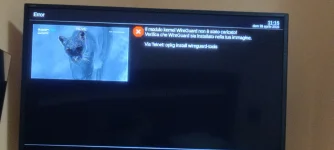
The 16.2 plugin worked perfectly until the TNAP release on April 20th, there's no point in asking Madhouse.opkg install wireguard-tools
No packages installed or removed.
That means the tools are already installed. The madhouse wireguard is Closed Source. Contact madhouse about this error.
I already tried the latest build a little while ago.That last build Is Today, which is on the Internet where the receiver can see it. Front display and boot-logos fixed in dual....
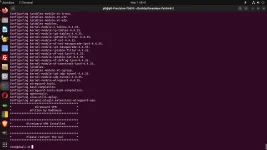
We find that there is an automatic fstrim that was set by default for this image along with most OE alliance images. TNAP 7 Is the only image currently capable of trimming a M.2 drive. While I doubt the fstrim wiped the drive (apologies if it did), it would be a good idea to eliminate the cron job that you do not know about! Or leave it if you want it to run.Some reason my M.2 SSD in the Octagon sf8008 got erased after flashing 04-10.
edit
I guess after the settings restore something got corrupted so was able to fix by initializing the storage.
Luckily had backed up a lot to my laptop.


Yes, thank you, I can now connect to the servers.Today's image works with wireguard. Let me know if there are additional problems.
View attachment 19877
Is this the version for Python 3.14 or am I wrong?Try this version.