Yes, they are silabs 2166D tuners. Will have to try in my Edision mini, but maybe the same tuners?Your SF8008 is SiLabs SI2166D?
SF8008 Avalink AVL 6261 (62X1) works. I do not have a receiver with SI2166D to test....

- Home
- Forums
- FTA Set Top Box Discussions/Files
- FTA Set Top Box Discussions
- The North American Project E2 Image Discussions
You are using an out of date browser. It may not display this or other websites correctly.
You should upgrade or use an alternative browser.
You should upgrade or use an alternative browser.
TNAP-7 Image Discussion
- Thread starter el bandido
- Start date

el bandido
TNAP-Images
The blindscan graph will work with Edision osmini4k, but only with the TNAP driver. You may install the TNAP driver using the driver selector plugin.
el bandido
TNAP-Images
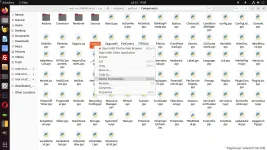
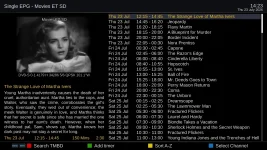
The epg list problem should be fixed with the attached EpgList.py file. You can either wait until another update is available or install the attached file directly in the receiver: /usr/lib/enigma2/python/Components. The EpgList.pyc file should be deleted as shown below, then restart enigma2.
Attachments
el bandido
TNAP-Images
el bandido
TNAP-Images
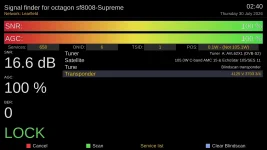
Added the Channel or Service count to Signal finder:
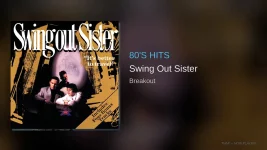
Made a few adjustments to tnapnowplaying:
Made a few adjustments to tnapnowplaying:

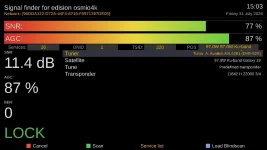
el bandido
TNAP-Images
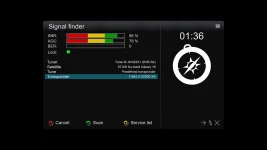
I prefer what we have as compared to some other images.
el bandido
TNAP-Images
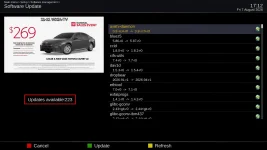
A decent-sized update is available. It is suggested to Flash this update with a new image due to what has changed.
GCC 16.1.0 = Current GCC 16 feature release
glibc 2.44 = Very newest 2.44 generation; Upstream was targeting its release around Aug. 1
OpenSSL 4.0.1-r0 = Current 4.0 release: 4.0.1
Python 3.14.7 = New Aug. 2026 bugfix release;
Samba 4.24.5-r0 = Current stable: 4.24.5
GStreamer = 1.28.5 Current stable: 1.28.5
FFmpeg = 8.1.2-r0 Current stable: 8.1.2
Rust = 1.96.1 Not newest --current stable of Rust is 1.97.1
A full image backup as a restore point is also suggested out of an abundance of caution.
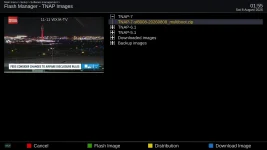
(Online Update Is Not Suggested)
GCC 16.1.0 = Current GCC 16 feature release
glibc 2.44 = Very newest 2.44 generation; Upstream was targeting its release around Aug. 1
OpenSSL 4.0.1-r0 = Current 4.0 release: 4.0.1
Python 3.14.7 = New Aug. 2026 bugfix release;
Samba 4.24.5-r0 = Current stable: 4.24.5
GStreamer = 1.28.5 Current stable: 1.28.5
FFmpeg = 8.1.2-r0 Current stable: 8.1.2
Rust = 1.96.1 Not newest --current stable of Rust is 1.97.1
A full image backup as a restore point is also suggested out of an abundance of caution.
(Online Update Is Not Suggested)

Done. No issues encountered.It is suggested to Flash this update with a new image due to what has changed...


el bandido
TNAP-Images
Suggestions are given. What you do or do not do is your decision.
It is good to know the large online update was a success. There are users who have been updating TNAP 7 for months without ever flashing the image. I can only wonder how their receiver is running as compared to a receiver that was updated by Image Flash.
For normal maintenance, an online update is convenient and usually OK. The recent image changes are not normal maintenance.
In some instances or situations, packages that are new may be missed by an online update. This is WHY the suggestion to flash was made. The command `opkg upgrade` primarily knows:
1. Which packages are currently installed.
2. Which newer versions are available in the feeds.
3. Which dependencies those packages require.
`opkg upgrade` does not automatically compare the receiver against the complete package manifest of the newest image. A freshly flashed image, however, is built directly from that current manifest.
Over time, continuously online upgraded systems can accumulate:
obsolete packages
unused files
old configuration(s)
remnants of previous image designs
A fresh flash removes much of that historical baggage and may provide a better user experience.
It is good to know the large online update was a success. There are users who have been updating TNAP 7 for months without ever flashing the image. I can only wonder how their receiver is running as compared to a receiver that was updated by Image Flash.
For normal maintenance, an online update is convenient and usually OK. The recent image changes are not normal maintenance.
In some instances or situations, packages that are new may be missed by an online update. This is WHY the suggestion to flash was made. The command `opkg upgrade` primarily knows:
1. Which packages are currently installed.
2. Which newer versions are available in the feeds.
3. Which dependencies those packages require.
`opkg upgrade` does not automatically compare the receiver against the complete package manifest of the newest image. A freshly flashed image, however, is built directly from that current manifest.
Over time, continuously online upgraded systems can accumulate:
obsolete packages
unused files
old configuration(s)
remnants of previous image designs
A fresh flash removes much of that historical baggage and may provide a better user experience.
el bandido
TNAP-Images
I think we should have this version as it seems better for dish alignment:

el bandido
TNAP-Images
Signal finder (shown in previous post) with Signal Sound or Audio. I have wanted this for some time, but always failed at it. Now it works! The sound changes as the signal increases or decreases. Keep in mind this is a work in progress, but it is stable enough to use and demonstrate. The video starts by doing a quick blindscan to grab some good transponders followed by demonstrating the signal audio.

EnoSat
Legit VIP
After installing the clean version 0808 on the MIO 4K and running various tests, the "blindscan" option disappeared.
So I tried the following:
opkg remove enigma2-plugin-systemplugins-blindscan --force-depends
opkg remove edision-blindscan-dvbs-utils-osmio4k --force-depends
opkg install edision-blindscan-dvbs-utils-osmio4k
opkg install enigma2-plugin-systemplugins-blindscan
reboot
But the item didn't show up. Do you have any other ideas besides reinstalling it ?
So I tried the following:
opkg remove enigma2-plugin-systemplugins-blindscan --force-depends
opkg remove edision-blindscan-dvbs-utils-osmio4k --force-depends
opkg install edision-blindscan-dvbs-utils-osmio4k
opkg install enigma2-plugin-systemplugins-blindscan
reboot
But the item didn't show up. Do you have any other ideas besides reinstalling it ?
el bandido
TNAP-Images
“After installing 0808 and running various tests, Blindscan disappeared” leaves out the one piece of information that matters most: What changed between the time Blindscan was visible and the time it was not? I have no clue and no answer to this question.
Then it is made worse here and turns it into a jigsaw puzzle:
opkg remove ... --force-depends
opkg remove ... --force-depends
opkg install ...
opkg install ...
Please Reflash 0808 clean, then configure the MIO4K normally, and check Blindscan before changing anything else. If it is present, the image is fine. Then make changes one at a time until you can identify exactly what causes it to disappear. Thanks.
Then it is made worse here and turns it into a jigsaw puzzle:
opkg remove ... --force-depends
opkg remove ... --force-depends
opkg install ...
opkg install ...
Please Reflash 0808 clean, then configure the MIO4K normally, and check Blindscan before changing anything else. If it is present, the image is fine. Then make changes one at a time until you can identify exactly what causes it to disappear. Thanks.

el bandido
TNAP-Images
I will repair the ustym4ks2ottx.... It needs display files. Thanks for the report!