How To Look For & Find 5G Interference in C Band

dont hook the tiny sa to the lnd, just put on the rod or yagi antenna and look for interfering signal when your tv has noise or pixel artifacts.
 
Thanks Mememeth. that will work for finding direction of RI.
But, I was thinking of hooking the tinysa to the lnb on the bud to view the full spectrum received there as well.
 
sing the tinysato look at / thru lnb ,you should usee a dr hd or birddog like item, they pass and or supply voltage to the lnb, useing tha tinysa ultra that way would let all the factory installed smoke out of it
 
Connecting to an LNBF:
Use a splitter rated 2GHz with one port power passing (or a 2 port power passing with a voltage block on one port). Connect the power passing leg to the STB to power the LNBF and select the polarity. Connect the non-power passing port to the Tiny SA. No need to attenuate as the internal attenuation should be fine. If you find the internal attenuator is not enough, there are some resellers on Amazon that package a selection of attenuator values or buy a step attenuator on Ebay or Amazon.

Personally, for signal sniffing, I use a 3+ element Yagi-Uda and 65dB step attenuator. Am attaching a photo of a set-up that I use for Fox Hunt signal tracking. An Arrow 3 element VHF Yagi-Uda, 65dB attenuator, Malchite SDR. For sniffing n77 signals, try a WiMax panel or Yagi, often found cheap at thrift stores and Ebay. https://www.ebay.com/itm/252616163661

20220730_111856[1].webp
 
Last edited:
Connecting to an LNBF:
Use a splitter rated 2GHz with one port power passing (or a 2 port power passing with a voltage block on one port). Connect the power passing leg to the STB to power the LNBF and select the polarity. Connect the non-power passing port to the Tiny SA. No need to attenuate as the internal attenuation should be fine. If you find the internal attenuator is not enough, there are some resellers on Amazon that package a selection of attenuator values or buy a step attenuator on Ebay or Amazon....

View attachment 17569

Awesome!
I already have a splitter set- up like that for running a receiver in loop-out, so no extra items needed there
I don't foresee doing much signal sniffing... so being able to ALSO use the TinySA on my lnb's gives me more incentive to fork out the dough. :th_thumbs20up:
 
The price you see ($129.95) Is Not the price you pay.

Date Ordered: Tuesday 03 January, 2023

Products
------------------------------------------------------
1 x JETSTREAM SMABNC (SMABNC) = $3.50
1 x TINYSA TINYSAULTRA (TINYSAULTRA) = $129.95
1 x JETSTREAM JT4120 (JT4120) = $3.95
1 x JETSTREAM SMAUHF (SMAUHF) = $4.95
------------------------------------------------------
Sub-Total: $142.35
United States Postal Service (Priority Mail®): $11.00
Sales Tax: $10.73
Total: $164.08
***Shipping charges are only an estimate. If shipping is more, we will notify you before shipping***
 
The Tiny SA Ultra was delivered a couple of days ago. I think most people that purchase one of these analyzers will find it easy to use. I have a couple of log periodic (yagi) antennas that are laying in the floor. These antennas will be installed later, but I could use one on the Tiny SA if needed.

A quick test of three local cell towers shows a small group of signals in the 3.9 GHz range. These signals have been identified as coming from the cell towers by doing a simple drive test using a vertical antenna that came with the Tiny SA. Having a small analyzer like this to "see" things makes a World of difference!

A cell tower will be seen on the analyzer as a group of spikes that are spaced out across a given frequency range. I usually set the analyzer to scan from 600 MHZ to 5 GHz. When I find interesting signals, I cut the scan range. A tour of 3 cell towers showed about the same groups of signals, and all three cell towers have a group around 3.9 GHz, or 3900 MHz.

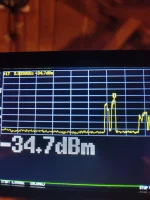
The Tiny SA does not have an easy way to do a screenshot, so I used a cell phone camera. Shown below is a group of spikes from a cell tower located around a Kilometer from my satellite dish for c band. This cell tower is within a couple degrees of due South. I have antennas aimed at this cell tower for my home internet. The Tiny SA was connected to one of these antennas when the photo shown below was taken. The signals around 3.9 GHz are about as strong as the rest of the signals coming from this cell tower. This is very interesting to me, and I would not have known about it except for the Tiny SA analyzer.

IMG_20230107_173255_hdr.webp
 
....I have antennas aimed at this cell tower for my home internet. The Tiny SA was connected to one of these antennas when the photo shown below was taken. The signals around 3.9 GHz are about as strong as the rest of the signals coming from this cell tower. This is very interesting to me, and I would not have known about it except for the Tiny SA analyzer.

View attachment 17579
Did your home internet switch to that band?
 
glad u like it, it could be put near u with a longer antenna, then when the tv image breaks up u can glance at the tinysa and see the signal, enjoy,
 
Excellent idea Mememeth! I have no c band reception issues at the present time.

A map shows T-Mobile Did Not buy any satellite c band spectrum for my area. Also, my T-Mobile gateway does not support c band operations.

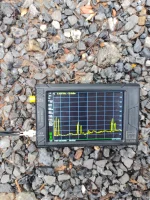
Shown below is a scan using a vertical antenna outside. The scan shown earlier was connected to an antenna mounted on the tower and aimed at the cell tower. This explains the big difference in signal strength.

In the photo below, you will set three sets of spikes. The set to the far left is the 600-900 MHz frequencies that are on the cell tower. These are the tallest spikes and also the strongest. The middle set of spikes is the cell bands around 1900-2500 MHz or 1.9-2.5 GHz. The set of spikes to the far right is satellite c band signals on the cell tower that are around 3900 MHz according to this analyzer. It should be noted that the c band cell signals are about as strong as the 1900-2500 signals, but are not as strong as the 600-900 MHz cell signals.

IMG_20230108_164302.webp
 
Last edited:
i dont know how to send a pdf file, but there is a work in progress project to make a flow chart for the tinysa ultra by , david massey , go to groups.io tinysa it is 5 pager right now, and people have thouble with the mio, ha. this msg was to go to el bandito,
 
Last edited:
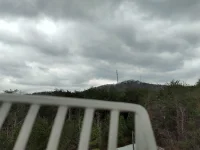
Using the Tiny Sa Ultra shows there is c band frequencies, mainly in the 3.8-3.9 GHz range coming from the cell tower across the street. Shown below is a picture of the cell tower as seen behind one of my antennas that is actually aimed at the tower. This picture was taken around 40 feet from the ground.

The c band signal from the cell tower was measured using the antennas on my tower. My antennas that are aimed at the cell tower are advertised at around 10db of gain, and show a nice, strong signal level of about -35dbm. Down on the ground, and using a small vertical antenna, the cell tower c band frequencies drop to about -60, -70 dbm. So there is a big difference in signal strength when comparing the antenna on my tower that is aimed at the cell tower, and the small vertical antenna on the ground in front of the c band satellite dish.

Further testing was done using a small beam antenna that has a frequency range of 600 MHz to 6 GHz. This antenna shows the c band signal to be strong when it is aimed at the cell tower, and weaker when the antenna is turned away from the cell tower. The 3.8-3.9 GHz c band signals also get stronger the closer you get to the cell tower.

No signal tests have been done on my c band satellite dish. C band Satellite signals on 87w, 89w, and 91w play without any issues, with no pixelation, break-ups...etc. I did not even suspect there were any c band signals on that cell tower, and would not have known about it without the Tiny SA Ultra.

Clutter and distance helps. The picture shows I am surrounded by trees, plus the cell tower is at least 1 kilometer away in air distance.There is no need for me to re-locate the satellite dish or buy any interference parts at this time. A spectrum analyzer is very useful when looking for interference sources. I think it is better to buy a cheap analyzer first to see exactly what is going on instead of buying interference parts such as lnbs or filters and hoping that they work!

IMG_20230111_151247_hdr.webp
 
Last edited:
There could also be another scenario where a c band satellite antenna is getting interference from the 5G c band, but the interference is not coming from the cell tower. For example, a 5G c band Internet gateway could be placed in a window that overlooks or is above a c band satellite dish. A satellite dish is pointed up, so it stands to reason that an interfering signal source needs to be above the dish. Getting the c band Internet gateway relocated to an area away from the dish might help in a situation such as this. But you have to know for certain where the inference is coming from before you can deal with it.

Using a cell phone that is connected to a c band 5G frequency while standing in front of a c band satellite dish would probably have no noticeable effect on the satellite operations of the c band dish.
 
Back
Top