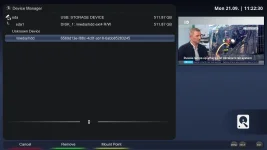
M.2 SSD For Octagon SF8008 v3 Supreme - Unknown Device

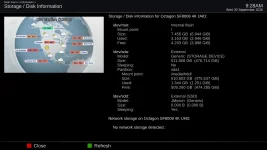
Hello, hoping you can help me get my M.2 NVME SSD working in my SF8008 v3 Supreme. When plugged into the M.2 slot, the drive shows up as "unknown device". When attached to the USB ports using a USB to M.2 adapter, the drive shows up in device manager and can be formatted. Why would the drive work connected to USB ports and not work when in the M.2 slot inside the receiver?

el bandido said I have a bridge for the M.2 internal drive. That is the difference... Do you mean there's a bridge inside the receiver or built into the SSD itself? Is there a way I can make this SSD work in the receiver?

I tried a WD Blue SN580 1TB and a WD Black SN7100 1TB. Both show up as unknown device when plugged into the M.2 slot. I know others have been able to install the same SSD's into their receivers but for some reason mine isn't working. Hoping its not a hardware failure.
 

Attachments

  • unknown device.webp
    unknown device.webp
    67 KB · Views: 13
Two things to do.
First, identify the installed image name and its version through the receiver's About screen.
Then using telnet or terminal, post the output of these 3 commands:
lsusb
cat /proc/partitions
dmesg | tail -100
 
My internal m.2 ssd stopped showing up a few weeks ago so I pulled it out and plugged in my external hdd to the usb.
This thread got me curious so I ordered an enclosure for the m.2 and got it today. With the enclosure the m.2 is working fine again.
I performed the 3 commands with the external enclosure not plugged in. Pretty sure my situation is hardware failure of the internal m.2.
Not seeing anything and I am sure when I got the sf8008 new it showed up as j micron or something like that.
 

Attachments

lsusb command with the usb m.2 enclosure plugged in.

TNAP 7 sf8008 /dev/pts/1
sf8008 login: root
Password:
root@sf8008:~# lsusb
Bus 001 Device 001: ID 1d6b:0002 Linux Foundation 2.0 root hub
Bus 001 Device 002: ID 05e3:0608 Genesys Logic, Inc. Hub
Bus 001 Device 003: ID 2040:b123 Hauppauge WinTV-HVR-955Q
Bus 001 Device 004: ID 0bda:c82c Realtek Semiconductor Corp. 802.11ac NIC
Bus 002 Device 001: ID 1d6b:0001 Linux Foundation 1.1 root hub
Bus 003 Device 001: ID 1d6b:0002 Linux Foundation 2.0 root hub
Bus 004 Device 001: ID 1d6b:0003 Linux Foundation 3.0 root hub
Bus 004 Device 002: ID 0bda:9210 Realtek Semiconductor Corp. RTL9210 M.2 NVME Adapter
root@sf8008:~#
 
You are missing the bridge:
pli@pli-Precision-T5610:~$ ssh root@192.168.1.2
Warning: Permanently added '192.168.1.2' (ECDSA) to the list of known hosts.
root@sf8008:~# lsusb
Bus 001 Device 001: ID 1d6b:0002 Linux Foundation 2.0 root hub
Bus 001 Device 002: ID 05e3:0608 Genesys Logic, Inc. Hub
Bus 001 Device 003: ID 2040:7240 Hauppauge WinTV HVR-850
Bus 001 Device 004: ID 152d:0583 JMicron Technology Corp. / JMicron USA Technology Corp. JMS583Gen 2 to PCIe Gen3x2 Bridge
Bus 001 Device 005: ID 0bda:c82c Realtek Semiconductor Corp. 802.11ac NIC
Bus 002 Device 001: ID 1d6b:0001 Linux Foundation 1.1 root hub
Bus 003 Device 001: ID 1d6b:0002 Linux Foundation 2.0 root hub
Bus 004 Device 001: ID 1d6b:0003 Linux Foundation 3.0 root hub
root@sf8008:~#

Let me see what I can find. That does not look good.
 
Sorry for the delayed response...

Software
System OE: OE-Alliance 6.0
Firmware version: OpenATV 8.0.0-beta.20260926 (2026-09-26)
Kernel / Drivers: 4.4.35 / 20240104

lsusb
Bus 001 Device 002: ID 05e3:0608 USB2.0 Hub
Bus 001 Device 006: ID 0bda:c82c Realtek 802.11ac NIC
Bus 001 Device 001: ID 1d6b:0002 Linux 4.4.35 ehci_hcd EHCI Host Controller
Bus 002 Device 001: ID 1d6b:0001 Linux 4.4.35 ohci_hcd Generic Platform OHCI controller
Bus 003 Device 001: ID 1d6b:0002 Linux 4.4.35 xhci-hcd xHCI Host Controller
Bus 004 Device 001: ID 1d6b:0003 Linux 4.4.35 xhci-hcd xHCI Host Controller
Bus 001 Device 003: ID 0bda:2838 RTLSDRBlog Blog V4
Bus 001 Device 004: ID 05e3:0751 USB Storage USB Storage
Bus 001 Device 005: ID 152d:0583 JMicron USB to PCIE Bridge

cat /proc/partitions
major minor #blocks name
1 0 4096 ram0
1 1 4096 ram1
1 2 4096 ram2
1 3 4096 ram3
1 4 4096 ram4
1 5 4096 ram5
1 6 4096 ram6
1 7 4096 ram7
1 8 4096 ram8
1 9 4096 ram9
1 10 4096 ram10
1 11 4096 ram11
1 12 4096 ram12
1 13 4096 ram13
1 14 4096 ram14
1 15 4096 ram15
179 0 7471104 mmcblk0
179 1 1024 mmcblk0p1
179 2 1024 mmcblk0p2
179 3 1024 mmcblk0p3
179 4 3072 mmcblk0p4
179 5 4096 mmcblk0p5
179 6 4096 mmcblk0p6
179 7 4096 mmcblk0p7
259 0 4096 mmcblk0p8
259 1 4096 mmcblk0p9
259 2 32768 mmcblk0p10
259 3 8192 mmcblk0p11
259 4 16384 mmcblk0p12
259 5 16384 mmcblk0p13
259 6 16384 mmcblk0p14
259 7 16384 mmcblk0p15
259 8 7337984 mmcblk0p16
179 24 4096 mmcblk0rpmb
179 16 4096 mmcblk0boot1
179 8 4096 mmcblk0boot0
8 0 499871744 sda
8 1 499869696 sda1

dmesg | tail -100
stStdTiming[h:1152, v:864]
stStdTiming[h:1280, v:1024]
stStdTiming[h:1440, v:900]
stStdTiming[h:1680, v:1050]
stStdTiming[h:1600, v:900]
stStdTiming[h:1280, v:800]
stStdTiming[h:1280, v:720]
stStdTiming[h:1400, v:1050]
stStdTiming[h:1152, v:864]
stStdTiming[h:1280, v:1024]
stStdTiming[h:1440, v:900]
stStdTiming[h:1680, v:1050]
stStdTiming[h:1600, v:900]
stStdTiming[h:1280, v:800]
stStdTiming[h:1280, v:720]
stStdTiming[h:1400, v:1050]
stStdTiming[h:1152, v:864]
stStdTiming[h:1280, v:1024]
stStdTiming[h:1440, v:900]
stStdTiming[h:1680, v:1050]
stStdTiming[h:1600, v:900]
stStdTiming[h:1280, v:800]
stStdTiming[h:1280, v:720]
stStdTiming[h:1400, v:1050]
panscan
proc_video_videomode_50hz_write [1080p]
proc_video_videomode_60hz_write [1080p]
proc_video_videomode_24hz_write [1080p]
wol off
video[0] ready to play
audio[0] ready to play
dvb video add event 17 - 7 0

[05:33:47:254 ERROR-HI_VPSS]:HI_DRV_VPSS_RelPortFrame[520] :Port = 0 RelPortFrame 0 Failed
dvb video add event 1 - 0 0 640 360

dvb video add event 2 - 0 0 30 0
dvb video add event 1 - 640 360 854 480

dvb video add event 1 - 854 480 1280 720
dvb video add event 16 - 0 1

audio[0] ready to play
video[0] ready to play
dvb video add event 1 - 0 0 1024 576

dvb video add event 2 - 0 0 25 0
dvb video add event 17 - 7 0

video[0] ready to play
audio[0] ready to play
dvb video add event 1 - 0 0 640 360

dvb video add event 2 - 0 0 30 0
dvb video add event 17 - 7 0

dvb video add event 1 - 640 360 854 480
dvb video add event 1 - 854 480 1280 720

dvb video add event 16 - 0 1
video[0] ready to play
audio[0] ready to play
dvb video add event 17 - 7 0

audio[0] ready to play
dvb video add event 17 - 7 0

video[0] ready to play
dvb video add event 1 - 0 0 640 360

dvb video add event 2 - 0 0 30 0
dvb video add event 1 - 640 360 854 480

dvb video add event 1 - 854 480 1280 720
dvb video add event 16 - 0 1

dvb video add event 17 - 7 0
audio[0] ready to play
video[0] ready to play
audio[0] ready to play
video[0] ready to play
dvb video add event 1 - 0 0 640 360

dvb video add event 2 - 0 0 30 0
dvb video add event 17 - 7 0

dvb video add event 1 - 640 360 1280 720
dvb video add event 16 - 0 1
proc_vmpeg_0_dst_apply_write 00000001

proc_vmpeg_0_dst_apply_write 00000001

[iframe_confirm:190] iframe confirm

video[0] ready to play
[iframe_finish:208] iframe finish

dvb video add event 17 - 7 0

audio[0] ready to play
 
Last edited:
For some reason that ": Port" turned into an emoji... haha... It doesn't have a space between the colon and P but I had to add the space to stop the emoji from showing up...
 
@diyjeb,
You are running OpenATV beta image, version 8. Your usb bridge is present as shown in the output of lsusb. Either start a thread about the issue on OpenATV forum as they would like to know about the problem, or load a different non-beta image and see if the results are the same. Something like OpenATV 7.6. I do not have the capability of debugging OpenATV images properly. Apologies. Thanks.
 
You are missing the bridge:
pli@pli-Precision-T5610:~$ ssh root@192.168.1.2
Warning: Permanently added '192.168.1.2' (ECDSA) to the list of known hosts.
root@sf8008:~# lsusb
Bus 001 Device 001: ID 1d6b:0002 Linux Foundation 2.0 root hub
Bus 001 Device 002: ID 05e3:0608 Genesys Logic, Inc. Hub
Bus 001 Device 003: ID 2040:7240 Hauppauge WinTV HVR-850
Bus 001 Device 004: ID 152d:0583 JMicron Technology Corp. / JMicron USA Technology Corp. JMS583Gen 2 to PCIe Gen3x2 Bridge
Bus 001 Device 005: ID 0bda:c82c Realtek Semiconductor Corp. 802.11ac NIC
Bus 002 Device 001: ID 1d6b:0001 Linux Foundation 1.1 root hub
Bus 003 Device 001: ID 1d6b:0002 Linux Foundation 2.0 root hub
Bus 004 Device 001: ID 1d6b:0003 Linux Foundation 3.0 root hub
root@sf8008:~#

Let me see what I can find. That does not look good.
Decided to do a full recovery usb flash to see if that would do anything and it did bring back the jmicron Bridge.
I haven't put the m.2 ssd back inside yet to see if it works again. Think I'd rather have it external anyway.

TNAP 7 sf8008 /dev/pts/1
sf8008 login: root
Password:
root@sf8008:~# lsusb
Bus 001 Device 001: ID 1d6b:0002 Linux Foundation 2.0 root hub
Bus 001 Device 002: ID 05e3:0608 Genesys Logic, Inc. Hub
Bus 001 Device 003: ID 2040:b123 Hauppauge WinTV-HVR-955Q
Bus 001 Device 004: ID 152d:0583 JMicron Technology Corp. / JMicron USA Technology Corp. JMS583Gen 2 to PCIe Gen3x2 Bridge
Bus 001 Device 005: ID 0bda:c82c Realtek Semiconductor Corp. 802.11ac NIC
Bus 002 Device 001: ID 1d6b:0001 Linux Foundation 1.1 root hub
Bus 003 Device 001: ID 1d6b:0002 Linux Foundation 2.0 root hub
Bus 004 Device 001: ID 1d6b:0003 Linux Foundation 3.0 root hub
Bus 004 Device 002: ID 0bda:9210 Realtek Semiconductor Corp. RTL9210 M.2 NVME Adapter
root@sf8008:~#
 
That gives you the bridge back so it should work. Why though did the bridge disappear? Basically what you are looking at when the stick is installed in the receiver is a 2.0 usb connection. I think you will find the storage is much faster when connected to the external usb 3.0 port.

Let me know if you decide to put it back internal and it does not work!
 
Here are the outputs using TNAP 7.0, revision 16 Sep 2026

lsusb
Bus 001 Device 001: ID 1d6b:0002 Linux Foundation 2.0 root hub
Bus 001 Device 002: ID 05e3:0608 Genesys Logic, Inc. Hub
Bus 001 Device 003: ID 0bda:2838 Realtek Semiconductor Corp. RTL2838 DVB-T
Bus 001 Device 004: ID 05e3:0751 Genesys Logic, Inc. microSD Card Reader
Bus 001 Device 005: ID 152d:0583 JMicron Technology Corp. / JMicron USA Technology Corp. JMS583Gen 2 to PCIe Gen3x2 Bridge
Bus 001 Device 006: ID 0bda:c82c Realtek Semiconductor Corp. 802.11ac NIC
Bus 002 Device 001: ID 1d6b:0001 Linux Foundation 1.1 root hub
Bus 003 Device 001: ID 1d6b:0002 Linux Foundation 2.0 root hub
Bus 004 Device 001: ID 1d6b:0003 Linux Foundation 3.0 root hub

cat /proc/partitions
major minor #blocks name
1 0 4096 ram0
1 1 4096 ram1
1 2 4096 ram2
1 3 4096 ram3
1 4 4096 ram4
1 5 4096 ram5
1 6 4096 ram6
1 7 4096 ram7
1 8 4096 ram8
1 9 4096 ram9
1 10 4096 ram10
1 11 4096 ram11
1 12 4096 ram12
1 13 4096 ram13
1 14 4096 ram14
1 15 4096 ram15
179 0 7471104 mmcblk0
179 1 1024 mmcblk0p1
179 2 1024 mmcblk0p2
179 3 1024 mmcblk0p3
179 4 3072 mmcblk0p4
179 5 4096 mmcblk0p5
179 6 4096 mmcblk0p6
179 7 4096 mmcblk0p7
259 0 4096 mmcblk0p8
259 1 4096 mmcblk0p9
259 2 32768 mmcblk0p10
259 3 8192 mmcblk0p11
259 4 16384 mmcblk0p12
259 5 16384 mmcblk0p13
259 6 16384 mmcblk0p14
259 7 16384 mmcblk0p15
259 8 7337984 mmcblk0p16
179 24 4096 mmcblk0rpmb
179 16 4096 mmcblk0boot1
179 8 4096 mmcblk0boot0
8 0 499871744 sda
8 1 499869696 sda1

dmesg | tail -100
[ 30.313468] video[0] ready to play
[ 30.495031] [12:27:28:853 ERROR-HI_VPSS]:HI_DRV_VPSS_RelPortFrame[520]:Port = 0 RelPortFrame 0 Failed
[ 30.855055] \x1b[1;32mdvb video add event 17 - 7 0
\x1b[m
[ 32.017427] hi_gmac_v200 f9840000.ethernet eth0: Link is Up - 1Gbps/Full - flow control rx/tx
[ 32.025132] IPv6: ADDRCONF(NETDEV_CHANGE): eth0: link becomes ready
[ 32.037637] OPS_si2166_init
[ 32.042238] @RDA5815M_Initialize
[ 32.082595] api->spi_download 0
[ 32.084447] Build Option: Si2183_B60_COMPATIBLE
[ 32.525671] Si2166-D60 Part running 'FW_6_1b4'
[ 32.547222] @si2166_i2c_gate_ctrl
[ 32.549254] @si2166_i2c_gate_ctrl
[ 32.551403] @OPS diseqc tone = 0(22K-OFF)
[ 32.567519] @si2166_diseqc_set_voltage OFF
[ 32.570703] @OPS diseqc tone = 0(22K-OFF)
[ 32.586522] @si2166_diseqc_set_voltage OFF
[ 32.772916] proc_vmpeg_0_dst_apply_write 00000001

[ 33.966570] UDF-fs: warning (device mmcblk0p1): udf_fill_super: No partition found (2)
[ 34.110444] UDF-fs: warning (device mmcblk0p1): udf_fill_super: No partition found (2)
[ 34.117608] yaffs: dev is 187695105 name is "mmcblk0p1" rw
[ 34.121861] yaffs: passed flags ""
[ 34.124004] yaffs: yaffs: Attempting MTD mount of 179.1,"mmcblk0p1"
[ 34.124013] yaffs: yaffs: MTD device 1 either not valid or unavailable
[ 34.124496] yaffs: dev is 187695105 name is "mmcblk0p1" rw
[ 34.128733] yaffs: passed flags ""
[ 34.130924] yaffs: yaffs: Attempting MTD mount of 179.1,"mmcblk0p1"
[ 34.130932] yaffs: yaffs: MTD device 1 either not valid or unavailable
[ 34.153665] FAT-fs (mmcblk0p3): Volume was not properly unmounted. Some data may be corrupt. Please run fsck.
[ 34.191451] FAT-fs (mmcblk0p3): Volume was not properly unmounted. Some data may be corrupt. Please run fsck.
[ 34.250099] stStdTiming[h:1152, v:864]
[ 34.252573] stStdTiming[h:1280, v:1024]
[ 34.255182] stStdTiming[h:1440, v:900]
[ 34.257783] stStdTiming[h:1680, v:1050]
[ 34.260383] stStdTiming[h:1600, v:900]
[ 34.262884] stStdTiming[h:1280, v:800]
[ 34.265350] stStdTiming[h:1280, v:720]
[ 34.268549] stStdTiming[h:1400, v:1050]
[ 34.271114] stStdTiming[h:1152, v:864]
[ 34.273619] stStdTiming[h:1280, v:1024]
[ 34.276308] stStdTiming[h:1440, v:900]
[ 34.278772] stStdTiming[h:1680, v:1050]
[ 34.281358] stStdTiming[h:1600, v:900]
[ 34.284531] stStdTiming[h:1280, v:800]
[ 34.287017] stStdTiming[h:1280, v:720]
[ 34.289536] stStdTiming[h:1400, v:1050]
[ 34.292321] stStdTiming[h:1152, v:864]
[ 34.294785] stStdTiming[h:1280, v:1024]
[ 34.297408] stStdTiming[h:1440, v:900]
[ 34.300577] stStdTiming[h:1680, v:1050]
[ 34.303135] stStdTiming[h:1600, v:900]
[ 34.305644] stStdTiming[h:1280, v:800]
[ 34.308233] stStdTiming[h:1280, v:720]
[ 34.310723] stStdTiming[h:1400, v:1050]
[ 40.106832] wol offstStdTiming[h:1152, v:864]
[ 44.004534] stStdTiming[h:1280, v:1024]
[ 44.007101] stStdTiming[h:1440, v:900]
[ 44.010211] stStdTiming[h:1680, v:1050]
[ 44.012821] stStdTiming[h:1600, v:900]
[ 44.015321] stStdTiming[h:1280, v:800]
[ 44.017876] stStdTiming[h:1280, v:720]
[ 44.020364] stStdTiming[h:1400, v:1050]
[ 44.022929] stStdTiming[h:1152, v:864]
[ 44.026005] stStdTiming[h:1280, v:1024]
[ 44.028564] stStdTiming[h:1440, v:900]
[ 44.031010] stStdTiming[h:1680, v:1050]
[ 44.033683] stStdTiming[h:1600, v:900]
[ 44.036150] stStdTiming[h:1280, v:800]
[ 44.038593] stStdTiming[h:1280, v:720]
[ 44.041061] stStdTiming[h:1400, v:1050]
[ 44.044299] stStdTiming[h:1152, v:864]
[ 44.046856] stStdTiming[h:1280, v:1024]
[ 44.049394] stStdTiming[h:1440, v:900]
[ 44.051850] stStdTiming[h:1680, v:1050]
[ 44.054382] stStdTiming[h:1600, v:900]
[ 44.056827] stStdTiming[h:1280, v:800]
[ 44.059356] stStdTiming[h:1280, v:720]
[ 44.061821] stStdTiming[h:1400, v:1050]
[ 44.067461] panscan
[ 44.069660] panscan
[ 44.071506] panscan
[ 44.073706] panscan
[ 44.075683] proc_video_videomode_50hz_write [1080p]
[ 44.079711] proc_video_videomode_60hz_write [1080p]
[ 44.083812] proc_video_videomode_24hz_write [1080p]
[ 44.088379] panscan
[ 47.577381] video[0] ready to play
[ 47.672219] audio[0] ready to play
[ 47.812375] [04:39:05:298 ERROR-HI_VPSS]:HI_DRV_VPSS_RelPortFrame[520]:Port = 0 RelPortFrame 0 Failed
[ 47.890084] \x1b[1;32mdvb video add event 1 - 0 0 1920 1080
\x1b[m
[ 47.894392] \x1b[1;32mdvb video add event 2 - 0 0 25 0
\x1b[m
[ 47.898453] \x1b[1;32mdvb video add event 17 - 7 0
\x1b[m
[ 53.191098] proc_vmpeg_0_dst_apply_write 00000001

[ 57.877103] proc_vmpeg_0_dst_apply_write 00000001
 
Since OpenATV and TNAP both run the same Octagon 4.4.35 kernel, changing images won't change this. Use the image of your choice for this problem.

Please do the following:
  1. Fully power off. Pull the power cord for 30 seconds; standby isn't enough.
  2. Install one SSD in the M.2 slot. Make sure it is seated fully and the screw is in.
  3. Unplug the RTL-SDR and the card reader for this test.
  4. Power on, telnet in, and post the output of:

In terminal or telnet:
cat /proc/scsi/scsi
cat /proc/partitions
dmesg | grep -iE "usb [0-9]|usb-storage|uas|scsi|sd[a-z]|jmicron"
lsusb -t
 
@diyjeb, Thanks, that helps a lot. The bridge is detected and the kernel sees a JMicron SCSI device, but no disk is being created from it. Your old 500 GB sda was the card reader. One more round, please. Keep the SSD installed and the card reader and RTL-SDR unplugged.

Part A (current driver):

ls /sys/bus/scsi/devices/0:0:0:0/block/
cat /sys/block/sd*/size
echo 0 > /sys/bus/usb/devices/1-1.4/authorized; sleep 2
echo 1 > /sys/bus/usb/devices/1-1.4/authorized; sleep 10
dmesg | tail -40
grep sd /proc/partitions


Part B (force the older usb-storage driver; undone by a reboot):
echo "152d:0583:u" > /sys/module/usb_storage/parameters/quirks
echo 0 > /sys/bus/usb/devices/1-1.4/authorized; sleep 2
echo 1 > /sys/bus/usb/devices/1-1.4/authorized; sleep 10
dmesg | tail -40
lsusb -t
grep sd /proc/partitions
 
Question: Did this drive ever work in this slot?
With the SSD installed, the receiver does see the internal bridge and creates the disk. But every time it asks for the disk's size, the bridge answers "Hardware Error, internal target failure." In other words, the JMicron chip on the board is saying it can't talk to the SSD plugged into it. We got exactly the same result with both USB drivers, so this isn't a TNAP or OpenATV issue, and no image or setting is going to change it. The problem is between the M.2 slot's bridge chip and the drive.

Two possibilities:
Compatibility. Your SN580 and SN7100 are newer PCIe Gen4 drives. The bridge in the receiver is an older Gen3 chip with old firmware, and some newer drives just won't initialize behind it.
The slot itself. Power, the connector, or mounting.

The only way to tell them apart is to try a different NVMe in the slot, ideally an older Gen3 drive. If you have one or can borrow one, I'd like to know the result. Before that, a quick check: fully unplug the receiver, re-seat the drive, and make sure it's an M-key drive screwed down flat with nothing touching the back of it.
The internal slot is only a USB 2.0 connection, about 35–40 MB/s. Your SSD in the RTL9210 enclosure on the rear USB 3.0 port will be several times faster.
 
Both drives never worked when plugged into the M.2 slot and I think you are right about the compatibility issue (Gen3 vs Gen4). I have an extensive background in radio and telecommunications manufacturing, installation and repair (with a bit of design experience) but never mastered the firmware / software side of things... So, resetting, re-seating, power cycling and so on is second nature for me... I'll try a Gen3 SSD and let you know if that works.

Thanks for your help with this, much appreciated.
 
They make these FTA receivers out of the cheapest parts available. Internal drives on a lot of receivers are really usb connections. I guess we could say "It is what it is". But would be nice to know upfront what drives work and what drives do not in the SF8008.
 
Yes, I asked a lot of questions and did a lot of reading before buying these two SSD's. I thought they would work. The SF8008 Supreme v3 is the latest and one would think it would be compatible with the new SSD's.
 
Back
Top