TNAP-4 Images for OSMIO4K - 20201221 - Discussion

Executable files pretty much have the most rights of any file in the receiver.
Running multiple executable files at the same time may cause issues or problems that would not normally be seen.
Some common executable files in the enigma2 receiver are:
WEBif
NTP Time
Blindscan

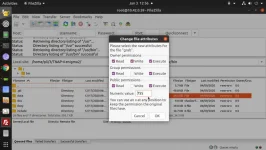
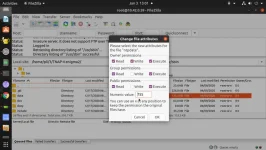
The Mio/Mio+ receivers could be considered to be miniature computers. The Mio/Mio+ receivers do not have a complete set of resources that would be found on the average home computer. The user that limits the amount of executable files being ran at one time may have less problems as compared to the user running multiple files that are executable. Here are the permissions of the 3 common executable files mentioned above:
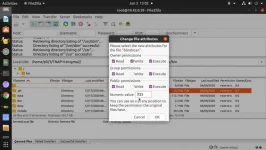
usr_bin_blindscan-permissions_ 2021-01-03 13-02-28.webp usr_bin_grab-permissions_2021-01-03 12-56-49.webp
usr_sbin_ntpdate-permissions_2021-01-03 13-01-10.webp

Your console output will look like this when polling the webif every 3 seconds:
[eConsoleAppContainer] Starting /usr/bin/grab
[eConsoleAppContainer] Starting /usr/bin/grab
[eConsoleAppContainer] Starting /usr/bin/grab
[eConsoleAppContainer] Starting /usr/bin/grab
[eConsoleAppContainer] Starting /usr/bin/grab
[eConsoleAppContainer] Starting /usr/bin/grab
[eConsoleAppContainer] Starting /usr/bin/grab
[eConsoleAppContainer] Starting /usr/bin/grab
[eConsoleAppContainer] Starting /usr/bin/grab
[eConsoleAppContainer] Starting /usr/bin/grab
[eConsoleAppContainer] Starting /usr/bin/grab
[eConsoleAppContainer] Starting /usr/bin/grab
[eConsoleAppContainer] Starting /usr/bin/grab
[eConsoleAppContainer] Starting /usr/bin/grab
[eConsoleAppContainer] Starting /usr/bin/grab
[eConsoleAppContainer] Starting /usr/bin/grab
[eConsoleAppContainer] Starting /usr/bin/grab
[eConsoleAppContainer] Starting /usr/bin/grab
[eConsoleAppContainer] Starting /usr/bin/grab
[eConsoleAppContainer] Starting /usr/bin/grab
[eConsoleAppContainer] Starting /usr/bin/grab

Let's say we start a blindscan while the webif is polling every 3 seconds. Then we have 2 executable files running.
Let's say the time is set to poll every five minutes, and it polls in the middle of the blindscan. Then we would have 3 executable files running for a short period.

Users that have the least amount of executable files running at the same time can be expected to have less issues or problems when compared to users that run multiple executable files at the same time. Blindscan is a fragile process, and it does not take much to disrupt it.

If you understand how your receiver works and use good judgement, you should have less problems or issues with it.
 
Is there a file available to download that can be placed on a USB stick to flash the most recent multiboot image version of TNAP4?
The multiboot file in the image section is with a date before the new fix was implemented.
 
What date are you talking about?
What fix are you talking about?
What is the build date of your image in the receiver? (See Menu--->About)
Thanks.
 
What date are you talking about?
What fix are you talking about?
What is the build date of your image in the receiver? (See Menu--->About)
Thanks.


I am referring to the fix that you said was implemented in the last week regarding the plugin that was not configured correctly. You refer to it in post 11, page 2 of this topic
I downloaded the multiboot file from the image topic and if I unpack it to check the file dates they are dated 22nd December 2020, dated before the fix you referred to above.

I have the TNAP-4 test image on my mio 4K at the moment and wished to update it to the latest release version.
 
Maybe we can sort this confusion. But we need to discuss or understand how the system works.
There are images that are installed in the receiver.
There are Plugins that are installed in the receiver.
Images and Plugins are two separate things. But an image may contain Plugins.

Images can be updated
Plugins can be updated.
Updating an image does not necessarily update the Plugins because Plugins and images are pretty much two separate things. You can update the Plugins without having to change or physically update the entire image.

Plugins for images that are used at home can be installed on a computer in the home, provided the Plugin Folders are configured for the receiver to use them.
TNAP Plugins are uploaded to a server, so almost anyone can use them. The Plugins for TNAP may be updated or changed without updating or changing the entire image. However, the Plugins List in the receiver needs to be updated so the receiver will know Exactly what is available on the Plugin Server.

To update the TNAP Plugins List in the receiver, run software update, which is: Menu--->Setup--->Software update. Or in terminal type opkg update . Doing either one of these options simply updates the Plugin list for your receiver. A Plugin list is created when the image is installed in the receiver on the first boot that has an internet connection. So if the Plugins on the internet server change, the receiver may not be able to "see" them until the Plugins list is updated (Menu--->Setup--->Software update).

For the issue mentioned in post#11, The two plugins were built wrong, which allowed the Plugins to be installed in the receiver, but would not allow them to be easily deleted from the receiver. This is why reinstalling the image was suggested. These two plugins are fixed now, so updating the Plugins List (Menu--->Setup--->Software update) will ensure that your receiver can "see" them in the Downloadable plugins(Menu--->Plugins--->Press Green Remote Button). If either of these bad Plugins were installed before they were fixed, then a reinstall of the image should fix them.

Reinstalling a TNAP-4 image is easy, providing the receiver is connected to the internet. To Reinstall with internet connection:
(1) Insert usb drive in the receiver that has a decent amount of space on it.
(2) Select the Proper image from Flash image (Menu--->Setup--->Flash image).
(3) Select the proper slot, with backup
(4) Start the image Flash.

This automatic reinstall procedure usually takes around 5 minutes. All you need to do at this point is wait for the receiver to reboot and reinstall the backup, which may or may not include downloading items from the internet. If a slot is selected that does not have "with backup", then no backup will be downloaded from the receiver. However, an older or previous backup may be installed if one is available in the receiver usb or hdd drives.
 
I have attached a couple of files that are used to determine what Plugins are available, and how the Plugins that are available compare to those that are in the receiver. Almost all of the updates for the image can be in .ipk, which is the common Plugin format.

Here is our example:
Package: enigma2-plugin-extra-no-t2mi-module
Version: 5.9.0
Description: no-t2mi kernel module
Section: devel
Priority: optional
Maintainer: devs
License: CLOSED
Architecture: all
OE:
Source:
Size: 79230
Filename: enigma2-plugin-extra-no-t2mi-module_5.9.0_all.ipk
MD5sum: d11a4f31ac95b3f37eb9209fff0896d5
SHA256sum: 9b89b6d614f620658a1701cffd1a34a87455c9ffc249c8543aa6f56c435a5310
If I open a Plugin up and change some files or modify it, then the SHA256sum and/or MD5sum values may change. The receiver has a Plugin list(s) that contains the MD5sum values. You may view these lists in /var/lib/opkg/lists of the receiver files.

This is why when you update, add, or change a Plugin, Software update needs to be ran in the receiver.
If we want to update the entire image, we build it, delete the current .ipk files that are on the server, then upload all of the updated ipk files to the server. To see the updates, run Software update in the receiver.
If we want to update Plugins only, we build them, upload the desired Plugins (.ipk files) to the server. To see the updates, run Software update in the receiver.

More or less, all software update does is read the Plugin list(s) from the server, and compare the list(s) to what is supposed to be loaded in the receiver. If a new version of a Plugin is available, then Software update will list the update(s) and gives the user the option to update.
 

Attachments

Has anybody been able to get the Freearhey 1.7 plugin from the feed (in Extensions) to work on the latest TNAP 4.0 update? I just (2/16/21) did a "Software Update" to the latest updates, which loaded, rebooted, and seem to be successful. I then tried to load the Freearhey plugin and when you go into it, it just shows the top splash screen with nothing else. There's no iptv feeds that show. If you hit the green button, it brings up a fault screen, which says it'll reboot the receiver, which it then does.

I uninstalled it for now, as it's not critical for me for it to work, BUT, it is on the feeds, and doesn't seem to work.
 
Run Software update, then install the 1.8 version in feeds.
The 1.7 version should be deleted from the feeds. I will try to remember that.
 
Well, the Export function still doesn't work with 1.8. It doesn't cause a lockup like 1.7, it just doesn't do anything as far as I can tell, but I guess it's not critical.
 
Downgrade to 1.4.
First, Update the feeds by running software update (Menu--->Setup--->Software update).
Next, uninstall freearhey 1.8.
Then install freearhey 1.4.

Let us know how that works.
 
Downgrade to 1.4.
First, Update the feeds by running software update (Menu--->Setup--->Software update).
Next, uninstall freearhey 1.8.
Then install freearhey 1.4.

Let us know how that works.

Ok, have now done all that, and also included a full REBOOT after installing Freearhey 1.4. However, even though I selected what said was Freearhey 1.4, the package it installs is also called Freearhey 1.8, and the Export button still doesn't work.

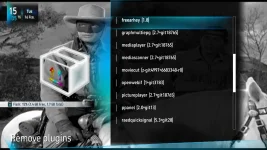
1_0_1_1_1_FFFF_A2F0FC8_0_0_0_20210216150225.webp

freearhey.webp
 
All right, I tried again. I removed Freearhey, rebooted, then updated the feeds, downloaded Freearhey 1.4, power-plug pull rebooted, and now I for sure have Freearhey 1.4. Export now works, or at least it asked me "do you want to convert United States to Favorites.tv" I confirmed that, and something happened. However, I'm now not sure how to find that "Favorites.tv"? It isn't in the user bouquets, and I'm not sure where it is. Well, there IS a "Favourites (TV)" bouquet, but there's nothing inside it?
 
The freearhey plugin has issues that will be hard to fix because the plugin code is encrypted. The creator of this plucin does not have time to fix it right now it seems.
 
Just as an aside, I'd be careful using a TiVo as a benchmark. It seems that their tuner front ends have some desense problems (or something) in the presence of strong signal strengths. I know that sometimes I have to use attenuators if I connect a TiVo to a FiOS ONT, because they hate it when the signal is too strong. If their OTA tuner is anything like their QAM tuner for CATV, it's probably fine as long as you're not in the near field of the transmitter.
 
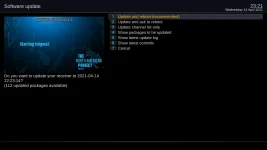
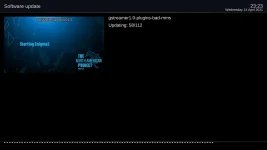
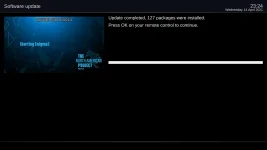
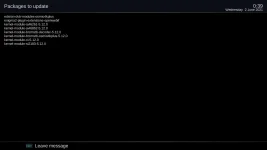
Online updates are available for the TNAP Edision MIO receivers. These updates are routine and include some changes to the time files, and Gstreamer updates. There may be over 100 updates shown, but most of them are small files.

It is advised to backup the image before updating it!
A good Internet connection is also needed.

mioplus-updates_20210414232121.webp mioplus-updates-progress_20210414232332.webp

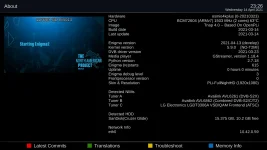
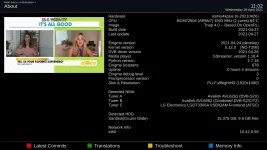
mioplus-updates-complete_20210414232435.webp mioplus-updates-about_20210414232638.webp

As always, Download files and updates at your own risk!

These updates have been tested to work several different times on the Mio/Mio4k+ receivers. The Mip Mini 4k has not been tested but is expected to work without issue.
 
Updates to kernel 5.12 are available in Software update. Be sure to make a complete backup of the image before installing these updates.

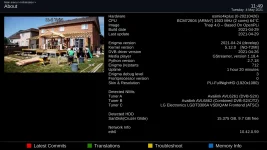
About__20210504114958.webp


It may be easier to flash the image.
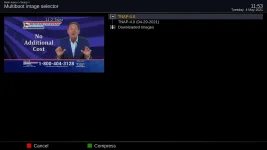
Updated images are available under Flash image.
Put a good usb stick in the receiver.
Select the TNAP 4 image.
Select the slot you want to flash with backup. Press the OK button.
In 5 -10 minutes, the process will be complete.
No need for any input from the user after the flash image process is started.


TNAP 4.0_Update_20210504115349.webp
 
New drivers will be uploaded soon and will be available as online updates. These new drivers have a few changes that seem to make blind scanning better. This new driver is T2MI capable.

Some feedback on how these drivers work would be nice. This is the first time a T2MI driver has been loaded into TNAP. Previous T2MI drivers have mixed the channels on transponders that are around 4 MHz apart, have the same polarity, and have a similar symbol rate.

Here is what I have found using these new drivers:

Previous drivers had a few MHz of space before a transponder could be logged. For example, If there was a transponder on 3700 MHz then the blindscan would need to be started below 3700 MHz in order to find it.
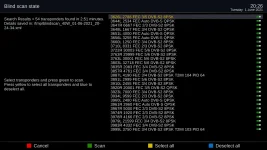
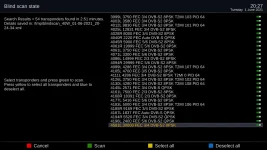
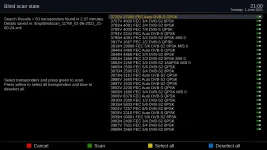
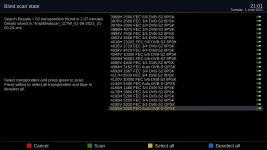
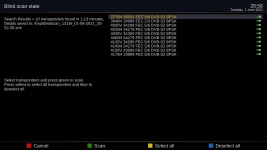
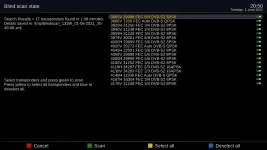
A blindscan of 40.5w started at 3625 MHz. The first transponder was found at 3626 MHz.
405.w-scan-2_20210601202614.webp <------------> 40.5w-scan-3_20210601202705.webp

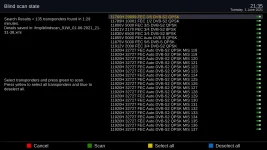
A blindscan of 117w c band returned 50 transponders.
117w-scan-1_20210601210059.webp <------------> 117w-scan-2_20210601210142.webp


The only problem I have found so far is the multi-stream transponders may be logged Many times
Here are the scan results for 91w ku that returned over 100 streams for transponder 11920H.
91w-ku-scan-result_20210601213551.webp

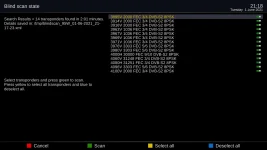
I will show some more scan results below. There was not much activity on 95w c band tonight. I will do more tests for this satellite later in the week. No mixing of channels that I can see.

95w-scan-result_20210601211805.webp

131w-scan-result_20210601205630.webp

133w -scan-result_20210601205011.webp
 
Updates for this driver are available online by running Software update. Making a complete backup of the image before updating is suggested.

online-updates_20210602003919.webp
 
Back
Top