TNAP-5.1 Image Discussion

No improvement on my mio4k+ box: as soon i go in "signal finder" menu or any other tuner submenu, the sluggishness starts !
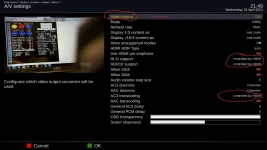
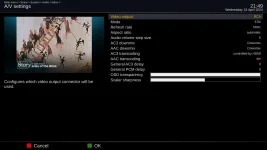
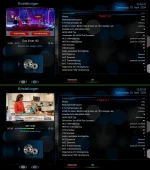
beside this, there are only 2 options for video output: dvi or rca only; no HDMI option, despite the fact that there are some other items listed with "controlled by HDMI" option !

1.webp2.webp
 
The thing to do here may be to quit building the Edision receivers and let TNAP 5 be the last Edision build. My Edision MIO+ no longer works and My MIO 4K has a few issues. Anyway, we will see what needs to be done.

Thanks for testing it.
 
On my MIO4K with TNAP 5.1 it only says DVI instead of HDMI, but that doesn't change the viewing quality on the TV.
I think it's an error of indication.
It's true that sometimes I have the impression that it goes more slowly in the different menus, but that's not always the case,
I've changed my skin and I have the impression is all OK
that this problem is no longer there ( these are just impressions )
 

Attachments

  • 5-vert.webp
    5-vert.webp
    156.4 KB · Views: 10
No improvement on my mio4k+ box: as soon i go in "signal finder" menu or any other tuner submenu, the sluggishness starts !
beside this, there are only 2 options for video output: dvi or rca only; no HDMI option, despite the fact that there are some other items listed with "controlled by HDMI" option !

View attachment 18244View attachment 18245

On my MIO4K with TNAP 5.1 it only says DVI instead of HDMI, but that doesn't change the viewing quality on the TV.
I think it's an error of indication.
It's true that sometimes I have the impression that it goes more slowly in the different menus, but that's not always the case,
I've changed my skin and I have the impression is all OK
that this problem is no longer there ( these are just impressions )


Flash the 0425 image that is available online. Thanks.
 
Reflashed the last version, and during the setup I skipped the internet connection settings.
The image was installed good, and then I set the network (wlan connection).
Did the online update, and looks like the new version is installed.
 
Interesting how diligence and persistence made it work.
Wondering. Is there a utility or command line that will layout, zero fill a partition from another running slot to prep it for a USB image flash?
Is that even a thing or is all of that done when doing a USB install? Some place a while back hinted that remnants could be left behind if the new image was smaller than the one it replaces.
Good question?
 
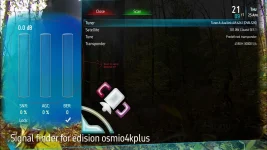
Well, started to do some signal adjustings. As soon as I enter the "signal finder" menu , the box is slowing down to the point that is just stahls, and i have to unplug it to be able to get it back to useable situation.
See the dreadful spinner as the box struggles to respond to the comands:

4.webp5.webp
I guess is getting more sluggish as in the previous 5.1 version.
 
Well, started to do some signal adjustings. As soon as I enter the "signal finder" menu , the box is slowing down to the point that is just stahls, and i have to unplug it to be able to get it back to useable situation.
See the dreadful spinner as the box struggles to respond to the comands:

View attachment 18249View attachment 18250
I guess is getting more sluggish as in the previous 5.1 version.

Try the PLi-FullNightHD skin. I do see the sluggishness with the GlamourAuraFHD skin here as well.
 
Would setting a swap file help? How about memory/processor usage? It is swamped?
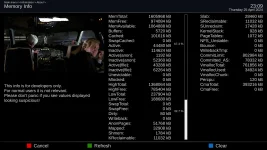
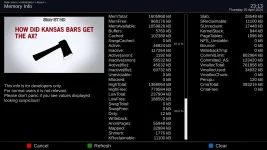
here are pic of memory activity: mem1 is before going into "positioner setup" menu.
mem2 is after, when the sluggishness started.

mem1.webp

mem2.webp

I do not find any major changed, unless I need new glasses !
 
Installing the 0426 version went well. All online updates installed ok.
Everything was good till I enter positioner setup-fine movement. After playing with the step e & step w, the sluggishness started to show up to the point that at the "exit" command the screen goes black for few seconds before you can see where you are in the menu. This is happening with Aura skin.
Fullnight hd skin performs a bit better with shorten lagging time in between the commands.
Overall, looks that it is an improvement for osmio4k+, fullnight hd skin, at least. Aura skin is still bad.
 
What happens when you flash the image without restoring anything?

The Positioner setup may be the problem as it is logging signal in db. This is the only thing that has changed in Positioner setup.
 
Back
Top