
I don't play a lot with new images. Only done this about 6 times. But I have a MIO 4K plus I don't use very often and wanted to load TNAP 5. I've loaded TNAP 5 and TNAP 5test successfully in slots with or without backup and setting up the tuners is no problem but when scanning I have the same issue on all installs. When the scan is complete and you press the green button to accept the scan results I get a green screen "software error" and it reboots. No channels are saved. Now when scanning from the signal finder it saves the channels but any channel selected gives a green screen "software error" and reboot. Channels are saved but if selected after a reboot it green screens and reboots. I've deleted the installs and tried different slots but still the same results. There is a early TNAP 3.2 in slot one and OpenViX in slot three and they appear unaffected by the problems with the TNAP 5 installs.

- Home
- Forums
- FTA Set Top Box Discussions/Files
- FTA Set Top Box Discussions
- The North American Project E2 Image Discussions
You are using an out of date browser. It may not display this or other websites correctly.
You should upgrade or use an alternative browser.
You should upgrade or use an alternative browser.
TNAP-5 Image Discussion
- Thread starter el bandido
- Start date


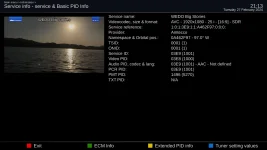
I have a Mio+ running TNAP5 updated to Feb. 8, 2024. There is a transponder on 97W Ku called WEDO Big Stories. The transponder details are as below. Lately, I can no longer watch it; only a black screen appears with no audio. SNR is 11.2 dB. The transponder is DVB-S2 2/3 8PSK and is not encrypted. So carrier lock level is 6.6 dB. Yet, if I play it via PotPlayer or via my smartphone then I can view the channel normally. Does anybody understand why this is so?




el bandido
TNAP-Images
There is not any transponder information in this. Only channel or Service information.
Anyway, If you will look under AVC in your attached, you will see it is 1920 X 1080 -25i.
The 25i part is unusual and most likely, your television cannot handle it. Running the service through the player probably converts it to something else. This explains why can view it using the player.
I have a Mio+ running TNAP5 updated to Feb. 8, 2024. There is a transponder on 97W Ku called WEDO Big Stories. The transponder details are as below. Lately, I can no longer watch it; only a black screen appears with no audio. SNR is 11.2 dB. The transponder is DVB-S2 2/3 8PSK and is not encrypted. So carrier lock level is 6.6 dB. Yet, if I play it via PotPlayer or via my smartphone then I can view the channel normally. Does anybody understand why this is so?
View attachment 18078
Anyway, If you will look under AVC in your attached, you will see it is 1920 X 1080 -25i.
The 25i part is unusual and most likely, your television cannot handle it. Running the service through the player probably converts it to something else. This explains why can view it using the player.
el bandido
TNAP-Images
I stand Corrected!
The TV is not the problem. The Edision cannot play it.
The TV is not the problem. The Edision cannot play it.
This is a new issue. The Edision used to play it for a couple of months before a week or so ago. Can this be fixed? Reportedly, Azbox and Amiko can play the transponder....If you will look under AVC in your attached, you will see it is 1920 X 1080 -25i.
The 25i part is unusual and most likely, your television cannot handle it. Running the service through the player probably converts it to something else. This explains why can view it using the player.
el bandido
TNAP-Images
What changed? I have no idea as I have not watched this channel. My best guess as to why it does not work has already been shown. You can check other images, but I doubt it is an enigma2 problem. Most likely, it will take Edision to fix it. Look and see what you can find out about it. See if anyone knows if the video format changed. Other than that, It looks like a normal satellite service.
Edision is Broadcom where the SF8008 receivers are Hisilicon. So the two are not the same.
Edision is Broadcom where the SF8008 receivers are Hisilicon. So the two are not the same.
el bandido
TNAP-Images
The salesman/admin at TVROSAT claims the Edision works fine using OpenATV on WEDO Big Stories. This information is False --or at least it is on My Edision.
https://www.tvrosat.com/forum/phpBB3/viewtopic.php?f=91&t=6299&start=20
https://www.tvrosat.com/forum/phpBB3/viewtopic.php?f=91&t=6299&start=20

Megatron817
Administrator
Big stories kinda plays on the Mio+ if you use time shift. Let it stay paused for a minute then it will play some or a little while before it stops. Video quality is not so great.

EnoSat
Legit VIP
What changed? I have no idea as I have not watched this channel. My best guess as to why it does not work has already been shown. You can check other images, but I doubt it is an enigma2 problem. Most likely, it will take Edision to fix it. Look and see what you can find out about it. See if anyone knows if the video format changed. Other than that, It looks like a normal satellite service.
Code:
19:42:18.3644 [eDVBServicePlay] have 1 video stream(s) (03e8), and 4 audio stream(s) (03e9, 03ea, 03eb, 03ec), and the pcr pid is 03e9, and the text pid is ffffffff
19:42:18.3656 [eDVBServicePlay] Setting audio delay: setAC3Delay, 0 + 0
19:42:18.3658 [eDVBServicePlay] Setting audio delay: setPCMDelay, 0 + 0
19:42:18.3659 [eTSMPEGDecoder] decoder state: play, vpid=03e8, apid=03e9
19:42:18.3660 [eDVBVideo0] VIDEO_SLOWMOTION 0 ok19:42:18.3690 [eDVBVideo0] VIDEO_FAST_FORWARD 0 ok19:42:18.3735 [eDVBVideo0] VIDEO_CONTINUE ok19:42:18.3736 [eDVBAudio0] AUDIO_CONTINUE ok19:42:18.3787 [eDVBCIInterfaces] gotPMT
19:42:18.3793 [eDVBDemux] open demux /dev/dvb/adapter0/demux0
19:42:18.3796 [eDVBSectionReader] DMX_SET_FILTER pid=5270
19:42:18.4620 [eDVBVideo0] VIDEO_GET_EVENT SIZE_CHANGED 1920x1080 aspect 3
19:42:18.4680 [eDVBVideo0] VIDEO_GET_EVENT FRAME_RATE_CHANGED 25000 fps
19:42:18.4685 [eDVBVideo0] VIDEO_GET_EVENT PROGRESSIVE_CHANGED 0
19:42:18.4687 [eDVBVideo0] VIDEO_GET_EVENT GAMMA_CHANGED 0
19:42:18.5638 [eDVBDemux] open demux /dev/dvb/adapter0/demux0
19:42:18.5641 [eDVBSectionReader] DMX_SET_FILTER pid=103
19:42:18.6724 [Dish] tuned, closing...
19:42:18.7384 [eDVBDemux] open demux /dev/dvb/adapter0/demux0
19:42:18.7388 [eDVBSectionReader] DMX_SET_FILTER pid=104
19:42:18.8630 [eDVBDemux] open demux /dev/dvb/adapter0/demux0
19:42:18.8634 [eDVBSectionReader] DMX_SET_FILTER pid=105
19:42:19.0133 [eDVBDemux] open demux /dev/dvb/adapter0/demux0
19:42:19.0137 [eDVBSectionReader] DMX_SET_FILTER pid=106
19:42:19.1503 [eDVBDemux] open demux /dev/dvb/adapter0/demux0
19:42:19.1507 [eDVBSectionReader] DMX_SET_FILTER pid=107
19:42:19.1694 [eDVBServicePlay] time shift not enough diskspace for timeshift! (less than 1GB)
19:42:19.1886 [eDVBDemux] open demux /dev/dvb/adapter0/demux0
19:42:19.1889 [eDVBSectionReader] DMX_SET_FILTER pid=108
19:42:19.4139 [eDVBDemux] open demux /dev/dvb/adapter0/demux0
19:42:19.4142 [eDVBSectionReader] DMX_SET_FILTER pid=109
19:42:19.5005 [eDVBDemux] open demux /dev/dvb/adapter0/demux0
19:42:19.5008 [eDVBSectionReader] DMX_SET_FILTER pid=110
19:42:19.5880 [eDVBDemux] open demux /dev/dvb/adapter0/demux0
19:42:19.5884 [eDVBSectionReader] DMX_SET_FILTER pid=5270
19:42:20.0506 [eEPGChannelData] start reading events(1709253740)
19:42:20.0507 [eDVBSectionReader] DMX_SET_FILTER pid=3842
19:42:20.0509 [eDVBSectionReader] DMX_SET_FILTER pid=3003
19:42:20.0512 [eDVBSectionReader] DMX_SET_FILTER pid=18
19:42:20.0514 [eDVBSectionReader] DMX_SET_FILTER pid=18
19:42:20.0518 [eDVBSectionReader] DMX_SET_FILTER pid=18
19:42:20.0522 [eDVBSectionReader] DMX_SET_FILTER pid=5000
19:42:20.0524 [eDVBSectionReader] DMX_SET_FILTER pid=5000
19:42:20.0528 [eEPGChannelData] abort non avail OpenTV EIT reading
19:42:20.0529 [eDVBSectionReader] DMX_SET_FILTER pid=57
19:42:20.0530 [eDVBServicePMTHandler] sdt update done
Code:
19:43:15.1244 [eDVBCAService] free slot 0 demux 0 for service 1:0:1:3E9:1:1:A462F98:0:0:0:
19:43:15.1245 [eDVBCAService] free service 1:0:1:3E9:1:1:A462F98:0:0:0:
19:43:15.1278 [eDVBServicePlay] time shift not enough diskspace for timeshift! (less than 1GB)
19:43:15.1280 [eDVBServicePlay] time shift not enough diskspace for timeshift! (less than 1GB)
19:43:15.1284 [eTSMPEGDecoder] decoder state: play, vpid=ffffffff, apid=ffffffff
19:43:15.1285 [eDVBPCR0] DEMUX_STOP ok19:43:15.1286 [eDVBPCR0] destroy
19:43:15.1286 [eDVBVideo0] DEMUX_STOP  ok19:43:15.1294 [eDVBVideo0] VIDEO_STOP ok19:43:15.1294 [eDVBVideo0] destroy
19:43:15.1295 [eDVBAudio0] AUDIO_STOP ok19:43:15.1394 [eDVBAudio0] DEMUX_STOP ok19:43:15.1395 [eDVBAudio0] AUDIO_CONTINUE ok19:43:15.1396 [eDVBAudio0] destroy
cleaning upThank you Megatron817 for posting this! It worked for me and I can see Kia again :hugs:!
Forgot to mention that I ran a debug on my edison and got these few lines:
19:43:15.1284 [eTSMPEGDecoder] decoder state: play, vpid=ffffffff, apid=ffffffff
19:43:15.1285 [eDVBPCR0] DEMUX_STOP ok19:43:15.1286 [eDVBPCR0] destroy
19:43:15.1286 [eDVBVideo0] DEMUX_STOP ok19:43:15.1294 [eDVBVideo0] VIDEO_STOP ok19:43:15.1294 [eDVBVideo0] destroy
19:43:15.1284 [eTSMPEGDecoder] decoder state: play, vpid=ffffffff, apid=ffffffff
19:43:15.1285 [eDVBPCR0] DEMUX_STOP ok19:43:15.1286 [eDVBPCR0] destroy
19:43:15.1286 [eDVBVideo0] DEMUX_STOP ok19:43:15.1294 [eDVBVideo0] VIDEO_STOP ok19:43:15.1294 [eDVBVideo0] destroy
el bandido
TNAP-Images
Forgot to mention that I ran a debug on my edison and got these few lines:
19:43:15.1284 [eTSMPEGDecoder] decoder state: play, vpid=ffffffff, apid=ffffffff
19:43:15.1285 [eDVBPCR0] DEMUX_STOP ok19:43:15.1286 [eDVBPCR0] destroy
19:43:15.1286 [eDVBVideo0] DEMUX_STOP ok19:43:15.1294 [eDVBVideo0] VIDEO_STOP ok19:43:15.1294 [eDVBVideo0] destroy
What problem or error in the operations of the receiver is shown here?
I was trying to watch we do stories
el bandido
TNAP-Images
Unfortunately, there is not anything that can be done to fix WEDO Big Stories in the enigma2 image build right now. Some enigma2 receivers have no issue with this channel, but others do. Most likely, the manufacturer of the fta receiver will have to fix this.
Another version of Avalink firmware might fix WEDO Big Stories. Maybe someone will try that.
Another version of Avalink firmware might fix WEDO Big Stories. Maybe someone will try that.
This is a good simple workaround. It continued to play well until I changed channels forcing timeshift to stop. Video quality was the same as originally broadcast (about 2 Mbps). Recording on the Edision also results in a file that can be played on the Edision without using any external apps.Big stories kinda plays on the Mio+ if you use time shift. Let it stay paused for a minute then it will play some or a little while before it stops. Video quality is not so great.