I am happy to report that the WLAN feature worked totally fine on the image = openpli-scarthgap-sf8008-20260103_multiboot.zip. I configured the Wireless settings and all is working as expected. Hope this helps!

- Home
- Forums
- FTA Set Top Box Discussions/Files
- FTA Set Top Box Discussions
- The North American Project E2 Image Discussions
You are using an out of date browser. It may not display this or other websites correctly.
You should upgrade or use an alternative browser.
You should upgrade or use an alternative browser.
TNAP-6 Image Discussion
- Thread starter EnoSat
- Start date

el bandido
TNAP-Images
Ok. It is a driver issue. Let me see what needs to be done. Thanks!
el bandido
TNAP-Images
My SF8008v1 died some time ago. So I cannot directly see the problem.
Anyway, try sf8008-20260103 multiboot as it has different drivers.
Anyway, try sf8008-20260103 multiboot as it has different drivers.
el bandido
TNAP-Images
Try this one: sf8008-20260104 multiboot
el bandido
TNAP-Images
We are wasting time here as I see the wifi problem. Let me see if we can find a solution....
el bandido
TNAP-Images
What is happening or so it seems is simple: There is not enough kernel space to load both wifi drivers. The SF8008 is cheaply built hardware, and they skimped a bit on the software. When newer models came out, they just used previous software. and the wifi's are usb devices in disguise. But today, we do not have a lot to choose from....
el bandido
TNAP-Images
Which version do you actually have? What is written on the front of the receiver? Does it have Supreme written on it? The original sf8008 will not have Supreme written anywhere on it and the tuners will identify as Si2166D. The original Supreme only has 2 GHz wifi. As for fixing it where SF8008 and SF8008 Supreme wifi drivers load correctly? Yes. That should be fixed. New images were just uploaded for the SF8008.
el bandido,
I have the original Octagon SF8008 4K Twin. Upper left has 4K UHD. Top right has the Red Octagon logo.
Lower right says 4K UHD Combo Receiver.
Confirmed, my front panel does not have Supreme labeled.
My tuners are Si2166D (DVB-S2X)
The WIreless LAN Identifies as a (rtl8192eu)
The Wired NIC is a (hi_gmac_v200)
Chipset is 3798mv200.
Note,
The 5.0 GHz networks work fine on all other Enigma 2 images loaded in the MultiBoot feature.
Hope this helps.
I have the original Octagon SF8008 4K Twin. Upper left has 4K UHD. Top right has the Red Octagon logo.
Lower right says 4K UHD Combo Receiver.
Confirmed, my front panel does not have Supreme labeled.
My tuners are Si2166D (DVB-S2X)
The WIreless LAN Identifies as a (rtl8192eu)
The Wired NIC is a (hi_gmac_v200)
Chipset is 3798mv200.
Note,
The 5.0 GHz networks work fine on all other Enigma 2 images loaded in the MultiBoot feature.
Hope this helps.
Just an FYI. Looks like there's some troubles to be worked out to get wlan working reliably.
I have a Zgemma in client mode in another room. It does not have wifi integrated in it.
My osmio4k had marginal signal strength in the same room on 2.4 GHz. And the 5 GHz band was worse.
For those with a spare wifi router laying around. Or a decent range extender. Problem solved.
Some routers have native bridge mode capabilities. The Netgear R7000 I'm using does not. Still an excellent router though.
DD-WRT, Tomato firmware and a little configuration allows running in bridge mode. And not only allows a LAN connection to the receiver.
But if you use your 2.4 wifi as the bridge, you get a 5 GHz wifi connection to boot. And vice versa.
I'm a tinkerer. I made a 5 GHz wifi patch antenna with some spare parts and full-service hardware store brass sheet and nylon hardware.
Because it's fun and you get to learn something. Aimed through the walls at my base router, signal is awesome.
Of course an Amazon wifi patch antenna. A good one for twenty samolians. works good too. I've used a few here and there.
Just be sure you get the right antenna connector. Or an adapter.
If you do have a router laying around you can check the DD-WRT or Tomato, Fresh Tomato, etc. HCL list to see if yours is a candidate.
The R7000 gets very good signal as compared with the native wifi on the mio. I mean very good.
And for the worry warts, the internal firewall is highly configurable. But of course nothing is plug 'n play. Once done, you're golden.
I've been away. I just cracked open TNAP 6.1 and did an update.
I see mention of "know telnet?" A terminal in webif sure would be nice.
Terminal? Yup. AI subtitles? Not so sure. I mean if it's anything like YouTube then the bee five two and efthirtyfive would be nice to see streaming across the screen after a day on the Miller welder. Okay. I'm still a smartass! Oh my. Oh my, ohmyohmy. The transistor turnedtosmoke. Oh-my!
I have a Zgemma in client mode in another room. It does not have wifi integrated in it.
My osmio4k had marginal signal strength in the same room on 2.4 GHz. And the 5 GHz band was worse.
For those with a spare wifi router laying around. Or a decent range extender. Problem solved.
Some routers have native bridge mode capabilities. The Netgear R7000 I'm using does not. Still an excellent router though.
DD-WRT, Tomato firmware and a little configuration allows running in bridge mode. And not only allows a LAN connection to the receiver.
But if you use your 2.4 wifi as the bridge, you get a 5 GHz wifi connection to boot. And vice versa.
I'm a tinkerer. I made a 5 GHz wifi patch antenna with some spare parts and full-service hardware store brass sheet and nylon hardware.
Because it's fun and you get to learn something. Aimed through the walls at my base router, signal is awesome.
Of course an Amazon wifi patch antenna. A good one for twenty samolians. works good too. I've used a few here and there.
Just be sure you get the right antenna connector. Or an adapter.
If you do have a router laying around you can check the DD-WRT or Tomato, Fresh Tomato, etc. HCL list to see if yours is a candidate.
The R7000 gets very good signal as compared with the native wifi on the mio. I mean very good.
And for the worry warts, the internal firewall is highly configurable. But of course nothing is plug 'n play. Once done, you're golden.
I've been away. I just cracked open TNAP 6.1 and did an update.
I see mention of "know telnet?" A terminal in webif sure would be nice.
Terminal? Yup. AI subtitles? Not so sure. I mean if it's anything like YouTube then the bee five two and efthirtyfive would be nice to see streaming across the screen after a day on the Miller welder. Okay. I'm still a smartass! Oh my. Oh my, ohmyohmy. The transistor turnedtosmoke. Oh-my!
el bandido
TNAP-Images
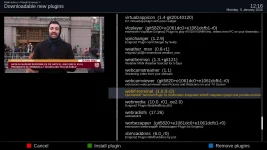
Have you bothered to check the feeds?
el bandido
TNAP-Images
For SF8008 specs:el bandido,
I have the original Octagon SF8008 4K Twin. Upper left has 4K UHD. Top right has the Red Octagon logo.
Lower right says 4K UHD Combo Receiver.
Confirmed, my front panel does not have Supreme labeled.
My tuners are Si2166D (DVB-S2X)
The WIreless LAN Identifies as a (rtl8192eu)
The Wired NIC is a (hi_gmac_v200)
Chipset is 3798mv200.
Note,
The 5.0 GHz networks work fine on all other Enigma 2 images loaded in the MultiBoot feature.
Hope this helps.
Octagon SF8008 Specs.
Features: - 4K Ultra HD Resolution - Enigma2 Linux OS Operating System - HEVC H.265 Video Decoding - WiFi (Built-In) & Gigabit LAN - DVB-S2X & DVB-C/T2 Combo - MicroSD Slot & Card Reader - HDR 10bit, HLG, HbbTV - OTA Updates The tuners mentioned are equipped with the latest standards DVB-S2X...
The WIreless LAN Identifies as a (rtl8192eu)...This is ONLY a 2.4 GHz wifi and not dual band. If OpenAtv supplies dual band on this receiver using that wifi then you have won the lottery. About three main things were different in the SF8008 and SF8008 Supreme. The Supreme model has these enhancements:
Bluetooh
Dual Band Wifi
Internal storage capability
As for the wifi issue, In their infinite wisdom, whoever coded the SF8008 Supreme decided that more was better and added the new drivers that were needed for the Supreme model to the existing SF8008 kernel module. This bold effort resulted in an almost will not fit situation when trying to insert kernel modules of a couple of Megabytes or bigger in size. The bigger kernel modules load and fragment what little space is left so the bigger 88x2cu 2 and 5GHz wifi module (~3.5MB) cannot be loaded.
The solution is to load the 88x2cu module before the other modules load to solve the space fragmentation issue. But once 88x2cu is loaded, you cannot load 8192eu, which is needed for the original SF8008. And vice-versa, If you load 8192eu, then you cannot load 88x2cu. An interesting dilemma.
The wifi kernel module fix is to look for Bluetooth, and if that is available, load 88x2cu (2+5GHz wifi). If no Bluetooth is detected, load 8192eu. This bluetooth check happens early in the module process, before attached usb devices. So if someone has a bluetooth dongle installed on an original sf8008, then 8192eu wifi modules should be loaded.
TNAP-6.1-sf8008-20260105_multiboot.zip Has the bluetooth check built into so wireless lan , and should operate correctly on any of the three SF8008 models when that image is installed.
Image checksum verification when the image is downloaded into the receiver is also fixed.
Yes, I definitely can connect wirelessly to separate 2.4 and 5.0 Networks with other Engima 2 images......Multiple booting OpenATV 7.6, OpenPLi 9.2. and Define OS 7. I'll double check to make sure I am not mistaken. In the past, I've run other images such as OpenEight, OpenPure2 and OpenBH and I believe they all used the 5.0 GHz band. I have two unique routers, each broadcasting 2.4 and 5.0 GHz bands. With the TNAP 6.1 20260104 image that I currently have installed, it does not show any of the 5.0 GHz SSIDs from my three routers. The wired LAN connection is definitely 1 Gig. And I definitely have twin tuners; both identified as Si2166D (DVB-S2X). I'm kinda perplexed  But still very happy with the Octagon SF8008 no matter which version it is!
In the meantime, I'll install the TNAP-6.1-sf8008-20260105_multiboot.zip image give that a test drive.
But still very happy with the Octagon SF8008 no matter which version it is!In the meantime, I'll install the TNAP-6.1-sf8008-20260105_multiboot.zip image give that a test drive.
Last edited:

Just did an online update to "TNAP-6.1-osmio4kplus-20260108" version from "TNAP-6.1-osmio4kplus-20251221" version, and atempted 2 times to mmake a backup with backupsuite plugin.
1st atempt estimated 79...minutes & 2nd atempt estimated 81.. minutes.
None of them completed after ~2hours ! I understood that backupsuite wasn't updated in long time.
Should I do a fresh install ?
1st atempt estimated 79...minutes & 2nd atempt estimated 81.. minutes.
None of them completed after ~2hours ! I understood that backupsuite wasn't updated in long time.
Should I do a fresh install ?
el bandido
TNAP-Images
Run these in telnet and let's see what you have:
df -h /
du -sh /usr/* | sort -h
du -sh /var/* | sort -h
df -h /
du -sh /usr/* | sort -h
du -sh /var/* | sort -h