
- Home
- Forums
- FTA Set Top Box Discussions/Files
- FTA Set Top Box Discussions
- The North American Project E2 Image Discussions
You are using an out of date browser. It may not display this or other websites correctly.
You should upgrade or use an alternative browser.
You should upgrade or use an alternative browser.
TNAP-6 Image Discussion
- Thread starter EnoSat
- Start date

el bandido
TNAP-Images
Current Slot Discrepancy:
Expected slot 22, but the test shows slot 21.
Could the user have:
1. Booted from a different slot than expected?
2. Miscounted their slots?
3. Is our counting off by one?
Please do the other tests.
1. Run the detailed test:
python3 test_extended_slots.py
1. This will show the complete slot mapping and confirm slot 21 vs 22.
2. Check which slot they think they're on:
What does the boot menu show as the current slot?
3. Does the plugin GUI work?
Can they open the plugin and see the slot list? Does it show slot 21 as active?
Expected slot 22, but the test shows slot 21.
Could the user have:
1. Booted from a different slot than expected?
2. Miscounted their slots?
3. Is our counting off by one?
Please do the other tests.
1. Run the detailed test:
python3 test_extended_slots.py
1. This will show the complete slot mapping and confirm slot 21 vs 22.
2. Check which slot they think they're on:
What does the boot menu show as the current slot?
3. Does the plugin GUI work?
Can they open the plugin and see the slot list? Does it show slot 21 as active?


el bandido
TNAP-Images
This is like putting a puzzle together. I have no clue if what I am seeing is what I am supposed to see.
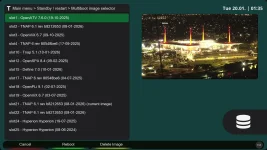
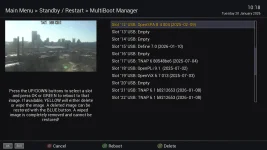
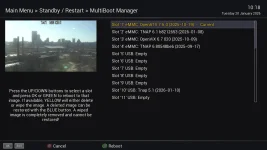
Question: Is the boot menu.webp shown above correct or is it missing some slots? This is output from a receiver file and is not part of the plugin. But it is important to know if it displays correct. This screenshot shows slots 1-4. Then skips to slot 10, skips slot 11 and shows slot 12...etc. Is this correct, and is it actually what is installed.? Can you supply a complete list of correct slot numbers and what is supposed to be in them? (The test shown below might show everything correctly, thus no list needed...)
This one test should show the 'Smokin' Gun' If we have a list of correct slot numbers to compare the output with:
cd /usr/lib/enigma2/python/Plugins/Extensions/TNAPSlotManager && python3 list_slots.py > /tmp/slot_list_output.txt 2>&1 && cat /tmp/slot_list_output.txt
That one line executed in Terminal will:
1. ✓ Change to the correct directory
2. ✓ Run list_slots.py (no color flags needed)
3. ✓ Capture EVERYTHING (stdout + stderr) to file
4. ✓ Display the output immediately
5. ✓ Save it to /tmp/slot_list_output.txt for easy retrieval
What This Will Tell Us:
From the boot menu we know:
- Slot 21: TNAP 6.1 (current)
- Slot 22: TNAP 6.1 (cloned successfully)
- Slot 1: OpenATV 7.6.0
- Slot 2: TNAP 6.1
- Slot 10: TNAP 5.1
- And many more...
If the plugin works correctly, list_slots.py should show:
- All 29 slots (1-4 internal, 5-29 SD card)
- Slot 21 marked as [ACTIVE] or [CURRENT]
- Slot 22 showing "TNAP 6.1" (not "Unknown")
- All other slots with their correct image names
- Correct kernel/rootfs device mappings
This ONE output will definitively answer: Does the extended slots fix actually work in the plugin? It's closer than it was, but obviously not working correctly yet....Thanks.
Question: Is the boot menu.webp shown above correct or is it missing some slots? This is output from a receiver file and is not part of the plugin. But it is important to know if it displays correct. This screenshot shows slots 1-4. Then skips to slot 10, skips slot 11 and shows slot 12...etc. Is this correct, and is it actually what is installed.? Can you supply a complete list of correct slot numbers and what is supposed to be in them? (The test shown below might show everything correctly, thus no list needed...)
This one test should show the 'Smokin' Gun' If we have a list of correct slot numbers to compare the output with:
cd /usr/lib/enigma2/python/Plugins/Extensions/TNAPSlotManager && python3 list_slots.py > /tmp/slot_list_output.txt 2>&1 && cat /tmp/slot_list_output.txt
That one line executed in Terminal will:
1. ✓ Change to the correct directory
2. ✓ Run list_slots.py (no color flags needed)
3. ✓ Capture EVERYTHING (stdout + stderr) to file
4. ✓ Display the output immediately
5. ✓ Save it to /tmp/slot_list_output.txt for easy retrieval
What This Will Tell Us:
From the boot menu we know:
- Slot 21: TNAP 6.1 (current)
- Slot 22: TNAP 6.1 (cloned successfully)
- Slot 1: OpenATV 7.6.0
- Slot 2: TNAP 6.1
- Slot 10: TNAP 5.1
- And many more...
If the plugin works correctly, list_slots.py should show:
- All 29 slots (1-4 internal, 5-29 SD card)
- Slot 21 marked as [ACTIVE] or [CURRENT]
- Slot 22 showing "TNAP 6.1" (not "Unknown")
- All other slots with their correct image names
- Correct kernel/rootfs device mappings
This ONE output will definitively answer: Does the extended slots fix actually work in the plugin? It's closer than it was, but obviously not working correctly yet....Thanks.

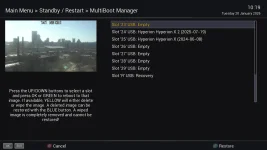
The TNAP boot menu is displaying the CORRECT installed slot listings. It is displaying the occupied slots but does not display empty slots. VIX displays the same format as TNAP. In the ATV boot menu, it displays both occupied and empty slots which matches the attached slot_list_output file.
Attachments
el bandido
TNAP-Images
Okay.
I am making a sheet of what you have in the slots.
Can you describe what works, what does not work, what you want to work or add, and what needs repair?
I am making a sheet of what you have in the slots.
Can you describe what works, what does not work, what you want to work or add, and what needs repair?
el bandido
TNAP-Images
● Empty Slot Detection Fixed!
Updated list_slots.py to properly detect and display empty slots. Here's what changed:
The Problem:
Empty slots were showing as:
- Status: "● INSTALLED"
- Image: "Unknown Linux System"
- Used Space: 45.2M (or 445M, etc.)
This happened because "empty" slots have filesystem overhead (lost+found/, leftover files) so they weren't detected as empty.
The Fix:
1. Better Empty Detection:
Now checks for essential directories (/usr/bin, /etc, /lib): If these are missing → Slot is EMPTY (even with some files) If these exist → Slot has an installed image
2. Improved Display:
Empty slots now show:
Status: ○ EMPTY SLOT
Image Version: None Detected
Used Space: 45.2M (filesystem overhead)
Expected Results:
Based on user's east-slots.txt, these should now show as EMPTY: Slots 5, 6, 7, 8, 9, 11, 13, 14, 20, 23, 26, 27, 28, 29
Installed slots remain unchanged:
Slots 1-4 (internal), 10, 12, 15-19, 21-22, 24-25
Main Files Modified:
list_slots.py (lines 120-131, 262-270)
The user should see all their empty slots properly marked as "○ EMPTY SLOT" instead of "Unknown Linux System".
Install updated version and tell me what needs fixin'....Thanks
Try cloning slots, backing up slots...etc.
Updated list_slots.py to properly detect and display empty slots. Here's what changed:
The Problem:
Empty slots were showing as:
- Status: "● INSTALLED"
- Image: "Unknown Linux System"
- Used Space: 45.2M (or 445M, etc.)
This happened because "empty" slots have filesystem overhead (lost+found/, leftover files) so they weren't detected as empty.
The Fix:
1. Better Empty Detection:
Now checks for essential directories (/usr/bin, /etc, /lib): If these are missing → Slot is EMPTY (even with some files) If these exist → Slot has an installed image
2. Improved Display:
Empty slots now show:
Status: ○ EMPTY SLOT
Image Version: None Detected
Used Space: 45.2M (filesystem overhead)
Expected Results:
Based on user's east-slots.txt, these should now show as EMPTY: Slots 5, 6, 7, 8, 9, 11, 13, 14, 20, 23, 26, 27, 28, 29
Installed slots remain unchanged:
Slots 1-4 (internal), 10, 12, 15-19, 21-22, 24-25
Main Files Modified:
list_slots.py (lines 120-131, 262-270)
The user should see all their empty slots properly marked as "○ EMPTY SLOT" instead of "Unknown Linux System".
Install updated version and tell me what needs fixin'....Thanks
Try cloning slots, backing up slots...etc.
Code:
  Old validation:
  exists = os.path.isdir(check_path) and len(os.listdir(check_path)) > 0

  This would:
  - ✗ Allow backing up slot 20 (445M leftover data) - WRONG!
  - ✗ Allow backing up slot 6 (20K overhead) - WRONG!
  - ✗ Try to clone from empty slots - FAIL!

  New validation (just applied):
  # Check if essential directories exist
  has_usr_bin = os.path.isdir(os.path.join(check_path, 'usr', 'bin'))
  has_etc = os.path.isdir(os.path.join(check_path, 'etc'))
  has_lib = os.path.isdir(os.path.join(check_path, 'lib'))

  # If missing essential directories, it's empty
  if not (has_usr_bin and has_etc and has_lib):
      return False  # Reject the operation

  Now the Backup/Clone System Will:

  ✓ Accept Valid Slots:
  - Slot 1-4: Internal images
  - Slot 10: TNAP 5.1
  - Slot 12: OpenSPA 8.4
  - Slot 15: Define 7.0
  - Slot 16-17: TNAP 6
  - Slot 18: OpenPLi 9.1
  - Slot 19: OpenViX 6.7
  - Slot 21-22: TNAP 6.1 ✓
  - Slot 24-25: zukonMOD Hyperion

  ✗ Reject Empty Slots:
  - Slot 5, 6, 7, 8, 9 (20K-45M overhead)
  - Slot 11, 13, 14 (filesystem overhead)
  - Slot 20 (445M leftover data) ← Previously would have failed mid-backup!
  - Slot 23, 26, 27, 28, 29 (empty)

  What This Means:

  1. Backup ANY installed slot → ✓ Works for slots 1-29 (if installed)
  2. Clone FROM any installed slot → ✓ Works correctly
  3. Clone TO any empty slot → ✓ Works (empties are valid targets)
  4. Prevents backup of empty slots → ✓ Won't waste time/space
  5. Extended slots (5-29) → ✓ Fully supported

  Example Scenarios:

  Scenario 1: Backup Slot 21 ✓
  python3 backup_slot.py 21 /media/usb
  - Validates slot 21 has complete image ✓
  - Backs up kernel + rootfs ✓
  - Creates: slot21_TNAP_6.1_20260120.tar.gz ✓

  Scenario 2: Try to Backup Slot 20 ✗
  python3 backup_slot.py 20 /media/usb
  - Checks slot 20 ✗
  - Missing /usr/bin, /etc, /lib ✗
  - Rejects: "Slot 20 does not contain a valid image" ✓
  - Prevents wasted time!

  Scenario 3: Clone Slot 21 → Slot 23 ✓
  python3 clone_slot.py 21 23
  - Validates slot 21 has image ✓
  - Validates slot 23 is empty or can be overwritten ✓
  - Clones successfully ✓

  Files Fixed:

  1. ✓ list_slots.py - Display/detection
  2. ✓ backup_slot.py - Backup validation (just fixed)
  3. ✓ clone_slot.py - Clone validation (just fixed)
Attachments
el bandido
TNAP-Images
Progress....I guess. If you could run this again, it would be much appreciated!
This one test should show the 'Smokin' Gun' If we have a list of correct slot numbers to compare the output with:
cd /usr/lib/enigma2/python/Plugins/Extensions/TNAPSlotManager && python3 list_slots.py > /tmp/slot_list_output.txt 2>&1 && cat /tmp/slot_list_output.txt
If the backup of slot 21 works or is successful, see what it does when it is reinstalled. Then list what is wrong in the enigma2 image part once the plugin is working correctly, and I will see about making it compatible with 50 slots.
This one test should show the 'Smokin' Gun' If we have a list of correct slot numbers to compare the output with:
cd /usr/lib/enigma2/python/Plugins/Extensions/TNAPSlotManager && python3 list_slots.py > /tmp/slot_list_output.txt 2>&1 && cat /tmp/slot_list_output.txt
If the backup of slot 21 works or is successful, see what it does when it is reinstalled. Then list what is wrong in the enigma2 image part once the plugin is working correctly, and I will see about making it compatible with 50 slots.
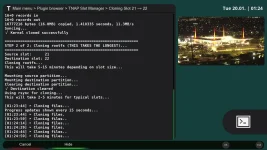
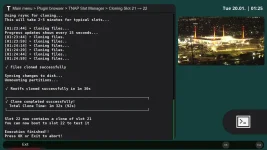
Tried the backup to /tmp but it didn't complete due to lack of space. Guessing it was backing up to the microsd card.
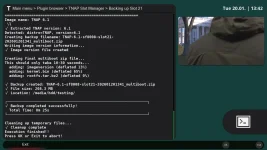
Created a directory /media/hdd/testing and tried the backup again and it seem to have completed.
Will try to restore to slot 21 with backupsuite and see what happens.
Created a directory /media/hdd/testing and tried the backup again and it seem to have completed.
Will try to restore to slot 21 with backupsuite and see what happens.
Attachments
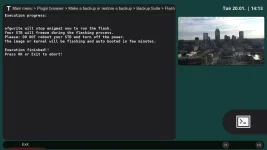
Couldn't get backupsuite in slot 21 to do a restore so.......
Copied TNAP-6.1-sf8008-slot21-202601201341_multiboot.zip from /media/hdd/testing to media/downloads.
Booted into Atv in slot 1 and Menu>setup>software management>Flash>downloads and selected the Tnap zip file.
Flashed it to slot 21 and rebooted to atv. Then went to atv multiboot and selected slot 21 and rebooted.
Now I am back in Tnap in slot 21 and working again.
Copied TNAP-6.1-sf8008-slot21-202601201341_multiboot.zip from /media/hdd/testing to media/downloads.
Booted into Atv in slot 1 and Menu>setup>software management>Flash>downloads and selected the Tnap zip file.
Flashed it to slot 21 and rebooted to atv. Then went to atv multiboot and selected slot 21 and rebooted.
Now I am back in Tnap in slot 21 and working again.
el bandido
TNAP-Images
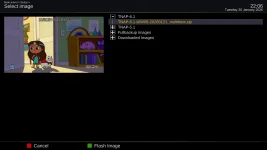
Download and Install the 0121 Image that just came online. This version has attempts at extended slot multi-boot detection in the image itself. Things like Flash image should now show the extended multi-boot slots. It has to be an image Flash. Online update will not work.
el bandido
TNAP-Images
Actually I do not think you can install the usb version into slot 4. I am almost certain it has to be in slot 1...And I am guessing because you are trying something I have never done!
el bandido
TNAP-Images
The enigma2 image files is what was modded. Flash image for example should show all your slots, and when you use the Multiboot image selector, you should see all of your slots. (Menu--->Standby/restart--->Multiboot image selector).