- Home
- Forums
- FTA Set Top Box Discussions/Files
- FTA Set Top Box Discussions
- The North American Project E2 Image Discussions
You are using an out of date browser. It may not display this or other websites correctly.
You should upgrade or use an alternative browser.
You should upgrade or use an alternative browser.
TNAP-7 Image Discussion
- Thread starter el bandido
- Start date


el bandido
TNAP-Images
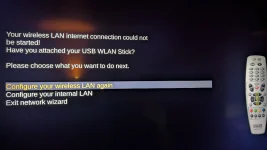
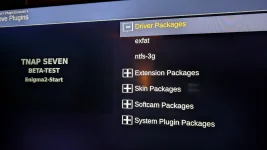
There are many network drivers available. You most likely do not see them because of no Internet connection. Let me see what needs to be done to fix this. TNAP 6.1 I think has a good wireless system. Maybe we need to import it???
I ran a wire & connected the box to the plugins & downloaded the driver. Luckly I found it & installed it.There are many network drivers available. You most likely do not see them because of no Internet connection. Let me see what needs to be done to fix this. TNAP 6.1 I think has a good wireless system. Maybe we need to import it???
Now the wifi is working with an address reservation.
Here are the crashlogs:
Attachments
el bandido
TNAP-Images
Excellent, but there are wifi issues that i would like to solve. This is a new build so we will have issues such as this. Your efforts and the efforts of others testing are appreciated. The more testers, the faster problems can be seen and solved. Anyway, Let's see what needs to be done here in this area....
Installed new version, osmini4k-20260201 multiboot.zip
Screenshots are acceptable now, but i still have problems with booting, either from full restart or from deep standby, usb removed
Previous 2 installs was in slot1, new install is in slot4
Here is output from telnet
Screenshots are acceptable now, but i still have problems with booting, either from full restart or from deep standby, usb removed
Previous 2 installs was in slot1, new install is in slot4
Here is output from telnet
Code:
TNAP 7 osmini4k

osmini4k login: root
Password:
root@osmini4k:~# init 4
root@osmini4k:~# enigma2
[Enigma] Python path is '/usr/lib/enigma2/python'.
[Enigma] DVB API version 5, DVB API version minor 12.
[Enigma] Enigma debug level 4.
[Avahi] avahi_timeout_new
[Avahi] avahi_watch_new(3 0x1)
[Avahi] avahi_timeout_update
[Avahi] avahi_timeout_new
[Avahi] avahi_timeout_free
[Avahi] avahi_timeout_new
[Avahi] avahi_timeout_free
[Avahi] avahi_timeout_new
[Avahi] avahi_timeout_free
[Avahi] avahi_timeout_new
[Avahi] avahi_timeout_free
[Avahi] avahi_timeout_new
[Avahi] avahi_timeout_free
[Avahi] avahi_timeout_new
[Avahi] avahi_timeout_free
[Avahi] client state: 2
[Avahi] avahi_timeout_new
[Avahi] avahi_timeout_free
[eInit] + (1) Background File Eraser
[eInit] + (5) Tuxtxt
[eInit] + (8) graphics acceleration manager
[bcm] /dev/fb0 No such file or directory
[eInit] + (9) Font Render Class
[Font] Initializing lib.
[Font] Loading fonts.
[Font] Intializing font cache, using max. 4MB.
[eInit] + (9) gLCD
[eFbLCD] /dev/fb1: No such file or directory
[eFbLCD] framebuffer /dev/fb1 not available
[eLCD] m_oled_brightness_proc = 0
[eDboxLCD] No oled0 or lcd0 device found!
[eLCD] (132x64x8) buffer 0x6704d0 8448 bytes, stride 132
[gLCDDC] resolution: 132x64x8 stride=132
[eInit] + (9) GFBDC
[fb] /dev/fb0 No such file or directory
[fb] framebuffer /dev/fb0 not available
[gFBDC] no framebuffer available
Segmentation fault         enigma2
root@osmini4k:~#
Megatron817
Administrator
IPTV works great but with PlutoTV and SamsungTVPlus the ads aren't handled so the picture freezes or goes to a black screen when it is time for an ad. Like TNAP3 or what ever version it was when PlutoTV plugin first came out a few years ago.
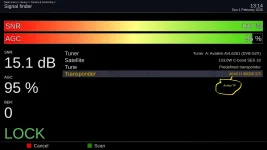
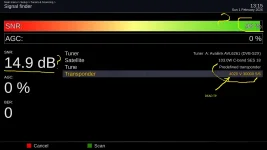
Regarding Mini4k, there is a cofusing transponder info: dead tp shows signal !
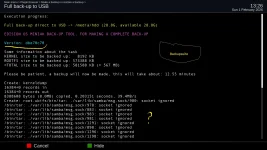
Also a minor info issue on backupSuite. I know this plugin was not updated in long time. Not important as there is another option to make a backup.
Also a minor info issue on backupSuite. I know this plugin was not updated in long time. Not important as there is another option to make a backup.
Attachments
el bandido
TNAP-Images
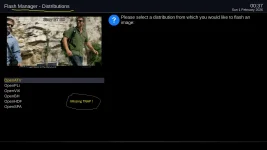
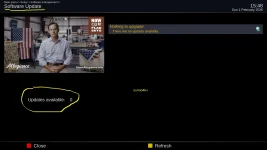
Wrong menu. You are wanting to Flash image, not update software. Do not have the receiver available right now to show the correct path.
Just noticed. That is an older version that has no path. You will need to flash from a different image. There is no online flash for that version.
Just noticed. That is an older version that has no path. You will need to flash from a different image. There is no online flash for that version.
Can I do a fresh install from another image slot ?Wrong menu. You are wanting to Flash image, not update software. Do not have the receiver available right now to show the correct path.
el bandido
TNAP-Images
You will need to flash from TNAP-6.x as that particular TNAP-7 has no path to flash TNAP-7. This is fixed in later versions.
I did flushed from openvix image slot in tnap slot. Looks fine so far.You will need to flash from TNAP-6.x as that particular TNAP-7 has no path to flash TNAP-7. This is fixed in later versions.
I found that mini version, has "flash online" with tnap listed in distribution menu.
el bandido
TNAP-Images
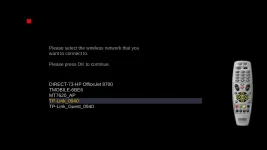
The osmini4k 0202 Image has some wifi Improvements. The crash(es) in this area should be solved, and at least some networks should be detected. There is more work to do in this area, but hopefully it is now at least partially usable. A few wifi usb devices may be automatically detected by the receiver as some wifi drivers are pre-installed.
el bandido
TNAP-Images
I do not see this being an image build fault. We would think an image build fault would be spread over several different receivers. A segmentation fault we would think would be wide-spread, but who knows?Installed new version, osmini4k-20260201 multiboot.zip
Screenshots are acceptable now, but i still have problems with booting, either from full restart or from deep standby, usb removed
Previous 2 installs was in slot1, new install is in slot4
Here is output from telnet
Code:TNAP 7 osmini4k osmini4k login: root Password: root@osmini4k:~# init 4 root@osmini4k:~# enigma2 [Enigma] Python path is '/usr/lib/enigma2/python'. [Enigma] DVB API version 5, DVB API version minor 12. [Enigma] Enigma debug level 4. [Avahi] avahi_timeout_new [Avahi] avahi_watch_new(3 0x1) [Avahi] avahi_timeout_update [Avahi] avahi_timeout_new [Avahi] avahi_timeout_free [Avahi] avahi_timeout_new [Avahi] avahi_timeout_free [Avahi] avahi_timeout_new [Avahi] avahi_timeout_free [Avahi] avahi_timeout_new [Avahi] avahi_timeout_free [Avahi] avahi_timeout_new [Avahi] avahi_timeout_free [Avahi] avahi_timeout_new [Avahi] avahi_timeout_free [Avahi] client state: 2 [Avahi] avahi_timeout_new [Avahi] avahi_timeout_free [eInit] + (1) Background File Eraser [eInit] + (5) Tuxtxt [eInit] + (8) graphics acceleration manager [bcm] /dev/fb0 No such file or directory [eInit] + (9) Font Render Class [Font] Initializing lib. [Font] Loading fonts. [Font] Intializing font cache, using max. 4MB. [eInit] + (9) gLCD [eFbLCD] /dev/fb1: No such file or directory [eFbLCD] framebuffer /dev/fb1 not available [eLCD] m_oled_brightness_proc = 0 [eDboxLCD] No oled0 or lcd0 device found! [eLCD] (132x64x8) buffer 0x6704d0 8448 bytes, stride 132 [gLCDDC] resolution: 132x64x8 stride=132 [eInit] + (9) GFBDC [fb] /dev/fb0 No such file or directory [fb] framebuffer /dev/fb0 not available [gFBDC] no framebuffer available Segmentation fault enigma2 root@osmini4k:~#
Try downloading and installing the 0202 image. Do nothing except install it. No restores or setup. Do the minimal menus to allow a reboot. Then reboot the box. Does it boot correctly with nothing setup and no devices attached? Reboot it again. If the reboots are OK then start setting it up. If possible, set it up in stages, where you add a few things, then reboot. This problem needs to be found and fixed. But as you can see from the logging, there is not much to go by or work with. Thanks.
el bandido
TNAP-Images
The log shows errors, but really almost all logs like that will show errors. You have skin and other errors, but nothing bad or detrimental. Set it up complexly now and see what it does. Try to set it up in groups or stages and reboot after each group or stage. We need to find the segmentation fault if possible....Thanks.

el bandido
TNAP-Images
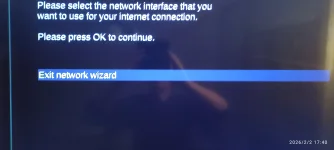
Early versions of Tnap-7 had WiFi issues, but most of them have been resolved. Shown below is from SF8008:
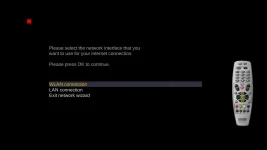
..but have you been able to go to the next step & see if the box can find a wireless adapter ?Early versions of Tnap-7 had WiFi issues, but most of them have been resolved. Shown below is from SF8008:
View attachment 19538
in my mini case: no wifi.