
- Home
- Forums
- FTA Set Top Box Discussions/Files
- FTA Set Top Box Discussions
- The North American Project E2 Image Discussions
You are using an out of date browser. It may not display this or other websites correctly.
You should upgrade or use an alternative browser.
You should upgrade or use an alternative browser.
TNAP-7 Image Discussion
- Thread starter el bandido
- Start date

el bandido
TNAP-Images
The 0405 image has been uploaded and contains several updates. Re-flash the image for best results.
An online update may not get all of the updates.
You want to display in signal finder like VIX which is fine, but this is a skin issue and would need edits for each skin that is not VIX. The information wanted is already generated. The skin just needs to be adjusted to show it.
The 101w Mood music channels load properly and work for myself and others. I do not know what needs to be fixed in the 101w Mood music channels without more information. The pids for the Mood music channels are correct.
An online update may not get all of the updates.
The language and radio display during a scan should be fixed.If I delete the other unnecessary languages, it always switches to English after a restart
View attachment 19736
Even though the option to not display them graphically is selected, the options are still displayed graphically
View attachment 19737
Editing bouquets in webif should be fixed. The 4 bouquets you uploaded were tested to work.I installed the new 0327 image. Webif issue remains. If I download any of the Classic, Documentary, Entertainment or Series bouquets then no bouquets are displayed in Webif. If I just delete those bouquets then Webif displays all bouquets.
Adding the firmware is possible, but not right now as there is other work to do.Do you think it would be possible to add a firmware selection option in addition to the driver selection ?
View attachment 19739
firmware 1.8.27679 - EDISION - wihout suppoer ShortFrameFEC
View attachment 19740
firmware 1.8.29209 - AVAILINK - with support ShortFrameFEC
View attachment 19741
PS: Would it be possible to add the NIT position from PID 16 to near the ONID/TSID as in OpenViX ?
View attachment 19742View attachment 19744
View attachment 19745
You want to display in signal finder like VIX which is fine, but this is a skin issue and would need edits for each skin that is not VIX. The information wanted is already generated. The skin just needs to be adjusted to show it.
What image does not display Picons? You uploaded a debug log but showed a crash log in the screenshot. Debug logs are no longer generated so the image was probably a bit old. Anyway, try the new image and see if the Picon issue is fixed. If not, then upload the crash log. ThanksIs there anyway to display Picons in the channel list on my Qviart Dual 4K
When I try to show in the channel list from menu Settings I receive this message
Signal finder has been rebuilt. Test for effects...v2703 MIO4K+ - It happens quite often that if I’ve had Signal Finder running for a while and want to change the frequency, the app crashes; however, if I change the frequency gradually, it works fine (except for the occasional freeze or display of the level from the previous transponder when the current one is inactive—but that’s a different issue).
View attachment 19748
Your crash that was shown in Network has been addressed.I just did a clean install of sf8008-20260328 MultiBoot Image on my Octagon SF8008 v1. Happy to report the WLAN drivers were installed and the Network functionality worked exactly as expected. The setup went flawlessly until I Saved and Exited from the default setup menu when the unit green screened and a crash log was displayed. I rebooted and all has been well ever since. I've attached the crash log for your review.
Observations: the first run boot and install seemed much faster than previous builds. The only negative, after I scanned 12000 v 20000 on 101°W SES1 and the Mood Music channels did not display as I had hoped from the recent forum discussions. I did a Signal Finder Scan on the Transponder and also a Blind Scan on the entire Satellite. I did find the Mood Music channels in the services menu but they don't play as expected.
Otherwise, this is the most stable and polished version of TNAP 7 that I have installed and used. I'll make it my daily driver for the week. Thanks for all of your hard work!
The 101w Mood music channels load properly and work for myself and others. I do not know what needs to be fixed in the 101w Mood music channels without more information. The pids for the Mood music channels are correct.

I flashed the new 0405 image and restored from backup. I loaded the four problem bouquets. I can still see all bouquets via webif.The 0405 image has been uploaded and contains several updates. Re-flash the image for best results.
Editing bouquets in webif should be fixed. The 4 bouquets you uploaded were tested to work.
el bandido
TNAP-Images
TNAP 7 is close to being complete. I am looking for any crashes, hangs, or items that do not work correctly.
Additions have been made to Signal finder that allows transponders in blindscan to be seen. A list of found transponders is stored in /tmp for every successful blindscan that returns transponders. Signal finder has been edited to allow the loading of the blindscan transponders so the signal may be checked or the transponders may be scanned.
The Signal finder does a scan of the transponder automatically, and an option to press the yellow button appears if this scan returns channels or services. Once you press the yellow button after channels or services are found, you have the option to exit or scan the transponder, which will add what was found to your channel file. The scan in the signal finder has been improved and shows channels and services that were previously not seen or ignored.
In images dated 0407 or later:
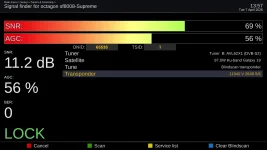
Additions have been made to Signal finder that allows transponders in blindscan to be seen. A list of found transponders is stored in /tmp for every successful blindscan that returns transponders. Signal finder has been edited to allow the loading of the blindscan transponders so the signal may be checked or the transponders may be scanned.
The Signal finder does a scan of the transponder automatically, and an option to press the yellow button appears if this scan returns channels or services. Once you press the yellow button after channels or services are found, you have the option to exit or scan the transponder, which will add what was found to your channel file. The scan in the signal finder has been improved and shows channels and services that were previously not seen or ignored.
In images dated 0407 or later:
el bandido
TNAP-Images
TNAP EPG has been updated to include the LPB channels on 101w Ku.
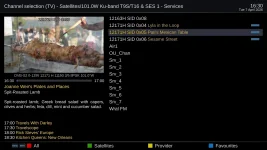
Qviart Dual, clean flash:
1) The signal always remains at 100%, as in previous releases.
2) There's something wrong with the epgimport plugin, ever since the first release of version 7.
When I click on the "Installed Plugins" section, I see an epgimport error.
I fixed it by removing the plugin and installing epgimport by Lululla (v99.6).
3) With the 05.04.26 release, the image crashes every time I try to access the channel list "menu."
I'm attaching the crash log.
4) If I move the "picon" folder from the flash drive to the pendrive, I no longer see the picons.
5) Changes to the decoder display (VFD control) aren't applied.
Even if I set it to "always clock," it doesn't appear; the display always shows "LD65."
I had already reported this problem when version 7 was first released.
6) image startup is very slow, much slower than all other images.
1) The signal always remains at 100%, as in previous releases.
2) There's something wrong with the epgimport plugin, ever since the first release of version 7.
When I click on the "Installed Plugins" section, I see an epgimport error.
I fixed it by removing the plugin and installing epgimport by Lululla (v99.6).
3) With the 05.04.26 release, the image crashes every time I try to access the channel list "menu."
I'm attaching the crash log.
4) If I move the "picon" folder from the flash drive to the pendrive, I no longer see the picons.
5) Changes to the decoder display (VFD control) aren't applied.
Even if I set it to "always clock," it doesn't appear; the display always shows "LD65."
I had already reported this problem when version 7 was first released.
6) image startup is very slow, much slower than all other images.
Attachments
Last edited:
Installed image SF8008-20260409 MultiBoot clean - source from Menu -> Setup -> Software Management -> Flash Images -> TNAP 7. During First Run Setup, I got into a loop where I could not exit from Tuner Setup. Buttons didn't allow me to save the Config. Ended up power cycling the receiver. Had 3 crashes in a row doing initial setup. See attached files.
FYI, I did the Blind Scan and the Signal Finder Scan on 101°W 12000 V 20000 for the Mood Music channels. The Music channels are not displayed. Is my expectation for them to Scan in automatically and play normally? I uploaded a Bouquet with manually entered PIDs for the Mood Music channels and they all play fine.
FYI, I did the Blind Scan and the Signal Finder Scan on 101°W 12000 V 20000 for the Mood Music channels. The Music channels are not displayed. Is my expectation for them to Scan in automatically and play normally? I uploaded a Bouquet with manually entered PIDs for the Mood Music channels and they all play fine.
Attachments
el bandido
TNAP-Images
1) Which Qviart Dual distro actually displays signal correctly? NONE that I know of. This is manufacturer neglect.Qviart Dual, clean flash:
1) The signal always remains at 100%, as in previous releases.
2) There's something wrong with the epgimport plugin, ever since the first release of version 7.
When I click on the "Installed Plugins" section, I see an epgimport error.
I fixed it by removing the plugin and installing epgimport by Lululla (v99.6).
3) With the 05.04.26 release, the image crashes every time I try to access the channel list "menu."
I'm attaching the crash log.
4) If I move the "picon" folder from the flash drive to the pendrive, I no longer see the picons.
5) Changes to the decoder display (VFD control) aren't applied.
Even if I set it to "always clock," it doesn't appear; the display always shows "LD65."
I had already reported this problem when version 7 was first released.
6) image startup is very slow, much slower than all other images.
2) I am not in Europe and do not have access to the European EPG unless maybe I download and install a channels list somehow.
Efforts were made last night to get the epgimport to work for you. You will need to test it and see. But you have a solution which is to use the alternate epgimport plugin. Would be nice though to have everything work "Out-of-the-Box". So see if my edits were good.
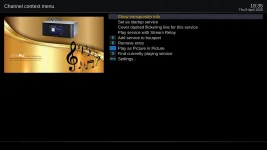
3) The crash log you attached was mostly empty in the area that we need to see. So the crash log has been adjusted for better output. The Menu inside the channel list does not crash for me and no one else has reported it. But we need to fix it if it is broken. The attached screencap shows the menu I think you are trying to access. Install 0104-2026 image when it is available and re-test. Post crash log if it crashes. Maybe we will see the exact problem this time.
4) For picons on a pendrive to work, three things must be true:
1. The folder must be named exactly picon (lowercase, singular) — or ZZPicon / XPicon if you changed the foldername setting. The scanner looks for [mountpoint]/picon/ exactly. A folder named Picons, picons, PICON, etc. will not be found.
2. The folder must contain .png or .svg files directly inside it — not in subfolders. The discovery check (Picon.py:46-50) looks for at least one .png or .svg directly in the folder to confirm it's a valid picon dir.
3. A full enigma2 restart after moving — activePiconPath is cached after the first successful picon lookup. If any picons were found on flash before, that path stays cached for the whole session. Only a restart clears it.
Rename the folder on the pendrive to exactly picon, make sure the .png files are directly inside it (not in a subdirectory), plug it in,
and restart enigma2 (not just the box — a GUI restart via Menu → Standby/Restart → Restart GUI is enough).
5) This should be fixed in 10-04-2026 or Later.
6) What is "slow"? 1 second, 10 seconds, or 5 minutes? Precisely time a different distro and see how long it takes as compared to TNAP 7. There is probably not much I can do, but at least some idea of "slow" would help. Make sure the distros are set as near identical as possible. Have Wireguard and other items running.
Last edited:
el bandido
TNAP-Images
Thanks for the info and logs. The Install wizard has been edited and hopefully that will solve the Crash problem.Installed image SF8008-20260409 MultiBoot clean - source from Menu -> Setup -> Software Management -> Flash Images -> TNAP 7. During First Run Setup, I got into a loop where I could not exit from Tuner Setup. Buttons didn't allow me to save the Config. Ended up power cycling the receiver. Had 3 crashes in a row doing initial setup. See attached files.
FYI, I did the Blind Scan and the Signal Finder Scan on 101°W 12000 V 20000 for the Mood Music channels. The Music channels are not displayed. Is my expectation for them to Scan in automatically and play normally? I uploaded a Bouquet with manually entered PIDs for the Mood Music channels and they all play fine.
Re Hidden Mood Music Radio Channels:
In the receiver, there resides a list of the Mood Music Channels: /lib/dvb/hidden_channels_101w_12000v.txt.
That list is loaded into the lamedb which is your channel file when the right conditions are met.
Conditions for loading these channels:
(1) Satellite orbit has to be EXACTLY 100.9W-101.0W. Transponder has to be 12000V (±1MHz for blindscan compatibility), SR20000 transponder (11998-12002). This is etched in stone. As you can see, a small amount of room is left for blindscan, but not much.
(2) The Mood Music Channel list has to reside in the proper location of the receiver.
(3) Code is written that says when that transponder is scanned on either of those satellite locations, then load the Mood Music Channels into lamedb. No and's if's or but's....It has to happen if the conditions are met!
We will walk through it in screenshots, and if that does not do it then I will go to the trouble to make a video. But this works. It simply does not have a choice if all conditions are met.
Here we see there are no radio channels for 100.9w
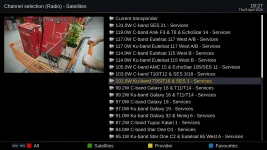
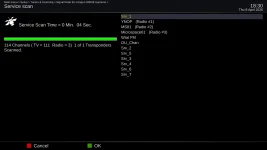
We will scan the one transponder that belongs to this satellite:
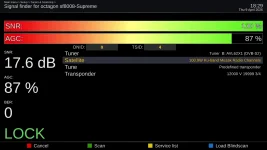
Scan Completes...
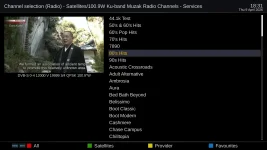
Note the Mood Music Radio Channels now exist:
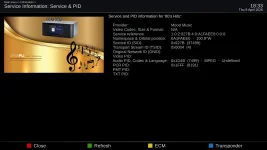
Note that the Radio Pid is correct:
This works on two Ku satellites. And it also works in blindscan, providing the found transponder is within the accepted tolerance.
If you want to verify the pids, then examine the file: /lib/dvb/hidden_channels_101w_12000v.txt
It does not have any choice but to work --If the conditions are met...

Question about EPG: Are
Is EPG information for the PBS channels on 99.0°W KU, available too? If so, how do I activate the feature.
el bandido
TNAP-Images
@ Babadem, Yes, 99.W Ku has epg. Set it and forget about it.It is simple to get TNAP EPG to work. The channels that have EPG have to be scanned onto your receiver EXACTLY as shown else it will not work. And the sources in epgimport have to be checked I think there is 3 or 4 sources for North American EPG. Anyway a thread on the subject is here: TNAP FTA Satellite EPG
El Bandido,Thanks for the info and logs. The Install wizard has been edited and hopefully that will solve the Crash problem.
Re Hidden Mood Music Radio Channels:
In the receiver, there resides a list of the Mood Music Channels: /lib/dvb/hidden_channels_101w_12000v.txt.
That list is loaded into the lamedb which is your channel file when the right conditions are met.
Conditions for loading these channels:
(1) Satellite orbit has to be EXACTLY 100.9W-101.0W. Transponder has to be 12000V (±1MHz for blindscan compatibility), SR20000 transponder (11998-12002). This is etched in stone. As you can see, a small amount of room is left for blindscan, but not much.
(2) The Mood Music Channel list has to reside in the proper location of the receiver.
(3) Code is written that says when that transponder is scanned on either of those satellite locations, then load the Mood Music Channels into lamedb. No and's if's or but's....It has to happen if the conditions are met!
We will walk through it in screenshots, and if that does not do it then I will go to the trouble to make a video. But this works. It simply does not have a choice if all conditions are met.
Here we see there are no radio channels for 100.9w
View attachment 19779
We will scan the one transponder that belongs to this satellite:
View attachment 19780
Scan Completes...
View attachment 19781
Note the Mood Music Radio Channels now exist:
View attachment 19782
Note that the Radio Pid is correct:
View attachment 19783
This works on two Ku satellites. And it also works in blindscan, providing the found transponder is within the accepted tolerance.
If you want to verify the pids, then examine the file: /lib/dvb/hidden_channels_101w_12000v.txt
It does not have any choice but to work --If the conditions are met...
Yes, everything is working as you expertly depicted. I was looking in the wrong place. Arrrg. All is well. Thanks!
el bandido
TNAP-Images
Excellent!
Now looking for more crashes bugs or problems....
Straightforward version bump — all 6 GStreamer components updated from 1.28.1 → 1.28.2 in lockstep. This will be finished in a bit. Dated 0410.
Now looking for more crashes bugs or problems....
Straightforward version bump — all 6 GStreamer components updated from 1.28.1 → 1.28.2 in lockstep. This will be finished in a bit. Dated 0410.

Megatron817
Administrator
Some reason my M.2 SSD in the Octagon sf8008 got erased after flashing 04-10.
edit
I guess after the settings restore something got corrupted so was able to fix by initializing the storage.
Luckily had backed up a lot to my laptop.
edit
I guess after the settings restore something got corrupted so was able to fix by initializing the storage.
Luckily had backed up a lot to my laptop.
Last edited:
1) I know it doesn't work on any distribution. I must have misunderstood one of the posts in this thread. I thought it had been fixed, sorry.1) Which Qviart Dual distro actually displays signal correctly? NONE that I know of. This is manufacturer neglect.
2) I am not in Europe and do not have access to the European EPG unless maybe I download and install a channels list somehow.
Efforts were made last night to get the epgimport to work for you. You will need to test it and see. But you have a solution which is to use the alternate epgimport plugin. Would be nice though to have everything work "Out-of-the-Box". So see if my edits were good.
3) The crash log you attached was mostly empty in the area that we need to see. So the crash log has been adjusted for better output. The Menu inside the channel list does not crash for me and no one else has reported it. But we need to fix it if it is broken. The attached screencap shows the menu I think you are trying to access. Install 0104-2026 image when it is available and re-test. Post crash log if it crashes. Maybe we will see the exact problem this time.
4) For picons on a pendrive to work, three things must be true:
1. The folder must be named exactly picon (lowercase, singular) — or ZZPicon / XPicon if you changed the foldername setting. The scanner looks for [mountpoint]/picon/ exactly. A folder named Picons, picons, PICON, etc. will not be found.
2. The folder must contain .png or .svg files directly inside it — not in subfolders. The discovery check (Picon.py:46-50) looks for at least one .png or .svg directly in the folder to confirm it's a valid picon dir.
3. A full enigma2 restart after moving — activePiconPath is cached after the first successful picon lookup. If any picons were found on flash before, that path stays cached for the whole session. Only a restart clears it.
Rename the folder on the pendrive to exactly picon, make sure the .png files are directly inside it (not in a subdirectory), plug it in,
and restart enigma2 (not just the box — a GUI restart via Menu → Standby/Restart → Restart GUI is enough).
5) This should be fixed in 10-04-2026 or Later.
6) What is "slow"? 1 second, 10 seconds, or 5 minutes? Precisely time a different distro and see how long it takes as compared to TNAP 7. There is probably not much I can do, but at least some idea of "slow" would help. Make sure the distros are set as near identical as possible. Have Wireguard and other items running.
View attachment 19776
2) With today's release, epgimport works correctly.
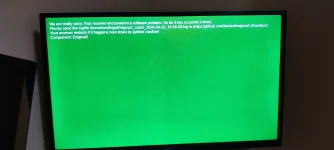
3) The channel list menu continues to crash, even with today's release.
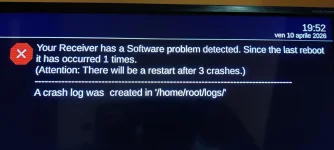
I'm attaching the error message and three logs of the three crashes. After the three crashes, I get this screen:
4) The folder name is picon and the files are png files. Checking more closely... I actually don't see them because I haven't enabled the picons display from the channel list menu (I can't, due to point #3).
5) For now, the bug remains, even with today's latest release.
I also wanted to point out that there's a time bug: I turned off the receiver at 7:32 PM Italian time, but the display showed 9:58 AM.
6) I mean very slow:
With TNAP 6, the times were similar to those of other distributions (BH, Cobralibero, SPA, ATV, PURE2, etc.), i.e., from 50 seconds to a maximum of 1 minute.
With TNAP 7, however, it took 1 minute and 50 seconds, even removing many plugins I don't use.
I started timing when "boot" appears.
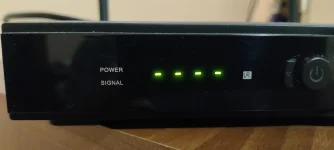
The boot message remains on the display for about 15 seconds, then 4 dashes appear (I've attached a photo) that remain on the display for about 1 minute.
I ran this test without modifying anything in the image, i.e., with a clean image, without removing or installing any plugins.
With a clean image, i.e., removing all the plugins I don't use, the result doesn't change much, i.e., 1 minute and 45 seconds.
Thanks again for your time, bye!
Attachments
-
Enigma2_crash_2026-04-10_19-52-22.log21.5 KB · Views: 1
-
Enigma2_crash_2026-04-10_19-50-11.log232 bytes · Views: 1
-
Enigma2_crash_2026-04-10_19-52-50.log1.2 KB · Views: 1
-
 IMG_20260410_195240.webp374.8 KB · Views: 7
 -
 IMG_20260410_195656.webp435.8 KB · Views: 5
 -
 IMG_20260410_200520.webp162.3 KB · Views: 9


el bandido
TNAP-Images
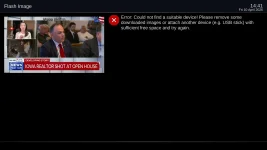
Well...Let's see...Trying to flash 0410 version mio4k+, but got this message for 2 diff brands of usb sticks, witch I have no problems on othe images:
..and I remember same issue did happened on some previouse versions (not all).
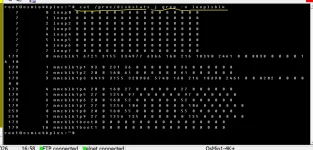
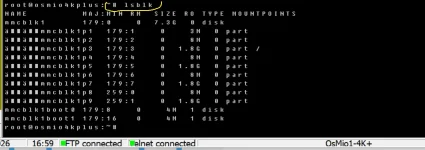
Run these commands in telnet and post the output. The usb drive needs to be in the receiver and recognized:
cat /proc/diskstats | grep -v looplsblk
lsblk
df -h
df -i
Here are crash logs for an 8gb Kingston stick:
& telnet output:
& telnet output:
Attachments


Last edited: