TNAP-7 Image Discussion

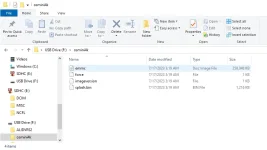
Thanks el bandido, but i did that and i still see the same thing. Stuck on boot with an Edision splash screen on the tv. And here is what i see on the file size difference after unzipping to the USB stick. The TNAP 7 being from the file you posted for me above. TNAP 7 on the right, and i think TNAP 5 on the left actually.
 

Attachments

  • TNAP 6.webp
    TNAP 6.webp
    30.2 KB · Views: 14
  • TNAP 7.webp
    TNAP 7.webp
    28.9 KB · Views: 15
With the April 16th release, I noticed that the channel list menu issue was resolved, and now I can also see the picons, and startup is much faster, now taking about 70 seconds, thanks!
As far as I'm concerned (Dual), the only remaining issue is:
- the problem of the incorrect time when I turn off the receiver.
- When the receiver is on, the time isn't shown on the display, only LD65.
 
Thanks el bandido, but i did that and i still see the same thing. Stuck on boot with an Edision splash screen on the tv. And here is what i see on the file size difference after unzipping to the USB stick. The TNAP 7 being from the file you posted for me above. TNAP 7 on the right, and i think TNAP 5 on the left actually.
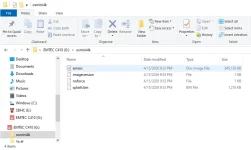
The recovery image was being built too big for the Bolt bootloader. Apologies!
The attached file should square everything. Worked for me.
 

Attachments

quick question... with previous releases, going back to TNAP1, I got used to and comfortable with what I think is referred to as "Neutrino-style" channel navigation, where the up/down keys go up/down the channels for the current satellite, and left/right bring up the channel list. I find it very intuitive. I think it was the default behavior in early releases and at some point TNAP went back to the default openPLI navigation key mapping, but there was a setting under Setup/System/GUI Settings/User Interface, that allows switching to Neutrino mapping

Unfortunately I'm not finding that setting in TNAP7. Is it there somewhere and I'm just not finding it? If not, is there a chance of bring it back?

As a fall back I think I should be able to get the same result by remapping keys in the "Hotkey" menu, just a bit tedious

Thanks!
 
Have you tried: Open channel list > Menu > Menu (Settings) > scroll to page 2 of settings
There you can enable / disable neutrino configurations.

My left key brings up channel list.
Awesome! Thanks a lot, I had not thought of looking there. The number of customization menus in those systems is nothing short of amazing and also a bit overwhelming at times
 
I apologize if this is a bit off-topic, but I haven't been able to answer my questions elsewhere.
I'm talking about the Qviart Dual boot logo: do you see it?
I see it with the sf8008, but not with the Dual. And I'm not just talking about TNAP, but also other distributions like Cobralibero and AreaDelta. However, if I use distributions like ATV and SPA, it works, and I see the boot logo.
It's not a recent anomaly, but rather one that's been there since I purchased the receiver 3 years ago.
Are you experiencing the same "problem"?
 
I do not see any logos on my Dual. Have been trying to find the reason for it. OpenATV has images for the Dual? Where? I do not see the Dual listed in the OE Alliance image build distro. Thanks
 
I do not see any logos on my Dual. Have been trying to find the reason for it. OpenATV has images for the Dual? Where? I do not see the Dual listed in the OE Alliance image build distro. Thanks
OPENATV 7.6
OPENATV 8 Alpha

Even with OpenBH, the logo has always been displayed, so the boot logo works with ATV, SPA, and BH.
Thank you for replying, I thought it was just a problem with my TV or the Dual
 
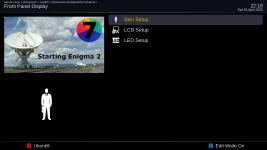
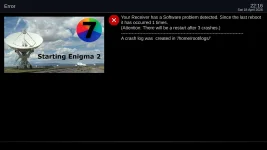
Just install a display skin package from the plugins browser and the display folder will be added at usr/share/enigma2 and you will be able to setup the display skin without a crash.
 
On the Mio+4k if I turn off my router and do a full reboot I loose my Ext HDD. Turn the router back on and do a full reboot the Ext HDD returns.
Doesn't have to have internet just a Network IP address so I guess I need to leave my private network router turned on with TNAP 7 while doing a full reboot.
 
On the Mio+4k if I turn off my router and do a full reboot I loose my Ext HDD. Turn the router back on and do a full reboot the Ext HDD returns.
Doesn't have to have internet just a Network IP address so I guess I need to leave my private network router turned on with TNAP 7 while doing a full reboot.

This s a boot ordering bug. Without a router, mountnfs.sh timed out waiting for network and skipped mount -a entirely. Since udev's automount also skips devices already in /etc/fstab (expecting the OS to handle them), the HDD fell through both paths unmounted. The fix runs local filesystem mounts immediately at the start of mountnfs.sh and network mounts still wait for the router as before.
 
Back
Top