- Home
- Forums
- FTA Set Top Box Discussions/Files
- FTA Set Top Box Discussions
- The North American Project E2 Image Discussions
You are using an out of date browser. It may not display this or other websites correctly.
You should upgrade or use an alternative browser.
You should upgrade or use an alternative browser.
TNAP-7 Image Discussion
- Thread starter el bandido
- Start date

el bandido
TNAP-Images
I installed it on my dual....
I tried it now: I removed Wireguard and then installed the version you posted.I installed it on my dual....
It doesn't change anything; it always starts checking the kernel module during boot.
It doesn't matter, it's fine.
Thanks for everything; the image is very responsive and has no issues.
Great job!

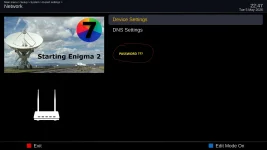
Sorry, my mistake: settings were on "advaced" only, not "expert".OSMIO4K+: fresh online flashed 0501 version, but can not setup password: is missing from the network menu:
it is there on version for mini4k !!!
el bandido
TNAP-Images
Anything that does not work correctly should be posted or written about! User error is still an error!
All the last couple, maybe three image updates did was fix fstrim fro proper operation. The reason there were image updates is because that was the only way to get the needed updates placed correctly. Now the updates have switched to online, so you should see s noticeable decrease in new images being uploaded unless something needs fixed, and online updates will slow down too.
Now we can work on additions and improvements instead of fighting basic operation crashes or errors. Some errors still probably exist, but the frequency of finding them should get slower.
All the last couple, maybe three image updates did was fix fstrim fro proper operation. The reason there were image updates is because that was the only way to get the needed updates placed correctly. Now the updates have switched to online, so you should see s noticeable decrease in new images being uploaded unless something needs fixed, and online updates will slow down too.
Now we can work on additions and improvements instead of fighting basic operation crashes or errors. Some errors still probably exist, but the frequency of finding them should get slower.

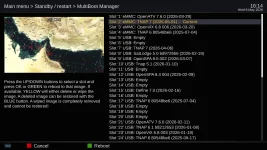
EB... in the slot names 1 thru 4 for instance, what is the directory and file names where they are stored? Can the file name be changed to a specific description of that image? Would changing the file name affect any future reboots? Would help when making changes to a specific image while testing.
el bandido
TNAP-Images
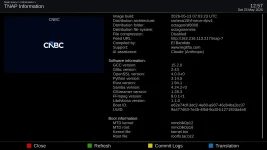
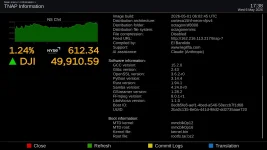
You could edit /usr/lib/enigma.info of receiver files. TNAP 7 images are precisely marked with a Customized build date and time as shown below.
el bandido
TNAP-Images
You have a variety of images in your multiboot slots. I am not sure exactly what you are trying to do. Some will be the same, while others will be different. The way the list works is:
1st choice → usr/lib/enigma.info
2nd choice → etc/image-version
3rd choice → falls back to etc/issue only if neither of the above exist
Last resort → shows "Empty"
Without a clear understanding or example of what you are trying to do, this is all I can tell you.
1st choice → usr/lib/enigma.info
2nd choice → etc/image-version
3rd choice → falls back to etc/issue only if neither of the above exist
Last resort → shows "Empty"
Without a clear understanding or example of what you are trying to do, this is all I can tell you.
While testing images, instead of keeping a hard copy log of each slot image, be able to just add a small comment to the slot image info. Example:
Slot 1 - eMMC: OpenATV 7.6.0 (2026-03-29) - has Aglare skin
Slot 2 - eMMC: TNAP 7 (2026-05-01) - has Fury skin
Slot 3 - eMMC: OpenVix 6.8 006 (2026-03-20) - has default skin
Slot 4 - etc, etc.
Slot 1 - eMMC: OpenATV 7.6.0 (2026-03-29) - has Aglare skin
Slot 2 - eMMC: TNAP 7 (2026-05-01) - has Fury skin
Slot 3 - eMMC: OpenVix 6.8 006 (2026-03-20) - has default skin
Slot 4 - etc, etc.
el bandido
TNAP-Images
Ok
Then in each individual image, you will need to edit the proper file. The list in post#450 would help. Edit one or two distros and you will get the hang of it.
Then in each individual image, you will need to edit the proper file. The list in post#450 would help. Edit one or two distros and you will get the hang of it.

el bandido
TNAP-Images
For the 101w-ku Muzak or Mood music mux, a tnapnowplaying plugin has been added that shows a poster plus the song title. A bit of eye-candy while listening to radio channels. In the extension feeds. Need to online update to refresh the plugin listings.
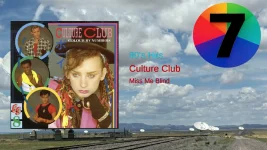
LOL!
LOL!

Now we're talking. Somebody with an eye for marketing has added a great feature to TNAP! At last we can get the info that's on the tip of our tongue when listening to old gold.For the 101w-ku Muzak or Mood music mux, a tnapnowplaying plugin has been added...
el bandido
TNAP-Images
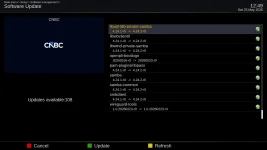
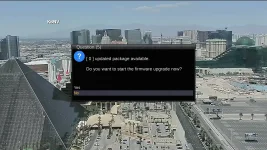
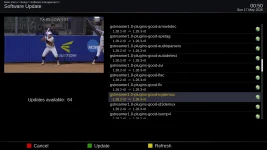
Minor gstreamer Software Update available online.
el bandido
TNAP-Images
Minor Samba Upgrade today: