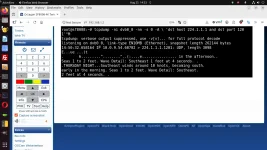
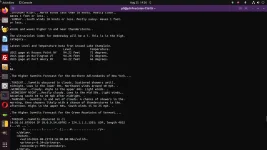
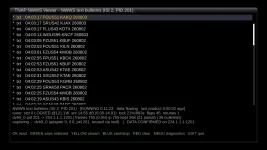
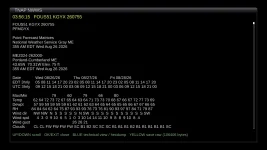
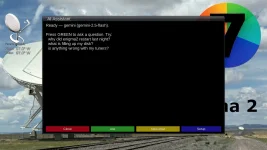
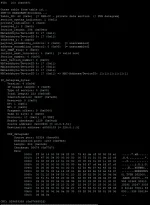
It should be explained what is being shown at the bottom of the screen in nwwsviewer.
Metrics and Status Information:
NWWS text bulletins (ISI 2, PID 201) [RUNNING 0:41:09 quiet 0:00:34 last product 0:00:34 ago]
tuner: slot 0 LOST LOCK @121.1W snr 14.31 dB (0.00-15.05) lock 16%/2473s flaps 186 retunes 0
dvb0_0 pid 201 -> 224.1.1.1:1201 | frames 2487 (0.0/s) ip 2487 kept 934 (68 partial) | 91 bulletin(s)
capturing - dvb0_0 (adapter 0, if 0, pid 201, reused via ioctl) | DATA CONFIRMED on 224.1.1.1:1201
1.
NWWS text bulletins (ISI 2, PID 201)
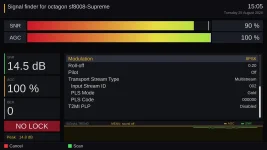
This identifies the stream and type of data the viewer is processing.
NWWS text bulletins = The viewer is currently looking for National Weather Service text products carried on the NOAAPORT/NWWS stream.
ISI 2 = Input Stream Identifier 2 is selected. On DVB-S2/Multistream transmissions, the ISI identifies the particular logical stream being received.
PID 201 = MPEG Transport Stream Packet Identifier 201 is the PID from which the DVB network/IP data is being extracted.
PID 201 is therefore the transport-stream path feeding this particular NWWS data session.
2. [
RUNNING 0:41:09]
The viewer/capture process has been running for 41 minutes, 9 seconds.
This is the elapsed operating time for the current monitoring session, not necessarily the amount of time the tuner has been locked.
3.
quiet 0:00:34
The monitored data path has been quiet for 34 seconds.
This counter increases while no new usable/relevant NWWS data activity is being received.
A short quiet period is normal because weather products are not necessarily transmitted continuously. A rapidly increasing quiet counter while the tuner is also reporting LOST LOCK can instead indicate that reception has stopped because the RF signal disappeared.
4.
last product 0:00:34 ago
The most recent successfully recognized NWWS product was received 34 seconds ago.
This is a product-level timer. It tells you how long it has been since the viewer last completed or recognized a bulletin/product.
Note:
In this screenshot, quiet and last product are both 34 seconds, which means the most recent useful activity and the most recent completed product occurred at approximately the same time.
Tuner / RF reception metrics
5.
tuner: slot 0
The Enigma2 tuner being monitored is Tuner slot 0.
On a receiver with multiple physical tuners, this tells you which tuner frontend is supplying the stream.
6.
LOST LOCK
The tuner is not currently locked to the satellite transponder. This is an instantaneous state. It does not mean the entire session failed.
The same screenshot shows:
(a) thousands of received frames,
(b) confirmed IP data,
(c) 91 decoded bulletins,
So the tuner had lock earlier in the session and successfully received data before the lock was lost.
7.
@121.1W
The tuner is associated with the satellite orbital position 121.1° West.
This is the configured/identified orbital location for the NOAAPORT signal being monitored.
8.
snr 14.31 dB
The displayed Signal-to-Noise Ratio is 14.31 dB.
SNR is the difference between the desired satellite signal level and the noise/interference level.
Higher SNR usually means more signal margin, while Lower SNR = less decoding margin.
The exact minimum SNR needed for reliable reception depends on modulation, FEC, symbol rate, receiver implementation, and signal conditions. For this particular transponder, SNR is fairly low. A decent 7.5 ft. or 8ft. dish should receive it. The SNR value should not be confused with raw signal strength or AGC.
9.
(0.00-15.05)
This is the observed SNR range during the monitoring session:
Minimum observed: 0.00 dB, and Maximum observed: 15.05 dB
Note:
The 0.00 dB minimum can occur when the tuner loses lock or when the driver cannot return a meaningful SNR measurement during an unlocked state. It should therefore not automatically be interpreted as a valid locked-signal SNR reading. The useful figure here is that the tuner has reached approximately 15.05 dB at its best during this run.
10.
lock 16%/2473s
This reports tuner lock availability over the monitored interval. Observed interval = 2473 seconds. Percent of that interval locked: 16%. 2473 Seconds is about 41 minutes, 13 seconds. At 16% lock availability, the receiver had usable tuner lock for roughly 396 seconds, or about 6 minutes 36 seconds during the measured interval. That is very poor lock continuity. It means the receiver spent about 84% of the monitored time unlocked. This is one of the most important diagnostics in the screenshot. How important it really is is currently unknown as our signal meter system is not designed for this.
11.
flaps 186
A flap is a change in tuner lock state — for example, going from locked to unlocked or from unlocked back to locked. The counter shows 186 lock-state changes during this monitoring session. A high flap count means the signal/lock is unstable.
Important interpretation Note:
If each state transition is counted separately, one complete loss-and-recovery cycle can contribute two flaps.
Therefore, 186 flaps does not necessarily mean 186 separate outages.
It does show that the receiver has been repeatedly bouncing between lock and no-lock states.
Combined with only 16% lock availability, this indicates a very unstable RF reception condition. But it should be noted that we are using a FTA receiver, whose signal interface is designed for satellite tv and radio, Not for receiving packets.
12.
retunes 0
The viewer has performed 0 automatic/manual retune recovery operations during this monitoring session.
This is useful for separating two different causes of interruptions such as lock instability originating from the tuner/signal. Or Lock changes caused by the application deliberately retuning. Because the value is zero here, the 186 flaps were not the result of viewer-triggered retune attempts.
DVB/IP capture metrics:
13.
dvb0_0
dvb0_0 is the Linux DVB network interface being used by dvbnet. The name normally corresponds to DVB adapter 0, network interface number 0.
It is the virtual network interface through which MPE/IP data extracted from the satellite transport stream enters the Linux networking stack. (Note, there are two of these.)
14.
pid 201
This confirms that dvb0_0 is listening to Transport Stream PID 201. That matches the PID shown in the viewer title/status line.
15. -> 224.1.1.1:1201 = The extracted traffic is being associated with the multicast endpoint, IP multicast address: 224.1.1.1
UDP port: 1201
This is the network destination being monitored for the NWWS data handled by this viewer.
The arrow means that PID 201 is ultimately yielding IP traffic for this multicast destination.
16.
frames 2487
The capture layer has processed 2,487 DVB/MPE data frames during the session. A frame is a lower-level transport/network unit delivered from the DVB data path before the application reconstructs higher-level weather products. This counter shows that actual payload-bearing data has made it through the DVB capture path.
17.
(0.0/s)
The current frame arrival rate is 0.0 frames per second. This is an instantaneous/recent rate, not the session average. Because the screenshot simultaneously says LOST LOCK, a current rate of 0.0/s is expected: no new frames are arriving while the tuner is unlocked. The total frame count remains at 2487 because those frames were received earlier.
18.
ip 2487
The decoder has extracted 2,487 IP packets/datagrams from the received DVB data. In this screenshot the IP count equals the frame count of frames 2487 and ip 2487. That indicates that each counted DVB/MPE frame in this sample produced an IP packet recognized by the network decoder. This is good evidence that the DVB-to-IP conversion path is functioning.
19.
kept 934
Of the extracted IP traffic, the viewer retained 934 packets/units for further NWWS processing. "Kept" means the traffic passed the viewer's relevance/filtering checks rather than being discarded as unrelated to the product stream being assembled. For this snapshot, 934 / 2487 ≈ 37.6% of the extracted IP packets were retained by the viewer for further processing. Not every packet on a multicast/data stream necessarily belongs to a complete NWWS text bulletin that the viewer wants to display.
20.
(68 partial)
The viewer currently reports 68 partial/incomplete product assemblies. A partial item is data that has started to form a product or bulletin but is not yet complete enough to be delivered as a finished bulletin. Typical reasons include missing packets, reception interrupted by loss of tuner lock, joining a product after its beginning was already transmitted, packet loss during a lock flap, or a product still being assembled when the status was sampled. With the tuner showing only 16% lock and 186 flaps, incomplete products are not surprising. This metric is particularly useful when diagnosing whether an unstable RF path is causing fragmented or incomplete weather products.
21.
91 bulletin(s)
The viewer has successfully recognized/assembled 91 NWWS bulletins during the current monitoring session. This is the most important application-level success counter. It proves that the complete chain has worked at least intermittently.
Chain Diagram:
Satellite RF
↓
DVB-S/S2 tuner
↓
Transport Stream PID 201
↓
dvbnet / dvb0_0
↓
MPE/IP extraction
↓
224.1.1.1:1201
↓
NWWS parser
↓
91 completed bulletins
So even though the tuner is currently reporting LOST LOCK, the data-reception and bulletin-decoding design itself is demonstrably working.
Capture-state line:
22.
capturing - dvb0_0
The viewer's packet capture is currently enabled and attached to dvb0_0. This means the application has not stopped its network capture simply because tuner lock has temporarily disappeared. If the tuner regains lock and packets return to the interface, the application is already in position to receive them.
23.
(adapter 0, if 0, pid 201, reused via ioctl)
This describes how the DVB network interface was obtained.
adapter 0
Linux DVB adapter number 0 is being used.
Typical device-tree relationship: /dev/dvb/adapter0/ ... if 0 DVB network interface number 0 is being used. That is why the interface is named dvb0_0.
pid 201
The interface is configured to extract PID 201.
reused via ioctl
The application found an existing DVB network interface already configured for the required PID and reused it instead of unnecessarily creating another interface. ioctl Refers to the Linux device-control calls used to query/control the DVB network device. This is normally desirable because it avoids creating duplicate dvbnet interfaces for the same PID.
24.
DATA CONFIRMED on 224.1.1.1:1201
This is a strong positive verification message. It means the application has actually observed real data arriving for 224.1.1.1:1201. This is more meaningful than merely proving that the tuner exists, dvb0_0 exists, PID 201 was configured, or the interface is marked UP.
DATA CONFIRMED means payload traffic has actually made it through the DVB/IP chain to the expected multicast destination.
What this particular screenshot tells us is the NWWS viewer itself is working. Here is why:
frames 2487 DVB data frames were received.
ip 2487 those frames were successfully decoded into IP traffic.
DATA CONFIRMED on 224.1.1.1:1201 the expected multicast data was actually seen.
91 bulletin(s) real NWWS products were successfully decoded and displayed.
The main problem shown by the metrics is RF/tuner lock instability, not a completely broken DVB/IP pipeline.
The strongest evidence is:
LOST LOCK
lock 16%/2473s
flaps 186
Only about 16% of the monitoring period had tuner lock, and the lock state changed 186 times. That explains why
the current packet rate is 0.0/s, there are partial/incomplete products, and bulletin reception occurs intermittently rather than continuously.
Bottom-line diagnosis from this screenshot:
The NOAAPORT/NWWS receiving chain is proven to work, but the satellite lock is extremely unstable. To a degree though how unstable it really is not exactly known because our satellite signal system is not designed for this.
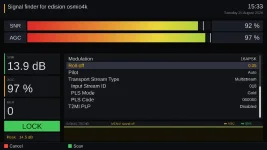
This plugin has been tested to work on Octagon sf8008 with Avalink tuner or demod, and Edision 4K receivers.