TNAP-7 Image Discussion

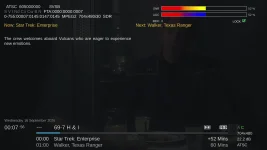
The actual /home/root/logs/Enigma2_crash_2026-09-08_13-30-45.log shown in screenshot 2 would be extremely useful. Posting a screenshot of enigma2 crash is very limited, and the complete log will most likely have useful information in it.

TNAP 5 Is unsupported with all feeds for it being removed. If the image is still useful, then fine. Else, Upgrade it.
 
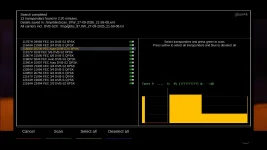
TBS5925 Blindscan is as crappy as it was some ten years ago when it was first introduced in to enigma2. No one seems to have this device, and I am not really interested in spending time trying to make a 15 year old tuner perform better because you cannot even buy one new. Currently the TBS5925 is useful as an extra tuner, and that is the limit.

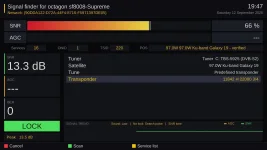
HDTV Mate ATSC 1.0 works fine on enigma2, and the scan for channels is much quicker than the Hauppauge. The Signal bars in Signal finder need work. Other than that, from what I see the device works fine.

HDTV Mate ATSC 3.0 has not been implemented in enigma2. Currently there is no DRM encryption solution for it. The ATSC 3.0 side will require more work to implement.

The question remains:
Does anyone have the GTMedia ATSC 1.0/3.0 Tuner?
 
Same issue (error message) with usb backup for mini4k.
if i leave the usb stick plugged in & reboot the box, no more error message !!!
No issue in other images: vix, atv.
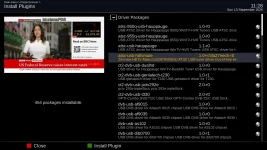
Install the attached plugin and reboot. See if doing that solves the mount issues.
 

Attachments

I just tried to do an upgrade with opkg and the telnet server was no longer accessible. The updates did not complete because after rebooting the box I did the opkg upgrade again and a long list updates were being done (again) with the same tail end output below. Here's the tail end before I got dumped out.
Configuring busybox-inetd.
System startup links for /etc/init.d/inetd.busybox already exist.
Restarting internet superserver: inetd .
Configuring busybox-telnetd.
System startup links for /etc/init.d/telnetd.busybox already exist.
Restarting telnet server: telnetd Connection closed by foreign host.
 
@Arion,
#676 Is low symbol rate blindscan for Edision. The unusual part for Edision is the driver sources are available along with the blindscan binary sources, which leads to customization possibilities. Modern editing tools such as AI can open new doors but they cannot work miracles.

Octagon SF8008 comes in three versions with the middle or second version having a different tuner/demod than the other two. And everything is Closed Source currently for Octagon. I have outright asked Octagon for their sources to be published and got no reply. Octagon sells receivers and relies on third parties to fix things which is why Octagon repairs or developments are basically non-existent.

All is not lost. It may be possible to add some sweep scan technology or maybe something else to the Octagon receivers that changes the blindscan. My original (version1) SF8008 is currently broken. Which leaves me Only with Avalink tuners in SF8008 (version2).

If time permits this winter, I will look and see if we can do something to at least enhance the SF8008 blindscan and its graph. But one thing is for certain: You will not get much if any results from Octagon outside of purchasing a pallet or two of receivers. Edision provided support that still shows today. Octagon does not. The difference is very noticeable such as post #676.
 
I recently bought a SF8008v3 from Rick as this is about the best receiver currently available in the U.S. and a few years ago bought a VU+ out of Europe. But the little box I liked the best was the OsMio 4k plus dual tuner receiver. That one still works but the display is burned in and they don’t sell them any more and the current Edison receivers don’t approach what the Mio plus did. The Mio is a backup now but I really wish I had bought a few more and put them away. Unfortunately it seems like streaming is the ‘go to’ now for most and the satellite reception hobby is in decline so it seems like manufacturers are loath to invest in bringing new boxes to market.
 
I would like to work on the SF8008 because versions 1 and 3 have SiLabs tuners that are good for symbol rates below 1000. The problem is you have no way to find them in blindscan.

Page 34, Post#676 Shows the blindscan capabilities of the Edision mini-mio-mio+ 4k receivers below 1000 Symbol Rate. The lowest I have found is blindscan is 290 Symbol Rate on 99w Ku and the lowest I have found that is usable so far is 360 Symbol Rate on 99w Ku. A Professional low drift lnb is suggested for these low symbol rates. The Edision 4K receivers are the only enigma2 receivers that can blindscan this low.

So you may use the Mio4kPlus to find the low symbol rate transponders and use them on the SF8008 as a work-around. To scan the low symbol rates, 00 is used for a low symbol rate start as shown in the #676 screenshots. When 00 is selected, two more entries appear. Currently the other two entries are hard to see.

The Edision 4K blindscan menu has to be set to 00 for a low symbol rate, then start the scan. Exit the blindscan plugin completely when the scan starts and when you return, the other two low symbol rate entries will be seen. This is a bug that has been fixed in the next update.
 
Tnap images generates html and txt scan reports after each ServiceScan. An example of what the Edision 4K receivers can do with low symbol rates is shown in the link.

I have a GigaBlue UE 4K receiver which has 2FBC internal tuners along with 2 Plug and Play (PNP) SiLabs DVB-S2x internal tuners. The DVB-S2x PNP tuner is or was available as a dual or single, with the dual being advertised as: GiGaBlue DVB-S2X dual / twin tuner module for UHD Quad 4k, UHD UE 4K & X2. I purchased this receiver a few years ago thinking it might be useful to use on multiple satellite dishes. The receiver was advertised to blindscan, which did not work.

ATSC and other usb tuners did not work either, so I shelved this receiver. After recently reviewing the usb tuner problem, a solution was found to make them work. Then attention was turned to the PNP DVB-S2x tuner and a blindscan binary was created that allows it to blindscan! The PNP tuners are unusual as they identify DVB-S2x transponders in blindscan, but they have to regress in ServiceScan to DVB-S2.

I plan at some point to add the GigaBlue UE4K to TNAP images. If someone has this receiver, they may find it is indeed useful.

GBUE-blindscan-menu_20260927214210.webp


GBUE-Blindscan-Transponders_20260927215932.webp
 
With the A.I. assistant plugin I’m not seeing the Gemini key right and the box rejects it. Where does the file reside on the box? Can I ssh into the box so I can copy and paste the key from the desktop app to the box?
 
Please use this thread for aiassistant. AIassistant with TNAP 7

That plugin is 'Under Construction", but it will be a terror once completed. The idea of course is what it says: Bring a powerful, free or low cost ai into the receiver. The key can or should be able to be entered in the aiassistant plugin menu. Or as an alternative, maybe make a folder named exactly "aiassistant". Put your key file(s) inside this folder, then send the whole folder with keys to /etc/enigma2 of the receiver then reboot. Path = /etc/enigma2/aiassistant/<key-files>

If it does not work or if you have problems, then post in the aiassistant thread. The idea of the aiassistant is to provide help to someone that has little to no experience. It is realized that entering a key like this sort of kills that whole idea. But the plugin is still being assembled.

Also there is an aisubtitles plugin that provides onscreen decoding for almost any channel being watched. TNAP 7 has several unique items in it. You just have to know where to look. As a novelty, you might also want to try the nwwsviewer, which pulls the packets from the noaa weather multistream transponder on 121W. The tnapnowplaying plugin provides posters for the hidden radio channels on 101w.
 
Back
Top