XDREAMY SKIN BY INSPIRON

@el bandido

Thanks for your feedback and detailed information,

After carefully reviewing your assessment, I felt that it had been interpreted in an unintentional way.

All what I want is making things easy to user and save his time, so instead of install the skin and then choose it then restart, I merged all in one step.

For plugin checking for dependencies, it is a double check step to ensure the box ready to build the database used to store the local data, but you are correct, it is better to add it to the control file then let the plugin doing the double check.

It is easy to replace set as default skin to regular init 4 && init 3, maybe I made it in that way because I use it as my default.

Overall, it is small things I can fix easily, thanks to spot light on it.

Regards.
 
Both ram readings are correct, depending on how you look at it. The plugin shows how much memory is completely empty while htop shows what can be used if needed. The attached document and .py file as a tester will explain it. It will be up to you to decide. Users seeing a high ram usage for no apparent reason will have a tendency to accuse your skin of using excess ram.
 

Attachments

Both ram readings are correct, depending on how you look at it. The plugin shows how much memory is completely empty while htop shows what can be used if needed. The attached document and .py file as a tester will explain it. It will be up to you to decide. Users seeing a high ram usage for no apparent reason will have a tendency to accuse your skin of using excess ram.
Really appreciate you input my friend, I think we can use both as standalone hybrid idea, let me check both and maybe I will change the mechanism to measure the ram readings.

Again thanks for your help
 
The xDreamy skin alters the image --or so it seems.

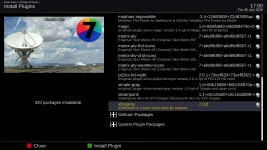
Install XDREAMY Version 7.3.0
xdreamy-7.3.0-feeds_20260730175042.webp

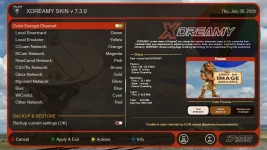
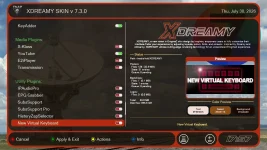
xDreamy has its own plugin. Changing the encryption to show colors works.
color-decrypt-channel_20260730175514.webp

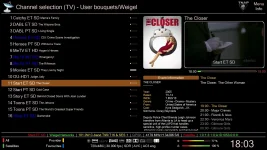
This turns the Biss channels Blue, which is expected:
101w-blue-channels_20260730180326.webp

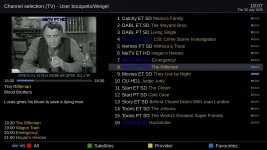
Switching to PLi skin retains the Blue channels, which is unwanted:
blue-channels-pli-hd-night_20260730180710.webp

xDreamy plugin presents other plugins that can be installed which in a way creates a mini enigma2 image inside of an enigma2 image:
other-plugins_20260730175749.webp

Nothing should be forced upon the user. Once another skin is selected for use, everything pertaining to xDreamy should disappear. Parts and pieces of the skin such as colored channel entries should not linger. And having a mini enigma2 image inside of an enigma2 image will most likely lead to other problems and failures. There are also numerous wallpapers or background screens which are nice, but also take space. The overall feel of xDreamy 7.3.0 is a great skin, but it wants to take over and become the only skin. It also gives the feel of installing a mini image.

The bitrate also does not read correctly. It shows values while the dish is traveling to a newly selected satellite. I did not look at this issue much, but it seems the bitrate continues to display whatever value was last calculated instead of 0 when the dish moves.

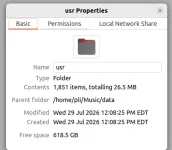
Unpacked, xDreamy has 1,851 items, totaling 26.5 MB. Hence, mini image:
xdreamy-unpacked-2026-07-30 18-24-38.webp
 
Good Catch....

For channels Server Coloring, it just small modifications in bouquet.tv files located in
/etc/enigma2/*.tv

You can turn off the feature and restore your backup settings file this will restore the colors back to normal, actually when your press the yellow key in the plugin, you will see two new options to add /remove the channels color but unfortunately both not working as planning, it is experimental feature I just added.

I don't look to XDREAMY as a skin anymore, look to it, it consider as a replacement for many plugins now.

EPGTranslator
TMDB
Panels
Coloring channels
Bootlogo changer
etc

Do you prefer to install all seperaly?

I know this is not usual but it a unique project amony many other regular skins.

But I agree with you when you switch from XDREAMY to another skin it should remove its impact, I will try to make this automatic next version.
 
The thing is we have plugins, so why add more? That is my question.

xDreamy appears to be assembled and edited using Qodo. There is nothing wrong with that, but there also appears to be a lot of copy and pasting in the file edits which can lead to loose ends. Then there are files and other items just left behind that should not be included in an .ipk file including a .bak or backup file. There were also many different version numbers in the code at various places which at minimum is just not a good idea.

Examining the code by disassembling the .ipk file gives the perception that problems existed but were coded over. Things kept getting added without ever solving all of the existing problems. The plugin.py file is huge and should really be broken into 3 to 4 files as doing this would make it lots easier on the AI coder, plus it would improve the performance of the AI coder. In general, an AI coder is not going to read 3 or 4 thousand lines of code for every edit, which means some areas of the large plugin.py are either never seen or are ignored. This can lead to all sorts of coding errors.

It is also extremely easy to expand a project beyond a point of usefulness as I have done that several times when coding with AI. For me, some of it was just pure excitement at seeing something working, and at other times, the AI offers helpful hints, such as: "want me to add this?"

Overall, I think the xDreamy skin is a very good piece of work, but at some point you should ask yourself if you are building a skin or an image? All of our FTA receivers are at least 10 years old in technology with some stretching out to around 15-20 years in technology. A FTA receiver kernel of 4.x.x is considered new. Our receivers were based and built for what was available when the receivers were produced. Not for what would be available a decade or two later.

Some receivers now are having space problems, which means consideration should be given to how much "bloat" we put in a plugin. My definition of bloat is something that is useful, but is of no use to the owner or user of the receiver. The space and resources we have available in a given receiver model were based on the smaller images of 10-15 years ago.

Attached are the changes that were made, and also the plugin that was created after the changes. You are welcome to keep these changes or discard them. The idea is to give suggestions. Not to say that it has to be done this way or like this. The plugin.py file is where the work should be focused. There are 74 broad except Exception: blocks. Then you have One of the seventeen URLs (Transmission) is plain http://, not https:// ... meaning that specific download has no encryption at all. Anyone positioned on the network between the receiver and dreambox4u.com (a compromised Wi-Fi hotspot, a hijacked DNS entry, a stale/expired domain later bought by someone else) could swap in a malicious script, and the receiver would run it as root without any way to notice.

Even the sixteen https:// ones fetch third-party scripts the xDreamy author doesn't control (various personal GitHub/GitLab repos) and run them unmodified if any of those repos is ever compromised, this becomes a code-execution path onto your box. Does a skin really need all of this? Is it useful to everyone? Just something to think about.
 

Attachments

Last edited:
The thing is we have plugins, so why add more? That is my question.

xDreamy appears to be assembled and edited using Qodo. There is nothing wrong with that, but there also appears to be a lot of copy and pasting in the file edits which can lead to loose ends. Then there are files and other items just left behind that should not be included in an .ipk file including a .bak or backup file. There were also many different version numbers in the code at various places which at minimum is just not a good idea.

Examining the code by disassembling the .ipk file gives the perception that problems existed but were coded over. Things kept getting added without ever solving all of the existing problems. The plugin.py file is huge and should really be broken into 3 to 4 files as doing this would make it lots easier on the AI coder, plus it would improve the performance of the AI coder. In general, an AI coder is not going to read 3 or 4 thousand lines of code for every edit, which means some areas of the large plugin.py are either never seen or are ignored. This can lead to all sorts of coding errors.

It is also extremely easy to expand a project beyond a point of usefulness as I have done that several times when coding with AI. For me, some of it was just pure excitement at seeing something working, and at other times, the AI offers helpful hints, such as: "want me to add this?"

Overall, I think the xDreamy skin is a very good piece of work, but at some point you should ask yourself if you are building a skin or an image? All of our FTA receivers are at least 10 years old in technology with some stretching out to around 15-20 years in technology. A FTA receiver kernel of 4.x.x is considered new. Our receivers were based and built for what was available when the receivers were produced. Not for what would be available a decade or two later.

Some receivers now are having space problems, which means consideration should be given to how much "bloat" we put in a plugin. My definition of bloat is something that is useful, but is of no use to the owner or user of the receiver. The space and resources we have available in a given receiver model were based on the smaller images of 10-15 years ago.

Attached are the changes that were made, and also the plugin that was created after the changes. You are welcome to keep these changes or discard them. The idea is to give suggestions. Not to say that it has to be done this way or like this. The plugin.py file is where the work should be focused. There are 74 broad except Exception: blocks. Then you have One of the seventeen URLs (Transmission) is plain http://, not https:// ... meaning that specific download has no encryption at all. Anyone positioned on the network between the receiver and dreambox4u.com (a compromised Wi-Fi hotspot, a hijacked DNS entry, a stale/expired domain later bought by someone else) could swap in a malicious script, and the receiver would run it as root without any way to notice.

Even the sixteen https:// ones fetch third-party scripts the xDreamy author doesn't control (various personal GitHub/GitLab repos) and run them unmodified if any of those repos is ever compromised, this becomes a code-execution path onto your box. Does a skin really need all of this? Is it useful to everyone? Just something to think about.
@el bandido

Really appreciate your input and highlights, this is honest audit and I respect each point in it, I was not planning to expand the skin features to this level, even I stopped for about a year with version 6.5 before resuming the work on it.

I am not a developer or even have experience in related field so sure you will finding a lot of errors somewhere in the code based on my limited skills but I keep improve it with time.

For my giant plugin you are 100 % correct and it start to be hard to maintain, I was planning to divide it into parts but let me first review your files sure I can use it as guide lines.

Appreciate your technical feedback and your I will review it once more.

Regards and have a great day
 
I can help you bust up the plugin.py. In reality, while the skin package seems complex, it has a few main files. Set the Control files properly and they can be almost forgotten. That plugin.py with its 74 broad except Exception: blocks is the place to start. Refactor that thing and break it into manageable pieces. Another thing about importing packages like transmission from other sources is your imports may not be compatible with the image. You want to use plugins or packages that were built explicitly for the image for best results.
 
I can help you bust up the plugin.py. In reality, while the skin package seems complex, it has a few main files. Set the Control files properly and they can be almost forgotten. That plugin.py with its 74 broad except Exception: blocks is the place to start. Refactor that thing and break it into manageable pieces. Another thing about importing packages like transmission from other sources is your imports may not be compatible with the image. You want to use plugins or packages that were built explicitly for the image for best results.
Actually I started ahead to division of skin plugin into 5 files based on code similarity as per your advise,

also make quick revision of your highlight .bak files, I found one generate by my script to modernize of some attributes in the xml.

Still planning to handle the other points you spot light on like make force skin default or restart GUI but I was busy in finalize my first plugin "XWeather" soon I will publish it and complete the remaining task.

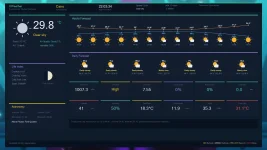
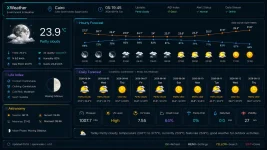
Have a look on the interface
 

Attachments

  • 1_0_1_1CB6_1CE8_71_820000_0_0_0_20260803220334.webp
    1_0_1_1CB6_1CE8_71_820000_0_0_0_20260803220334.webp
    89.4 KB · Views: 5
  • file_00000000620c8243aefb1be3d00bdebb.webp
    file_00000000620c8243aefb1be3d00bdebb.webp
    143.2 KB · Views: 5
🚀 XDREAMY Version 7.4.0


The wait is over! We've packed this release with incredible features to make your experience faster, smarter, and more enjoyable. Here's what's coming:


---


✨ What's New in Version 7.3.0


1. 🎨

New set preminium bootlogo, background with Ancient Egyptians touch.

---


2. 🌍 New live Arc gauges for SNR, AGC, BER and volume, applied in Infobar and Secondinfobar

---


3. ⭐ Division of the giant plugin file into small files to make it faster and easy to maintain.

---


4. 💾 Clean the installation package from useless add-ons, unused converters and Renderers.

---


5. 🟡 Fix Action Key (Yellow Button) to batch color the channels bouquet or remove the colors, which was broken in the previous version.

---


6. 📍 Many Fixes and improvements under the hood. .

---


🛠️ IMPORTANT NOTES

1. If you didn't see the new Arc system for any reason make sure to install cairo dependence via command


opkg install python3-pycairo

---


📥 How To Update


Option 1: Online Update


```

Menu → XDREAMY Plugin → Check for Updates

```


Option 2: Manual Install


```

Download from: [enigma2-plugin-skins-xDreamy_7.4.0_all]

Install via: IPK/DEB Package Manager

```


Option 3: Fresh Install (Telnet)


```

wget -q "--no-check-certificate" https://raw.githubusercontent.com/Insprion80/Skins/main/xDreamy/installer.sh -O - | /bin/sh

```


---

#XDREAMY #Version7 #SkinPlugin #Enigma2 #Satellite #Update #NewFeatures #ArabicTranslation

---
 
Back
Top