YouTube for SF8008

eastof111

BinThere
Staff member
Using the 04-13-2026 image and Youtube plugin works well except when recording the selected video is split up in to separate audio (m4a) and video (mp4) files The only way to watch the recording is to merge the two into one. The current Youtube plugin used is 25c0dd80+25c0dd854b-r8 which was restored from prior image.

Uninstalled 25c0dd80+25c0dd854b-r8 and installed 87440b50+8744b5731-ro from the feed. Same recording problems plus now I get "There was an error creating entry list". Other than that the prior version (-r8) seems to work better.

Also, after every Online flash to a new image, I keep getting these timer errors. I always have to delete the timers and recreate the timers until it happens again during the online flash to new image.
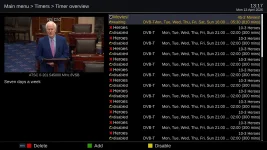
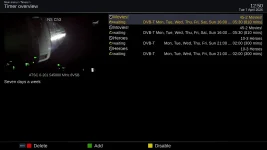
Timers 1_0_1_3_220.webpTimer repeats entries 1_0_1_3_220_.webp
 
Last edited:
Your crash logs are empty f any information that would pint to the problem. Look at the sizes:
175 bytes
502 bytes
Then one with a bit more:
1.2Kb

Nothing useful in any of them, with the first 2 being empty and the last one repeating a useless string. If you want to find the cause or get it fixed, you will need to dig deeper because I cannot reproduce it, and no one else has reported anything similar. The last time we looked at this, the stick was not even registered in the receiver.

I cannot answer to WHY on other images as I am only really concerned with this image. It does help to know other images work, but at the same time, my receiver works with a similar Kingston drive. The first question is: Are you 100 percent sure that drive is installed in the receiver? The receiver does not acknowledge your usb drive. So let's see if we can solve this riddle, which is my Kingston works and yours does not. First and foremost, 100 percent verify the stick is properly installed in the receiver.

In terminal, what is the output of lsusb?
lsusb

Please Carefully run these in order. Telnet commands are in black bold:
# Step 1 - baseline (stick already inserted)
lsblk
cat /etc/fstab
ls /media/


# Step 2 - enable logging, then unplug and replug the stick
touch /etc/udev/udev.debug
sleep 2

# --- unplug USB stick ---
sleep 3
# --- replug USB stick ---
sleep 5
cat /tmp/udev.log


If the above steps can be done then the results should show the problem or issue. Thanks.
 
On line flashed to 04-15 with no restore......

After setting up language - display properties - lan - time zone, checked timers and it was empty without repetitions. Opened up youtube and no videos display other than an error message "There was an error in creating entry list".
 
On line flashed to 04-15 with no restore......

After setting up language - display properties - lan - time zone, checked timers and it was empty without repetitions. Opened up youtube and no videos display other than an error message "There was an error in creating entry list".
We are building the latest commit (Version) — no plugin update available. The diagnosis is confirmed: the bundled API key is blocked by Google. This happens with every open-source enigma2 YouTube plugin because the key is visible in public source code. Google revokes or quota-limits them.
So if we add a key, eventually it would quit working.

Steps for Key:
1. Go to console.cloud.google.com, sign in with a Google account
2. Create a new project → Enable APIs → search for YouTube Data API v3 → Enable it
3. Go to Credentials → Create Credentials → API key
4. Copy the key
5. On the receiver, create /etc/enigma2/YouTube.key containing: API_KEY = AIzaSy...your_key_here...
6. Restart enigma2 — YouTube will work with 10,000 free API units/day
 
Thanks for the info but still a no go for me.
On line flash with 04-16-2026 and NO restore.
Setup language - skip backup - resolution setup - lan setup - time zone setup -
display setup.

Started youtube and got the "There was an error in creating entry list".
init 4
uploaded key
init 6
Started youtube and got the "There was an error in creating entry list".

Going back to older Tnap where youtube videos work well except for the problem when recording videos produces two files which I have to merge later in order to watch. In this older Tnap version there isn't a key file and the videos load and display fine.
 

Attachments

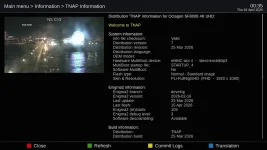
  • Tnap 1.webp
    Tnap 1.webp
    103.8 KB · Views: 0
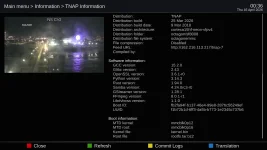
  • Tnap 2.webp
    Tnap 2.webp
    92 KB · Views: 0
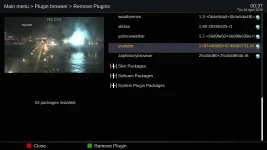
  • Tnap 3.webp
    Tnap 3.webp
    68.2 KB · Views: 0
Firesticks are cheap, and they play Youtube just fine. Satellite receivers aren't meant to do everything well beyond receiving satellite channels.
 
Thanks for the info but still a no go for me.
On line flash with 04-16-2026 and NO restore.
Setup language - skip backup - resolution setup - lan setup - time zone setup -
display setup.

Started youtube and got the "There was an error in creating entry list".
init 4
uploaded key
init 6
Started youtube and got the "There was an error in creating entry list".

Going back to older Tnap where youtube videos work well except for the problem when recording videos produces two files which I have to merge later in order to watch. In this older Tnap version there isn't a key file and the videos load and display fine.
FWIW,
TNAP 6 YouTube plugin is supplied by Tapaat while the TNAP 7 plugin is supplied by Fairbird. The TNAP 7 plugin has more updates than the TNAP 6 (Tapaat version).
As a test, you may delete the YouTube plugin in TNAP 7 and install the version from Tapaat here: Releases · Taapat/enigma2-plugin-youtube

Most likely though, the Tapaat version will quit working after a time too once its embedded keys are blacklisted. We will see...
 
Yeah I tried that in March when Huevos posted in the WOS forum for someone that was having the same problem. I don't think it was ever resolved since the original op never answered as to whether it cured his problem.

I tried it again and still get the "There was an error in creating entry list".

Youtube keeps making PIA changes even on my android tv to the point that the app I use with the tv has to be updated at least once a month now.
 
I guess the old idiom "third time's a charm" has some meaning. I reloaded the py file to the youtube plugin directory (init 4 - 6) rebooted.
Now I can record a video correctly with out having to merge the audio and video files.

Still can't figure out why my prior attempts did not work, because I did not do anything different to cause the recording bug. Happy camper here.....
 

Attachments

Did a online flash to 04-20-2026 with a restore.
Youtube not working with a "There was an error in creating entry list".
Reloaded the py file from post #13 and rebooted. Youtube still produces the same error message.

Restored 04-17-2026 backup. This time I added Youtube to the setup> software management> select files/folders to backup.

Did a online flash to 04-20-2026 with a restore.
Youtube working again.

By adding the current youtube info into the backup, will this affect future online updates from the feed?

Forgot to mention that after the update to 04-20-2026 my timer entries still repeat the same listed items.
 
No. The backup does not have anything to do with the feeds updates in this situation, except for the YouTube plugin.

There seems to be a thread at most image forums, so others are also having problems. The solutions vary. Let's see what happens.
 
Back
Top