TNAP-5.1 Image Discussion

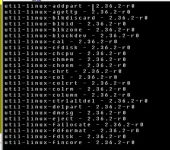
One personal issue: trying to remove softcams-ncam, I get this message suggesting how to do it witch I do not understand, due to my missing e2 knowledge.

ncam.webp
 
What happens when you flash the image without restoring anything?

The Positioner setup may be the problem as it is logging signal in db. This is the only thing that has changed in Positioner setup.

I think the sluggish behavior is the satfinder system plugin that gets updated when doing an online software update. The 2024-04-26 image for the Mio4k+ is fine until a software update is done. I reverted the satfinder system plugin from before the software update and all is good again here.
 
I think the sluggish behavior is the satfinder system plugin that gets updated when doing an online software update. The 2024-04-26 image for the Mio4k+ is fine until a software update is done. I reverted the satfinder system plugin from before the software update and all is good again here.
Can you post it ?
thx.
 
extract first then replace it at usr/lib/enigma2/python/plugins/SystemPlugins and reboot.

Thank you.
I guess the place for the files is: usr/lib/enigma2/python/plugins/SystemPlugins/SATFINDER.
It is working better, but is missing "service list" in signal finder menu. So I replaced your plugin.pyc with the one from my tnap5 backup.
 
Last edited:
I understood that, so where is zip file ?
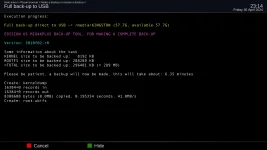
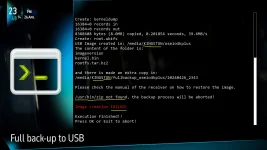
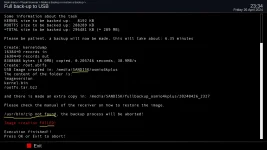
So, I took the chance and loaded the missing zip file from the tnap5 backup.
Now backupsuite is working.
 
Last edited:
Don't have the same receiver as you, but I am guessing this file should work. If not, someone with the same receiver as you will have to upload.

Can't upload files right now, the BBS is still in repair mode....
 
In telnet, the command opkg list-installed Does exactly what it says. It lists the packages that are installed, and yes, there are quite a few items in the list. The idea was to see what you had installed, but it doesn't look like that is gonna happen. Wait a bit and there will be another image which should straighten it out. If it doesn't get straightened out or fixed in the next image, then let me know and we will do something else.
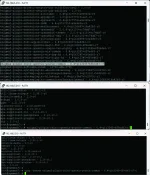
 
In telnet, the command opkg list-installed Does exactly what it says. It lists the packages that are installed, and yes, there are quite a few items in the list. The idea was to see what you had installed, but it doesn't look like that is gonna happen. Wait a bit and there will be another image which should straighten it out. If it doesn't get straightened out or fixed in the next image, then let me know and we will do something else.

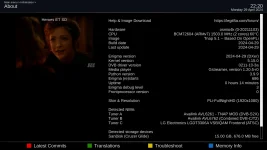
So what should I look for in this list ?
 
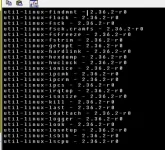
Easy. Scroll through the list of installed packages.
Find your ncam plugin. Highlight the line with your mouse. Smack <enter>.
That line appears at the bottom of the list. Scroll back to the beginning of that line.
Type in opkg -remove at the beginning of the line. Add a space so there is one between the command and the plugin name.
Scroll to the end on the line.
Smack <enter>.
There's more than one way to skin a cat, I know. But it works for me.

Remove ncam? Where's the fun in that? Unless it is set to autostart in the softcam manager, it remains dormant.

Putty.webp
 
As mentioned earlier, the plugin problem should fix itself on the next update. Let me know if it doesn't and we will do something else.
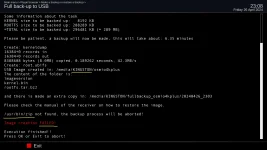
 
TNAP-5.1 images dated 0429 are online and available for Flash installation. These images should fix the rest of the issues, and appear to be solid in my tests of the MIO4K receiver. Positioner setup (Autofocus) has been checked along with satellite Blindscan, and some time was spent observing different features. No issues were found here.

Some sort of comments or feedback on the blindscan plugin would be appreciated. Signal in db has been added to the blindscan plugin for motorized dish systems to ensure the dish is aimed correctly before blindscanning a satellite. The dish motor does not move until started by the user, Unless the blindscan is started and the dish needs to move to the targeted satellite. Setting the blindscan plugin this way stops unwanted dish movement even on dual tuner systems.

About
mio4k-about.webp

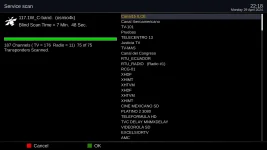
A find of 75 Transponders in a blindscan of 117w is Very Good!
mio4k-117w-c-blindscan-end.webp

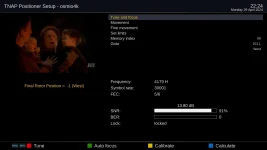
No problems found in Positioner setup or Autofocus.
mio4k-autofocus.webp

Please post any problems, comments, or issues with the 0429 image.
 
Back
Top