TNAP-5.1 Image Discussion

If that be True, then the TS Sat Editor needs to be modified to work correctly or removed from feeds.

Some parts of the system work fine as long as the satellites.xml is configured in a way that can be read. Signal finder is a good example. I don't know what it would take to make the blindscan plugin perform like the signal finder for showing a signal. Showing a signal for a transponder or showing Lock in the blindscan plugin has always been problematic. At the end of the day, it may simply be removed and forgotten about.
 
I added the 102.9w dummy satellite to the TNAP5.1 Satellites xml file so the 103w ku-band Radio channels can be setup in the tuner setup menu.
I did a fresh install and seen the radio channels were their in TNAP 5.1 but could not be setup.
 

Attachments

Last edited:
Don't know anything about TS Sat Editor. Nor ever found a reason to need it.
I have my master satellites.xml tucked away along with incremental updates. As well as offloaded backup images on my pc.
On a new image flash it is always used to replace the one included in it. Just an easy drag with Filezilla.
It is trimmed with all of the sats that I'll never be able to 'see'.
And when scrolling through the list for tuner setup, scanning, etc. Works out much more easy. For me.

Not really sure what magic the editor does. But every blindscan for transponders where the results are in /tmp gets compared with the corresponding satellite in satellites.xml.
A few minutes of editing to append the /tuxbox file and I'm good to go.
Even due to differences in the specified satellite tp's in the /tuxbox file , if one is given as 4040 H 30000 and the scan results in 4038 H 29998. I overwrite it.
I guess differences in LNB LO freq. drift, etc. causes that.

When I was pissin' around with old DN, Direc LNBF's which have different LO freq's. Including the "special" LNBF for 118W. That's where doing a little math to figure out why my scans were coming up with transponders that just didn't make sense. Hah. I learned! Eventually.

One thing for sure. Just a single space off in your satellite.xml can cause the next boot to corrupt your entire tuner setup, channel lists. Boot errors letting you know your .xml is borked.
So a flashable image backup is mandatory. And being able to manipulate the file structure through terminal and your FTP application.

I know, I know. "Don't ever change your satellites.xml file". Before someone barks at me. Apparently that seems like what TS Sat Editor is doing, or let's you do. Right!
 
I added the 102.9w dummy satellite to the TNAP5.1 Satellites xml file so the 103w ku-band Radio channels can be setup in the tuner setup menu.
I did a fresh install and seen the radio channels were their in TNAP 5.1 but could not be setup.

Every satellite needs a transponder. Try adding or copying a transponder and install it in your new location. REBOOT.

Also, the satellites.xml for TNAP5.1 is unfinished. There are active satellites missing because Lyngsat thinks they are no longer being used!
 
Every satellite needs a transponder. Try adding or copying a transponder and install it in your new location. REBOOT.

Also, the satellites.xml for TNAP5.1 is unfinished. There are active satellites missing because Lyngsat thinks they are no longer being used!

I added the transponder for the dummy sat 102w . file from previous post has been replaced. Thanks.
 
My information from earlier was Wrong! The TS Sat Editor provides a format that works, even though the order is wrong, or at least not consistent with the satellites.xml format used in the image. Seems another file straightens things out and allows it to work, so the TS Sat Editor will work "As Is" and will supply signal to the blindscan plugin if a signal exists.

Some updates were done to the Blindscan plugin, including fixing the wrong frequency being displayed when an User defined lnb is being used. Other adjustments were made that might allow the transponder signal to be read more easily. Pretty much, the features in TNAP should work for everyone equally. Be sure to say something if there are more problems getting a satellite to show signal in the Blindscan plugin when using motorized systems.

Updates to satellites.xml were done and allow the Muzak channels to play.

Blindscan-update.webp
 
"This tidbit at the top means something and should not be deleted like it is in your satellite.xml files: <?xml version="1.0" encoding="UTF-8"?>"
My satellites file, shows a different encoding:

Sat.webp

Is it important to be UTF-8 ?
I use "Syntext Serna Free 4.4" program, to edit/modify my satellites.xml file.
Thx.
 
I do not know why the encoding is up there, or what happens if a different encoding is used, or if No encoding is used. As long as everything runs OK, then do not worry about it. But if you have problems, try to remember the satellites.xml is not set the same as the build.
 
...Be sure to say something if there are more problems getting a satellite to show signal in the Blindscan plugin when using motorized systems....

...Updates to satellites.xml were done and allow the Muzak channels to play.
I installed the "correct" satellites.xml provided above by Megatron817. I then flashed using the new 0505 online software. It seems when I used TS-Satellites Editor that the satellites.xml format went back to the "incorrect" format. So I decided not to worry about it. I use this editor frequently since it is convenient for quickly adding satellites and transponders and I'm familiar with it. But I notice the Start Dish Motor still doesn't work. It's only a curiosity. I don't need to use it really.

Mood Music works fine on 103W. But the Mood Music tp has also been on 101W in parallel for some time. We should be preparing to shift to 101W from 103W for this feature since we know the life of 103W is limited. How would we do that?
 
I installed the "correct" satellites.xml provided above by Megatron817. I then flashed using the new 0505 online software. It seems when I used TS-Satellites Editor that the satellites.xml format went back to the "incorrect" format. So I decided not to worry about it. I use this editor frequently since it is convenient for quickly adding satellites and transponders and I'm familiar with it. But I notice the Start Dish Motor still doesn't work. It's only a curiosity. I don't need to use it really.

Mood Music works fine on 103W. But the Mood Music tp has also been on 101W in parallel for some time. We should be preparing to shift to 101W from 103W for this feature since we know the life of 103W is limited. How would we do that?

Start Dish Motor still doesn't work? The dish does not Move???

Please read Again post#106 of this thread. The TS Sat Editor itself Is Not the problem and may be used. My apologies for supplying the wrong information, but it appeared to be correct at the time!

There is an online update for blindscan (Menu--->Setup--->Software update). Install the update, Reboot the receiver. See if the Start Dish Motor still doesn't work. If there is a problem, then it needs to be fixed!

Moving the music channels is no big deal. They can be moved to 101w if you KNOW that is the new permanent location. This is not a hard thing to do.
 
I do not know why the encoding is up there, or what happens if a different encoding is used, or if No encoding is used. As long as everything runs OK, then do not worry about it. But if you have problems, try to remember the satellites.xml is not set the same as the build.

Slightly off topic....
I've been using the Vix supported site http://satellites-xml.org/ for many years to create satellite,xml files. It provides both UTF-8 and iso8859-1 formats. Guessing the encoding header is for stb and dvb cards, there doesn't appear to be an explanation of difference in formats. See comparative xmls.

View attachment satellites.xml.UTF-8.zip View attachment satellites.xml.iso8859-1.zip

There is also a good lamedb to satellite.xml converter tool one can use to compare a lamedb file to a satellite.xml file for missing items.
 
Header from my satellites.xml:

<?xml version="1.0" encoding="utf-8"?>
<!-- Created by E-Channelizer on 17 Feb, 2024 at 12:23 - https://www.echannelizer.com -->

Header from a blindscan:

<?xml version="1.0" encoding="iso-8859-1"?>

No issues at all copying lines from a blindscan to your satellites.xml as long as indents line up perfectly.
 
Start Dish Motor still doesn't work? The dish does not Move???...

...Moving the music channels is no big deal. They can be moved to 101w if you KNOW that is the new permanent location. This is not a hard thing to do.
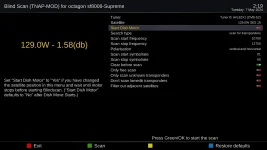
Using Start Dish Motor, the dish definitely moves correctly. And blind scan works fine. Faster than ever actually. The only issue is the wrong dB reading in the Blind Scan screen that is displayed. Even if there is only one frequency listed for a satellite (e.g. 129W Reuters) then the displayed dB shows incorrectly. In this example, 2.67 dB displays when the actual SNR is 11.6 dB.

View attachment 18308

For the Mood Music, if it's easy to change, then we can just wait until they aren't on 103W anymore.
 
Interesting..... I wonder Why I get a similar signal on 129w. No Reuters for me!
129w-ku-1.58db.webp

Like I said earlier, When you start the dish motor, the first transponder is tuned in the satellites.xml. There is not much of a way around this. If the signal is not working on one satellite, then it would reason other satellites have issues. So what other satellite besides 129w ku has a signal issue?

All transponders on 129 are very low signal for me. I do get "BEAM_SES15WB_W01_0029" which tells me I am on the satellite.
Code:
                         Scan Report 

< File created on Tuesday, May 07, 2024 at 02:37:06 > 
< Satellite =  129.0W Ku-band SES 15 >
< Receiver =  SF8008-Supreme >
< Enigma2 Image = Tnap 5.1 > 
< Kernel Version = 4.4.35 > 
< DVB Driver Date = 2024-01-04 > 
< Blindscan Frequency Range = 10700 to 12750 MHz > 
< Blindscan Symbol Rate Range = 1 to 60 Msps > 
< Blindscan Only Free Channels or Services? = False  > 
< Tuner = Tuner B: AVL62X1 (DVB-S2) >


< 'DVB-S2 QPSK 10772H / 52542 / AUTO' > Tp# 1
< Transponder SNR =['2.77db'-Locked], LNB Power = 66.98 >
< Tue, 07 May 2024 02:37:15 /> 

< 'DVB-S2 QPSK 10887H / 52542 / AUTO' > Tp# 2
< Transponder SNR =['2.9db'-Locked], LNB Power = 72.48 >
< Tue, 07 May 2024 02:37:23 /> 

< 'DVB-S2 QPSK 11056V / 34284 / 1/2' > Tp# 3
< Transponder SNR =['1.28db'-Locked], LNB Power = 66.06 >
< Tue, 07 May 2024 02:37:30 /> 

< 'DVB-S2 32APSK 11056H / 30002 / 3/4' > Tp# 4
< Transponder SNR =['3.45db'-UnLocked], LNB Power = 67.89 >
< Tue, 07 May 2024 02:37:34 /> 

< 'DVB-S2 QPSK 11113H / 52093 / 1/2' > Tp# 5
< Transponder SNR =['3.2db'-Locked], LNB Power = 71.56 >
< Tue, 07 May 2024 02:37:42 /> 

< 'DVB-S2 QPSK 11228H / 52093 / AUTO' > Tp# 6
< Transponder SNR =['4.79db'-Locked], LNB Power = 83.49 >
< Tue, 07 May 2024 02:37:49 /> 

< 'DVB-S2 QPSK 11574V / 24998 / AUTO' > Tp# 7
< [1] BEAM_SES15WB_W01_0029 --- UnKnown Service Type E:  1:0:E:1E:1D:1:906AD36:0:0:0: SNR = 3.52  /> 
< [2] NoName  1:0:0:1:1D:1:906AD36:0:0:0: SNR = 3.52  /> 
< Transponder SNR =['3.52db'-Locked], LNB Power = 67.89 >
< Tue, 07 May 2024 02:37:53 /> 

< 'DVB-S2 QPSK 11574H / 34283 / 1/2' > Tp# 8
< Transponder SNR =['2.43db'-Locked], LNB Power = 77.99 >
< Tue, 07 May 2024 02:37:56 /> 

< 'DVB-S2 QPSK 11810V / 12000 / 1/2' > Tp# 9
< Transponder SNR =['655.22db'-UnLocked], LNB Power = 66.06 >
< Tue, 07 May 2024 02:38:04 /> 

< 'DVB-S2 QPSK 11846V / 5811 / 1/2' > Tp# 10
< Transponder SNR =['0.26db'-UnLocked], LNB Power = 58.72 >
< Tue, 07 May 2024 02:38:22 /> 

< 'DVB-S2 QPSK 11861V / 1400 / 8/9' > Tp# 11
< Transponder SNR =['0.97db'-UnLocked], LNB Power = 51.38 >
< Tue, 07 May 2024 02:38:41 /> 

< 'DVB-S2 32APSK 11978V / 7500 / 3/4' > Tp# 12
< Transponder SNR =['0.88db'-UnLocked], LNB Power = 59.64 >
< Tue, 07 May 2024 02:38:59 /> 

< 'DVB-S2 QPSK 12003V / 8274 / AUTO' > Tp# 13
< Transponder SNR =['1.3db'-UnLocked], LNB Power = 63.31 >
< Tue, 07 May 2024 02:39:18 /> 

< 'DVB-S2 32APSK 12014V / 2272 / 3/4' > Tp# 14
< Transponder SNR =['2.66db'-UnLocked], LNB Power = 56.88 >
< Tue, 07 May 2024 02:39:36 /> 

< 'DVB-S2 QPSK 12022V / 4125 / AUTO' > Tp# 15
< Transponder SNR =['654.71db'-UnLocked], LNB Power = 59.64 >
< Tue, 07 May 2024 02:39:55 /> 

< 'DVB-S2 32APSK 12104V / 16728 / 3/4' > Tp# 16
< Transponder SNR =['0.37db'-UnLocked], LNB Power = 64.22 >
< Tue, 07 May 2024 02:40:03 /> 

< 'DVB-S2 8PSK 12122H / 17001 / 3/5' > Tp# 17
< Transponder SNR =['1.38db'-UnLocked], LNB Power = 64.22 >
< Tue, 07 May 2024 02:40:12 /> 

< 'DVB-S2 32APSK 12136V / 16726 / 3/4' > Tp# 18
< Transponder SNR =['1.38db'-UnLocked], LNB Power = 64.22 >
< Tue, 07 May 2024 02:40:20 /> < 

Blind Scan Time = 5 Min. 26 Sec.
2 Channels ( TV = 2  Radio = 0)  18 of 18 Transponders Scanned.
 
Interesting..... I wonder Why I get a similar signal on 129w. No Reuters for me!

Like I said earlier, When you start the dish motor, the first transponder is tuned in the satellites.xml. There is not much of a way around this. If the signal is not working on one satellite, then it would reason other satellites have issues. So what other satellite besides 129w ku has a signal issue?

All transponders on 129 are very low signal for me. I do get "BEAM_SES15WB_W01_0029" which tells me I am on the satellite.
129W was just a simple example since I only blind scan in one transponder. And it is always strong. Here on the west coast 129W upper Ku is almost empty. Every satellite shows 2.67 dB when I use the Start Dish Motor feature. There was a time in the recent past when you first described this feature that it worked correctly on my receiver including the correct blind scan screen dB reading. What changed?

View attachment 129.0W_Ku-band_1ch_1tp_05-07-2024_07-08-22.txt
 
Last edited:
Dunno what changed. Lets find out.
Take one of your other image slots in the receiver and load the TNAP 5.1 image in the feed (Menu--->Setup--->Flash image) Do Not restore anything at all. After the image installs, do an online update. Then setup a couple or three satellites and see how things work.

These features such as motor start and showing signal in the blindscan plugin should work equal for everyone, provided the image is set correctly. The signal in the blindscan plugin works exactly as it should across both tuners in my system.

You are the only one that has showed any interest in this feature, so either you are the only one that blindscans with a motorized dish or no one else cares about it. The best solution may be to put the TNAP 5 blindscan plugin back in the 5.1 image and forget about it.
 
Dunno what changed. Lets find out. ...
I loaded the current TNAP5.1 image fresh. Tested. Problem still there. I then started stepping back in time loading each image fresh. 0427: bad. 0412: Good! The feature works if I load 0412 with no updates. Then I online updated 0412: Bad.
 
So what's wrong with just parking your dish on the sat that you wish to scan and doing it? That's how I've always done it.
Just like the dish aim tweaker plugin. I found that if you use it and it bumps the dish back and forth searching for the strongest signal.
It can screw up the rest of the reference counts for the rest of your stored positions. Having you going through and manually peaking signals and storing the new position.
Or just going into the dish controller and resetting the zero reference.
I'm all for sending the goto command and letting the dish stop. And then scanning. Crazy, ain't it!
"evly machine a-have it rimitation"
 
Back
Top