TNAP-7 Image Discussion

Regarding my post #79; After some time (30-40min), the box (in wifi), shows up in computer network menu !!!
Is it maybe because of a smaller/slower memory size of the box ?
an online flash with saved settings, avoids this problem.
I've seen the drivers loaded in the box; my usb wifi adapter was not there, but the image can not come loaded with all drivers.
thank you for the help.
As I said, it's not a big issue as long as I can connect to the box by other means.
 
After the clean flash/install, wifi is not active due to missing driver. So, to download the driver from plugins list, the box must have lan(wire) connection. At this stage, the box is visible in computer network menu (see wire pic) & dreamse & DCCe2.
Wifi & lan, both work on mini, and being able to connect with Dreamset & DCCe2 software to do the changes/updates.
After wire is deactivated and the only connection left is wifi, the box is not wisible in the computer (see wifi pic)!
Not a biggy, but this is not happening with other images or in mio4k+.
Maybe we need to see if we can get some drivers where they can be downloaded from the internet? Receivers without WIFI that need WIFI can be a challenge.

You are dealing with two network interfaces, and may have both active at some point. The Network interfaces in this image has ipv6 selection that should be set to OFF if not needed. This needs to be verified.

Each Network will have its own ip address. If this is not True, then you can expect problems. So if you connect to something like Dreamset with a wired ip, then you need to make sure Dreamset understands you have switched ip's when disconnecting the wired interface and using WIFI.

When having connection problems like you have described, try telnet or terminal to connect to the box. If telnet connection works, then you should also have a connection to Dreamset using the same ip address. Something to think about: We are usually not going to have a device that works on the internet, but fails at something like Dreamset. Anything is possible, but if the wifi is working on the Internet then it should connect to Dreamset.

Manually Turn Off and disable unused Network interfaces. Check ipv6 settings. Two networks interfaces on one receiver trying to connect at the same time will usually give problems unless care is taken in setting them up.
 
Unfortunately,
Today's Octagon version didn't fix my problem.
Maybe if there was an option to save Enigma_debug to USB,
I could send the log, and that would explain something.
NEW 0204 SF8008 images have been uploaded to tnapimages.com.
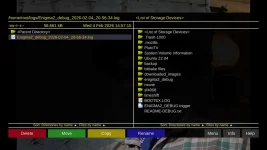
Download the attached empty file (ENIGMA2_DEBUG.trigger), unzip it and put it on a Known-To-Be-Good usb drive.

Download and install the 0204 sf8008 image on your receiver. After the receiver boots and gets to the language question, insert the usb drive into the receiver and try to set the receiver up. When finished, remove the usb drive. insert the usb drive into your computer, zip the enigma2_debug folder and attach it to a post here. Thanks.
 

Attachments

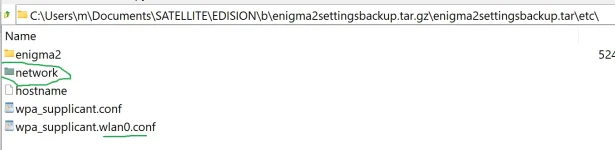
I was thinking about "File Commander plugin" to use it to install the network settings saved on a usb from previous version, so I
do not have to connect by wire. Is it possible ?
 

Attachments

  • settings1.webp
    settings1.webp
    29 KB · Views: 4
  • settings2.webp
    settings2.webp
    20.7 KB · Views: 2
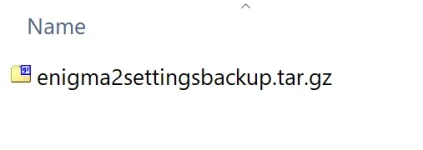
The enigma2 part has to be stopped to edit the settings (init 4). Would be easier I think to save the settings as a file and move that file to the new setup, then restore it.
 
The enigma2 part has to be stopped to edit the settings (init 4). Would be easier I think to save the settings as a file and move that file to the new setup, then restore it.
How can you send int 4 command without network connection ?
I did save the settings & was looking at plugin file commander to load it in the box.
 

Attachments

  • settings file.webp
    settings file.webp
    5.4 KB · Views: 4
It can be done, but sending a command like init 4 without a script to run it would leave you outside the receiver. It can be done using script(s).

Now that we have forgotten about trying to stop enigma using init 4, let's make this simple. Get a blank usb drive with nothing on it. Set the receiver to the image you would like to copy from. Insert the usb into the receiver and then backup the settings using the receiver's menu. Then put the image on the receiver that you want to transfer settings to and use the receiver's menus to load them. This may not work across different images, but it should work from TNAP-6.x to TNAP-7.

Remember when restoring backups:
If problems exist, then remove the backup and see if the problem is removed. A backup can introduce problems or issues.
 
Okay. Maybe this helps. Here is what my last build for osmini4k has:

USB WiFi Chipset Coverage (29 drivers total):

Realtek Chipsets (15 drivers):

- RTL8xxxU family: RTL8192CU, RTL8188CU, RTL8192EU, RTL8192FU, RTL8188EU
- RTL8187 (older 802.11g)
- RTL8192CE (PCIe but also USB variants)
- RTL8188FU (AC600, newer)
- RTL8723 family: RTL8723AU, RTL8723BS (SDIO/USB)
- RTL8712U (older N150)
- RTL8814AU (AC1900, high-end)
- RTL8821CU (AC600)
- RTL8822BU (AC1200)

Ralink/MediaTek Chipsets (6 drivers):

- RT2800 family: RT2800USB (general driver for many chipsets)
- RT3070 (N150)
- RT3573 (N300 dual-band)
- RT5572 (N600 dual-band)
- MT7601U (N150, newer MediaTek)
- MT7610U (AC600, dual-band)

Atheros Chipsets (2 drivers):

- ATH9K-HTC (AR9271 - N300)
- CARL9170 (AR9170 - N300)

USB Ethernet Adapters (3 drivers):

- ASIX (various USB Ethernet)
- AX88179/178A (Gigabit USB Ethernet)
- SMSC75xx (USB Ethernet)

Infrastructure:

- cfg80211 (wireless configuration API)
- mac80211 (software MAC layer)
- wireless-regdb-static (regulatory database)

Popular USB WiFi Adapters Now Supported:

This covers a HUGE range of popular adapters:
- TP-Link: TL-WN722N, TL-WN821N, Archer T2U/T3U/T4U
- Edimax: EW-7811Un, EW-7822ULC
- Netgear: A6100, A6210
- D-Link: DWA-171, DWA-182
- ASUS: USB-AC51, USB-AC53, USB-AC56
- Alfa Network: AWUS036NH, AWUS036ACH
- Panda Wireless: PAU05, PAU09
- Numerous generic/Chinese adapters using these chipsets

Estimated device coverage: 200-300+ different USB WiFi adapter models!

Users with osmini4k can now plug in almost ANY USB WiFi adapter they have lying around and it will "just work" - no more "Catch-22" of needing Internet to download WiFi
drivers!

We will see right? I need to put this image on my osmini4k and verify it boots, then upload it so it can be used. Maybe this will help someone as it was a pain to get these items into the image without the build crashing.
 
NEW 0204 SF8008 images have been uploaded to tnapimages.com.
Download the attached empty file (ENIGMA2_DEBUG.trigger), unzip it and put it on a Known-To-Be-Good usb drive.

Download and install the 0204 sf8008 image on your receiver. After the receiver boots and gets to the language question, insert the usb drive into the receiver and try to set the receiver up. When finished, remove the usb drive. insert the usb drive into your computer, zip the enigma2_debug folder and attach it to a post here. Thanks.
 

Attachments

Thanks for taking the time to run ENIGMA2_DEBUG.trigger. The information it produces is interesting to look at, and it seems maybe you have an original Octagon SF8008 instead of Version 2 or Version 3? Your log shows memory errors which may be the problem with the LAN instead of hardware. But hardware problems or not with the LAN, you do have memory errors in that receiver.

More adjustments have been made in the 0205 image. You may install it and see if at least one of your network interfaces works. If you still do not have a network interface after installing 0205 image, then please run ENIGMA2_DEBUG.trigger again as more information to output was added to it. It seems one kernel driver was missing from TNAP 7 that would cause the original SF8008 WIFI to fail on loading.

For the Edision osmini4k users,
The 0205 image should contain every network driver available at default. We can try this and see if it presents problems. Having all of those network drivers pre-loaded may cause issues if someone wanted to load several other types of usb drivers or devices such as usb tuners. We will just have to see how it works....
 
How hard would it be to change the front display to show mostly the clock instead of channel names? Most of the names aren't showing all the letters. I think what is currently displayed is meant for an oled display and the SF8008 is a 7 segment display.
Thanks.
 
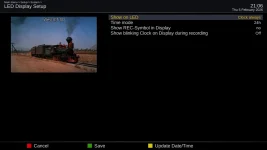
Everything you need is supposed to be already there. In the plugins menu, Install: enigma2-plugin-systemplugins-vfdcontrol. A successful install gives this menu:
Main menu--->Setup--->System--->LED Display Setup
LED-Display-Setup_20260205210633.webp
And to further customize, you have:
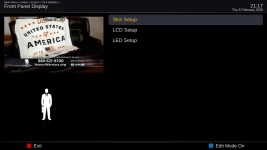
Menu--->Setup--->System--->GUI Settings--->Front Panel Display
Front-Panel-Display_20260205211730.webp
The options in those two menus allow for customization(s). Should be everything you want and more...
 
The vfdcontrol does not install so I can't change anything there.
The Front Panel Display - skin Setup menu just says press ok to keep the current selected skin display.xml. and I don't see how to change to a different one.
 
This is in in the 0206 sf8008 build manifest: enigma2-plugin-systemplugins-vfdcontrol sf8008 git3943+ce797ab0+ce797ab26c-r0. (Build times are in UTC)

We are pulling from two sets of plugins which are OpenPLi and OEAlliance. A lot of plugins are the same and this can cause conflicts, which is what happened to the vfdcontrol plugin. I am sure there will be others....
 
Thanks for taking the time to run ENIGMA2_DEBUG.trigger. The information it produces is interesting to look at, and it seems maybe you have an original Octagon SF8008 instead of Version 2 or Version 3? Your log shows memory errors which may be the problem with the LAN instead of hardware. But hardware problems or not with the LAN, you do have memory errors in that receiver.

More adjustments have been made in the 0205 image. You may install it and see if at least one of your network interfaces works. If you still do not have a network interface after installing 0205 image, then please run ENIGMA2_DEBUG.trigger again as more information to output was added to it. It seems one kernel driver was missing from TNAP 7 that would cause the original SF8008 WIFI to fail on loading.

For the Edision osmini4k users,
The 0205 image should contain every network driver available at default. We can try this and see if it presents problems. Having all of those network drivers pre-loaded may cause issues if someone wanted to load several other types of usb drivers or devices such as usb tuners. We will just have to see how it works....
Still the same.
 

Attachments

Still the same.
Your SF8008 has bootloader settings that allocate only 72MB for media memory (mmz), while standard SF8008 units allocate 380MB. This causes network drivers to fail on TNAP 7 due to insufficient DMA memory.
TNAP 7 is not compatible with your box's non-standard memory configuration.
Recommendation: Use OpenViX, OpenPli, or another image that works with your box's configuration.
 
Your SF8008 has bootloader settings that allocate only 72MB for media memory (mmz), while standard SF8008 units allocate 380MB. This causes network drivers to fail on TNAP 7 due to insufficient DMA memory.
TNAP 7 is not compatible with your box's non-standard memory configuration.
Recommendation: Use OpenViX, OpenPli, or another image that works with your box's configuration.
All other images I've installed haven't had this problem.
If nothing can be done, too bad.
 
What other image has python 3.14?
Do not know exactly what the problem is (python 3.14), but you have memory problems with that box in the bootloader. The logs prove it. Nothing I can do. Apologies.
 
Back
Top