
- Home
- Forums
- FTA Set Top Box Discussions/Files
- FTA Set Top Box Discussions
- The North American Project E2 Image Discussions
You are using an out of date browser. It may not display this or other websites correctly.
You should upgrade or use an alternative browser.
You should upgrade or use an alternative browser.
TNAP-6 Image Discussion
- Thread starter EnoSat
- Start date


el bandido
TNAP-Images
Did you restore the settings? Autorestore? Does Backupsuite work now?
No. I had to redo all my settings.Did you restore the settings? Autorestore? Does Backupsuite work now?
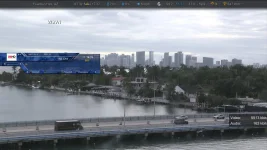
After online update, the version was still showing the previous one from Dec 21.

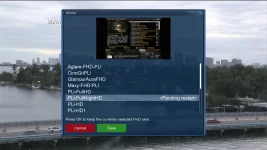
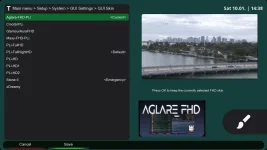
I had Aglare 6.5 as my current skin on the 01-04-2026 image. Did a Tnap 6.1 Flash online to 01-08-2026 for sf8008 v. 1 and after reboot it displayed:
During the auto restore process, it tried to install Aglare 5.2 but failed. I uninstalled Aglare from the plugins menu and it displayed as 5.4. I reinstalled Aglare 6.5 using a ipk file and the skin is working fine again.
Did a Backupsuite and it backs up to the correct directory and folder again.
During the auto restore process, it tried to install Aglare 5.2 but failed. I uninstalled Aglare from the plugins menu and it displayed as 5.4. I reinstalled Aglare 6.5 using a ipk file and the skin is working fine again.
Did a Backupsuite and it backs up to the correct directory and folder again.
Attachments
el bandido
TNAP-Images
First, What is backupsuite plugin? In its simplest form or explanation, ALL the backupsuite plugin does is copy the current file system in the receiver and package it so it can be reloaded easily. That is it, and basically, that is all the backupsuite plugin does.
There is flawed logic in the backupsuite plugin that calculates or estimates how long a backup should take. I thought about just removing this estimated time as it is almost always wrong. The reason it takes longer for backupsuite to run than it did in past images is we have added more files. It's as simple as that. The current version of python that TNAP6.x runs is more complex when compared to earlier versions. Also, it depends on what a person has installed. The backupsuite plugin cannot execute or run after the image grows to a certain size.
And the backup area is also important. The backupsuite plugin logic requires an area that is four times the size of the file system to backup. A clean install of an enigma2 image means no files or scripts were transferred to the newly installed image and this includes the lamedb and settings file located in /etc/enigma2. It helps to do a clean install at regular intervals to remove bloat that autorestore captures. The settings file and lamedb file located in /etc/enbigma2 can usually be transferred to the new freshly installed image without any negative consequences. Every file on a disk takes one inode, and it is possible to have many MB's or even GB's of free space that cannot be utilized if all of the inodes have been used.
We can use regular Linux disk commands to see how large our current file system is and where the large files exist. Another thing to consider is we are mostly using receivers that were built between 2016 and 2018. Sure Octagon has "New" SF8008 receivers, but they are really just updated versions of the old design. Our receivers were designed for smaller file systems because that is what we had in 2016-2018.
One thing I saw in looking at backusuite plugin is the compression process of the plugin was only using one core when at minimum we have two cores in TNAP supported receivers. So adjustments were made that runs the cores to their fullest during the backup process, which speeds things up a bit. Hence the updated backupsuite plugin in the feeds.
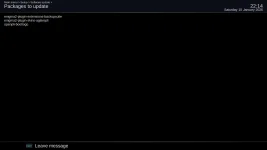
The Aglare skin is automatically or is supposed to be automatically installed into TNAP feeds as the maintainers of this skin seem to think an .ipk plugin is what is proper on github. Some adjustments were made again to hopefully have this plugin update automatically in the future.
There is flawed logic in the backupsuite plugin that calculates or estimates how long a backup should take. I thought about just removing this estimated time as it is almost always wrong. The reason it takes longer for backupsuite to run than it did in past images is we have added more files. It's as simple as that. The current version of python that TNAP6.x runs is more complex when compared to earlier versions. Also, it depends on what a person has installed. The backupsuite plugin cannot execute or run after the image grows to a certain size.
And the backup area is also important. The backupsuite plugin logic requires an area that is four times the size of the file system to backup. A clean install of an enigma2 image means no files or scripts were transferred to the newly installed image and this includes the lamedb and settings file located in /etc/enigma2. It helps to do a clean install at regular intervals to remove bloat that autorestore captures. The settings file and lamedb file located in /etc/enbigma2 can usually be transferred to the new freshly installed image without any negative consequences. Every file on a disk takes one inode, and it is possible to have many MB's or even GB's of free space that cannot be utilized if all of the inodes have been used.
We can use regular Linux disk commands to see how large our current file system is and where the large files exist. Another thing to consider is we are mostly using receivers that were built between 2016 and 2018. Sure Octagon has "New" SF8008 receivers, but they are really just updated versions of the old design. Our receivers were designed for smaller file systems because that is what we had in 2016-2018.
One thing I saw in looking at backusuite plugin is the compression process of the plugin was only using one core when at minimum we have two cores in TNAP supported receivers. So adjustments were made that runs the cores to their fullest during the backup process, which speeds things up a bit. Hence the updated backupsuite plugin in the feeds.
The Aglare skin is automatically or is supposed to be automatically installed into TNAP feeds as the maintainers of this skin seem to think an .ipk plugin is what is proper on github. Some adjustments were made again to hopefully have this plugin update automatically in the future.
el bandido
TNAP-Images
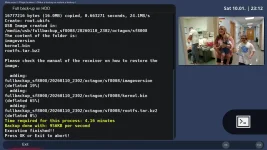
Shown below is how long it took to backup my SF8008. The completed rootfs.tar.bz2 size is 233.8 MB (233,839,522 bytes). Compare that to the current multiboot rootfs.tar.bz2 image size of 156.9 MB (156,904,237 bytes). Easy to see I have installed some things...
el bandido
TNAP-Images
Translations has been added to aisubtitles-tnap. This addition allows foreign languages to be translated. Shown is Univision with the Spanish audio being translated to English. It should be noted that this ai driven plugin can be used for free every day for a few hours. The needed keys are free and do not require a credit card or any form of payment to get. This is a bona-fide AI plugin.

Just flashed online 01-11-2026 from 01-08-2026 to sf8008 in slot 2 and the auto restore feature is missing. Started to use the setup wizard but changed my mind and went to plugins to restore the 01-08-2026 backup. Started backupsuite and it could not locate the /media/hdd/fullbackup_sf8008 directory to select a backup image.
Rebooted to Vix in slot 4 and flashed a Tnap image to slot 2. Rebooted to Tnap in slot 2 and was able to use backupsuite to restore my 01-08-2026 backup.
Everything working fine again.
Rebooted to Vix in slot 4 and flashed a Tnap image to slot 2. Rebooted to Tnap in slot 2 and was able to use backupsuite to restore my 01-08-2026 backup.
Everything working fine again.
el bandido
TNAP-Images
What did these return?
df -h /
du -sh /usr/* | sort -h
du -sh /var/* | sort -h
An online update is a bit different than flashing an image. This should be fine unless you are having some sort of problem: 20260108
df -h /
du -sh /usr/* | sort -h
du -sh /var/* | sort -h
An online update is a bit different than flashing an image. This should be fine unless you are having some sort of problem: 20260108
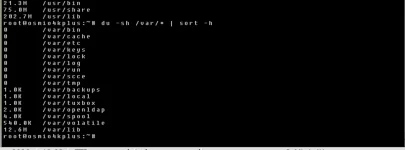
this what is happening:What did these return?
df -h /
du -sh /usr/* | sort -h
du -sh /var/* | sort -h
An online update is a bit different than flashing an image. This should be fine unless you are having some sort of problem: 20260108
Attachments


el bandido
TNAP-Images
You have in the first screenshot, 662MB used. But for some reason 200 MB of this is unaccounted for in our searches. It may be in the /home folder???? Anyway....
In the receiver, Copy the /etc/enigma2 folder, and if needed, copy the /etc/tuxbox folder. Store these folders so you can reuse them.
Flash the image online (TNAP-6.1-osmio4k-20260111_multiboot)
Watch the image install and Do Not let it restore anything.
Once the installation completes, and you have answered all of the questions, Start telnet. Enter init 4 into the telnet window.
Then manually move the etc/enigma2 folder into the receiver files, and if needed, move the /etc/tuxbox folder into the receiver. To move these folders into the receiver, delete existing receiver folders and replace them. Then type reboot into the telnet terminal window. This should fix the unknown or unwanted file problem.
Now try to do a backup using backupsuite before doing anything else. It should complete in about 4 minutes.
In the receiver, Copy the /etc/enigma2 folder, and if needed, copy the /etc/tuxbox folder. Store these folders so you can reuse them.
Flash the image online (TNAP-6.1-osmio4k-20260111_multiboot)
Watch the image install and Do Not let it restore anything.
Once the installation completes, and you have answered all of the questions, Start telnet. Enter init 4 into the telnet window.
Then manually move the etc/enigma2 folder into the receiver files, and if needed, move the /etc/tuxbox folder into the receiver. To move these folders into the receiver, delete existing receiver folders and replace them. Then type reboot into the telnet terminal window. This should fix the unknown or unwanted file problem.
Now try to do a backup using backupsuite before doing anything else. It should complete in about 4 minutes.
el bandido
TNAP-Images
And I explained how to fix it. Online update can only do so much. You need to re-flash and rid yourself of the roughly 200MB of file(s) that you have for some unknown reason.
Empty image. Just flashed
Image restored, with everything loaded that I want:
You are showing 662MB Total, but only 202.7 in /usr/lib. You have roughly 200MB stuffed somewhere in your image that is probably useless. The best way to get rid of it is re-flash using the steps I laid out. A pain-in-the-ass I know, but you should probably do it....
Empty image. Just flashed
Code:
TNAP 6.1 osmio4k

osmio4k login: root
root@osmio4k:~# df -h /
Filesystem                Size      Used Available Use% Mounted on
/dev/root                 1.8G    411.0M      1.3G  24% /
root@osmio4k:~# du -sh /usr/* | sort -h
1.0K    /usr/games
1.0K    /usr/keys
1.0K    /usr/src
58.0K   /usr/include
3.2M    /usr/libexec
9.5M    /usr/sbin
20.7M   /usr/bin
55.5M   /usr/share
194.8M  /usr/lib
root@osmio4k:~# du -sh /var/* | sort -h
0       /var/bin
0       /var/cache
0       /var/etc
0       /var/keys
0       /var/lock
0       /var/log
0       /var/run
0       /var/scce
0       /var/tmp
1.0K    /var/backups
1.0K    /var/local
1.0K    /var/tuxbox
2.0K    /var/openldap
4.0K    /var/spool
456.0K  /var/volatile
6.5M    /var/lib
root@osmio4k:~#
Image restored, with everything loaded that I want:
Code:
root@osmio4k:~# df -h /
Filesystem                Size      Used Available Use% Mounted on
/dev/root                 1.8G    638.4M      1.1G  37% /
root@osmio4k:~# du -sh /usr/* | sort -h
1.0K    /usr/games
1.0K    /usr/keys
1.0K    /usr/src
3.0K    /usr/script
58.0K   /usr/include
3.2M    /usr/libexec
9.5M    /usr/sbin
54.0M   /usr/bin
55.5M   /usr/share
343.6M  /usr/lib
root@osmio4k:~# du -sh /var/* | sort -h
0       /var/bin
0       /var/cache
0       /var/etc
0       /var/keys
0       /var/lock
0       /var/log
0       /var/run
0       /var/scce
0       /var/tmp
1.0K    /var/backups
1.0K    /var/local
1.0K    /var/tuxbox
2.0K    /var/openldap
4.0K    /var/spool
12.9M   /var/lib
17.8M   /var/volatile
root@osmio4k:~#
You are showing 662MB Total, but only 202.7 in /usr/lib. You have roughly 200MB stuffed somewhere in your image that is probably useless. The best way to get rid of it is re-flash using the steps I laid out. A pain-in-the-ass I know, but you should probably do it....
Erased tnap from the slot & installed from usb version "TNAP-6.1-osmio4kplus-20260108_multiboot".
Set up wifi & root pass only.
did an online software update (hoping for TNAP-6.1-osmio4kplus-20260111_multiboot version), but version is still the same:
Try againe online software update, but got "No updates available" message !
Here is the update log: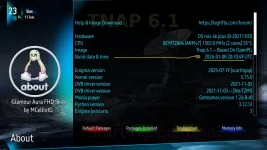
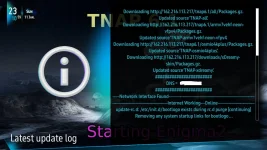
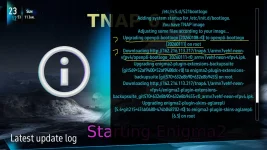
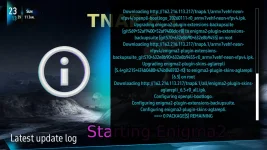
So, if I need to update to the latest version, I will allways need to do a fresh install ?
Set up wifi & root pass only.
did an online software update (hoping for TNAP-6.1-osmio4kplus-20260111_multiboot version), but version is still the same:
Try againe online software update, but got "No updates available" message !
Here is the update log:
So, if I need to update to the latest version, I will allways need to do a fresh install ?
Last edited:
el bandido
TNAP-Images
An online update will not change the image build date!!! You will need to flash the 0111 image! Not the 0108 image.

el bandido
TNAP-Images
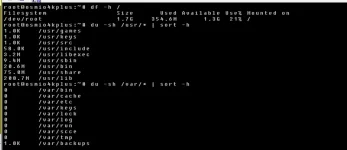
Excellent!!! You are down to 354 MB. But that may climb a bit when you add things. Now flash the 0111 image.
Up to "TNAP-6.1-osmio4kplus-20251221_multiboot" version, after an online update, "about" was allways showing the latest tnap version ! Starting with "TNAP-6.1-osmio4kplus-20260108_multiboot" version, there is no way to know what version is installed, unless I will do a fresh install.An online update will not change the image build date!!! You will need to flash the 0111 image! Not the 0108 image.
View attachment 19412
Will do that.Excellent!!! You are down to 354 MB. But that may climb a bit when you add things. Now flash the 0111 image.