
- Home
- Forums
- FTA Set Top Box Discussions/Files
- FTA Set Top Box Discussions
- The North American Project E2 Image Discussions
You are using an out of date browser. It may not display this or other websites correctly.
You should upgrade or use an alternative browser.
You should upgrade or use an alternative browser.
TNAP-7 Image Discussion
- Thread starter el bandido
- Start date

el bandido
TNAP-Images
WHO will test this???Can Enigma2 process channel names from satellite ATSC PIDs (MGT,TVCT,RRT,EIT,STT) as well ?
e.g.
DVB
View attachment 19908
ATSC
View attachment 19907
Next Image build will have this: scan: enable ATSC VCT parsing for DVB-S/S2 and DVB-C transponders · EB-TNAP/enigma2-tnap@4445e54
el bandido
TNAP-Images
5150/5750 LNB should be fixed:
hello i have problem with cband mode 05150/05750
not working with each other much change to 05150 on h and 05750 on v
on tnap 6 works good but in tnap 7 still have this bug
also channel numbering have problem
i have octagone sf800
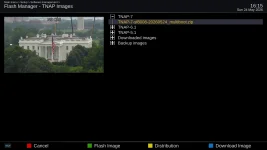
thx works fine now
there is a bug in osd calibration dosenot keep the changes after restarting
there is bug also on making swap once i click save the swap deleted and must do it again
also i use open pli hd night skin mod hamdy it cannot grab posters on latest image but on the previous image it works fine its on py 3.13
Last edited:

EnoSat
Legit VIP
Searching for names from ATSC pids works, but since the system has switched to ATSC, the transponder information is not displayed
Image version
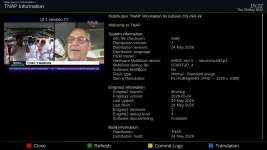
DVB mode

Scan
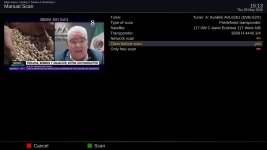
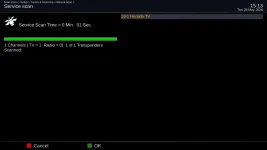
Show Channel Info
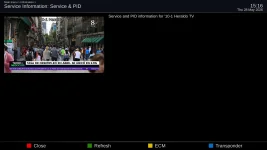
Show Transpondr Info
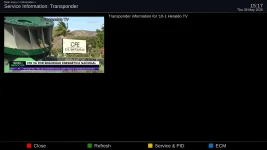
Image version
DVB mode
Scan
Show Channel Info
Show Transpondr Info
OpenPLi Enigma2 crash log
crashdate=Thu May 28 15:51:46 2026
compiledate=May 24 2026
skin=Default Skin
sourcedate=2026-05-24
branch=develop
rev=cf3b18b
component=enigma2
model=osmini4k
machinebuild=osmini4k
imageversion=7
imagebuild=20260524
kernelcmdline=root=/dev/mmcblk1p9 rootfstype=ext4 rootwait mitigations=off
nimsockets:
[Enigma] Python path is '/usr/lib/enigma2/python'.
[Enigma] DVB API version 5, DVB API version minor 12.
[Enigma] Enigma debug level 4.
[Avahi] avahi_timeout_new
[Avahi] avahi_watch_new(3 0x1)
[Avahi] avahi_timeout_update
[Avahi] avahi_timeout_new
[Avahi] avahi_timeout_free
[Avahi] avahi_timeout_new
[Avahi] avahi_timeout_free
[Avahi] avahi_timeout_new
[Avahi] avahi_timeout_free
[Avahi] avahi_timeout_new
[Avahi] avahi_timeout_free
[Avahi] avahi_timeout_new
[Avahi] avahi_timeout_free
[Avahi] avahi_timeout_new
[Avahi] avahi_timeout_free
[Avahi] client state: 2
[Avahi] avahi_timeout_new
[Avahi] avahi_timeout_free
[eInit] + (1) Background File Eraser
[eInit] + (5) Tuxtxt
[eInit] + (8) graphics acceleration manager
[bcm] /dev/fb0 No such file or directory
[eInit] + (9) Font Render Class
[Font] Initializing lib.
[Font] Loading fonts.
[Font] Intializing font cache, using max. 4MB.
[eInit] + (9) gLCD
[eFbLCD] /dev/fb1: No such file or directory
[eFbLCD] framebuffer /dev/fb1 not available
[eLCD] m_oled_brightness_proc = 0
[eDboxLCD] No oled0 or lcd0 device found!
[eLCD] (132x64x8) buffer 0x732d90 8448 bytes, stride 132
[gLCDDC] resolution: 132x64x8 stride=132
[eInit] + (9) GFBDC
[fb] /dev/fb0 No such file or directory
[fb] framebuffer /dev/fb0 not available
[gFBDC] no framebuffer available
dmesg
crashdate=Thu May 28 15:51:46 2026
compiledate=May 24 2026
skin=Default Skin
sourcedate=2026-05-24
branch=develop
rev=cf3b18b
component=enigma2
model=osmini4k
machinebuild=osmini4k
imageversion=7
imagebuild=20260524
kernelcmdline=root=/dev/mmcblk1p9 rootfstype=ext4 rootwait mitigations=off
nimsockets:
[Enigma] Python path is '/usr/lib/enigma2/python'.
[Enigma] DVB API version 5, DVB API version minor 12.
[Enigma] Enigma debug level 4.
[Avahi] avahi_timeout_new
[Avahi] avahi_watch_new(3 0x1)
[Avahi] avahi_timeout_update
[Avahi] avahi_timeout_new
[Avahi] avahi_timeout_free
[Avahi] avahi_timeout_new
[Avahi] avahi_timeout_free
[Avahi] avahi_timeout_new
[Avahi] avahi_timeout_free
[Avahi] avahi_timeout_new
[Avahi] avahi_timeout_free
[Avahi] avahi_timeout_new
[Avahi] avahi_timeout_free
[Avahi] avahi_timeout_new
[Avahi] avahi_timeout_free
[Avahi] client state: 2
[Avahi] avahi_timeout_new
[Avahi] avahi_timeout_free
[eInit] + (1) Background File Eraser
[eInit] + (5) Tuxtxt
[eInit] + (8) graphics acceleration manager
[bcm] /dev/fb0 No such file or directory
[eInit] + (9) Font Render Class
[Font] Initializing lib.
[Font] Loading fonts.
[Font] Intializing font cache, using max. 4MB.
[eInit] + (9) gLCD
[eFbLCD] /dev/fb1: No such file or directory
[eFbLCD] framebuffer /dev/fb1 not available
[eLCD] m_oled_brightness_proc = 0
[eDboxLCD] No oled0 or lcd0 device found!
[eLCD] (132x64x8) buffer 0x732d90 8448 bytes, stride 132
[gLCDDC] resolution: 132x64x8 stride=132
[eInit] + (9) GFBDC
[fb] /dev/fb0 No such file or directory
[fb] framebuffer /dev/fb0 not available
[gFBDC] no framebuffer available
dmesg
Attachments
Last edited:
el bandido
TNAP-Images
there is a bug in osd calibration dosenot keep the changes after restarting
there is bug also on making swap once i click save the swap deleted and must do it again
also i use open pli hd night skin mod hamdy it cannot grab posters on latest image but on the previous image it works fine its on py 3.13
Searching for names from ATSC pids works, but since the system has switched to ATSC, the transponder information is not displayed
Image version
Try the image updates(0529)....Thanks.
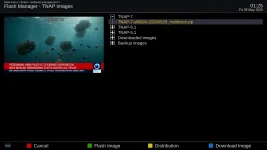
How do I get the option to enable neutrino mode to show under User Interface? It's not available for some reason. This is a clean install on an OS mio 4K.

You don't see the menu option here?How do I get the option to enable neutrino mode to show under User Interface? It's not available for some reason. This is a clean install on an OS mio 4K.
el bandido
TNAP-Images
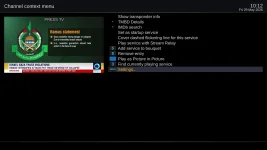
Press menu while on a channel in Channel Selection menu.How do I get the option to enable neutrino mode to show under User Interface? It's not available for some reason. This is a clean install on an OS mio 4K.
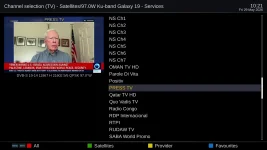
Scroll down and highlight settings or press menu on the remote.
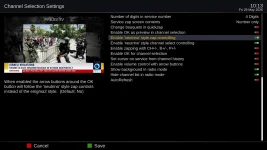
The Neutrino type settings can be adjusted in this menu.
el bandido
TNAP-Images
"Ciao Tamicia! Prova prima ad eseguire 'Aggiornamento Software' dal menu del tuo Qviart Dual, poi controlla se è disponibile un nuovo download nel ricevitore. Facci sapere come va!"
el bandido
TNAP-Images
"Ciao Tamicia! Abbiamo trovato e corretto un piccolo bug sul sito. Per vedere i file aggiornati, fai un aggiornamento forzato della pagina con Ctrl+Shift+R su Windows/Chrome, oppure svuota la cache del browser per tnapimages.com. Questo farà sì che il browser scarichi la lista aggiornata dei file. Facci sapere come va!"
Thank you! That did the trick. Looks like an awesome image so far. Thanks for all your hard work, it's truly appreciated.Press menu while on a channel in Channel Selection menu.
View attachment 19920
Scroll down and highlight settings or press menu on the remote.
View attachment 19921
The Neutrino type settings can be adjusted in this menu.
View attachment 19922
Hi, I cleared the browser cache, it works now."Ciao Tamicia! Abbiamo trovato e corretto un piccolo bug sul sito. Per vedere i file aggiornati, fai un aggiornamento forzato della pagina con Ctrl+Shift+R su Windows/Chrome, oppure svuota la cache del browser per tnapimages.com. Questo farà sì che il browser scarichi la lista aggiornata dei file. Facci sapere come va!"
Thank you!
Is there any chance of adding a 5950 lnb option? I'm probably the only person using it but I have an lnb for 65w that uses that frequency.
el bandido
TNAP-Images
What is the make/model of lnb that has a 5950 l.o.? You may use this lnb by setting it as User Defined.
EnoSat
Legit VIP
The ATSC result for 2905 is OK. But even so, sometimes no information is displayed, or the program scans for both ATSC and DVB.
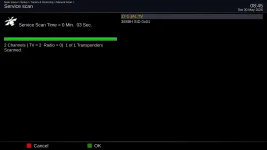
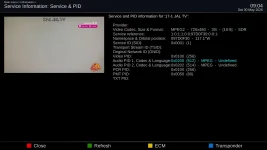
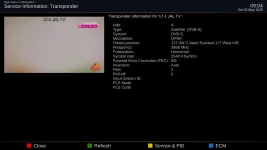
The bigger problem is that after installing it on the MINI4K :
but the BRCM module disappears after a restart
As a result, the graphical interface will not launch
Partial correction with
Code:
eDVB services /4/
transponders
097d0f30:0000:0000
    s 3888000:2540000:0:4:-1171:2:0
/
end
services
0001:097d0f30:0000:0000:1:0:1
17-1 JAL TV
p:
end
Have a lot of bugs!
Code:
root@osmini4k:~# lsmod
Module                  Size  Used by
si2183                647168  0
brcmstb_osmini4k     5558272  8
avl6261                61440  1 brcmstb_osmini4k
ci                     28672  1 brcmstb_osmini4k
avl6862               352256  1 brcmstb_osmini4k
root@osmini4k:~#
Code:
root@osmini4k:~# lsmod
Module                  Size  Used by
si2183                647168  0
avl6261                61440  0
ci                     28672  0
avl6862               352256  0
root@osmini4k:~#Partial correction with
Code:
root@osmini4k:~# modprobe brcmstb_osmini4k
root@osmini4k:~# init 3
root@osmini4k:~# lsmod
Module                  Size  Used by
brcmstb_osmini4k     5558272  0
si2183                647168  0
avl6261                61440  1 brcmstb_osmini4k
ci                     28672  1 brcmstb_osmini4k
avl6862               352256  1 brcmstb_osmini4k
root@osmini4k:~#
Last edited:
What is the NETcaster Extension?
I accidentally hit the blue button today, and a menu named Extensions came up. The options on it were self-evident, except for #3, NETcaster. I tried clicking on it to see what would happen, and I got a crash, so I still don't know what it's meant to do.
I accidentally hit the blue button today, and a menu named Extensions came up. The options on it were self-evident, except for #3, NETcaster. I tried clicking on it to see what would happen, and I got a crash, so I still don't know what it's meant to do.
el bandido
TNAP-Images
The Blue remote is set at default to show the satellite blindscan plugin. So I do not understand how you "accidentally hit the blue button today, and a menu named Extensions came up."
Posting screenshots and crashlogs would help. Crash logs are in /home/root of the receiver files.
Posting screenshots and crashlogs would help. Crash logs are in /home/root of the receiver files.
Yes, I know it's supposed to launch the blindscan plugin, but it hasn't done so ever since I did a clean install of the TNAP 7 test version. (I never bothered to change it, I've been busy...) I absentmindedly hit it tonight and this is what came up:
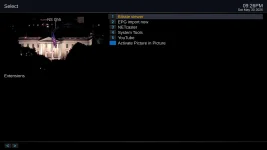
I've attached the crash log. Obviously it's failing to load some library it needs, but my question remains, what is this extension supposed to do?
I've attached the crash log. Obviously it's failing to load some library it needs, but my question remains, what is this extension supposed to do?