TNAP-6 Image Discussion

From your previous post (592), slot 23 has debris in it. The clone should work if everything is OK. What about the receiver menus? Do they show the extended slots?

You may clone slots using terminal. Just cd to the plugin location in the receiver like we did earlier. Test and see if terminal cloning works:
Clone Command Syntax:

python3 clone_slot.py [SOURCE_SLOT] [DESTINATION_SLOT]

Your Example:

python3 clone_slot.py 4 23

What this does:
- Source: Slot 4 (TNAP 6 - internal)
- Destination: Slot 23 (Empty - SD card)
- Result: Clones slot 4 → slot 23 (complete copy)

More Examples:

# Clone current slot 21 to empty slot 23
python3 clone_slot.py 21 23

# Clone internal slot 2 to SD slot 10
python3 clone_slot.py 2 10

# Clone between SD slots
python3 clone_slot.py 10 20

# Clone SD slot back to internal
python3 clone_slot.py 16 3

What Happens:

1. Validation:
- Checks source slot has valid image ✓
- Checks destination slot exists ✓
- Asks for confirmation (destination will be overwritten)
2. Cloning Process:
- Clones kernel partition (dd copy)
- Clones rootfs partition (rsync copy)
- Preserves all files, permissions, symlinks
3. Result:
- Destination slot is exact copy of source
- Bootable immediately
- Shows same image name in list

Important Notes:

⚠ Destination will be COMPLETELY OVERWRITTEN
- Any data in slot 23 will be lost
- Plugin will ask for confirmation first

✓ Works for any slot combination:
- Internal → Internal (1-4)
- Internal → SD (1-4 → 5-29)
- SD → SD (5-29 → 5-29)
- SD → Internal (5-29 → 1-4)

✓ Much faster than backup/restore:
- No compression/decompression
- Direct partition copy
- Takes ~2-5 minutes for 2GB image

✓ Now validates properly:
- Won't clone from empty slots (e.g., slot 20 with 445M leftover)
- Won't clone from slots without complete images

Your Specific Case:

python3 clone_slot.py 4 23

Before:
- Slot 4: TNAP 6 (582.1M)
- Slot 23: Empty (340.1M leftover)

After:
- Slot 4: TNAP 6 (582.1M) - unchanged
- Slot 23: TNAP 6 (582.1M) - exact copy! ✓
 
I installed 01-21 into slot 22 and enigma2-plugin-extensions-tnapslotmanager_1.1.17-r3_all.ipk. Then ran the cd /usr/lib/enigma2/python/Plugins/Extensions/TNAPSlotManager && python3 list_slots.py > /tmp/slot_list_output.txt 2>&1 && cat /tmp/slot_list_output.txt command. I am still showing left over files in certain slots even though they indicate as being empty.

Since I can't use Filezilla to identify the slots with leftovers, what's the best terminal command to erase any left over files in each slot and allow the slot to remain intact for future use.
 

Attachments

Ok so the enigma2 edits to the image seem to be successful as you are "seeing" the extended slots now in the enigma2 image menus....Progress I guess.

Two scripts are attached. One will clean your slots. This script can be modified to clean other slots by editing it. Send both scripts to /tmp of the receiver. Open telnet and cd to /tmp of the receiver. Then make executable:
chmod +x clean_empty_slots.sh
Run it:
./clean_empty_slots.sh

There are a couple of unidentified images lurking about in your last .txt file, I think slots 27 and 28?? So let's see about identifying a solution to make them visible.
chmod +x diagnose_unknown_slots.sh ./diagnose_unknown_slots.sh > /tmp/slot_diagnosis.txt
Then either upload the generated file or just copy the output:
/tmp/slot_diagnosis.txt
Or
cat /tmp/slot_diagnosis.txt
 

Attachments

OK will give the file.zip a go...

Due to the embedded left over files in certain slots, I am guessing that slot manager plugin cloning is not working correctly.

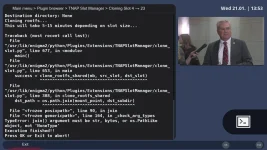
I tried to clone slot 4 to 23 and got this message...
 

Attachments

  • SlotManager clone of slot 4 to slot 23 error.webp
    SlotManager clone of slot 4 to slot 23 error.webp
    125.3 KB · Views: 8
OK ran the cleanup script and here's the slot_diagnosis info.
LOL. When you show errors like that, then it triggers a fix! Or at least an attempt. We knew there was a cloning problem, but the screenshot announces what the problem is and where it lives! Install attached .ipk and try cloning again.
Thought the last ipk was R3, my bad.
 

Attachments

To make sure everything is proper for my minimum system, I backed up a slot, then cloned it. Total time = 49 seconds.
enigma2-plugin-extensions-tnapslotmanager_1.1.17-r4_all.ipk

Seems you may have corrupted slots or something? Slot 27 and 28 in one of your .txt files shows images but they are unknown...???? The last diagnostic script for this turned up nothing. Please find attached and run: detailed_slot_diagnosis
 

Attachments

I didn't have much time earlier to completely check out the clone from slot 4 to slot 23. When booted into slot 23 it seemed to behave correctly by just checking and running the bouquets. Did not get a chance to check plugins or anything else.

I am currently back on 01-21 in slot 22 with the last R4 ipk installed and doing some terrestrial recordings. All seems well. Although I have yet to check all plugins.
 

Attachments

Is everything working correctly, Or do we still have items/features that are broken? You have a couple of slots that cannot be identified? Can these slots be booted into? What are they supposed to be? (Slot 27 and 28?)

Attached is a script designed especially for you to use FileZilla with any existing slot. Tested on slots 1-4. Not tested on extended slots.
 

Attachments

The browse_slots_final works great...

I am using slot 22 which I flashed earlier with the downloaded 01-21 zip file and installed the R4 ipk file.

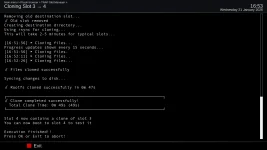
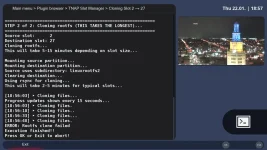
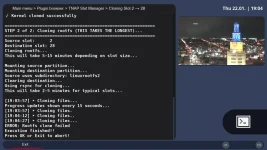
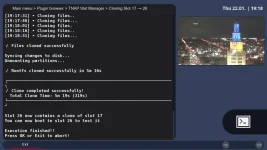
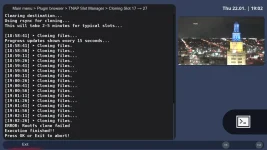
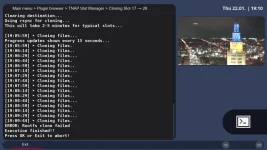
Then I cloned 2 to 27, 2 to 28, 17 to 27, 17 to 28 without success. Then cloned slot 17 to 26 and it cloned ok.

So, slots 27 and 28 seem to be unknown. Did not try to boot into these slots even though they now show up in the multiboot menu. I might try booting into these slots later when I do a backup of all my slots and download them to my pc.

Still haven't tested all my installed plugins in the cloned slots yet.
 

Attachments

  • slot 2 to 27 error clone.webp
    slot 2 to 27 error clone.webp
    116.5 KB · Views: 4
  • slot 2 to 28 error clone.webp
    slot 2 to 28 error clone.webp
    115.6 KB · Views: 4
  • slot 17 to 26 cloned OK.webp
    slot 17 to 26 cloned OK.webp
    91.2 KB · Views: 4
  • slot 17 to 27 error clone.webp
    slot 17 to 27 error clone.webp
    114 KB · Views: 3
  • slot 17 to 28 error clone.webp
    slot 17 to 28 error clone.webp
    115.6 KB · Views: 3
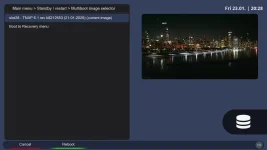
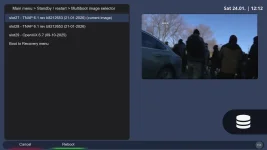
  • slot 27 and 28 in boot menu displays.webp
    slot 27 and 28 in boot menu displays.webp
    70.8 KB · Views: 4
At least something works great!
Slot number 27 & 28 did not identify correctly, and when we checked them using the scripts, they were missing some files in /etc...Or those two slots reported that.
Then you still have a clone slot problem as shown in your screenshots. So the plugin gets edited again.

Install the attached.ipk file and see if the clone slot feature works like it should. Note: Slots1-4 are of course different than the rest. The attached plugin should handle any cloning job....

See if this statement is correct:
The plugin will now successfully clone between any slot combination:
- Internal → Internal (shared subdirs)
- Internal → Extended (dedicated partition)
- Extended → Internal
- Extended → Extended
The only exception should be you cannot clone into the slot you are using. For example, if you are currently booted to slot 3 then you cannot clone another slot into 3 as it would wipe you out. The script in the plugin will refuse this request.
 

Attachments

Haven't had a chance to do any clonig yet. I'd like to clear up any slot discrepancies first. Still using slot 22 with Tnap 01-22 installed and 1.1.18-r4 ipk file.

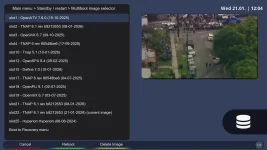
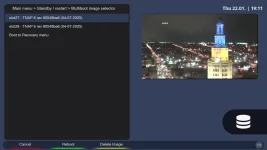
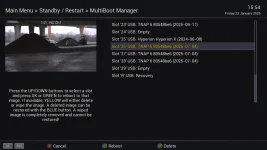
The python3 list_slots.py > slot_list_output.txt displays slot 26, 27, 28 installed and 29 empty, but in the Tnap multiboot manager the display shows nothing past slot 25.

Using the Tnap slot manager > list all slots matches the slot_list_output.txt
file.

I booted into atv and checked their multiboot manager, it shows slots 26, 27, 28 installed and 29 empty which matches the slot_list_output.txt.
 

Attachments

  • slot_list_output.txt
    slot_list_output.txt
    34.2 KB · Views: 2
  • ATV multiboot manager display.webp
    ATV multiboot manager display.webp
    102.4 KB · Views: 1
With the earlier supplied script, you should be able to mount any slot and examine the files. See what is actually in those slots that show "empty" in the receiver but actually contains a files system. If nothing else, delete them as files should not be in the slots unless they are actual images.

Another test before doing anything else is, especially deleting something: If ATV 'Sees' images in slots 26, 27, 28, then boot into these slots and see what they are. It is assumed these slots --or at least two of them are missing some common files in the /etc folder as that is were we are reading image information from.
 
I've deleted all files in slot 26 and 28. But I cannot delete items in slot 27.
/media/slot_browser/slot27/usr/share/enigma2/Steampunk/preview/_background_Grey_Dark.png.

All dirs are 777 except I can't change the png file to 777.

Cloned slot 22 to 28 using the slot manager and it boots correctly.

Now I need to get rid of that png file before I do more clone testing.
 

Attachments

  • 1_0_1_3_220_1_AA90000_0_0_0_20260123202810.webp
    1_0_1_3_220_1_AA90000_0_0_0_20260123202810.webp
    60.8 KB · Views: 1
See if this works. In telnet:
chattr -i /media/slot_browser/slot27/usr/share/enigma2/Steampunk/preview/_background_Grey_Dark.png
Then:
rm -f /media/slot_browser/slot27/usr/share/enigma2/Steampunk/preview/_background_Grey_Dark.png

If not, What does this return?
lsattr /media/slot_browser/slot27/usr/share/enigma2/Steampunk/preview/_background_Grey_Dark.png
 
When I run browse_slots_final.sh and mount slot 27 I can't run a command because the script is still operational. If I quit the script file, it will automatically unmount slot 27. Thus not allowing me to run:
chattr -i /media/slot_browser/slot27/usr/share/enigma2/Steampunk/preview/_background_Grey_Dark.png or any other command.

Also tried running a second window of putty while the first window had slot_browser active and slot 27 mounted. Then ran the command:
rm -f /media/slot_browser/slot27/usr/share/enigma2/Steampunk/preview/_background_Grey_Dark.png with no effect.

I then ran the command: lsattr /media/slot_browser/slot27/usr/share/enigma2/Steampunk/preview/_background_Grey_Dark.png and it returned an error code of command not found.

Too bad you can't run a server > special command in filezilla, it would make things a lot easier.
 
Okay, Let's do this by hand. You have scripts and tools to find the slots. This should work for slot 27.
Make a directory somewhere:
mkdir -p /tmp/clean_slot
Then mount slot 27
mount /dev/sda47 /tmp/clean_slot

Now do whatever as that mount will be there until you reboot or un-mount it!
A reboot deletes the mount but leaves the folder. If the folder was in /tmp of the receiver, then it also gets removed during a reboot. Otherwise, the folder stays until deleted.

Verify if you want using terminal:
mount | grep sda47
Or
df -h /tmp/clean_slot

Un-Mount:
umount /tmp/clean_slot
Or
umount /dev/sda47

These are just examples and you can alter them to fit your needs.
 
Back
Top